asyncomplete.vim does completion without freezing the editor
async completion in pure vim script for vim8 and neovim
At a glance
- What is it?
- asyncomplete.vim is an asynchronous completion popup for Vim 8 and Neovim, written in pure Vim script and driven by timers, and it is the rare plugin that ships no completion sources of its own. Everything you might expect it to complete, from a language server to an UltiSnips snippet to a file name, arrives as a separate plugin, which turns the completion engine into a piece of infrastructure and the sources into a choice.
- Who is it for?
- asyncomplete.vim suits a Vim or Neovim user who wants a completion popup that does not block the way the built-in menu does, and who is willing to choose a source and wire it up. It is a poor fit if you want a plugin that works out of the box with completion, because the repository deliberately contains no sources at all, and it is a poor fit if you are on an old Neovim, since the language server path needs a version with lambda support.
- Can I use it commercially?
- Yes. MIT is a permissive licence: you can use, modify and sell software built on it, as long as you keep its copyright and licence notices.
- Is it still maintained?
- Yes. The repository last received commits 150 days ago.
- What is it written in?
- Mainly Vim Script, according to GitHub's language statistics.
Answers come from the project's GitHub data, last synced on November 16, 2026, and from our analysis. They are not legal advice.
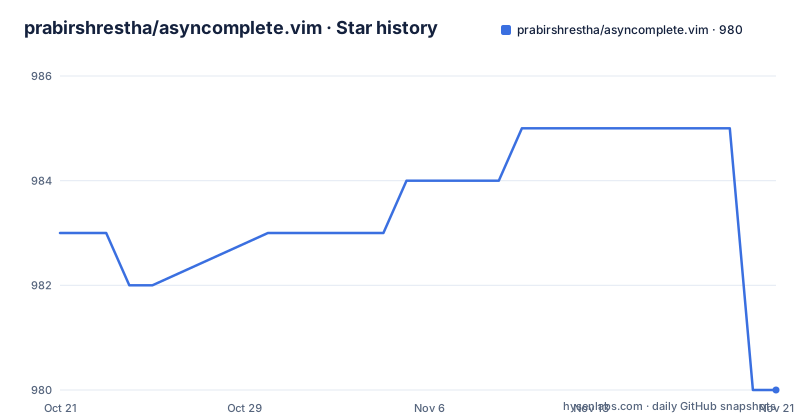
Star history
- prabirshrestha/asyncomplete.vim985 ★ · +2
| Repository | 2026-10-21 | 2026-11-16 |
|---|---|---|
| prabirshrestha/asyncomplete.vim | 983 | 985 |
2 Stars in the last 26 days, measured from the daily GitHub snapshot. Compare with other projects
Editorial analysis
The popup is a timer, not a blocking call
The plugin is described as async autocompletion for Vim 8 and Neovim with timers, and it was inspired by nvim-complete-manager but written in pure Vim script. That last clause is the interesting one, because the usual reason to reach for a manager like that is Lua or a host language implementation, and doing it in Vim script means the plugin loads in a stock Vim 8 as readily as in Neovim, with no runtime to install. The mechanism is the popup menu, drawn while the sources work in the background, and the key design decision is that the menu is not something you wait for. The source list is long and every entry is a separate repository, so the plugin has to be able to ask several things at once and show whatever arrives first, which is the behaviour the timer based design buys. The repository layout is a conventional Vim plugin, with `autoload/` for the functions, `plugin/` for the loading code, `doc/` for the help file, a `test/` directory and a `.vintrc.yaml` for the vint linter.
The tab mapping is where the behaviour actually lives
Installing the plugin is one line in a plugin manager:
Plug 'prabirshrestha/asyncomplete.vim'But the configuration that matters is the key mapping, because the plugin changes what the tab key does while a popup is visible. The recommended mappings are three, and the pattern is the same in each, the popup visible changes the key and otherwise the key passes through:
inoremap <expr> <Tab>   pumvisible() ? "\<C-n>" : "\<Tab>"
inoremap <expr> <S-Tab> pumvisible() ? "\<C-p>" : "\<S-Tab>"
inoremap <expr> <cr>    pumvisible() ? asyncomplete#close_popup() : "\<cr>"
So tab moves to the next completion while the menu is up, shift tab moves to the previous one, and enter closes the menu. If you would rather enter always inserted a newline, the readme gives the variant that appends a carriage return after closing the popup, which is the behaviour most people want in a terminal where enter is muscle memory for a new line. This is the part of the setup where a mistake shows up as tab not working at all, so it is worth pasting rather than retyping.
Auto popup, force refresh, and a back space check
By default the plugin shows the completion popup as you start typing, and there is a setting to turn that off, `g:asyncomplete_auto_popup` set to 0. With it off, you can still summon the popup explicitly, either through a force refresh mapping or by pressing tab. The force refresh mapping is a plug mapping, and the readme notes that in Vim 8 the control character is spelled differently:
imap <c-space> <Plug>(asyncomplete_force_refresh)
" For Vim 8 (<c-@> corresponds to <c-space>):
" imap <c-@> <Plug>(asyncomplete_force_refresh)
The readme also shows a more elaborate tab mapping for people who want tab to refresh the list rather than insert a tab, and it includes a small helper function that inspects the character before the cursor and only forces a refresh when it is whitespace. That is the kind of detail that separates a plugin that works from one that fights you, and it is a good example of the readme being written by somebody who has used the plugin rather than documented from the source.
The preview window needs two settings, not one
The preview window shows the full candidate in a window next to the completion menu, and enabling it takes two steps rather than one, which is the kind of detail that sends people to the forums. The first is a plugin setting that says you intend to modify the complete option variable, because otherwise the plugin overwrites it every time, and the second is the actual setting:
" allow modifying the completeopt variable, or it will
" be overridden all the time
let g:asyncomplete_auto_completeopt = 0

set completeopt=menuone,noinsert,noselect,preview
The `noinsert` and `noselect` options are what make the preview useful, because they stop Vim from inserting or selecting a candidate as you type, and `preview` is what opens the window. There is also an autocommand to close the preview when the completion finishes, and the readme gives it in one line, an autocommand on CompleteDone that closes the preview window if the popup is no longer visible. So the full setup is the flag, the completeopt line and the autocommand, and each one has a reason.
The repository contains no sources, on purpose
This is the design decision that makes the plugin interesting. The readme says it in one line, that asyncomplete.vim deliberately does not contain any sources, and that you should use one of the following or create your own. The engine handles the asynchronous part, the popup, the mappings, the preview window and the refresh, and everything that knows about a language lives somewhere else. The language server path is the obvious first choice, through vim-lsp and asyncomplete-lsp.vim, and the readme includes a full example registering a Python language server, with the allowlist restricting it to Python buffers. There is a version constraint worth noting, that the vim-lsp setup for Neovim requires Neovim v0.2.0 or higher because it uses lambda setup. And the point of using a language server rather than a syntax-only completion is breadth, since besides auto-complete you also get go to definition, find references, symbol renaming, document symbols, workspace symbols and formatting, all from the same integration.
Twenty sources, and the table is the feature list
The table of sources is alphabetical and it is the most useful page in the repository, because it shows the full extent of what the engine can drive. The list includes Ale, buffer completion, C and C++ through clang, Clojure through async-clj-omni, Common Lisp through vlime, dictionary lookup, Emmet, English next word prediction, emoji, file and directory names, NeoInclude, Go through gocode, Git commit messages, JavaScript with Flow, Neosnippet, Omni, PivotalTracker stories, Rust through racer, a TabNine source powered by AI, tmux completion, TypeScript through tscompletejob, UltiSnips, user defined completion functions, Vim syntax items, Vim tags and Vim's own completion. The spread is the point. Some of these are language servers, some are snippet engines, some are search indexes, and one is a machine learning completion service, and the engine does not care which. It also means the plugin is a moving part you install once and then extend, which is a different relationship with the maintainer from the usual one where everything arrives together.
A small plugin with a plain licence
The rest of the repository is small and conventional. The `autoload/` directory holds the functions the mappings call, such as the popup closing and the forced refresh that the readme refers to by name, the `plugin/` directory holds the code that runs at startup, and `doc/` holds the help file that `:help` reads. There is a `test/` directory, so the plugin is exercised rather than only demonstrated, and a `.vintrc.yaml` configuration for the vint linter, which is the standard Vim script linter. A `renovate.json` sits at the root, so the dependency updates are automated in the usual way. The licence is MIT, and the topics cover Vim 8, Neovim, code completion, UltiSnips and asyncomplete itself. There are no tagged releases on the repository, and the last push was on 2026-06-18, so the plugin is maintained through the default branch rather than through versioned artefacts, which for a Vim plugin distributed by a plugin manager is the normal arrangement.
Editorial conclusion
asyncomplete.vim suits a Vim or Neovim user who wants a completion popup that does not block the way the built-in menu does, and who is willing to choose a source and wire it up. It is a poor fit if you want a plugin that works out of the box with completion, because the repository deliberately contains no sources at all, and it is a poor fit if you are on an old Neovim, since the language server path needs a version with lambda support. Before you set it up, check three things: which source you want, since the table in the readme has more than twenty entries and they are separate plugins to install, that you have remapped the tab key, since the default mapping is the whole point of the plugin, and that you have read the preview window section, because the two settings it needs interact with the ones you may already have.
Frequently asked questions
What is asyncomplete.vim?
An asynchronous autocompletion plugin for Vim 8 and Neovim, written in pure Vim script and driven by timers. It draws the completion popup while sources work in the background, so the editor is not blocked waiting for a candidate list.
Does asyncomplete.vim include any completion sources?
No, and that is deliberate. The repository contains the engine only, and you install or write the sources you want, with the readme listing more than twenty source plugins, from language servers through clang, gocode, racer and Flow to snippet engines, dictionary lookup, file names and a TabNine source.
How do I install asyncomplete.vim?
With a plugin manager line, `Plug 'prabirshrestha/asyncomplete.vim'`, and then the key mappings, because the plugin changes what tab does while the popup is visible. The recommended mappings move tab to the next candidate, shift tab to the previous one, and enter to close the popup, with a variant given for when you want enter to always insert a new line.
How do I enable the preview window in asyncomplete.vim?
With two settings. Set `g:asyncomplete_auto_completeopt` to 0 so the plugin stops overwriting your completion options, then set `completeopt=menuone,noinsert,noselect,preview`. The readme also gives an autocommand on CompleteDone that closes the preview window when the popup is gone.
What are the requirements for asyncomplete.vim?
It works in Vim 8 and in Neovim, with no runtime to install since it is pure Vim script. The language server path is separate and needs Neovim v0.2.0 or higher, because the vim-lsp setup uses lambda setup. The plugin is MIT licensed, has no tagged releases, and the last push to the repository was on 2026-06-18.
Official sources
Add this badge to your README
If you maintain this project, the badge below links readers to this analysis and shows its maintenance status from the daily GitHub snapshot. Paste the markdown into your README; add ?metric=license or ?metric=stars to the image URL for a different field.

[](https://hysenlabs.com/projects/prabirshrestha-asyncomplete-vim)Star history chart for your README
[](https://hysenlabs.com/projects/prabirshrestha-asyncomplete-vim)Was this useful?