Pi: A TypeScript toolkit that bundles LLM access, agent loops, and a coding CLI
Pi combines a provider-neutral LLM API, agent loop, terminal interface, and coding CLI in a TypeScript toolkit.
At a glance
- What is it?
- Pi is a monorepo of TypeScript packages that combine a provider-neutral LLM API, an agent runtime, a terminal UI, and a coding agent CLI. It is built for engineers who want a self-contained, extensible coding agent without a vendor lock-in, but it ships with no permission system and expects you to sandbox it yourself.
- Who is it for?
- Adopt Pi if you want a TypeScript-native coding agent that you can extend and run across multiple LLM providers, and if you are comfortable with its explicit lack of a built-in permission system. Do not adopt it if you need out-of-the-box sandboxing or a stable, long-term supported API, because the project is under active development with frequent releases and a contribution policy that auto-closes new contributor PRs.
- Can I use it commercially?
- Yes. MIT is a permissive licence: you can use, modify and sell software built on it, as long as you keep its copyright and licence notices.
- Is it still maintained?
- Yes. The repository received new commits within the last day.
- What is it written in?
- Mainly TypeScript, according to GitHub's language statistics.
Answers come from the project's GitHub data, last synced on November 9, 2026, and from our analysis. They are not legal advice.
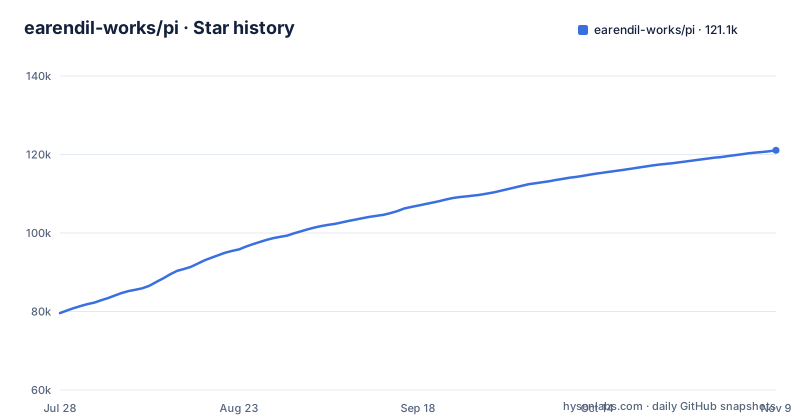
Star history
- earendil-works/pi121,063 ★ · +41,473
| Repository | 2026-07-28 | 2026-11-09 |
|---|---|---|
| earendil-works/pi | 79.6k | 121.1k |
41,473 Stars in the last 104 days, measured from the daily GitHub snapshot. Compare with other projects
Editorial analysis
What Pi actually bundles
Pi is not a single tool. It is a monorepo that publishes several npm packages. The README lists seven packages, including: @earendil-works/pi-coding-agent, the interactive coding agent CLI; @earendil-works/pi-agent-core, the agent runtime with tool calling and state management; @earendil-works/pi-ai, a unified multi-provider LLM API for OpenAI, Anthropic, Google and others; and @earendil-works/pi-tui, a terminal UI library with differential rendering. There is also @earendil-works/pi-telemetry, which provides vendor-neutral telemetry contracts, a reference adapter, conformance tests, and typed schemas. The project's own description calls it a 'provider-neutral LLM API, agent loop, terminal interface, and coding CLI.' That is a wide surface. The value proposition is that you get the whole stack in one place, in TypeScript, instead of assembling separate libraries for API access, agent state, and terminal rendering.
Who this is for
The target user is a developer who wants an interactive coding agent that can be extended and that does not tie them to a single LLM vendor. The README points to the coding agent as the main entry point, and the website pi.dev hosts demos and documentation. If you are building your own agent harness, the lower-level packages like pi-agent-core and pi-ai give you building blocks. If you just want a CLI that helps you code, pi-coding-agent is the package to install. The monorepo structure means you can use one package without the others, but the tight integration across packages is the main reason to choose Pi over a collection of separate tools.
How the pieces fit together
The architecture is visible from the package list. pi-ai sits at the bottom, providing a unified API over multiple LLM providers. pi-agent-core builds on that with a runtime that handles tool calling and state management. pi-coding-agent uses the agent runtime to implement an interactive coding agent CLI. pi-tui provides the terminal interface with differential rendering, which is a technique to minimize redraws by computing the difference between the previous and next screen state. The layering reads as follows: provider calls go through pi-ai, agent logic through pi-agent-core, and user interaction through pi-tui or the CLI. The telemetry package sits alongside, offering contracts and conformance tests so that different tools can emit telemetry in a consistent format. This modular design means you could replace the TUI with your own interface, or swap the agent loop for a different one, as long as you keep the same state and tool-calling contracts.
Getting it running
The README opens Getting started with an installer: curl -fsSL https://pi.dev/install.sh | sh on macOS and Linux, or powershell -c "irm https://pi.dev/install.ps1 | iex" on Windows. The installer pins all dependencies and updates Pi with pi update. Alternatively, npm install -g --ignore-scripts @earendil-works/pi-coding-agent installs directly but does not pin transitive dependencies. Pi requires Node.js 22.19 or newer. You then run pi in your project directory and use /login inside Pi to connect a subscription or API key for a built-in provider. There is also a Nix route, nix run github:earendil-works/pi/stable. To build from source, the Development section gives npm install --ignore-scripts, then npm run build, which refreshes model data first. There is also npm run build:offline, which rebuilds using existing model data without network access. For checks, npm run check runs lint, format, and type checks. Tests run via ./test.sh, which skips LLM-dependent tests if you do not have API keys. To run Pi from sources, use ./pi-test.sh from any directory.
The missing permission system is a real limitation
The README is explicit: Pi does not include a built-in permission system for restricting filesystem, process, network, or credential access. By default, it runs with the permissions of the user and process that launched it. That is a significant gap for a coding agent that can execute commands and edit files. An agent with your shell permissions can delete files, send network requests, or read credentials without any prompt. The project acknowledges this and points to containerization as the solution. It documents three patterns: a 'Gondolin extension' that keeps pi and provider auth on the host while routing built-in tools and '!' commands into a local Linux micro-VM; plain Docker to run the whole pi process in a container; and OpenShell, a policy-controlled sandbox. Each has trade-offs. Gondolin gives you host auth and sandboxed tools, but it is more complex. Plain Docker is simple but may restrict access to your host filesystem in ways that break workflows. OpenShell adds policy control but is another dependency. This is not a tool you can run directly on your workstation without thinking about isolation.
Supply-chain hardening is a priority
The README describes careful dependency handling. The installer pins all dependencies, a direct npm install does not pin transitive dependencies, and the README says Pi does not require dependency lifecycle scripts for a normal npm installation, with installs using --ignore-scripts. The root package.json check script chains check:pinned-deps, check:runtime-deps and check:install-lock:coding-agent before type checking. This is more rigorous than many open source projects. The trade-off is that contributors cannot casually add dependencies.
Maintenance and upgrade cost
The project is under active development, with three releases between 2026-10-15 and 2026-11-02: v1.3.0, v1.4.0, and v1.5.0. Frequent minor releases mean APIs may change. The README mentions longer-term plans in RFCs, so the project has a roadmap. Upgrading from one version to the next may require adapting to changes in the agent runtime or the CLI. The build process regenerates model data from provider catalogs, which means you need network access for a full build, but --offline-model-data lets you use a snapshot for reproducible builds. The project also auto-closes new issues and PRs from new contributors by default, with maintainers reviewing them daily. That policy reduces noise but may slow down community contributions. For adoption, you should budget time to track releases and test your workflows after each upgrade. The license is MIT, which is permissive.
A real alternative: build your own with separate libraries
The main alternative to Pi is assembling your own stack from separate libraries. For example, you could use the Vercel AI SDK for provider-neutral LLM access, LangChain for agent loops, and Ink for terminal UIs. The difference is that Pi provides a coherent, integrated set of packages that share contracts and types, while a DIY approach requires you to glue together libraries that may not align in their state management or tool-calling conventions. The trade-off is that Pi is a smaller, less mature project, so you inherit its design decisions and its release cadence. With separate libraries, you can choose the best tool for each layer and swap components independently, but you also take on the integration burden. Pi's telemetry package with conformance tests is a specific advantage, because it standardizes how agents emit telemetry, which is rare in the DIY world. If you value consistency over flexibility, Pi is the better choice; if you need to customize every layer, a DIY approach gives you more control.
Editorial conclusion
Adopt Pi if you want a TypeScript-native coding agent that you can extend and run across multiple LLM providers, and if you are comfortable with its explicit lack of a built-in permission system. Do not adopt it if you need out-of-the-box sandboxing or a stable, long-term supported API, because the project is under active development with frequent releases and a contribution policy that auto-closes new contributor PRs. Before adopting, verify the current release version, read the containerization docs, and test the agent with your provider and your specific codebase.
Frequently asked questions
What is the Pi agent harness?
Pi is a TypeScript toolkit that combines a provider-neutral LLM API, an agent loop, a terminal interface and a coding CLI in one monorepo called pi-monorepo. Its seven packages include pi-ai for the multi-provider API, pi-agent-core for tool calling and state management, pi-tui for terminal rendering and pi-coding-agent for the interactive CLI.
Does Pi restrict what the coding agent can access?
No. Pi does not include a built-in permission system for restricting filesystem, process, network or credential access, and by default it runs with the permissions of the user and process that launched it. Stronger boundaries come from containerizing it, with three patterns described in packages/coding-agent/docs/containerization.md: a Gondolin extension, plain Docker, and OpenShell.
How do I build Pi from source?
Run npm install --ignore-scripts and then npm run build, which refreshes model data and builds the packages in dependency order. Use npm run build:offline to rebuild from existing model data without network access, and ./pi-test.sh to run pi from sources from any directory.
Which npm package do I install to use the Pi coding agent?
The interactive coding agent CLI is published as @earendil-works/pi-coding-agent. Installing it with npm install -g --ignore-scripts does not pin transitive dependencies, according to the README, while the installer script pins all dependencies. The related runtime packages are @earendil-works/pi-agent-core and @earendil-works/pi-ai.
Official sources
Where developers are discussing it
Posts on Hacker News, dev.to and Lobsters that link to this repository, found by our scan of those communities. 1 in the last 30 days; newest first.
- Chord, distributed objects and hot reload for pi-durableHacker News · Oct 26, 2026 · 1 points · 0 comments
- I built an open-source Trello where a custom Pi agent harness does the cardsdev.to · Oct 10, 2026 · 3 points · 1 comments
- Pi v1.0.0Hacker News · Oct 1, 2026 · 12 points · 2 comments
Add this badge to your README
If you maintain this project, the badge below links readers to this analysis and shows its maintenance status from the daily GitHub snapshot. Paste the markdown into your README; add ?metric=license or ?metric=stars to the image URL for a different field.

[](https://hysenlabs.com/projects/earendil-works-pi)
[](https://hysenlabs.com/projects/earendil-works-pi)Star history chart for your README
[](https://hysenlabs.com/projects/earendil-works-pi)Was this useful?