AgentiLoop Agent: a native Swift harness that drives macOS through the Accessibility API
AgentiLoop Agent! An Autonomous Agentic Agent for Mac, and exclusive Apple only harnesss. Suppprtd automation, scripting, coding, build anything and more. Powered by 18+ LLM providers across local and cloud platforms.
At a glance
- What is it?
- Agent! is a Swift 6.2 / SwiftUI app that wires 18 LLM providers into an autonomous loop with file editing, shell, Xcode builds and AppleScript. It is macOS 26 only, and its helper daemons need a real Team ID.
- Who is it for?
- Adopt Agent! if you already work on macOS 26 with Xcode installed and you want an agent that edits files under a read-before-edit gate and drives native apps rather than a browser tab. Do not adopt it if you need Linux or Windows, if you cannot run macOS 26, or if you want the Launch Agent and Launch Daemon helpers without an Apple Developer Team ID, since the README states those helpers will not register under an ad-hoc signed build.
- Can I use it commercially?
- Check first. The repository uses a licence we do not classify automatically, so read its LICENSE file before any commercial use.
- Is it still maintained?
- Yes. The repository last received commits 8 days ago.
- What is it written in?
- Mainly Swift, according to GitHub's language statistics.
Answers come from the project's GitHub data, last synced on October 25, 2026, and from our analysis. They are not legal advice.
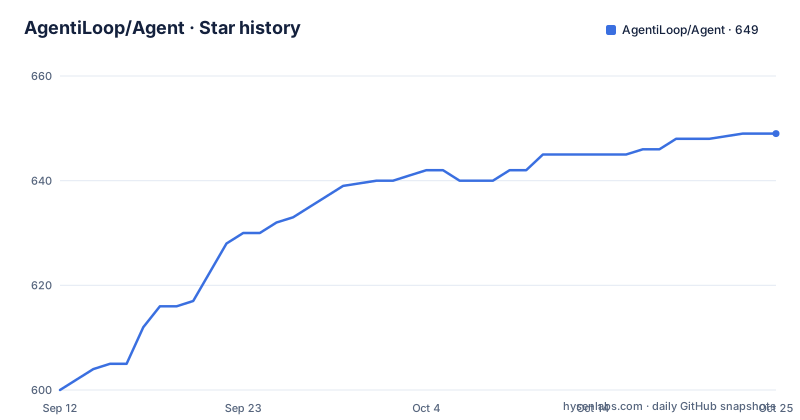
Star history
- AgentiLoop/Agent649 ★ · +49
| Repository | 2026-09-12 | 2026-10-25 |
|---|---|---|
| AgentiLoop/Agent | 600 | 649 |
49 Stars in the last 43 days, measured from the daily GitHub snapshot. Compare with other projects
Editorial analysis
The gap Agent! is aimed at: automation that reaches native Mac apps, not just a terminal
Most coding agents live in a terminal or a browser tab. They can read a repository, run a shell command and produce a diff. What they cannot do is press a button in Photo Booth, add a track to a Music playlist, or read today's Calendar events, because those actions have no command-line equivalent on macOS. Agent! is built for that gap. The README lists example prompts such as "Play my Workout playlist in Music", "Take a photo with Photo Booth" and "What calendar events do I have today?" alongside conventional coding requests like "Refactor this class into smaller files". The repository topics confirm the intended surface: accessibility, applescript, imessage, jxa, automation, macos. So the target user is a Mac-based developer or power user who wants one agent to span both the codebase and the desktop, and who is willing to accept an Apple-only harness in exchange. If your work is cross-platform, the premise does not apply to you.
How the loop actually works: goal_state, evidence, and a read-before-edit gate
The mechanism described in the release notes is a self-verifying task loop. The agent reasons, executes a tool, observes the result and self-corrects, and per the README a task "can't declare itself done until `goal_state` criteria are marked with evidence". There is also an opt-in critic step that reviews the diff before completion. The most concrete safety mechanism is the read-before-edit gate: `edit_file`, `apply_diff` and `diff_apply` refuse to modify a file the model has not read during the current task, or that has changed on disk since the last read, checked with SHA-256. When the gate refuses, it auto-reads the file so the next call is the edit. External file changes are surfaced each turn as diff snippets. Tool results that are too large are spilled to disk at emission and can be recovered with `restore_tool_result`, which keeps oversized output out of the context window. Context compaction is threshold-driven: model window minus reserved output minus buffer, keyed off real `input_tokens`, with a provider-side nine-section summary, after which the open goal, the plan checklist and edited files are re-attached. A 413 overflow forces compaction and retries with a shorter prompt. This is a more specific design than most agent harnesses document, and the read-before-edit gate in particular is the kind of constraint that prevents the classic failure where an agent overwrites a file it only half-remembered.
Provider coverage, local models and the Apple Intelligence path
Agent! claims 18 providers: Claude, GPT, Gemini, Grok, Mistral, DeepSeek, Qwen, Z.ai, BigModel, Hugging Face, OpenRouter, Ollama (cloud and local), vLLM, LM Studio, Codestral, Mistral Vibe and on-device Apple Intelligence. The README states there is no subscription and no telemetry, and that you bring your own API key, run fully local, or run free on Apple Intelligence. For local serving, the release notes say LM Studio, Ollama and vLLM now report their actual per-model context length instead of a hardcoded 32K assumption, which matters because compaction thresholds are computed from that number. The README also gives a hardware note: only GLM-4.7-Turbo (32B) fits consumer hardware, described as 64 to 128GB Apple Silicon via Ollama. That is a narrow local path, and it is worth reading as a statement about the author's testing rather than a general rule. The cheap cloud suggestion is GLM-5.1 via Z.ai, described as the default model with a fast signup. I cannot verify pricing or model quality from the repository material, so treat those as recommendations from the maintainer, not measured results.
Getting it running: two build paths and what each one costs you
The download path is short: fetch the latest release, drag it to Applications, open it, then go to Settings, choose a provider and enter an API key. Building from source starts with `git clone https://github.com/AgentiLoop/agent.git` followed by `cd Agent`. Option A uses `Agent.xcodeproj` in Xcode: set your Development Team, build and run the `Agent` target, and approve the helper when prompted. Option B needs only the Xcode Command Line Tools: `./build.sh` for Debug, `./build.sh Release` for a release build, then `open "build/DerivedData/Build/Products/Debug/Agent!.app"`. The README is explicit that Option B produces ad-hoc signed builds, and that the Launch Agent and Launch Daemon helpers will not register because SMAppService needs a Team ID. The LLM loop, tools, Accessibility, AppleScript, shell and MCP still work in that configuration. The documented troubleshooting covers the usual traps: `xcode-select` pointing at Command Line Tools is fixed with `sudo xcode-select -s /Applications/Xcode.app/Contents/Developer`; a stale DerivedData failure is fixed with `./build.sh clean && ./build.sh`; and the build argument is case-sensitive, so `Release` with a capital R. The deployment target is macOS 26, so an older macOS or Xcode will fail before anything else.
The security model is the interesting part, and also the sharpest edge
The release notes describe defense in depth rather than a single guard. `ShellSafetyService` is enforced daemon-side in both AgentHelper and AgentUser as well as client-side. Release builds reject un-teamed XPC clients, and both XPC listeners require same-team code signing derived from the app's own signature. That is a real architectural commitment: the shell guard is not just a check in the UI layer that a determined prompt could route around. The sharp edge is that this same design is what makes Option B a partial experience. If you build ad-hoc signed, the helpers do not register, and the README says so plainly. There is also an inherent tension worth naming: the app is designed to run shell commands "as you or as root" and to drive any app through the Accessibility API. Those are the capabilities that make it useful, and they are also the capabilities that make the daemon-side enforcement matter. I have not run this project, so I cannot say how well the enforcement holds in practice. What I can say is that the design intent is documented at a level of detail unusual for a project this size, and that the same-team signing requirement is a meaningful boundary rather than a formality.
Where it is the wrong tool: platform lock-in and a fast-moving release cadence
The first limitation is the platform. macOS 26.4.1 or later, Swift 6.2, Xcode for the full experience. There is no Linux or Windows story here, and the Accessibility and AppleScript surfaces have no equivalent elsewhere. The second is the helper split: if you cannot supply a Team ID, you lose the Launch Agent and Launch Daemon registration, which is exactly the part that makes background or privileged automation work. The third is cadence. Releases arrive quickly, with v1.1.4.200, v1.1.8.204 and v1.1.9.205 all dated within days of each other in September 2026. That is good for fixes and bad for anyone who needs a frozen dependency, because the release notes describe changes to compaction, retry behaviour and the edit gate across those versions. The fourth is the dependency story: the README states that every Swift package it depends on was written by the same author. That reduces supply-chain surface from third parties but concentrates maintenance on one person, and it means a bug in a shared package surfaces as a bug in the app. None of these are hidden. They are the price of a single-author, Apple-only, fast-iterating harness.
How it differs from a general-purpose CLI coding agent
The obvious comparison is a terminal-based coding agent such as an open source CLI that reads a repo and emits patches. The difference in approach is where the loop terminates. A CLI agent typically ends at a diff or a commit, and the human applies it. Agent! ends at the operating system: it can build the Xcode project natively with clickable errors, commit the diff, snapshot every edit for one-click rollback or a whole-task `rewind_task`, drive a Mac app through the Accessibility API, send results over iMessage, and answer to a spoken "Agent!". It also indexes repositories into a portable JSONL repo-map, which is a different retrieval strategy from embedding a codebase into a vector store. The trade-off is portability. A CLI agent runs in CI on a Linux runner; Agent! needs a Mac desktop session with Accessibility permissions granted. If your workflow is headless or containerised, the CLI approach wins by default. If your workflow is a developer sitting in front of a Mac who wants the agent to touch the same apps they do, the comparison flips, and that is the case Agent! is built for.
Licence, maintenance and what to check before you commit
The licence is MIT, which permits commercial use, modification and redistribution provided the copyright notice and permission notice are included. That is a permissive arrangement, and I am not giving legal advice: read the LICENSE file in the repository and, for a commercial deployment, have counsel confirm how it interacts with the LLM provider terms you accept separately. The README notes that the app is also supported by a PayPal tip jar, which is a signal about how the project is funded: donations and, presumably, the author's own time. That has a practical consequence. There is no stated commercial support contract, no SLA, and the fast release cadence suggests one maintainer moving quickly. Upgrading means tracking the release notes, because compaction thresholds, retry behaviour and the edit gate have all changed across the v1.1.x line. The CI workflow runs build and test on every PR, and the README claims 273 passing tests, which I cannot independently verify but which at least indicates a test suite exists. Before adopting, verify the macOS version on your machine, confirm you can supply a Team ID if you need the helpers, and check that your preferred provider is among the 18 listed and that your local server reports its real context length, since the compaction logic depends on it.
Editorial conclusion
Adopt Agent! if you already work on macOS 26 with Xcode installed and you want an agent that edits files under a read-before-edit gate and drives native apps rather than a browser tab. Do not adopt it if you need Linux or Windows, if you cannot run macOS 26, or if you want the Launch Agent and Launch Daemon helpers without an Apple Developer Team ID, since the README states those helpers will not register under an ad-hoc signed build. Before committing, verify two things yourself: that your chosen provider is one of the 18 listed and that its context window is reported correctly by your local server, and that the read-before-edit gate plus SHA-256 check behaves as described on a scratch repository, because that gate is the main thing standing between the agent and an unintended overwrite.
Frequently asked questions
What is the AgentiLoop Agent app?
It is a 100% native Swift 6.4 and SwiftUI app for Mac that puts a long list of LLM providers, plus on-device Apple Intelligence, into an autonomous task loop. It reads codebases, builds Xcode projects, manages git, drives Mac apps, and runs shell commands as you or as root.
Which LLM providers does AgentiLoop Agent support?
The readme headline says 23 providers and then names 24: Claude, Codex, OpenAI, Fluxion AI, Gemini, Grok, Mistral, Mistral Vibe, DeepSeek, Hugging Face, Z.ai, BigModel, Alibaba DashScope, Qwen, Qwen Code, Meta Muse, MiniMax, OpenRouter, Requesty, A2Agent, OrcaRouter, Ollama, vLLM, and LM Studio. Apple Intelligence is offered separately on device.
Does AgentiLoop Agent run on Windows and Linux?
The desktop app does not; it is a Mac app. Two separate command-line tools, AgentiLoopCLI and AgentiLoopGo, cover macOS, Windows, and Linux with the same capabilities, and the readme says Agent! for Mac built them. The CLI is at version 0.0.5.
Can I build AgentiLoop Agent from source?
Yes, with either Xcode and an Apple Developer account, or the Xcode Command Line Tools alone using ./build.sh and ./build.sh Release. The Command Line Tools route builds ad-hoc signed, so the Launch Agent and Launch Daemon helpers do not register, while the LLM loop, tools, Accessibility, AppleScript, shell, and MCP still work.
What does AgentiLoop Agent need to run on macOS?
macOS 14.6 or later, built with Swift 6.4 on Xcode 27. Release binaries are Apple Silicon disk images, signed, notarized, and stapled with the AgentiLoop Team ID, and can also be installed with brew install --cask agentiloop-agent.
Official sources
Add this badge to your README
If you maintain this project, the badge below links readers to this analysis and shows its maintenance status from the daily GitHub snapshot. Paste the markdown into your README; add ?metric=license or ?metric=stars to the image URL for a different field.

[](https://hysenlabs.com/projects/agentiloop-agent)Star history chart for your README
[](https://hysenlabs.com/projects/agentiloop-agent)Was this useful?