E2B: A Closer Look at Cloud Sandboxes for AI-Generated Code
Open-source, secure environment with real-world tools for enterprise-grade agents.
At a glance
- What is it?
- E2B provides open-source infrastructure for running AI-generated code in isolated cloud sandboxes, with SDKs for Python and JavaScript. This review examines its setup, execution models, and where its trade-offs matter.
- Who is it for?
- Adopt E2B if you build AI agents that need to execute untrusted code or control a desktop environment, and you are comfortable with a cloud dependency or willing to self-host on AWS, GCP, Azure or a general Linux machine. Skip it if you want a fully local sandbox with no external API key.
- Can I use it commercially?
- Yes. Apache-2.0 is a permissive licence: you can use, modify and sell software built on it, as long as you keep its copyright and licence notices.
- Is it still maintained?
- Yes. The repository received new commits within the last day.
- What is it written in?
- Mainly Python, according to GitHub's language statistics.
Answers come from the project's GitHub data, last synced on November 5, 2026, and from our analysis. They are not legal advice.
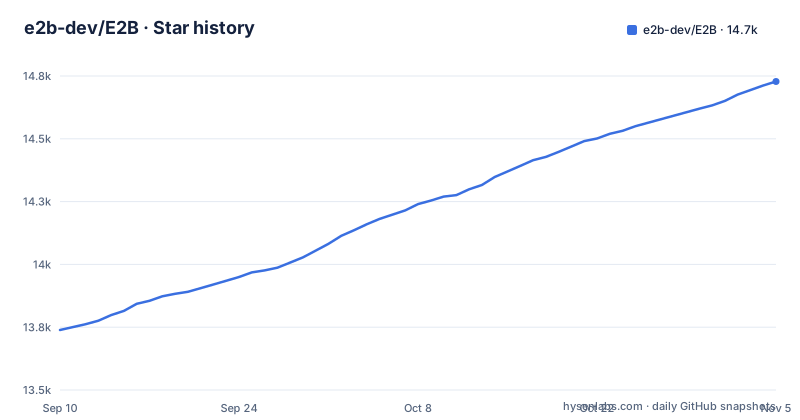
Star history
- e2b-dev/E2B14,728 ★ · +989
| Repository | 2026-09-10 | 2026-11-05 |
|---|---|---|
| e2b-dev/E2B | 13.7k | 14.7k |
989 Stars in the last 56 days, measured from the daily GitHub snapshot. Compare with other projects
Editorial analysis
What E2B Solves and Who It Serves
E2B addresses a specific problem: executing code that an AI model generates, without giving that code access to your host machine or your production network. If you are building an agent that writes a Python script, runs a shell command, or controls a browser, you need a boundary between the model's output and your infrastructure. E2B provides that boundary as a cloud sandbox. The intended users are developers of AI agents, copilots, and tools that embed code interpreters or computer-use features. The README positions it as infrastructure, not a library, and the use of both JavaScript and Python SDKs signals that it targets the two largest agent-building ecosystems. If you are not running AI-generated code, this project has little to offer you.
How the Sandbox Model Works
The core mechanism is a remote sandbox that you create and control through an SDK. You do not run code in your process. Instead, the SDK communicates with E2B's cloud infrastructure, which spins up an isolated environment. The basic flow, as shown in the README, is: install the SDK, set an API key, create a sandbox, and then run commands or code against that sandbox. The sandbox is a full environment, not just a restricted function call. You can run shell commands with `sandbox.commands.run('echo ...')`, and for code execution you use a separate Code Interpreter SDK that provides `runCode` or `run_code`. The Desktop SDK extends this to graphical sessions, letting you launch applications like Google Chrome and take screenshots. This layered design means you pick the level of abstraction: raw commands, code execution with result parsing, or full desktop control.
Getting Started: Commands and Configuration
Setup follows a standard pattern. For Python, you run `pip install e2b`, and for JavaScript, `npm i e2b`. You then need an API key from the E2B dashboard, stored as the environment variable `E2B_API_KEY`. A minimal Python session uses a context manager: `with Sandbox.create() as sandbox:` and then `sandbox.commands.run('echo "Hello from E2B!"')`. The JavaScript version is similar, using `await Sandbox.create()`. For code interpretation, you install a separate package: `pip install e2b-code-interpreter` or `npm i @e2b/code-interpreter`. The README shows that the code interpreter returns structured output, such as `execution.text`. For desktop automation, you install `e2b-desktop` or `@e2b/desktop` and then call `desktop.launch('google-chrome')` and `desktop.screenshot()`. The clear separation of packages means you only install what you need, but it also means you must track multiple dependencies.
Self-Hosting: The Terraform Constraint
E2B is open source, and the README points to a separate infrastructure repository for self-hosting. The deployment path is Terraform-based, and the supported targets listed are AWS, Google Cloud (GCP), Azure, and a general Linux machine via Embed. The Terraform dependency also implies that you need infrastructure-as-code skills and a cloud account. The self-hosting guide is the embed deployment guide in a different repository, `e2b-dev/runtime`, which sets up the E2B runtime. For teams that need full control over data residency or network policies, this is the only route, but it is not a trivial one.
Limitations and Failure Modes
The most obvious limitation is the reliance on an external API key and cloud service for the default usage. Every command you run goes over the network to an E2B sandbox. That introduces latency, and it means your code execution stops working if the E2B service is down or if you exceed rate limits. The README does not mention offline mode or local execution. Another limitation is the scope of the sandbox. You must trust E2B's isolation guarantees, and you should not assume that the sandbox is persistent by default; the examples create a sandbox and run a single command, but the README does not describe state persistence across sessions. For long-running agents, you will need to check the documentation for timeout and lifecycle settings. Finally, the Desktop SDK is in a separate package, so computer-use features are not available in the base sandbox. If you need mouse and keyboard control, you must add that dependency and understand its own limitations.
Alternative Approaches and a Comparison
A direct alternative is running code in a local container using Docker or a sandboxing library like Firecracker or gVisor. The difference is architectural. With E2B, the sandbox lives in the cloud, managed by a third party or by your own Terraform-deployed infrastructure. With Docker, you control the sandbox on your own machine or CI runner. Docker gives you lower latency and no external API key, but you must handle image management, resource limits, and network isolation yourself. E2B abstracts those details away, but you trade control for convenience. Another alternative is to use a hosted code interpreter service from an LLM provider, such as OpenAI's code interpreter, but that is tied to a specific model and does not give you a general-purpose sandbox with shell access. E2B's approach is more flexible because it is model-agnostic, but it requires you to manage the infrastructure or trust the hosted service.
Maintenance and License Considerations
The project is under active development, with releases on November 2, 2026, for the main e2b package (2.62.1) and the Code Interpreter packages (@e2b/code-interpreter 2.9.1 and @e2b/code-interpreter-python 2.11.7). Three package releases on the same day suggest a fast-moving codebase. That is a double-edged sword. You get new features and fixes, but you also face frequent breaking changes if the API shifts. The README does not mention a deprecation policy or a stability guarantee. For production use, you should pin your SDK version and test upgrades carefully. The license is Apache-2.0, which is permissive for commercial use, but it applies to the SDK code in this repository. The infrastructure for self-hosting lives in a separate repository, and you should check its license separately. Apache-2.0 does not impose copyleft obligations, but it does require retaining copyright notices. This is not legal advice, but it is a practical point: if you modify the SDK or the infrastructure, you must keep the license notices.
Editorial conclusion
Adopt E2B if you build AI agents that need to execute untrusted code or control a desktop environment, and you are comfortable with a cloud dependency or willing to self-host on AWS, GCP, Azure or a general Linux machine. Skip it if you want a fully local sandbox with no external API key. Before committing, verify your workload fits the cloud sandbox model: check the docs for timeout limits, sandbox persistence, and cost implications of long-running sessions. Also confirm that the specific SDK version you use matches the latest e2b release, 2.62.1, since the project updates frequently. The real test is whether you can tolerate the latency and data egress of sending every command to a remote sandbox, so prototype with a simple script before scaling.
Frequently asked questions
How much does an E2B sandbox cost?
The README does not state any price, rate limit or free tier for sandboxes. It points to the dashboard for keys and to the documentation at e2b.dev/docs, so billing terms are something you have to look up rather than read in the repository.
What exactly is E2B?
E2B is open-source infrastructure for running AI-generated code in secure isolated sandboxes in the cloud, started and controlled through a JavaScript SDK or a Python SDK. The project is Apache-2.0 licensed.
Who is the CEO of E2B?
The repository does not name an owner or a CEO. The documentation host is docs.e2b.dev and the dashboard is at e2b.dev/dashboard, where an API key is issued after signing up.
What is an E2B sandbox used for?
It is used to execute code and shell commands generated by an agent, including runCode() and run_code() through the Code Interpreter SDK, and to control a desktop with mouse, keyboard, screenshot, application and desktop streaming APIs through the Desktop SDK.
Official sources
Where this project is recommended
Add this badge to your README
If you maintain this project, the badge below links readers to this analysis and shows its maintenance status from the daily GitHub snapshot. Paste the markdown into your README; add ?metric=license or ?metric=stars to the image URL for a different field.

[](https://hysenlabs.com/projects/e2b-dev-e2b)Star history chart for your README
[](https://hysenlabs.com/projects/e2b-dev-e2b)Was this useful?