Tinycast: a native macOS launcher that runs Raycast extensions
Tinycast — a tiny, fully native macOS launcher, hotkeys, and clipboard history.
At a glance
- What is it?
- Tinycast is a SwiftUI and AppKit launcher for macOS 26 and later, installed through a Homebrew tap. It is dependency-free and runs Raycast extensions natively, but it is still in beta.
- Who is it for?
- Tinycast suits Mac users on macOS 26 or newer who want a native launcher with clipboard history, snippets and Raycast extension support, and who accept beta release numbering. Skip it if you are on a macOS release older than 26, since the install table lists only macOS 26 or newer, or if you need a stable, versioned product.
- Can I use it commercially?
- Check first. The repository uses a licence we do not classify automatically, so read its LICENSE file before any commercial use.
- Is it still maintained?
- Yes. The repository received new commits within the last day.
- What is it written in?
- Mainly Swift, according to GitHub's language statistics.
Answers come from the project's GitHub data, last synced on November 15, 2026, and from our analysis. They are not legal advice.
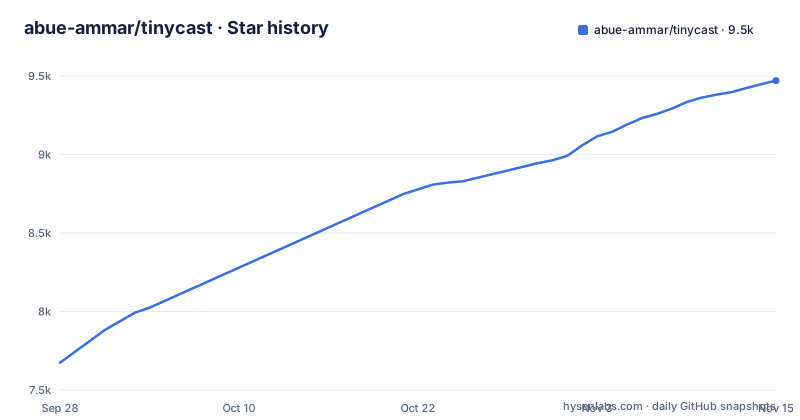
Star history
- abue-ammar/tinycast9,471 ★ · +1,797
| Repository | 2026-09-28 | 2026-11-15 |
|---|---|---|
| abue-ammar/tinycast | 7.7k | 9.5k |
1,797 Stars in the last 48 days, measured from the daily GitHub snapshot. Compare with other projects
Editorial analysis
What Tinycast replaces on a Mac
Tinycast is a launcher that lives behind one global hotkey. Press the shortcut and a palette appears over whatever you are doing; type to filter, press Enter to launch. The README lists the reach of that palette: app launching with fuzzy search and pinned favorites, clipboard history for text and images, an inline calculator with unit, currency and crypto conversion, quicklinks, Apple Shortcuts, snippets, custom shell commands, window management, system actions, calendar and meeting join, notes, an emoji picker and AI chat.
The target user is someone who already runs a launcher and resents what it costs. The README's headline claim is under 100 MB of RAM, and it states SwiftUI and AppKit with zero third-party dependencies, no Electron and no telemetry. That is the pitch: the same daily surface, written natively, without a browser runtime underneath it. The secondary audience is Raycast users who have accumulated extensions, because Tinycast states it runs real Raycast extensions rendered as native SwiftUI.
It is free and open source, with a tip link rather than a paid tier. Development is public and release numbering is currently in beta.
How the palette, the index and the permissions fit together
The architecture visible in the repository is a single Xcode project, Tinycast.xcodeproj, generated through project.yml, with a Tests directory and a Scripts directory for build and release workflows. docs/README.md indexes the rest, including one document per feature, plus architecture and design system notes. There is no package manifest for third-party code, which matches the zero-dependency claim.
File search is the clearest design decision. The README says Search Files finds files and folders from a private index of the folders you choose, kept on your Mac. It needs Full Disk Access and is off by default, and anything in a folder you did not add is invisible to the palette.
Clipboard history covers text and images and is pasted back into the app you were using. Snippets are reusable Markdown templates with dynamic placeholders and optional keyword expansion. AI chat is off out of the box, as are AI features generally, and it uses your own key or an installed AI account rather than a bundled service.
Installing Tinycast from the Homebrew tap
Tinycast is not in the default Homebrew set. The README requires trusting the tap first, then tapping it. Both lines run before any install:
brew trust --tap abue-ammar/tinycast   # required for third-party taps
brew tap abue-ammar/tinycast
The install command depends on your Mac. Apple silicon on macOS 26 or newer uses the plain cask; Intel on macOS 26 uses tinycast-universal.
brew install --cask tinycastIf you are unsure which Mac you have, the README points at Apple menu then About This Mac. Downloading a DMG from Releases instead means clearing the quarantine flag once yourself, because the app is self-signed:
xattr -dr com.apple.quarantine "/Applications/Tinycast.app"Early builds are available as a separate cask, tinycast@beta, which installs Tinycast Beta.app beside the stable app.
First run: hotkey, Tab, and the Accessibility prompt
The README describes the daily flow through its feature list. One global hotkey summons the palette from anywhere, per-app hotkeys toggle an app between focus and hidden, and Copy Deeplink (⇧⌘C) gives you a tinycast:// link for any command, quicklink, snippet, note or chat.
Several features ship off: Search Files, which needs Full Disk Access, Dictation, and every AI feature. Turn on only the ones you need.
Where Tinycast is the wrong tool
The macOS floor is the first real constraint. The README's install table lists only macOS 26 or newer, so on an older macOS there is no documented install path.
Self-signing is the second. The README says Tinycast is self-signed, which is why a DMG install needs the quarantine command. It is worth knowing if your environment has opinions about unsigned or self-signed binaries.
Third, the project is in beta. The most recent releases are versioned 0.12.x with beta build numbers, and the newest is a beta build. That is not a criticism of the code, but it does mean you should expect the shape of settings and features to move. If you need a launcher whose behaviour is frozen and documented against a stable version number, this is not that yet.
Finally, if you plan to contribute, the repository root carries CONTRIBUTING.md and CONTRIBUTOR_LICENSE_AND_FEEDBACK_AGREEMENT.md; read both before sending a patch.
Raycast, Alfred and the difference in approach
The obvious comparison is Raycast, and Tinycast's README makes the comparison for you by stating it runs real Raycast extensions rendered as native SwiftUI, plus an import path for your setup from Raycast. That is a compatibility play rather than a feature-by-feature one: instead of asking you to rebuild your extension collection, it tries to execute what you already have. Whether a given extension behaves identically is not something the README commits to, and it is the first thing to test if you depend on one.
Alfred is the other long-standing macOS launcher, and the difference in approach is structural. Alfred's workflows are its own model, built around its own scripting and plugin conventions. Tinycast instead targets the Raycast extension format, and its Search Files feature keeps a private index of the folders you choose on your Mac.
Against both, the distinguishing claim is the runtime: SwiftUI and AppKit, zero third-party dependencies, no Electron, no telemetry. If you have watched a launcher's memory footprint grow, that is the axis Tinycast is competing on, and the README's under-100-MB figure is the number to hold it to.
Licence, maintenance and what an upgrade costs you
The repository ships a LICENSE file and a NOTICE.md, and the README's badge reads AGPL-3.0. The repository metadata reports the licence as NOASSERTION, which means the automated classifier did not map the file to a known identifier. Those two signals disagree, and the practical answer is to read LICENSE and NOTICE.md yourself rather than trust either label. AGPL-3.0 is a copyleft licence with a network-use clause; if you plan to redistribute Tinycast, bundle it, or expose modified behaviour over a network, that clause is the part to read closely. This is not legal advice, and the repository also carries a CONTRIBUTOR_LICENSE_AND_FEEDBACK_AGREEMENT.md that contributors should read before sending anything.
Maintenance is active by the evidence available: the repository is not archived, and the last push was on 2026-11-02, with releases on 2026-10-31, 2026-11-01 and 2026-11-02. The cadence is high and the version numbers are still pre-1.0 beta. Upgrading through Homebrew is a normal cask update. The beta cask installs a separate Tinycast Beta.app beside the stable app.
The upgrade cost to plan for is configuration drift, not installation. Settings, shortcuts, snippets and quicklinks are the surfaces most likely to change while the version stays below 1.0, and the README documents an export-and-import path for settings plus a Raycast import. Export before a jump you care about.
Editorial conclusion
Tinycast suits Mac users on macOS 26 or newer who want a native launcher with clipboard history, snippets and Raycast extension support, and who accept beta release numbering. Skip it if you are on a macOS release older than 26, since the install table lists only macOS 26 or newer, or if you need a stable, versioned product. Before adopting, check which of the features you want need Full Disk Access, confirm which cask matches your CPU, and check whether the AGPL-3.0 licence fits how you intend to use or redistribute it.
Frequently asked questions
Does Tinycast run on macOS 15 Sequoia?
The README's install table lists only macOS 26 or newer, with tinycast for Apple silicon and tinycast-universal for Intel, and gives no cask for macOS 15 Sequoia.
How do I install Tinycast with Homebrew?
The README requires running brew trust --tap abue-ammar/tinycast and then brew tap abue-ammar/tinycast before installing a cask. Which cask you install depends on your Mac: tinycast for Apple silicon on macOS 26 or newer, tinycast-universal for Intel on macOS 26.
Why does Tinycast ask for Accessibility permission?
The current README does not mention an Accessibility prompt. The permission it names is Full Disk Access, which Search Files needs and which is off by default.
Can Tinycast run the Raycast extensions I already have?
The README says Tinycast runs real Raycast extensions rendered as native SwiftUI, and it documents an import of your setup from Raycast. The README does not state per-extension compatibility guarantees, so test the extensions you depend on.
Is Tinycast free and open source?
The README describes it as free and open source and staying that way, with optional support payments through Polar.sh or crypto rather than a paid tier. The README badge reads AGPL-3.0, while the repository metadata reports NOASSERTION, so read LICENSE and NOTICE.md for the actual terms.
Does Tinycast build its own file index?
Yes. The README says Search Files uses a private index of the folders you choose, kept on your Mac. It needs Full Disk Access and is off by default.
Official sources
Where developers are discussing it
Posts on Hacker News, dev.to and Lobsters that link to this repository, found by our scan of those communities. 1 in the last 30 days; newest first.
- TinycastHacker News · Oct 19, 2026 · 1 points · 1 comments
- Tinycast – a tiny native macOS launcher, hotkeys, and clipboard historyHacker News · Sep 29, 2026 · 1 points · 0 comments
- Raycast Rugpull: Free Alternative to RaycastHacker News · Sep 16, 2026 · 2 points · 0 comments
Add this badge to your README
If you maintain this project, the badge below links readers to this analysis and shows its maintenance status from the daily GitHub snapshot. Paste the markdown into your README; add ?metric=license or ?metric=stars to the image URL for a different field.

[](https://hysenlabs.com/projects/abue-ammar-tinycast)Star history chart for your README
[](https://hysenlabs.com/projects/abue-ammar-tinycast)Was this useful?