tuicr: a vim-native code review TUI that pushes inline comments to five forges
a code review TUI with vim keybindings
At a glance
- What is it?
- tuicr is a Rust TUI for reviewing diffs in git, jj, or mercurial repos, with vim keybindings and direct export to GitHub, GitLab, Bitbucket, Azure DevOps, or a clipboard markdown block. The core judgement: it is the only tool in its comparison table that pushes inline comments to all three major forges, but its value depends on your willingness to learn its modal workflow.
- Who is it for?
- Adopt tuicr if you live in a terminal, use vim keybindings, and review code across git, jj, or mercurial with a need to push inline comments to GitHub, GitLab, Bitbucket, or Azure DevOps without leaving the TUI. Skip it if you prefer a graphical review interface, rarely leave the GitHub web UI, or need Bitbucket Data Center support, which is explicitly out of scope.
- Can I use it commercially?
- Yes. MIT is a permissive licence: you can use, modify and sell software built on it, as long as you keep its copyright and licence notices.
- Is it still maintained?
- Yes. The repository last received commits 2 days ago.
- What is it written in?
- Mainly Rust, according to GitHub's language statistics.
Answers come from the project's GitHub data, last synced on October 22, 2026, and from our analysis. They are not legal advice.
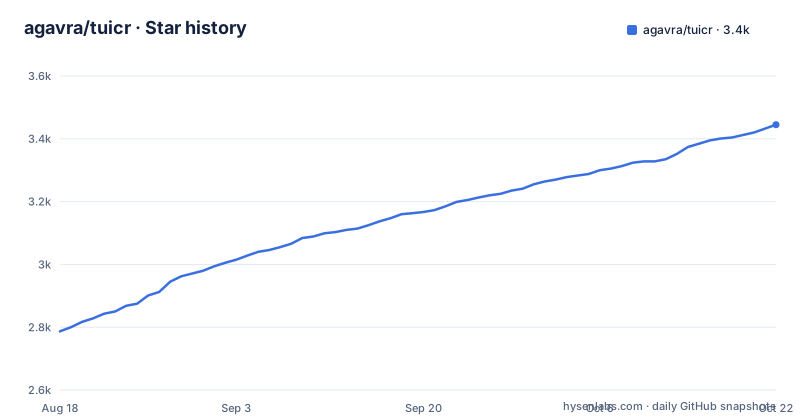
Star history
- agavra/tuicr3,445 ★ · +658
| Repository | 2026-08-18 | 2026-10-22 |
|---|---|---|
| agavra/tuicr | 2.8k | 3.4k |
658 Stars in the last 65 days, measured from the daily GitHub snapshot. Compare with other projects
Editorial analysis
What tuicr solves and who it is for
tuicr addresses a specific pain: code review that happens in a terminal, with the ability to write inline comments and then push them as a real review to a forge. The README positions it as a TUI with vim keybindings, which immediately targets developers who already use vim or modal editors. It is for people who review pull requests, merge requests, or plain diffs without leaving their terminal, and who need the review to land back on GitHub, GitLab, Bitbucket, or Azure DevOps. The tool also supports git, jj, and mercurial, which is a broader VCS range than most review tools. The intended user is likely a backend or infrastructure engineer who spends hours in a terminal and finds the GitHub web review interface too slow or too mouse-dependent. The README's comparison table shows that tuicr is the only tool listed that pushes inline comments to all three major forges, which is the core differentiator.
The mechanism: continuous diff, modal comments, and export pipeline
The core mechanism is a continuous diff stream. Instead of viewing files one by one, tuicr scrolls through every changed file in a single stream, styled after GitHub's diff view. You navigate with j and k, press c to add a comment at the line, range, file, or review level, and then either copy the review with y or submit it with :submit. The review is tracked at file or hunk granularity and persisted across sessions, so you can close the TUI and resume later. The export pipeline is the key architecture: comments are stored locally as pending drafts, and :submit opens a picker for the review action (Comment, Approve, Request changes, or Draft, depending on the forge). For each forge, tuicr uses the corresponding CLI (gh, glab, bkt, or az) to post the inline comments. For Azure DevOps, there is no unified-diff API, so tuicr builds the diff locally with git diff base...head, which means you must run tuicr from a local clone. The clipboard export produces a structured markdown block with numbered comments and file/line anchors, designed for pasting into a coding agent.
Getting it running: install commands and first launch
Installation is straightforward and offers multiple paths. The README lists a curl script, Homebrew, pacman, cargo, mise, and nix. The quickest path is curl -fsSL tuicr.dev/install.sh | sh, or brew install tuicr on macOS. For a source build, you clone the repo and run cargo install --path . from the root. The first launch is tuicr, which opens a commit selector; you can also run tuicr tui for the same TUI explicitly, tuicr -w for uncommitted changes, tuicr -r main..HEAD for a commit range, or tuicr pr 125 for a GitHub or Bitbucket PR. For GitLab, use tuicr mr 125. The update mechanism is notable: tuicr update checks which package manager owns the executable and uses that manager to upgrade, with SHA-256 verification for script-installed binaries. This is a practical touch for a tool that will likely be installed on many machines.
Export targets and their real constraints
The export targets are the heart of tuicr, but each has its own limitations. GitHub requires gh authenticated to the repo, and :submit offers Comment, Approve, Request changes, or Draft. GitLab requires glab authenticated to the host, and Request changes only works if your account is an assigned reviewer. Bitbucket requires bkt authenticated to bitbucket.org, and only Comment and Approve are supported; Draft and Request changes are not, and Bitbucket Data Center is explicitly out of scope. Azure DevOps uses a Personal Access Token in AZURE_DEVOPS_EXT_PAT, with a fallback to az login, and requires running tuicr from a local clone because there is no unified-diff API. The clipboard export is the most flexible: y or :clip copies a markdown block that can be pasted into any coding agent. The README even describes an agent-driven workflow where the agent opens tuicr in a split pane, which suggests the tool is designed to fit into AI-assisted development loops.
The vim model and the review tracking trade-off
tuicr's vim keybindings are not just j/k navigation; the README mentions visual mode, {N}G, and Ctrl-d/Ctrl-u, which are core vim motions. This is a deeper modal model than a tool like lumen, which only has j/k navigation. The trade-off is that if you do not know vim, the learning curve is steep. The review tracking is another trade-off: tuicr persists reviewed state at file or hunk granularity, and when you reopen a PR, it preselects commits newer than your latest submitted review, marking already-covered commits with a checkmark. But this only works when the forge records which commit an approval covered. Bitbucket does not, so that preselection does not apply there. This is a genuine limitation: if you review a Bitbucket PR, you lose the convenience of automatic commit-level progress tracking.
The :summary view and the limits of a TUI
The :summary command shows every pending local-draft comment in a list that replaces the diff, with the file sidebar still visible if open. You can navigate with j/k, press Enter to jump to a comment in the continuous diff, and Esc to return. The first comment is selected automatically, and the view scrolls to keep it visible. This is a well-thought-out feature for managing multiple comments, but it also reveals a limitation: the TUI is single-pane, so you cannot see the diff and the summary at the same time, unless you open the sidebar. The README says the summary replaces the diff, which means you lose context while reviewing the list. For a tool that prides itself on a continuous diff, this is a design compromise. It is not a fatal flaw, but it is a place where a split-pane layout would be more ergonomic.
Alternatives and the actual difference in approach
The README compares tuicr to hunk, lumen, gh pr review, and git diff. The key difference is that hunk and lumen are TUI diff viewers that let you write comments, but they do not push inline comments to any forge. gh pr review can post a review, but only at the review level, not inline line comments. git diff is just a diff viewer. So tuicr's approach is to be a full review lifecycle tool: you view the diff, write comments, and submit them as a real PR review, all in the terminal. The alternative that comes closest is hunk, which is also a TUI diff viewer with comment support, but it lacks vim keybindings and forge export. If you only need to view and comment locally, hunk might be simpler. But if you need to push the review back to GitHub or GitLab, tuicr is the only one in this comparison that does it.
Maintenance, license, and upgrade cost
tuicr is written in Rust and released under the MIT license, which is permissive and suitable for commercial use. The project is actively maintained, with recent releases in August 2026, including v0.24.0. The update mechanism is built in, which reduces maintenance cost: tuicr update handles upgrades through the package manager that owns the executable, or in-place for script-installed binaries with SHA-256 verification. This is a strong point for keeping the tool current. The upgrade cost is low because the tool is a single static binary, so there are no dependencies to manage. However, the license does not include any warranty, and as with any tool that interacts with forge APIs, you should verify that the CLI tools (gh, glab, bkt, az) are installed and authenticated, as these are external dependencies. The README points to specific docs for GitLab and Bitbucket setup, which suggests that configuration is not always trivial.
Editorial conclusion
Adopt tuicr if you live in a terminal, use vim keybindings, and review code across git, jj, or mercurial with a need to push inline comments to GitHub, GitLab, Bitbucket, or Azure DevOps without leaving the TUI. Skip it if you prefer a graphical review interface, rarely leave the GitHub web UI, or need Bitbucket Data Center support, which is explicitly out of scope. Before adopting, verify that your forge's CLI (gh, glab, bkt, or az) is authenticated and that your repo is a local clone, since Azure DevOps requires a local git diff. Also check the docs for Bitbucket token scopes and GitLab self-hosted setup, as these are the areas with the most setup friction. The project is actively maintained with regular releases, and the single static binary makes installation trivial, but the real cost is learning the modal keybindings and accepting that Bitbucket approval does not track commit coverage, so preselecting newer commits will not work there.
Frequently asked questions
How do I install tuicr and keep it updated?
Six routes are documented: an install script piped to sh, brew, pacman, cargo install, mise use github:agavra/tuicr and nix run github:agavra/tuicr, plus prebuilt GNU and static musl binaries on the releases page. `tuicr update` delegates to whichever package manager owns your executable, while script and manual installs update in place after SHA-256 verification. A `nix run` invocation is temporary; use `nix profile install` for an installation tuicr update can upgrade.
Which command line tool does tuicr need for each code host?
One per host: `gh` authenticated to the repository for GitHub, `glab` authenticated to the host for GitLab, `tea` with a login added for the instance for Gitea, and `bkt` authenticated to bitbucket.org for Bitbucket. Azure DevOps offers Comment, Approve and Request changes, and the last two cast a reviewer vote as well.
Does tuicr work outside git repositories?
Yes. tuicr auto-detects git, jj or mercurial and reviews uncommitted changes, commit ranges, or a GitHub, GitLab, Gitea, Bitbucket or Azure DevOps pull request and a Gerrit change. SHA-256 repositories automatically use the Git CLI backend, including when reviewing root commits, while ordinary SHA-1 repositories default to libgit2.
What do the keys inside the tuicr interface do?
Navigate with j and k, press c to comment, y to copy the review, and :submit to push it to the host. Comments attach at line, range, file and review level. `:summary` lists every pending local-draft comment, replacing the diff while the file sidebar stays visible, and Enter jumps from the summary to the selected comment without clearing reviewed state.
How does tuicr compare with hunk and lumen?
The README's own table gives tuicr the only yes for pushing inline reviews to GitHub, GitLab, Gitea, Bitbucket, Azure DevOps and Gerrit, the only Mercurial support, and full vim keybindings where hunk has none and lumen has partial ones without visual mode, `{N}G` or `Ctrl-d`/`Ctrl-u`. `gh pr review` is marked partial because it only posts at review level. hunk takes the agent-ready markdown export row, through a CLI skill.
How often does tuicr release, and can I pin an older version?
Three releases landed in under a month: v0.27.0 on 23 September 2026, v0.26.0 on 15 September and v0.25.0 on 2 September, all on 0.x numbering. `tuicr update 0.18.0` installs a known-good version, and exact-version installs are supported for Cargo and direct binaries, while Homebrew, Mise and Nix use their own pinning workflow.
Official sources
Add this badge to your README
If you maintain this project, the badge below links readers to this analysis and shows its maintenance status from the daily GitHub snapshot. Paste the markdown into your README; add ?metric=license or ?metric=stars to the image URL for a different field.

[](https://hysenlabs.com/projects/agavra-tuicr)Star history chart for your README
[](https://hysenlabs.com/projects/agavra-tuicr)