Pi Web: A Browser UI That Shares Pi's Session Files, Not a Fork of Them
GitHub describes it as Web UI for the pi coding agent. The repository metadata lists TypeScript as its primary language. The metadata lists the MIT license. This article stays within the project description and details documented in the GitHub repository README.
At a glance
- What is it?
- Pi Web is a local web interface for the pi coding agent that reads the same session and config files pi uses. It is useful for resuming conversations and managing models from a browser, but its filesystem boundary and remote-access warnings deserve attention.
- Who is it for?
- Adopt Pi Web if you already use pi and want a browser-based way to browse, resume, and branch sessions, manage models and API keys, and inspect project files without leaving the browser. Do not adopt it if you need a general filesystem browser, or if you plan to expose the server beyond localhost without a reverse proxy and a strong password.
- Can I use it commercially?
- Yes. MIT is a permissive licence: you can use, modify and sell software built on it, as long as you keep its copyright and licence notices.
- Is it still maintained?
- Yes. The repository last received commits 2 days ago.
- What is it written in?
- Mainly TypeScript, according to GitHub's language statistics.
Answers come from the project's GitHub data, last synced on October 22, 2026, and from our analysis. They are not legal advice.
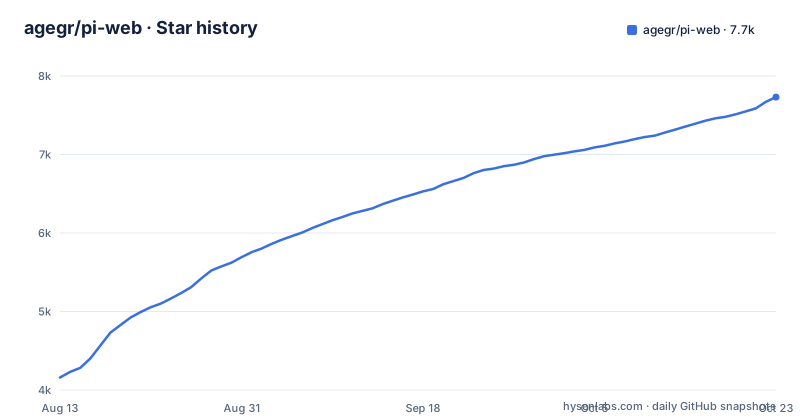
Star history
- agegr/pi-web7,671 ★ · +3,512
| Repository | 2026-08-13 | 2026-10-22 |
|---|---|---|
| agegr/pi-web | 4.2k | 7.7k |
3,512 Stars in the last 70 days, measured from the daily GitHub snapshot. Compare with other projects
Editorial analysis
What Pi Web Solves and Who It Is For
Pi Web is a local browser UI for the pi coding agent, which is an agent that runs coding tasks from the command line. The problem it solves is that pi's native interface is terminal-based, and reviewing long sessions, switching between projects, or managing model credentials from a terminal is tedious. Pi Web reads the same local configuration and session files as pi, so you can browse and resume conversations, run agent turns, configure models and resources, and inspect project files from a browser. It is for developers who already use pi and want a graphical layer on top of it, not for people who need a standalone coding agent. The README stresses that Pi Web uses the same session files under `~/.pi/agent/sessions/<encoded-cwd>/<timestamp>_<uuid>.jsonl`, so it is a companion, not a replacement.
How It Works: Shared Files and Two Branching Mechanisms
The core mechanism is that Pi Web does not maintain its own session store. It reads and writes the same JSONL session files that pi uses, which means you can switch between the terminal and the browser without losing context. The session workspace shows conversations grouped by project, with running state, context usage, cost, and compaction details. For branching, Pi Web offers two distinct actions. 'New session' creates an independent session file from an earlier message, so the new session has no connection to the original. 'Edit from here' creates a branch inside the current session, keeping the history in one file. This distinction matters because it changes how you later export or delete sessions. The README also mentions Git worktrees: you can switch checkouts from the sidebar, and sessions from the same repository stay grouped together. The actual worktree behavior, including visibility and removal, is documented in `docs/worktrees.md`, which is not included in the README excerpt.
Getting It Running: Commands and Configuration Keys
The quick start is a single npx command: `npx @agegr/pi-web@latest`. It requires Node.js 22.19.0 or newer, so check with `node --version` first. The CLI opens a browser automatically; if it does not, open `http://127.0.0.1:30141`. By default, the server binds only to `127.0.0.1`, which is a sensible default for a tool that can execute high-privilege actions. For a global install, run `npm install -g @agegr/pi-web@latest` and then `pi-web`. Configuration is done through command-line options or environment variables. For example, `pi-web -p 8080 -H 0.0.0.0 --no-open` changes the port and hostname and disables browser opening. Environment variables like `PI_WEB_NO_OPEN=1`, `PI_WEB_HOSTNAME`, and `PORT` are alternatives. There is also `PI_WEB_PASSWORD` for HTTP Basic Auth, with the username always `pi`. The README warns that Basic Auth does not encrypt the password in transit, so exposing over plain HTTP to the internet is not advised.
The File Access Boundary Is a Real Limitation
Pi Web's file browser is not a general filesystem browser. The README explicitly states that it is limited to working directories selected in Pi Web and project or session roots it already knows about. This is a deliberate security boundary, but it also means you cannot navigate to arbitrary paths on your machine. If you want to preview a file outside a known project root, you have to select that working directory first. This limitation is easy to miss because the feature list says 'browse and upload files', which sounds general. For users who expect a full file manager, this will be a surprise. The README also notes that Pi Web must be able to read the agent data directory and the working directories recorded by its sessions, and that you should run Pi Web in the same filesystem environment as pi when sharing sessions. If pi runs inside a container or on a remote machine, Pi Web will not see those files unless the filesystem is shared.
Security Considerations: Remote Access and Allowed Hosts
Binding to a non-loopback address exposes an agent that can execute high-privilege actions, so the README is explicit about the risk. It recommends a long random password via `PI_WEB_PASSWORD` and using HTTPS through a trusted reverse proxy or VPN. There is also `PI_WEB_ALLOWED_HOSTS`, which is an allow-list of exact hostnames that a reverse proxy might send. This list does not change the bind address; it only affects which Host headers are accepted. The README says the allow-list does not change the address Pi Web binds to, so you still need `--hostname 0.0.0.0` to listen on all interfaces. The Basic Auth username is hardcoded to `pi`, which is worth remembering if you automate logins. The security model is reasonable for a local tool, but it relies on the user reading the warnings. The README does not mention any rate limiting or brute-force protection, so on a LAN with a weak password, that could be a concern.
A Real Alternative: The Native Pi CLI and Terminal Workflows
The most direct alternative is to use pi itself from the terminal, without any web UI. The difference is in the interaction model. Pi Web adds a graphical layer for browsing sessions and configuring models, but the underlying agent is still pi. If you are comfortable with the terminal, you can achieve the same session resumption and branching by editing JSONL files manually or using pi's own commands, though that is far less convenient. Another alternative is a general-purpose terminal multiplexer like tmux, which lets you keep multiple pi sessions running in panes, but it does not provide a session browser or model configuration UI. The key difference is that Pi Web centralizes session management and configuration in a browser, while the terminal approach keeps everything in text. For users who prefer keyboard-driven workflows, the terminal is lighter and has no Node.js version requirement. For users who want a visual overview of context usage and cost, Pi Web is the better fit.
Maintenance, Upgrade, and License Implications
Pi Web is under active development, with recent releases like v0.8.12-beta.1 and v0.8.11. The update process is simple: stop the running process with Ctrl+C and run the same install command again. There is a `PI_WEB_SKIP_VERSION_CHECK=1` environment variable to disable update checks, which suggests the tool checks for updates by default. The development workflow uses `npm install`, `npm run dev`, and checks with `npm test`, `tsc --noEmit`, and `npm run lint`. The README warns not to run `next build` during development because it writes to `.next/` and can interfere with the dev server. The license is MIT, which means you can use, modify, and distribute it freely, but you get no warranty. The project is not archived, and the last push is recent, so maintenance appears active. However, the README does not mention any long-term support or migration path for configuration changes, so you should check the release notes before upgrading if you rely on specific behaviors.
The Session Row Context Menu Hook for Downstream Integrations
One detail that stands out is the browser event hook for downstream integrations. Pi Web dispatches a cancelable `pi-web:session-row-contextmenu` event on the window. An Electron wrapper or other integration can listen for it and call `preventDefault()` synchronously if it will handle the menu. The event detail includes `id`, `path`, `cwd`, optional `name`, pointer coordinates, and a `refresh()` callback. This is a thoughtful extension point because it allows custom UIs to replace the native context menu without patching the `SessionSidebar` component. The README notes that this hook is browser-side and independent of pi agent extensions, which means it works even if pi itself does not know about it. For developers building a desktop wrapper, this is a concrete integration point that saves them from forking the UI. It is a small feature, but it shows the project is designed with extensibility in mind, not just as a single-purpose tool.
Editorial conclusion
Adopt Pi Web if you already use pi and want a browser-based way to browse, resume, and branch sessions, manage models and API keys, and inspect project files without leaving the browser. Do not adopt it if you need a general filesystem browser, or if you plan to expose the server beyond localhost without a reverse proxy and a strong password. Before using it, verify that your Node.js is 22.19.0 or newer, that you run it on the same filesystem as pi, and that you understand the file access boundary: it only sees working directories you select or session roots it already knows. Also check the worktrees documentation to see how the switcher handles worktree visibility and removal, since that behavior is not fully described in the README.
Frequently asked questions
What is Pi Web?
Pi Web is a local browser UI for the pi coding agent, built with Next.js and TypeScript. It reads the same local configuration and session files as pi, so you can browse and resume conversations, run agent turns, configure models and inspect project files from a browser.
What is PiWeb?
PiWeb is the npm package `@agegr/pi-web`, which requires Node.js 22.19.0 or newer. You can run it with `npx @agegr/pi-web@latest` or install it globally and use the `pi-web` command.
What is the Pi Web API and how do I access it?
Pi Web serves a local server on port 30141 bound to `127.0.0.1` by default. To reach it from elsewhere you bind another address with `--hostname` or `PI_WEB_HOSTNAME` and set `PI_WEB_PASSWORD`, with API clients using Basic Auth and the username `pi`.
Official sources
Add this badge to your README
If you maintain this project, the badge below links readers to this analysis and shows its maintenance status from the daily GitHub snapshot. Paste the markdown into your README; add ?metric=license or ?metric=stars to the image URL for a different field.

[](https://hysenlabs.com/projects/agegr-pi-web)Star history chart for your README
[](https://hysenlabs.com/projects/agegr-pi-web)