AgentConnect: A multi-agent platform that moves AI work out of the terminal and into team channels
The open-source, multi-agent alternative to Claude Tag. @ any agent, wherever work happens, your agents work alongside your team and each other, learning as they go.
At a glance
- What is it?
- AgentConnect is an open-source platform for running ACP-compatible AI agents inside Slack, Telegram, Discord, Lark, GitHub, and GitLab. It targets teams that want shared, reviewable agent workflows instead of personal terminal tools.
- Who is it for?
- Adopt AgentConnect if your team already lives in Slack, Telegram, Discord, or GitHub and needs multiple agents to work in shared, reviewable threads with role-based access and persistent memory. Skip it if you only need a single agent in one terminal or if you cannot tolerate the operational weight of self-hosting a platform with daemons, schedules, and credential handling.
- Can I use it commercially?
- Yes. Apache-2.0 is a permissive licence: you can use, modify and sell software built on it, as long as you keep its copyright and licence notices.
- Is it still maintained?
- Yes. The repository received new commits within the last day.
- What is it written in?
- Mainly TypeScript, according to GitHub's language statistics.
Answers come from the project's GitHub data, last synced on October 22, 2026, and from our analysis. They are not legal advice.
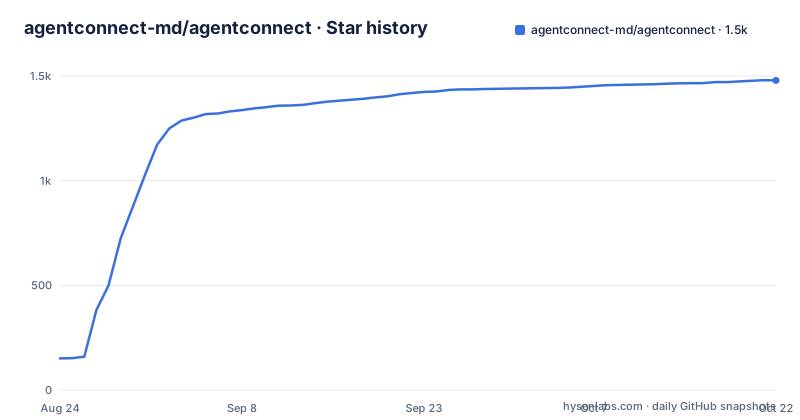
Star history
- agentconnect-md/agentconnect1,479 ★ · +1,328
| Repository | 2026-08-24 | 2026-10-22 |
|---|---|---|
| agentconnect-md/agentconnect | 151 | 1.5k |
1,328 Stars in the last 59 days, measured from the daily GitHub snapshot. Compare with other projects
Editorial analysis
The problem: agents are stuck in personal terminals
AgentConnect starts from a specific complaint: most AI agents behave like personal tools. One engineer runs Claude Code or Codex in their own terminal, and teammates cannot see the session, take over, or review the output. Context accumulates on a single laptop. The README says every team ends up writing the same glue: message channels, cron jobs, credential handling, and context stitching. AgentConnect tries to replace that glue with a platform. The intended user is a team, not an individual. The use cases all involve shared visibility: triaging issues together, running support across trusted workspaces, starting work from a schedule or webhook, and keeping private forks current. If you are a solo developer who just wants a faster coding loop, this project is probably overkill. It is built for the moment when more than one person needs to see what an agent is doing and when agents need to call each other.
How it works: agents as channel members with roles and memory
The core mechanism is that agents are linked to bots in Slack, Telegram, Discord, and Lark, or to repositories and workflows on GitHub and GitLab. Each agent gets a role, a runtime, a model, a workspace, tools, and a machine, all configured independently. Agents can call one another, and they carry context forward through their own memory and skills. The README also mentions Knowledge, which is reviewed and published so every agent can find it on demand. Work can start from a message, an issue, a pull request, a webhook, or a schedule. The architecture is not described in detail in the material, but the feature list implies a daemon-based system that listens to channel events, manages sessions, and dispatches work to agent runtimes. The phrase "one place to operate your whole fleet: agents, sessions, schedules, tools, knowledge, and daemons" suggests a control plane that coordinates multiple moving parts. This is a platform, not a library. The data flow is event-driven: a message or webhook triggers a session, agents process it, and the result returns to the conversation where it started.
Runtime flexibility: any ACP-compatible agent
A central design choice is the Agent Connect Protocol (ACP). The README lists Claude Code, Codex, Grok Build, DeepSeek, Pi, and "any ACP-compatible agent" as supported runtimes. The benefit is that changing one runtime does not rebuild the workflow around it. This is a meaningful difference from platforms that lock you into one vendor. If your team standardizes on Claude Code today but wants to try Codex next quarter, the workflow stays intact. The cost is that you depend on the ACP ecosystem. If a runtime you need is not ACP-compatible, you cannot use it. The README does not explain how ACP works technically, so you should check the docs for the protocol specification and the list of certified runtimes. The promise of "run side by side" also implies that different agents can use different models and tools in the same workflow, which is useful for specialized reviewers, such as a general reviewer on every pull request and an architecture reviewer only on certain changes.
Getting started: what the README shows and what it omits
The README links to a website, a cloud app, and documentation, but it does not include a single install command. There is no "npm install" or "docker run" in the material. The repository is TypeScript and Apache-2.0, and the releases are frequent, with three versions pushed within a day, but the README stops at the marketing level. To get it running, you have to visit docs.agentconnect.md. This is a gap for an evaluation article. The README does show the shape of the platform: you create agents with roles, link them to bots in your chat platforms, configure runtimes and models, and then manage sessions, schedules, tools, and knowledge from a central dashboard. The cloud app at app.agentconnect.md suggests a hosted option, while self-hosting is available because the stack is Apache-2.0. The README says self-hosting lets you keep agent execution and workspaces in your environment. For a concrete setup, you need the docs, which are not in the provided material. If you are evaluating this, plan to spend time on the docs before you can run anything.
Limitations and failure modes
The most obvious limitation is that the README is thin on operational details. It does not explain how credentials are stored, how sessions are secured, or how the daemons are deployed. The permission model exists, with controls over who can see agents and sessions, which repositories and tools an agent may use, and which other agents it may call, but the README does not specify how that model is enforced. Another failure mode is that the value depends entirely on integration. If your team does not use Slack, Telegram, Discord, Lark, GitHub, or GitLab, the platform has no surface. The README also mentions "trusted workspaces," which implies cross-workspace support, but that setup is likely complex. A third limitation is that agents "learning as they go" and "remember what they learn" raises questions about context management. The README does not describe how memory is bounded, how knowledge is versioned, or what happens when an agent's memory grows stale. For regulated environments, the lack of detail on audit trails and data residency could be a blocker. The README does not mention any security certifications or compliance features.
The real alternative: writing your own glue vs. a vendor platform
The README positions AgentConnect as an alternative to Claude Tag, which is presumably a commercial product. The actual difference is that AgentConnect is open source and protocol-based. The alternative is not just another tool, it is the status quo: building your own integration layer. The README lists the glue teams write: message channels, cron jobs, credential handling, context stitching. AgentConnect replaces that with a platform. A second alternative is a commercial multi-agent platform that is not open source, but the README does not name one. The key comparison is between adopting AgentConnect and maintaining a custom solution. With a custom solution, you control everything but you own the maintenance. With AgentConnect, you get a shared session model, role-based access, and knowledge management out of the box, but you depend on the project's release cadence and the ACP ecosystem. The frequent releases (three in one day) suggest active development, but that also means you need to track updates. The Apache-2.0 license gives you the right to modify and self-host, which mitigates the risk of project abandonment, but you still need the skills to operate it.
Maintenance, licensing, and what to verify before adopting
The project is Apache-2.0, which is permissive. You can self-host, modify, and use it commercially without paying a license fee. The README does not mention any open-core or paid features, but the existence of a cloud app suggests the maintainers may offer hosted services separately. The maintenance cost is not zero. The platform involves daemons, schedules, credentials, and integrations across multiple chat and code hosting services. You will need to manage updates, monitor sessions, and handle failures. The release frequency is high, which is good for features but means you should have a process for upgrading. The README does not describe a migration path from a custom solution or from a single-agent setup. Before adopting, verify three things: the ACP compatibility of the exact agent runtimes you plan to use, the self-hosting requirements in the docs, and the permission model's fit for your compliance needs. The README says you can keep agent execution and workspaces in your environment, but it does not explain how. The project is young enough that the docs are the only source of truth for these details.
Editorial conclusion
Adopt AgentConnect if your team already lives in Slack, Telegram, Discord, or GitHub and needs multiple agents to work in shared, reviewable threads with role-based access and persistent memory. Skip it if you only need a single agent in one terminal or if you cannot tolerate the operational weight of self-hosting a platform with daemons, schedules, and credential handling. Before committing, verify that your preferred agent runtimes are ACP-compatible, confirm the self-hosting requirements in the docs, and test the permission model against your compliance needs. The project is Apache-2.0, but the real cost is integration and maintenance, not licensing.
Frequently asked questions
What problem does AgentConnect solve for a team already using coding agents?
It replaces the per-team glue: message channels, cron jobs, credential handling and context stitching. Its stated complaint is that agents live in one person's terminal, so teammates cannot see, take over or review them, and the context stays on one laptop.
Which AI agents can AgentConnect run?
Claude Code, Codex, Grok Build, DeepSeek, Pi, Antigravity, the GitHub Copilot CLI, the Devin CLI, qwen-code and OpenCode, plus anything ACP-compatible. Runtime, model, workspace, tools and machine are configured per agent.
What password does the AgentConnect compose file use for Postgres?
It defaults to the fixed string agentconnect-local-only when the environment variable is not set. The port is bound to 127.0.0.1 rather than published, and the image is postgres:18-alpine.
Why does the AgentConnect browser playground say the relay is not configured?
Because the playground rides a relay pool and not the control plane. With PUBLIC_RELAY_URL unset, the token mint route at POST /orgs/:org/agents/:id/webchat/token returns 503, so you must run the relay and point the variable at it.
Official sources
Add this badge to your README
If you maintain this project, the badge below links readers to this analysis and shows its maintenance status from the daily GitHub snapshot. Paste the markdown into your README; add ?metric=license or ?metric=stars to the image URL for a different field.

[](https://hysenlabs.com/projects/agentconnect-md-agentconnect)Star history chart for your README
[](https://hysenlabs.com/projects/agentconnect-md-agentconnect)