APT-Hunter: hunting APT activity inside Windows event logs
APT-Hunter is Threat Hunting tool for windows event logs which made by purple team mindset to provide detect APT movements hidden in the sea of windows event logs to decrease the time to uncover suspicious activity
At a glance
- What is it?
- APT-Hunter is a Python threat hunting tool that reads Windows EVTX exports, applies pre-defined detection rules and hunts by string, regex, Event ID or Sigma, then writes timelines for Excel and Timesketch. It also has a web dashboard and optional local LLM triage, and it binds to all interfaces by default.
- Who is it for?
- Adopt APT-Hunter if you already hold EVTX exports from a Windows estate and want fast, repeatable rule and Sigma hunts with timeline output you can hand to responders. Do not adopt it as a live collection agent, since collection is handled by the separate PowerShell scripts, nor as a replacement for a full SIEM.
- Can I use it commercially?
- Yes, with conditions. GPL-3.0 is a copyleft licence: if you distribute software that includes it, you must release that software's source code under the same licence. Running it internally without distributing it does not trigger that obligation.
- Is it still maintained?
- Yes. The repository last received commits 33 days ago.
- What is it written in?
- Mainly Python, according to GitHub's language statistics.
Answers come from the project's GitHub data, last synced on October 23, 2026, and from our analysis. They are not legal advice.
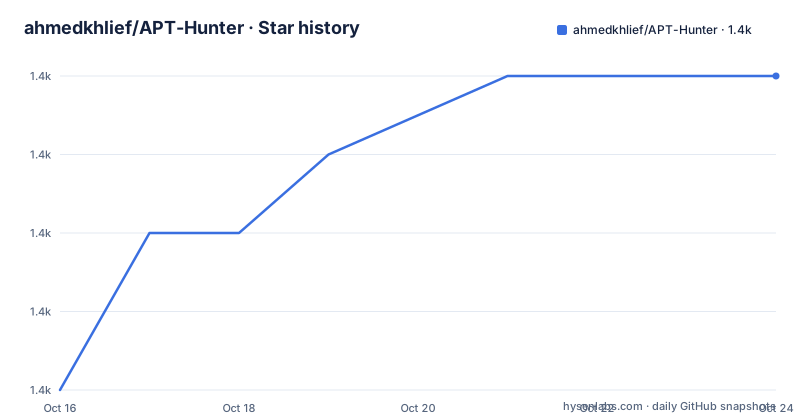
Star history
- ahmedkhlief/APT-Hunter1,432 ★ · +4
| Repository | 2026-10-16 | 2026-10-23 |
|---|---|---|
| ahmedkhlief/APT-Hunter | 1.4k | 1.4k |
4 Stars in the last 7 days, measured from the daily GitHub snapshot. Compare with other projects
Editorial analysis
The problem it targets: suspicious behaviour buried in event volume
Windows event logs are where the evidence is, and where analysts drown. APT-Hunter is built for that specific friction. The project description frames it as a threat hunting tool for Windows event logs, made with a purple team mindset, whose purpose is to detect APT movements hidden in large volumes of events and shorten the time it takes to uncover suspicious activity. Compromise assessment is named as the case where the tool is said to be most effective.
The audience is therefore an analyst who already has logs and needs to find the signal, not an administrator setting up monitoring. That framing explains several choices further down, such as hunting by string or Sigma rule on top of the built-in rule set, and output that lands in a format other tools already read.
The repository is written in Python 3.8 or later, licensed under GPL-3.0, with the default branch on main. The last push was on 2026-09-20, and that same day carried the V4.0 release. A linked write-up at shells.systems introduces the tool and describes v3.0 as rebuilt with multiprocessing.
Pre-defined detection rules, and log type detected on its own
The core mechanism is a set of pre-defined detection rules combined with log statistics. Rules cover Security, System, Sysmon, PowerShell, Defender, WinRM, Scheduled Tasks and Terminal Services logs, among others, and the log type is detected automatically, so you point the tool at a folder of mixed EVTX files without telling it which is which.
The README states that results are written as a timeline, and that dedicated reports are available for logon events, process execution and object access. The extra report flags are named in the option table as -procexec, -logon, -objaccess and -allreport, and -allreport turns on the full set in the documented quick start.
The dependency list gives a hint about the data path. The core analysis group installs evtx for parsing, pandas and numpy for the statistical pass, python-dateutil and pytz for time handling, XlsxWriter and openpyxl for spreadsheet output, netaddr and geoip2 for address and geolocation work, and flatten_json to flatten nested JSON records. The detection rules themselves ship in the repository as rules.json, and O365_detection_rules.json covers Office 365 audit logs.
Multiprocessing across half the available cores by default
Analysis is parallelised, and the parallelism is exposed rather than hidden. The -cores option sets the number of CPU cores to use, and the documented default is half of the cores available on the machine. The project describes this as a multiprocessing engine for fast analysis of large log sets, and the v3.0 write-up is titled around the same rebuild.
A half-core default is a sensible compromise, but it has consequences worth planning for. On a single-core box you get one worker, so the speedup the design aims at does not exist. On a workstation shared with an active investigation, a run will claim a large share of the CPU unless you pass -cores explicitly, which can slow down the forensic tooling you are trying to feed. Pinning the value with -cores is the missing habit in most example commands, and none of the documented examples set it.
Time filtering is the other lever on large sets. The -start and -end options restrict the timeline and take ISO format values, so narrowing the window before a run is usually cheaper than filtering afterwards.
Hunting by string, regex file, Event ID and Sigma rule
Beyond the built-in rules, the tool hunts on your own indicators. The -hunt, -huntfile and -eid options cover a literal string, a regular expression or a file of regular expressions, and a specific Event ID. A hunt for a tool name such as psexec is the obvious use, and the file-of-regexes form exists so a team can keep its own indicator list outside the tool.
The documented examples:
python3 APT-Hunter.py -hunt "psexec" -p /opt/wineventlogs/ -o Project2
python3 APT-Hunter.py -huntfile huntfile.txt -p /opt/wineventlogs/ -o Project2
python3 APT-Hunter.py -sigma -rules rules.json -p /opt/wineventlogs/ -o Project2
Sigma support is handled through the -sigma and -rules options, which take rules already converted to JSON. Two helper scripts exist for that step. Get_Latest_Sigma_Rules.sh fetches the latest rules converted for APT-Hunter and writes rules.json, and Custom-Sigma-Convertor.sh sits alongside it for the conversion itself. The dependency on SigmaHQ/sigma means the rule content comes from an external repository, so the freshness of your detection logic depends on when that fetch script last ran.
Timeline output aimed at Excel and Timesketch, not at a proprietary format
Output is a deliberate design decision here. The timeline is written as Excel and as CSV described as Timesketch-ready, alongside the logon, process-execution and object-access reports. A sample CSV in the repository is named Sample_TimeSketch.csv, and the sample folder also holds sample logon, object access, process execution and collected-SIDS exports, an EventID frequency analysis sheet, and a sample report workbook.
The point is interoperability with what an analyst already uses. Rather than asking responders to learn another interface, the result lands in Excel, in Timeline Explorer, in Timesketch, or in the built-in dashboard. Timezone handling is explicit through the -tz option, which takes local or a named zone such as Asia/Dubai, and it matters more than usual when the same incident is examined by people in different regions.
One limitation follows from this choice. The sample artefacts are spreadsheets and CSVs, so a large hunting run produces a set of files you then have to move, name and archive yourself. There is no store, no query language over past runs, and no correlation between two separate projects run on the same estate.
The dashboard defaults to 0.0.0.0:5000
The web dashboard shows total events, severity counts, a severity breakdown, the top triggered detection rules, and daily event volume, with the sidebar listing every event log and summary table. It adds filtering, charts, an incident timeline, and IR report export to Markdown or .docx. The repository carries the application in a webapp/ directory, driven by run_webapp.py, and Flask plus python-docx are the dependencies that back the dashboard and the document export.
Launching it takes one of three documented routes:
python3 run_webapp.py <Output>/<Output>_Report.xlsx
python3 APT-Hunter.py -p <logs> -o <Output> -web
python3 APT-Hunter.py -webview <Output>
The default binding is the part to notice. The server binds to 0.0.0.0:5000 unless you change it, and the README suggests --host 127.0.0.1 to keep it local. On a shared or lab network that default exposes hunt results and IR material to the local segment, so pass the host option deliberately rather than relying on the default. Reviewed findings and the timeline survive a rebuild of the report cache, and accepting a finding pins it to the incident timeline with its evidence attached as collapsible sub-events, which are kept out of the charts so the charts stay readable.
Local LLM triage through any OpenAI-compatible server
The -llm option family wires the tool to a local model server. The documented providers include Ollama, LM Studio and llama.cpp, all of which expose an OpenAI-compatible interface, and the README states that nothing leaves your machine. The flags cover the provider, URL, model, key, severity threshold, batch size and context window, which is enough control to tune how much text is sent per call and how aggressively findings are escalated.
A second layer sits on top. The agentic triage feature clusters thousands of alerts into a short, reviewable list of findings, so the analyst is not scrolling through raw hits. Combined with the dashboard's accept and pin behaviour, the intended workflow is: run the rules, let the model group the noise, then review and pin what survives.
The honest caveat is that this is the least verifiable part of the tool. The documentation promises local execution, which is a real property for sensitive incident data, but it does not state which model to use, how the clustering decides, or what the false-positive rate looks like on a real estate. Treat the LLM output as a sorting aid that a human then confirms, not as a finding in itself.
Collection is a separate job, done by PowerShell scripts
APT-Hunter reads logs. It does not gather them. Collection is handled by two scripts in the repository, windows-log-collector-full-v3-EVTX.ps1 and windows-log-collector-full-v3-CSV.ps1, which produce the EVTX or CSV input the tool then expects. That split is the main wrong-tool scenario. If you need continuous collection, or collection from a machine you are not already sitting next to, this repository is not the tool for it, and the tool must be pointed at exports you have already gathered and handled according to your own evidence process.
The same reasoning applies to real-time alerting. Every detection mechanism here runs after the fact over a directory of files. The -start and -end window, the -o output name and the report set are all built for a completed, bounded set of logs.
On the flip side, that design is a genuine advantage for the case the tool targets. Working from immutable exports means the analysis is repeatable, the input does not shift under you, and a second analyst can run the same command against the same folder and get the same output.
Maintenance, releases and what GPL-3.0 means for reuse
The project is not archived, and the last push was on 2026-09-20, the same date as the V4.0 release. Earlier tags are visible in the release list: V3.3.1 in November 2024 and V3.3 in August 2024. The gap between those two and V4.0 is long enough that anyone on V3.3 should check the release notes for the V4.0 changes rather than assuming a smooth upgrade.
The upgrade cost of running from source is low in the sense that matters here: there is no database to migrate and no service to reconfigure. A new pull and a fresh pip install from requirements.txt is the whole procedure, and the requirement list is short, grouping the analysis stack apart from the dashboard, LLM and triage stack. The Windows collection scripts are versioned separately, so a stale collector can feed a current analyser without an obvious error.
Licence is GPL-3.0, and the LICENSE file sits at the top level. That matters more than usual for a detection tool, because rule sets and hunting logic in this kind of project are often lifted into commercial products. GPL-3.0 carries copyleft obligations for derived works, so if you intend to embed or redistribute parts of APT-Hunter, read the LICENSE text and take your own advice on it.
Editorial conclusion
Adopt APT-Hunter if you already hold EVTX exports from a Windows estate and want fast, repeatable rule and Sigma hunts with timeline output you can hand to responders. Do not adopt it as a live collection agent, since collection is handled by the separate PowerShell scripts, nor as a replacement for a full SIEM. Before running it, confirm you understand the dashboard default of 0.0.0.0:5000 and pass --host 127.0.0.1 if the host is not isolated, and read the GPL-3.0 LICENSE file before embedding any of its detection code in a commercial product.
Frequently asked questions
How do I install APT-Hunter?
Download compiled binaries from the Releases page, or run it from source with Python 3.8 or later by cloning the repository and installing the dependencies with python3 -m pip install -r requirements.txt.
What log formats does APT-Hunter accept?
It analyses Windows event logs, and the collection scripts in the repository produce EVTX or CSV output. The -p option takes either a single file or a directory, and the log type is detected automatically.
Can APT-Hunter use Sigma rules?
Yes, through the -sigma and -rules options, which take rules already converted to JSON. The Get_Latest_Sigma_Rules.sh script fetches the latest rules converted for APT-Hunter and writes rules.json.
Does the APT-Hunter web dashboard send data to an external service?
The server binds to 0.0.0.0:5000 by default, so it listens on the local network unless you pass --host 127.0.0.1. The local LLM analysis feature is described as running against your own OpenAI-compatible server, with nothing leaving your machine.
Can APT-Hunter collect event logs from a target machine?
Collection is handled separately by the PowerShell scripts windows-log-collector-full-v3-EVTX.ps1 and windows-log-collector-full-v3-CSV.ps1. APT-Hunter analyses log files and directories you point it at with -p.
Official sources
Add this badge to your README
If you maintain this project, the badge below links readers to this analysis and shows its maintenance status from the daily GitHub snapshot. Paste the markdown into your README; add ?metric=license or ?metric=stars to the image URL for a different field.

[](https://hysenlabs.com/projects/ahmedkhlief-apt-hunter)Star history chart for your README
[](https://hysenlabs.com/projects/ahmedkhlief-apt-hunter)Was this useful?