python-magic: Identifying File Types Through libmagic
A python wrapper for libmagic
At a glance
- What is it?
- python-magic is a ctypes wrapper around the libmagic C library, the same code behind the Unix file command. It is a thin binding, which shapes both what it does well and where it breaks.
- Who is it for?
- Adopt python-magic when you need the same identification answers the file command gives, on files or on in-memory buffers, and when you can install libmagic alongside it. Do not adopt it when you only need to map a filename extension to a MIME type; Python's standard library mimetypes module handles that without a C dependency.
- Can I use it commercially?
- Check first. The repository uses a licence we do not classify automatically, so read its LICENSE file before any commercial use.
- Is it still maintained?
- Yes. The repository last received commits 38 days ago.
- What is it written in?
- Mainly Python, according to GitHub's language statistics.
Answers come from the project's GitHub data, last synced on November 21, 2026, and from our analysis. They are not legal advice.
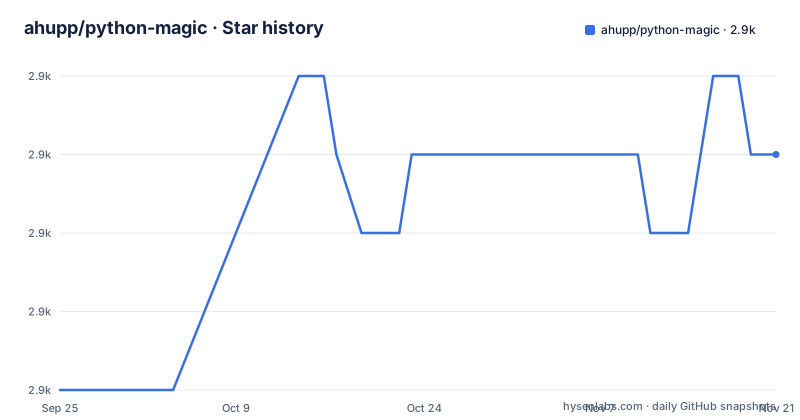
Star history
- ahupp/python-magic2,923 ★ · +3
| Repository | 2026-09-25 | 2026-11-21 |
|---|---|---|
| ahupp/python-magic | 2.9k | 2.9k |
3 Stars in the last 57 days, measured from the daily GitHub snapshot. Compare with other projects
Editorial analysis
The gap between a filename and what a file actually is
A file extension is a claim, not a fact. Anyone can rename a JPEG to report.pdf, and a pipeline that trusts the extension will hand the wrong bytes to the wrong parser. libmagic takes the opposite approach: it reads the file's header bytes and matches them against a predefined list of file type signatures. The README states plainly that libmagic "identifies file types by checking their headers according to a predefined list of file types." That same library backs the Unix file command, so python-magic exists to give Python programs the same answer the shell already produces.
The audience is narrow and practical. If you run an upload endpoint, a document ingestion job, or a media pipeline, you need to know what arrived before you route it. python-magic is for engineers who have decided that content-based identification is worth a native dependency. It is not a general-purpose utility library, and the README does not present it as one.
A ctypes binding, and what that means for threading
The module is a wrapper, not a reimplementation. The README calls it "a simple wrapper around the libmagic C library," and the author's note in the README explains the history: the project "originally used SWIG for the C library bindings, but switched to ctypes once that was part of the python standard library." That choice matters. ctypes ships with Python, so the package has no compiled extension of its own. The native code lives entirely in libmagic, which you install separately.
For most users the module-level functions are the whole API. from_file and from_buffer return a human-readable description, and passing mime=True returns a MIME type instead. The Magic class offers more direct control, including overriding the magic database file and enabling character encoding detection. The README says the identification methods from_file, from_buffer and from_descriptor serialize access with a per-instance lock, so they can be called from multiple threads on the same instance. That does not cover concurrent parameter changes through setparam or direct access to the libmagic cookie.
The README also notes that most bugs reported against python-magic "are actually bugs in libmagic." Because the Python layer is thin, the quality of identification tracks the installed libmagic version, not the Python package version. Upgrading python-magic will not change what a PDF is detected as; upgrading libmagic might.
Installing python-magic and identifying your first file
The package installs from PyPI, but it will not work alone. The README is direct about this: "This module is a simple wrapper around the libmagic C library, and that must be installed as well." Start with the Python package.
pip install python-magicThen install libmagic for your platform. On Debian and Ubuntu the README gives this command.
sudo apt-get install libmagic1On macOS with Homebrew, the equivalent is brew install libmagic, or port install file under macports. Once both pieces are present, identification is a two-line exercise. The README's own example reads a PDF from the test data directory.
>>> import magic
>>> magic.from_file("testdata/test.pdf")
'PDF document, version 1.2'
>>> magic.from_file("testdata/test.pdf", mime=True)
'application/pdf'
You should see a descriptive string in the first call and a MIME type in the second. If you are working with bytes you already hold in memory, from_buffer is the alternative. The README recommends "using at least the first 2048 bytes, as less can produce incorrect identification," which is a concrete threshold worth respecting in any streaming implementation.
>>> magic.from_buffer(open("testdata/test.pdf", "rb").read(2048))
'PDF document, version 1.2'
If the library cannot be found, the README points to DYLD_LIBRARY_PATH on macOS and LD_LIBRARY_PATH on SmartOS as environment variables for non-standard locations. If you hit "MagicException: could not find any magic files!" the suggested fix is to pass the database path explicitly as magic.Magic(magic_file="path_to_magic_file").
Where python-magic fails, and when it is the wrong tool
The first failure mode is environmental. A missing libmagic library and a missing magic database are distinct problems. Install or locate the native library for the former; for a missing database, the README suggests passing its path with `magic.Magic(magic_file=...)`. This is not a bug you patch in your own code; it is a deployment detail that differs across distributions and containers.
Windows is the rougher edge. The README documents three distinct errors. "WindowsError: [Error 193] %1 is not a valid Win32 application" means a 32-bit libmagic DLL is being loaded into a 64-bit Python build. The README links to third-party 64-bit builds rather than shipping one. "WindowsError: exception: access violation writing 0x00000000" may indicate mixed Windows and Cygwin Python, and the README's guidance is to keep the libmagic and Python builds consistent. If your team supports Windows without a package manager that provides libmagic, budget time for this.
The second limitation is conceptual. Header-based identification tells you what a file claims to be at its start, not what it contains. A recognizable PDF header can lead to a PDF classification even if the remainder is malformed or contains other data; detection is not proof that the entire file is safe or valid. python-magic is the wrong tool if your actual requirement is validation, malware scanning, or content inspection. It answers one question: what type of file is this, judged by its leading bytes.
The third is the threading boundary: the per-instance lock covers from_file, from_buffer and from_descriptor, but not concurrent setparam calls or direct access to the libmagic cookie.
python-magic compared with mimetypes and the file command
The most common alternative is Python's standard library mimetypes module, and the difference in approach is fundamental. mimetypes maps a filename or extension to a MIME type using a lookup table. It never opens the file. That makes it fast, dependency-free, and completely fooled by a renamed file. python-magic opens the file, reads the header, and matches signatures. If you control the filenames and only need a MIME string for an HTTP header, mimetypes is sufficient and you avoid a native dependency entirely. If you accept untrusted uploads, extension-based guessing is the wrong answer.
Shelling out to the file command is the other option, since it uses the same underlying library. The trade-off is process overhead: spawning a subprocess per file is slower and clumsier than a library call, and parsing text output is more fragile than reading a return value. python-magic gives you the same identification logic in-process. The README also notes that the python bindings shipped with libmagic itself use a module name that conflicts with this package, and that python-magic "includes a compatibility layer for the libmagic API," documented in COMPAT.md.
Maintenance, licensing and the cost of a native dependency
The repository is not archived, and the last push was on 2026-10-14. That is a current commit history, though the README does not describe a release cadence, and the repository has no published releases. The version in setup.py is 0.4.28. The README states the versioning policy in one line: "Minor version bumps should be backwards compatible. Major bumps are not." That is the upgrade contract you can plan against.
Licensing is stated in two places. The README says python-magic "is distributed under the MIT license," and setup.py carries license="MIT" with the matching classifier. The repository's own metadata reports NOASSERTION, which is a tooling limitation rather than a conflicting claim. Note that MIT covers this Python wrapper, not libmagic itself, which is a separate project with its own terms. If you redistribute a container image, the libmagic licence is a separate question, and the README does not address it.
The operational cost is the dependency itself. Every environment needs libmagic installed, and its version determines detection quality. The README's bug-reporting section says as much: file an issue and the maintainer will triage whether the problem lies in libmagic, whose bugs go to a separate tracker. That triage step is part of the maintenance reality of a thin wrapper.
Editorial conclusion
Adopt python-magic when you need the same identification answers the file command gives, on files or on in-memory buffers, and when you can install libmagic alongside it. Do not adopt it when you only need to map a filename extension to a MIME type; Python's standard library mimetypes module handles that without a C dependency. Before committing, verify that libmagic is present on every deployment target, including Windows, and check whether your platform ships a 64-bit libmagic build, since the README documents a 32-bit DLL failing inside 64-bit Python.
Frequently asked questions
How do I install python-magic?
Install the Python package with pip install python-magic, then install libmagic separately, since the README states the C library must be installed as well. On Debian and Ubuntu that is sudo apt-get install libmagic1; on macOS with Homebrew it is brew install libmagic.
What does python-magic do?
It is a Python interface to the libmagic file type identification library, which identifies file types by checking their headers against a predefined list of file types. The same functionality is exposed on the command line by the Unix file command.
How do I use python-magic to identify a file?
Call magic.from_file with a path to get a descriptive string such as 'PDF document, version 1.2', or pass mime=True to get a MIME type such as 'application/pdf'. For bytes already in memory, use magic.from_buffer, and the README recommends at least the first 2048 bytes.
How is python-magic different from the mimetypes module?
python-magic reads the file's header bytes and matches them against libmagic's signature list, while mimetypes maps a filename or extension to a MIME type without opening the file. A renamed file fools an extension lookup but not header inspection.
Official sources
Add this badge to your README
If you maintain this project, the badge below links readers to this analysis and shows its maintenance status from the daily GitHub snapshot. Paste the markdown into your README; add ?metric=license or ?metric=stars to the image URL for a different field.

[](https://hysenlabs.com/projects/ahupp-python-magic)Star history chart for your README
[](https://hysenlabs.com/projects/ahupp-python-magic)Was this useful?