MyClash: override scripts and configs for the Mihomo core
Mihomo(Clash Meta)覆写脚本与配置文件,无DNS泄露,内置分流与地区策略,支持节点自动识别、倍率分类、全局排除及多项自定义配置,解决机场私有 DNS 导致的节点域名解析问题。
At a glance
- What is it?
- MyClash is a set of Mihomo override scripts and static YAML configurations aimed at subscribers whose provider hides node domains behind private DNS. The script form can rewrite rules and rebuild groups at runtime, while the YAML form cannot, and both require the client own DNS override to be turned off.
- Who is it for?
- MyClash fits a subscriber on the Mihomo core whose provider resolves node domains through private DNS or a hosts mapping loop, and who wants region groups derived automatically instead of by hand. It does not fit anyone on the original Clash core or on sing-box, and it is the wrong choice for a user who wants to keep the client own DNS override switched on, because the script refuses to work in that mode.
- Can I use it commercially?
- Yes. MIT is a permissive licence: you can use, modify and sell software built on it, as long as you keep its copyright and licence notices.
- Is it still maintained?
- Yes. The repository last received commits 2 days ago.
- What is it written in?
- Mainly JavaScript, according to GitHub's language statistics.
Answers come from the project's GitHub data, last synced on November 7, 2026, and from our analysis. They are not legal advice.
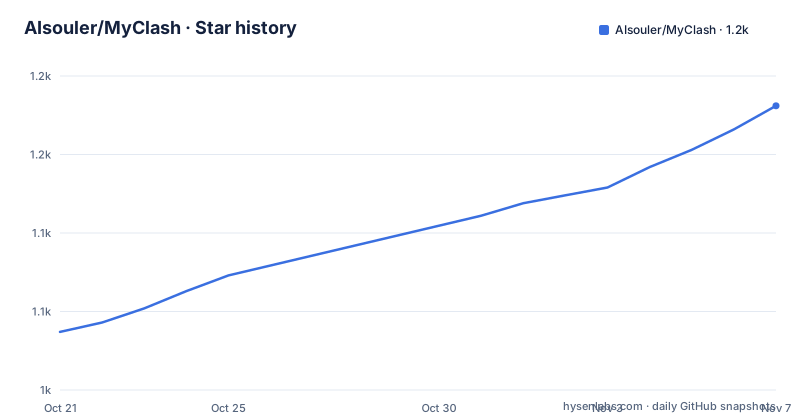
Star history
- AIsouler/MyClash1,181 ★ · +144
| Repository | 2026-10-21 | 2026-11-07 |
|---|---|---|
| AIsouler/MyClash | 1k | 1.2k |
144 Stars in the last 17 days, measured from the daily GitHub snapshot. Compare with other projects
Editorial analysis
The proxy client problem MyClash is written for
MyClash is not a proxy client. It is a set of override scripts and configuration files for clients that run the Mihomo (Clash Meta) core, and it exists for one specific situation: a subscription provider whose node hostnames cannot be resolved by ordinary public DNS. The users it targets are subscribers of such a provider, and the configuration they usually start from is a file the provider generates, which the user is not supposed to edit. The repository therefore ships two ways to apply its logic, an override script that runs inside the client and a static YAML file that replaces the provider configuration, and it ships a full version and a lite version of each. The client used for this is Bettbox, a graphical front end that can toggle the script options without touching the code.
Why private DNS breaks node resolution
The central problem is described in detail in the README. More and more providers resolve their node domains through a private DNS server that public resolvers cannot answer, and some go further and map node domains through hosts entries that loop back to a local listener. Ordinary override techniques cannot cope with that, and the failure mode is specific: after an override, the node either does not resolve at all or resolves to a junk line, the group of nodes that appears to work but quietly routes traffic somewhere else. The scripts here handle the private DNS and the node domain hosts mapping so that this does not happen, and the README asks for feedback if resolution still fails. That is the reason the project insists on one operational step: you have to turn off the DNS override feature inside the proxy software itself, otherwise the script and the client fight each other.
Windows specific steps for the DNS leak problem
On Windows there is a second layer, because the operating system resolves names on its own. The README says that solving DNS leaks on Windows requires disabling the system setting for smart multi-homed name resolution, or turning on strict routing in the proxy software. The second option is the one the project links to in the Mihomo documentation under the tun inbound configuration, and it is the less invasive choice, since it changes the behaviour of the client rather than of the host. The requirement is worth stating plainly because it is the step most likely to be skipped: with the client DNS override still enabled, or with the system resolver still doing its own thing, the script cannot guarantee that a query for a node domain leaves the machine the way the user expects.
Script versus static YAML, and what each cannot do
The two delivery forms look similar in the interface and differ in what they can reach. A YAML file is static, so it cannot read the provider node list at runtime, which means no custom configuration options, no region policy groups generated from the nodes that actually exist, and a region with no matching node falls back to REJECT, which blocks that traffic entirely rather than sending it somewhere. The script form can, because it runs inside the client and inspects the live configuration. The static form has one more restriction: a provider that uses private DNS or hosts based node mapping has to be written into the YAML by hand. The README is clear that the script is meant to override a provider supplied configuration, and explicitly warns against using it to override a configuration you wrote yourself.
Importing the override into a mihomo client
Installation is a copy and paste. Pick the variant you want and give the client the raw link, which is what the README asks for both the full and the lite script:
https://raw.githubusercontent.com/AIsouler/MyClash/main/Script/mihomoScript.js
https://raw.githubusercontent.com/AIsouler/MyClash/main/Script/Script.js
The first is the full script and the second the lite one. A client with script override support takes either the link or the pasted code, and the import steps are shown in the screenshot the README links. The static configuration files work the same way, and you paste the matching link instead:
https://raw.githubusercontent.com/AIsouler/MyClash/main/Config/mihomoConfig.yaml
https://raw.githubusercontent.com/AIsouler/MyClash/main/Config/mihomoConfigLite.yaml
What you should see after importing is a client whose policy groups list AI, YouTube, Google, Telegram, Steam, Netflix and Spotify, plus one group per region that the provider happens to serve.
How routing groups and node tidying are built
The script derives its structure from the provider subscription rather than from a fixed list. Region policy groups are generated by recognising the country in each node name, covering Hong Kong, Japan, the United States, Singapore and Taiwan among others, and each region can be set to automatic selection, manual selection, or split into high multiplier and low multiplier groups. Node tidying adds the country flag, normalises the display name, drops nodes that fail to resolve, and sorts what remains by the multiplier the provider advertises. The routing logic deliberately avoids the common cn-domain direct pattern and uses an optimised cn-ip direct fallback combined with a cn-domain domestic DNS split, so that domestic traffic stays off the tunnel while foreign traffic is not mistaken for local. Rules are pulled on demand through rule-set, which keeps the configuration small and the memory footprint down, and the options cover IPv4 or IPv6 preference, blocking of foreign QUIC traffic, and custom nodes added by hand.
Where the override approach breaks down
Several limits come with the design. The scripts target the Mihomo core only, so a user on the original Clash core or on sing-box gets nothing from them. Requiring the client DNS override to be disabled is a real cost: the client loses the handling it shipped with, and on Windows the host resolver behaviour has to change as well, so the DNS leak fix depends on the user following two separate instructions. A provider that renames its nodes or stops embedding country names will break the automatic region detection, and in the static YAML form the failure is a REJECT group rather than a fallback. The rules themselves are pulled from external rule providers at runtime, which means the behaviour of the client depends on files that live outside this repository.
Licence, updates and the upstream rule sources
The repository is released under the MIT licence with a LICENSE file in the root, and the last push was on 2026-10-19, but there are no tagged releases, which has a direct effect on how you install it: the raw URLs serve the main branch, so the file behind the link can change without notice, and there is no version string to record in your own notes. The repository also holds the assets the scripts draw on, with an Icons directory of SVG icons for the policy groups, a Rules directory, a Test directory and an AGENT.md file alongside a Prettier configuration. The rule sets are not written here, and the README credits the upstream projects they come from, among them YaNet, the YiXuanZX rules collection, bett-rules, Qure and JSDMirror.
Editorial conclusion
MyClash fits a subscriber on the Mihomo core whose provider resolves node domains through private DNS or a hosts mapping loop, and who wants region groups derived automatically instead of by hand. It does not fit anyone on the original Clash core or on sing-box, and it is the wrong choice for a user who wants to keep the client own DNS override switched on, because the script refuses to work in that mode. Before importing it, read the raw file you are about to point your client at, pin a local copy of Script/mihomoScript.js rather than the raw main branch URL, and confirm that the provider node names still carry the country prefixes the region detection expects.
Frequently asked questions
Which proxy client core does MyClash work with?
Only the Mihomo (Clash Meta) core. The scripts and configuration files are not usable with the original Clash core or with sing-box.
Why do I have to turn off the DNS override in my client?
The scripts handle private DNS and node domain hosts mapping themselves, so the client own DNS override would conflict with them. The README lists this as a required step for using a script or configuration from the project.
What is the difference between the MyClash script and the YAML config?
The YAML file is static, so it has no custom options, cannot generate region groups from the live node list, falls back to REJECT for regions with no matching node, and needs manual entries for providers using private DNS. The script can do all of that at runtime.
How do I get the MyClash override into my client?
Copy the raw link for the full or the lite script and import it through the script override option in a client that supports it, such as Bettbox, which can also toggle the options in its interface.
Is MyClash licensed for reuse?
Yes. The project is released under the MIT licence, with a LICENSE file in the repository root.
How do I avoid DNS leaking on Windows with MyClash?
The README says to disable the system setting for smart multi-homed name resolution, or to enable strict routing in the proxy software, in addition to turning off the client DNS override.
Official sources
Add this badge to your README
If you maintain this project, the badge below links readers to this analysis and shows its maintenance status from the daily GitHub snapshot. Paste the markdown into your README; add ?metric=license or ?metric=stars to the image URL for a different field.

[](https://hysenlabs.com/projects/aisouler-myclash)Star history chart for your README
[](https://hysenlabs.com/projects/aisouler-myclash)Was this useful?