Arthas: Alibaba's Live JVM Diagnostic Tool for Production Java
Alibaba Java Diagnostic Tool Arthas.
At a glance
- What is it?
- Arthas is a Java diagnostic tool from Alibaba that lets you inspect and modify a running JVM without restarting or changing code. This review covers its core commands, setup, limitations, and where it fits in your troubleshooting toolbox.
- Who is it for?
- Adopt Arthas if you operate Java services in production and need to inspect class loading, decompile code, or trace slow methods without a redeploy. Skip it if your environment forbids attaching agents to running JVMs or if you prefer a commercial APM with a UI.
- Can I use it commercially?
- Yes. Apache-2.0 is a permissive licence: you can use, modify and sell software built on it, as long as you keep its copyright and licence notices.
- Is it still maintained?
- Yes. The repository last received commits 5 days ago.
- What is it written in?
- Mainly Java, according to GitHub's language statistics.
Answers come from the project's GitHub data, last synced on November 13, 2026, and from our analysis. They are not legal advice.
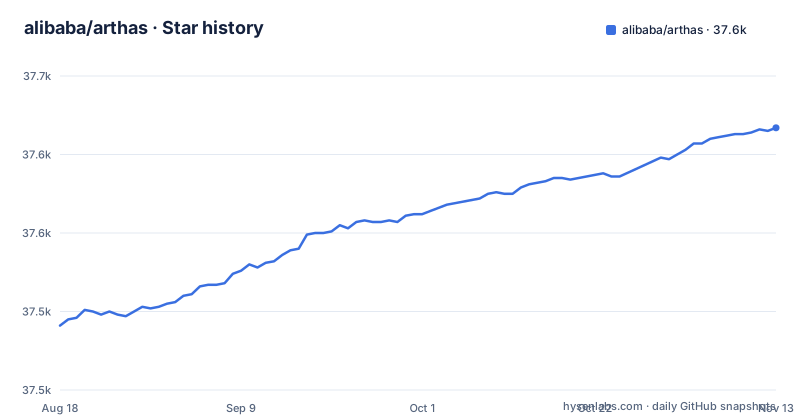
Star history
- alibaba/arthas37,617 ★ · +126
| Repository | 2026-08-18 | 2026-11-13 |
|---|---|---|
| alibaba/arthas | 37.5k | 37.6k |
126 Stars in the last 87 days, measured from the daily GitHub snapshot. Compare with other projects
Editorial analysis
The Problem Arthas Solves
Production Java issues are hard to debug when the network is closed off from your local IDE. Restarting the application to add logs is slow and may make the problem disappear. Arthas attaches to a running JVM and lets you inspect classes, methods, threads, and heap objects without stopping the service. It is aimed at developers and SREs who need answers from a live system, not a staging replica. The README stresses that Arthas works as an observer and never suspends existing threads, which is the core promise: you get visibility without the downtime that remote debugging or a restart would cause.
How Arthas Attaches and Communicates
Arthas uses the Java agent mechanism to attach to a target JVM. The bootstrap tool, arthas-boot.jar, finds the local Java process and attaches the agent, which then opens a command line interface. You interact through either telnet or websocket, so you can run it locally or remotely, and even from a browser via the WebConsole feature. The agent itself does not modify your application code or require a restart. The README lists support for JDK 8 and above, including JDK 17, 21, and 25, and it runs on Linux, Mac, and Windows. The architecture is straightforward: a client sends commands, the agent executes them in the target JVM, and the result streams back. This design keeps the footprint small, but it also means the agent must be allowed to attach, which some hardened environments may block.
Getting It Running: Two Installation Paths
The quickest start is to download arthas-boot.jar and run it. The README shows: curl -O https://arthas.aliyun.com/arthas-boot.jar, then java -jar arthas-boot.jar. It will list running Java processes and let you pick one. For Linux, Unix, and Mac, you can also run curl -L https://arthas.aliyun.com/install.sh | sh, which downloads the as.sh script. After that, executing as.sh enters the interactive interface, and as.sh -h shows help. Both methods require you to have Java installed, since you are launching a Java tool. The one-line as.sh installer is described for Linux, Unix, and Mac, so on Windows you would use the jar approach. The interactive mode supports auto-complete, which the README highlights as a usability feature.
Core Commands: What You Can Actually Do
The README showcases several commands that define Arthas's value. The thread command shows the top CPU-consuming threads with stack traces, which helps find runaway code. The jad command decompiles a class, showing decompiled source for the class that is actually loaded, which is useful for confirming the running code is what you expect. The sc command searches loaded classes and prints classloader details, helping with jar conflicts. The mc command compiles .java files into .class files in memory, and retransform loads external .class files to hotswap the running classes. These two commands are powerful because they let you patch a live JVM, but they carry risk: a bad retransform can corrupt application state. The README also mentions monitoring method invocation statistics like qps and rt, and system metrics such as CPU and GC, so Arthas covers both inspection and performance analysis.
Where Arthas Falls Short
Arthas is not a substitute for a full APM platform. It lacks a persistent dashboard, alerting, and historical trend analysis. The dashboard command exists, but it is a live view, not a stored metric store. The tool is also command-line driven, which has a learning curve; the user manual and command documentation are linked from the README. More critically, attaching an agent to a production JVM may violate security policies in regulated environments. The README advertises telnet and websocket access for remote diagnostics, so in a hostile network an open Arthas port could be a risk. Finally, retransform can change the behavior of a running application, and if you do not fully understand the class file you are loading, you can break the service. Because retransform changes loaded classes in place, you must be careful.
Alternatives: JAttach, Btrace, and APM Tools
A direct alternative is Btrace, an open source tool that uses a similar agent approach but focuses on tracing with a scripting language. Commercial APM products like New Relic or Datadog provide dashboards and alerts out of the box, but they require you to install their agent and often incur licensing costs. The difference is that Arthas is free, open source under Apache-2.0, and gives you deep, on-demand introspection without a persistent data pipeline. If you need only occasional, interactive troubleshooting, Arthas is lighter than a full APM. If you need continuous monitoring and alerting, you should look elsewhere.
Maintenance, Licensing, and Upgrade Considerations
Arthas is licensed under Apache-2.0, which allows commercial use, modification, and distribution with attribution. The project is actively maintained, with recent releases in 2026, including 4.3.3, 4.3.4, and 4.3.5. The release cadence suggests regular updates, but you are responsible for testing new versions in your environment before deploying to production. Check the release notes linked from the README for breaking changes, especially if you use custom scripts around Arthas commands.
Editorial conclusion
Adopt Arthas if you operate Java services in production and need to inspect class loading, decompile code, or trace slow methods without a redeploy. Skip it if your environment forbids attaching agents to running JVMs or if you prefer a commercial APM with a UI. Before using it in production, verify your security policy allows agent attachment, test the telnet and websocket ports, and confirm the target application runs JDK 8 or later. Arthas is a sharp tool: effective for diagnosis, but it can alter running code, so use retransform with care.
Frequently asked questions
What is Arthas and what is it for?
It is a Java diagnostic tool open sourced by Alibaba, used to troubleshoot production issues in Java applications without modifying code or restarting servers. Its stated design property is that it works as an observer and will never suspend your existing threads, which is what separates it from a remote debugger.
How do I install Arthas?
The recommended route is the bootstrap jar, downloaded with `curl -O https://arthas.aliyun.com/arthas-boot.jar` and started with `java -jar arthas-boot.jar`. On Linux, Unix, and Mac there is also a one-line installer, `curl -L https://arthas.aliyun.com/install.sh | sh`, which downloads the as.sh bootstrap script to the current directory so you can move it or add it to your PATH.
Does Arthas work with modern JDKs and operating systems?
It states that version 4.x supports JDK 8 and later, explicitly including JDK 17, JDK 21, and JDK 25, and that it supports Linux, Mac, and Windows. The Dockerfile in the repository builds from an Amazon Corretto 8 Alpine JDK base image.
What can Arthas do that a normal debugger cannot?
It can report whether a class is loaded and which jar it came from, decompile a loaded class, show classloader statistics and possible leaks, display method invocation details and stack traces, trace invocations to find slow sub-invocations, monitor metrics such as qps, response time and success rate, capture profiler flame graphs, and retrieve heap objects that are instances of a specified class.
Official sources
Add this badge to your README
If you maintain this project, the badge below links readers to this analysis and shows its maintenance status from the daily GitHub snapshot. Paste the markdown into your README; add ?metric=license or ?metric=stars to the image URL for a different field.

[](https://hysenlabs.com/projects/alibaba-arthas)Star history chart for your README
[](https://hysenlabs.com/projects/alibaba-arthas)Was this useful?