FlutterBoost: putting Flutter pages inside an app you already ship
FlutterBoost is a Flutter plugin which enables hybrid integration of Flutter for your existing native apps with minimum efforts
At a glance
- What is it?
- Alibaba's FlutterBoost is a Dart plugin for hybrid integration, letting a native iOS, Android or ohos app push and pop Flutter pages while keeping its own navigation intact.
- Who is it for?
- FlutterBoost earns its place when you have a shipped native app and a specific feature that Flutter fits better than what you have. Its philosophy is narrow and defensible, treat a Flutter page as something you open by name the way you open a WebView, and let the plugin own page resolution.
- Can I use it commercially?
- Yes. MIT is a permissive licence: you can use, modify and sell software built on it, as long as you keep its copyright and licence notices.
- Is it still maintained?
- Yes. The repository last received commits 166 days ago.
- What is it written in?
- Mainly Dart, according to GitHub's language statistics.
Answers come from the project's GitHub data, last synced on November 22, 2026, and from our analysis. They are not legal advice.
Star history
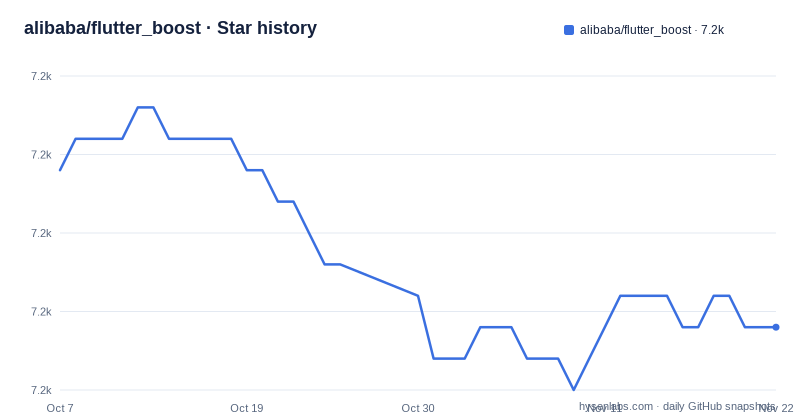
- alibaba/flutter_boost7,192 ★ · -5
| Repository | 2026-10-07 | 2026-11-22 |
|---|---|---|
| alibaba/flutter_boost | 7.2k | 7.2k |
-5 Stars in the last 46 days, measured from the daily GitHub snapshot. Compare with other projects
Editorial analysis
Pinning the plugin with a git ref instead of a pub version
There is no `flutter_boost: ^4.6.5` line to copy. The README tells you to open `pubspec.yaml` and add a git dependency with an explicit ref:
flutter_boost:
    git:
        url: 'https://github.com/alibaba/flutter_boost.git'
        ref: '4.6.5'
A git ref rather than a hosted version is the first real signal about this plugin. It means the tag is the unit of distribution, that a tag has to exist before you can depend on it, and that your lockfile records a commit rather than a semver range.
The prerequisites are short and one of them is a trap for newcomers. The first says you need to integrate Flutter into your existing project before proceeding, which is the whole hard part of hybrid work and is not something this plugin does for you. The second says the Flutter SDK version supported by Boost 3.0 is 1.22 or above. The wording pins that requirement to Boost 3.0 specifically; for newer Boost tags, the README's Version Notes map Flutter SDK versions to tags. The tag you choose determines the rules that apply to you.
The design bet: a Flutter page addressed like a URL
The README states the problem plainly: managing native pages and Flutter pages at the same time is non-trivial in an existing app. FlutterBoost takes over page resolution, and the README says the only thing you need to care about is the name of the page, which it notes is usually something you would call a URL. That is the whole idea in one sentence, and it is a real design choice rather than a slogan.
Naming a page the way you name a route means the native side never needs to know a widget class, and the Flutter side never needs to know which native controller is on screen. The consequence is that you get a hybrid app without inventing a bridging protocol for navigation, which is where most hybrid integrations go wrong.
The repository is organised to match that split. `lib/` holds the Dart side, `android/`, `ios/` and `ohos/` hold the native hosts, and `pigeon/` plus `run_pigeon.sh` sit at the top level, which is the Flutter mechanism for generating typed channel interfaces from a Dart definition rather than hand-writing platform message handlers. Generating the channel code is the detail that decides whether this integration stays maintainable, and putting pigeon in the repository rather than in a contributor's head is a good sign about intent.
There is also a documented API surface beyond routing: `docs/routeAPI.md` for the basic routing API, `docs/lifecycle.md` for page lifecycle, and `docs/event.md` for a custom API for sending cross-platform events. Lifecycle is where hybrid apps usually leak, and having a documented page lifecycle callback set rather than ad-hoc notifications is what stops that.
Three native hosts, and ohos is the one eating the changelog
The tree shows the plugin carries real native code for each platform rather than being Dart with a thin shim: `android/`, `ios/`, `ohos/`, plus `pigeon/` and `run_pigeon.sh` at the top level. `example/` and `example_new_for_ios/` hold two sample apps, which suggests the iOS integration path diverged enough from the original to need its own example rather than an option in the existing one.
The ohos support is the newest thing and the loudest. The README opens with a Release Note announcing that flutter_boost has been fully adapted for ohos, and directing readers to item 10 of the FAQ document for the conventions before integrating. That instruction is worth heeding, because it means the platform conventions live in `Frequently Asked Question.md`, a file with a space in its filename, rather than in the integration guide.
The three most recent GitHub releases are 4.6.1 (2024-07-18), 4.6.0 (2024-07-08) and 4.5.11 (2024-06-12). If you ship on ohos, read item 10 of the FAQ and the release notes before upgrading rather than after.
The version matrix you have to resolve before writing code
The README gives a mapping from Flutter SDK version to Boost tag, and it is the single most consequential block of text in the file:
- For Flutter SDK 3.0 and above, use `4.0.1+`.
- For Flutter SDK below 3.0, use `v3.0-release.2` or earlier versions.
- The null safety versions supporting Flutter SDK 2.5.x are `3.1.0+`.
- The versions supporting Flutter SDK 3.16.x are `5.0.0+`.
- The versions supporting HarmonyOS are `[4.5.0, 5.0.0)`.
Read the last line carefully, because it contradicts the fourth. Boost 5.0.0 and above is what Flutter SDK 3.16.x needs, while the versions supporting HarmonyOS are the half-open range from 4.5.0 up to but not including 5.0.0. A team that needs both a recent Flutter SDK and HarmonyOS on ohos is being pointed at two incompatible ranges. The README does not reconcile them, and the ohos Release Note above the mapping says nothing about which side wins.
The mapping also tells you what happened to the plugin's history. Version 3.0 was tied to Flutter SDK 1.22, version 3.1.0 is where null safety arrived for SDK 2.5.x, 4.0.1 is the floor for SDK 3.0, and 5.0.0 is the floor for SDK 3.16.x. Each Flutter breaking release has forced a Boost floor, which is a reasonable way to run a plugin but leaves you choosing a tag from a table rather than tracking a single line.
There is also an inconsistency between the README and the releases page. The README documents 4.6.5 and instructs you to pin ref `4.6.5`, but the newest GitHub release is 4.6.1 from 2024-07-18. The gap between the documented tag and the tagged release is where you will find out whether the branch you are about to depend on has release notes at all.
A simplified architecture, and what that simplification costs
The 4.6.5 notes in the README are short and revealing. They say null safety is already supported, that Flutter SDK upgrades do not require Boost upgrades, then list simplifying the architecture, simplifying the interface, a unified design of the double-end interface, and solving what they call the Top Issue. The claim that an SDK upgrade does not force a Boost upgrade is the important one, because it is the failure mode that makes hybrid plugins expensive.
What the simplification costs is usually flexibility. Fewer interfaces means fewer places to hook custom behaviour, and when you do need to change something you are more likely to be editing the plugin or vendoring it than configuring it.
The other cost is dependency shape. Because the plugin arrives as a git dependency, a vendored fork is the natural escape hatch when you hit the case the simplified interface does not cover, and once you fork, the version table in the README no longer describes your code. That is the point to decide whether to keep it, and it is a decision to make early rather than after the first page freezes.
Where the integration steps actually are
The README is an index. The work is in four linked documents under `docs/`, and they are worth naming because the split tells you which question belongs where: `docs/install.md` for detailed integration steps, `docs/routeAPI.md` for the basic routing API, `docs/lifecycle.md` for the page lifecycle API, and `docs/event.md` for the custom API for sending cross-platform events. The contribution guides sit beside them at `docs/issue.md` and `docs/pr.md`. Two more files exist at the top level and are not linked from the Usage section: `INTEGRATION.md` and `Frequently Asked Question.md`.
The absence of native build steps in the README is the correct choice, since those differ by host app, and the link structure is the honest acknowledgement of that. The cost is that there is exactly one path to the answer and it is a GitHub link. Nothing in the README previews the shape of the Android activity you have to subclass or the iOS view controller you have to embed, so you cannot tell from the README alone whether your host app is one of the shapes this plugin supports.
Two other details are worth a reader's attention. The repository keeps a Chinese README at `README_CN.md` alongside the English one, plus a Chinese introduction article, which is normal for a project maintained by Alibaba-Xianyu Tech and useful if you are integrating from China. And that team describes itself as one of the earliest and largest running Flutter at scale online in China, which is relevant context: the plugin is shaped by hybrid migration of a large production app, not by a library written for the abstract problem. That origin fits the emphasis on page names over API richness.
The licensing is the simplest thing here. MIT, with the text in `LICENSE`.
Editorial conclusion
FlutterBoost earns its place when you have a shipped native app and a specific feature that Flutter fits better than what you have. Its philosophy is narrow and defensible, treat a Flutter page as something you open by name the way you open a WebView, and let the plugin own page resolution. What it costs is native work on three platforms and a version choice you have to get right before you write any code, since the README maps Flutter SDK versions onto Boost tags and the README pins the plugin by git ref rather than a package version. The last push to main was on 2026-06-09, while the newest GitHub release is 4.6.1 from 2024-07-18 and the README documents 4.6.5, so read `docs/install.md` for the tag you are about to use. It is the wrong tool for a Flutter-first app, where the plugin's page-resolution layer duplicates what Flutter navigation already does.
Frequently asked questions
What is Flutter used for?
Flutter is Google's UI toolkit, and FlutterBoost exists for the case where you cannot adopt it wholesale. The plugin lets an existing native iOS, Android or ohos app open and close individual Flutter pages while the app's own navigation keeps working, so a team can move one feature at a time instead of rewriting the whole shell.
What are the disadvantages of Flutter?
The plugin exists because of them. The README says managing native pages and Flutter pages at the same time is non-trivial in an existing app, which is the practical cost of mixing the two toolkits. The visible consequences are a native integration step per platform and a version table you must resolve before writing code.
Does Flutter have a future?
For this plugin the answer is documented as a compatibility statement rather than a promise. The 4.6.5 notes say Flutter SDK upgrades do not require Boost upgrades, which is the property that keeps the plugin cheap to maintain, and the version table maps newer SDKs onto newer Boost floors. The README does not say anything about Flutter's own roadmap, and it is not the place to look for that.
Official sources
Add this badge to your README
If you maintain this project, the badge below links readers to this analysis and shows its maintenance status from the daily GitHub snapshot. Paste the markdown into your README; add ?metric=license or ?metric=stars to the image URL for a different field.

[](https://hysenlabs.com/projects/alibaba-flutter-boost)Star history chart for your README
[](https://hysenlabs.com/projects/alibaba-flutter-boost)Was this useful?