Sentinel: a SwiftUI front end for Gatekeeper, frozen since 2025
Configure Gatekeeper, remove apps from quarantine and self-sign apps
At a glance
- What is it?
- Sentinel unquarantines and ad-hoc signs macOS applications from a window or the Finder context menu, and its author has put development on hold indefinitely because he no longer has a Mac to build on. The last push was on 2026-05-11 and the current version is 3.1.4.
- Who is it for?
- Sentinel still earns a place on a developer Mac that regularly runs locally built or downloaded apps Gatekeeper refuses to open, and the Homebrew cask plus Finder extension cover the two paths you actually use. Skip it if you need ongoing compatibility with new macOS releases, because the author states development is on hold indefinitely, issue responses and releases included, and the release history stopped at 3.1.4 on 2025-11-24.
- Can I use it commercially?
- Check first. The repository uses a licence we do not classify automatically, so read its LICENSE file before any commercial use.
- Is it still maintained?
- Yes. The repository last received commits 180 days ago.
- What is it written in?
- Mainly Swift, according to GitHub's language statistics.
Answers come from the project's GitHub data, last synced on November 7, 2026, and from our analysis. They are not legal advice.
Star history
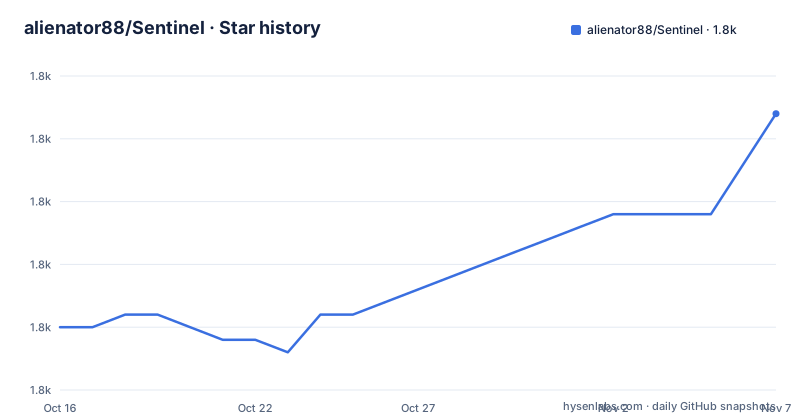
- alienator88/Sentinel1,787 ★ · +17
| Repository | 2026-10-16 | 2026-11-07 |
|---|---|---|
| alienator88/Sentinel | 1.8k | 1.8k |
17 Stars in the last 22 days, measured from the daily GitHub snapshot. Compare with other projects
Editorial analysis
Development stopped at the end of 2025, and the README says why
The project status line reads On Hold, and the explanation is unusually specific. The author says development has basically stopped since the end of 2025, that a new job, joining a friend building a SaaS company and other priorities removed the time, and most concretely that he previously developed on a work MacBook and no longer has access to a Mac he can use for personal work. The consequence he states is that he cannot build, test or release updates, so issue responses, feature work, pull request reviews and new releases are on hold indefinitely. He adds the project is not abandoned entirely and that he would like to return if circumstances change. The last push to the repository was on 2026-05-11, and the newest tagged release is v3.1.4 from 2025-11-24.
The drop target does two different jobs depending on what you want
One window handles the main work, and the two actions are deliberately distinct rather than one combined operation. Drop an app on the drop target to unquarantine it, with an option to auto-open the app once it has been unquarantined. Drop an app on the same target to ad-hoc self-sign it and replace the certificate. The second path matters when an app has been modified after signing, since re-signing produces a signature the system will accept where the original one no longer matched. Keeping them as separate choices matters too: a developer who only wants to open an app should not be silently re-signing it, and the option to auto-open is the kind of convenience that should be a deliberate click rather than a default.
A Finder extension puts unquarantine in the right click menu
Beyond the main window, the project ships a Finder extension so you can right click an app and unquarantine it in place, without opening the app first and without dropping anything. The repository layout shows why that is a separate target: FinderOpen/ sits at the top level next to Sentinel/, Shared/ and Sentinel.xcodeproj/, so the extension is its own Xcode target sharing code with the main app rather than a setting inside it. For someone who unquarantines a build several times an hour, the context menu is the path that matters, and it is also the path that depends on the app being correctly installed.
The auto-updater is custom, and /Applications is where it expects to live
Sentinel does not use the standard macOS update path. The README describes a custom auto-updater that pulls the latest release notes and binaries from GitHub Releases, and adds a condition in the same sentence: Sentinel should be run from the /Applications folder to avoid permission issues. That detail is not cosmetic. An updater that writes into its own bundle needs write access to that bundle, which the Applications folder grants and a copy running from Downloads or a mounted image does not. A user who drags the app somewhere convenient will find updates failing, and the repository includes an announcements.json file at the top level, which is consistent with the updater reading release notes from outside the bundle.
Homebrew is the documented install, binaries come from releases
Two routes are documented. The releases page carries pre-compiled versions described as always up to date, and Homebrew installs the app with a single command:
brew install alienator88-sentinelNeither route builds anything on your machine, which matters for a SwiftUI app whose whole value is dealing with system security services. The README does note the app is 100% Swift, and the repository is a standard Xcode project with Sentinel Resources and a Shared directory, so building from source is possible in principle. Do not expect the README to walk you through it.
macOS 13 through 26 are listed as supported, betas are not
The requirements table is explicit. Ventura 13.x, Sonoma 14.x, Sequoia 15.x and Tahoe 26.x are all marked supported, and the Beta row is marked unsupported. The README explains the floor rather than leaving it implied: versions before macOS 13.0 are not supported because the Swift and SwiftUI APIs the app needs do not exist there. With development paused, that table is also the ceiling you should expect to hit. A future macOS release past the versions listed will not be validated by anyone, and the answer to a Gatekeeper API change will not come from the project.
Against a script, and against deciding you do not need it at all
The README credits a Gatekeeper script by Wynioux, the macOS-GateKeeper-Helper project, as the inspiration for the app, which is a fair description of the alternative: a command you run per application, with no window, no Finder menu, no self-signing step and no updater. Choose the script if you unquarantine an app once in a while on a machine you script. Choose Sentinel if you do it constantly, or if you need ad-hoc signing, which is the feature the script reference does not cover. The second alternative is to need none of it. Gatekeeper exists to stop applications the system cannot vouch for, and an app that quarantines and refuses to open is the system working. Sentinel is for the cases where you already know the binary, which is a judgement about your own trust boundary rather than a missing feature.
Apache 2.0 with the Commons Clause is not plain Apache 2.0
The licence carries an IMPORTANT marker in the README and deserves reading in full. Sentinel is licensed under Apache 2.0 with the Commons Clause, and the README's own summary is that you may do anything you like with the source, modify it and contribute to it, while the licence explicitly prohibits any form of monetization for Sentinel or any modified version of it. In practice: internal use and modification are fine, shipping a paid derivative is not. Anyone evaluating this for a commercial product should read LICENSE.md in the repository rather than rely on this summary. No legal advice here, just the pointer to the file that governs the answer.
Editorial conclusion
Sentinel still earns a place on a developer Mac that regularly runs locally built or downloaded apps Gatekeeper refuses to open, and the Homebrew cask plus Finder extension cover the two paths you actually use. Skip it if you need ongoing compatibility with new macOS releases, because the author states development is on hold indefinitely, issue responses and releases included, and the release history stopped at 3.1.4 on 2025-11-24. Before relying on it, read LICENSE.md, because Apache 2.0 with the Commons Clause permits modification and contribution but prohibits monetizing Sentinel or any modified version of it. And keep in mind what the app is for: it removes a protection macOS puts in place, so treat the machine it runs on as trusted input rather than a hardened endpoint.
Frequently asked questions
Which macOS versions does Sentinel support?
The requirements table marks macOS 13 Ventura, 14 Sonoma, 15 Sequoia and 26 Tahoe as supported, and beta versions as unsupported. Anything before macOS 13.0 is not supported because the Swift and SwiftUI APIs the app needs are missing there.
Is Sentinel still being developed?
No. The README marks the project On Hold, stating development has basically stopped since the end of 2025 because the author no longer has a Mac for personal development work, and that releases and issue responses are on hold indefinitely. The last push was on 2026-05-11 and the current version is 3.1.4.
Can I redistribute or sell a modified version of Sentinel?
The README states Sentinel is licensed under Apache 2.0 with the Commons Clause, which allows modification and contribution but explicitly prohibits any form of monetization for Sentinel or any modified version of it. The full text is in LICENSE.md.
Official sources
Add this badge to your README
If you maintain this project, the badge below links readers to this analysis and shows its maintenance status from the daily GitHub snapshot. Paste the markdown into your README; add ?metric=license or ?metric=stars to the image URL for a different field.

[](https://hysenlabs.com/projects/alienator88-sentinel)Star history chart for your README
[](https://hysenlabs.com/projects/alienator88-sentinel)Was this useful?