Foundation Sunshine turns LizardByte's Sunshine into a Windows-only Moonlight host with virtual HDR displays and a desktop GUI
Sunshine fork: an enhanced sunshine, a self-hosted game streaming host for Moonlight with HDR10/HDR Vivid, virtual displays, advanced audio, optimized encoders, and a modern control panel.
At a glance
- What is it?
- AlkaidLab/foundation-sunshine is a GPL-3.0 fork of Sunshine, the self-hosted streaming host for Moonlight, tuned for Windows with HDR extensions, the ZakoDisplay virtual monitor, multichannel audio and a standalone control panel. Most of those additions only show up when the client is one of the project's own Moonlight builds, which is the main thing to plan around.
- Who is it for?
- Foundation Sunshine fits someone streaming a Windows 10 22H2 or newer PC with an AMD, Intel or NVIDIA hardware encoder to devices that can run Moonlight V+ or Moonlight macOS Enhanced, especially if they need a virtual HDR display on a headless machine. It is the wrong host for a Linux or macOS machine, and a weaker choice if every client must be stock Moonlight, since the fork's HDR, display, audio and input additions need a cooperating client.
- Can I use it commercially?
- Yes, with conditions. GPL-3.0 is a copyleft licence: if you distribute software that includes it, you must release that software's source code under the same licence. Running it internally without distributing it does not trigger that obligation.
- Is it still maintained?
- Yes. The repository received new commits within the last day.
- What is it written in?
- Mainly C++, according to GitHub's language statistics.
Answers come from the project's GitHub data, last synced on November 14, 2026, and from our analysis. They are not legal advice.
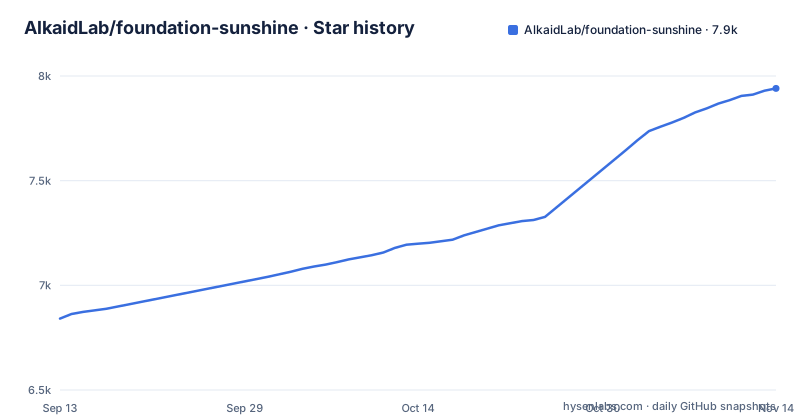
Star history
- AlkaidLab/foundation-sunshine7,941 ★ · +1,100
| Repository | 2026-09-13 | 2026-11-14 |
|---|---|---|
| AlkaidLab/foundation-sunshine | 6.8k | 7.9k |
1,100 Stars in the last 62 days, measured from the daily GitHub snapshot. Compare with other projects
Editorial analysis
A Sunshine fork aimed at one host platform: Windows
Foundation Sunshine is a fork of LizardByte's Sunshine, and it narrows where the host runs. The installer is a Windows executable, and the requirements are Windows 10 22H2 or newer plus an AMD, Intel or NVIDIA graphics card with hardware video encoding. The download guidance is equally specific: on the latest release, expand Assets and take the file ending in `WindowsInstaller.exe`.
The setup has two halves. The host, called Sunshine, goes on the PC you want to control. The client, Moonlight, goes on the phone, tablet or other computer you use to watch and operate it. Foundation only changes the host, and links to client builds maintained by members of the same community.
If your host is a Linux box or a Mac, this fork is not for you. Linux appears only on the client side, through Moonlight V+ for PC and AppImage downloads.
ZakoDisplay gives a headless PC an HDR virtual monitor
The feature that most changes what a host can be is the virtual display. ZakoDisplay, from the separate zako-vdd project, provides HDR virtual screens and several screen combinations with no physical monitor attached. A second piece, Zako Direct, takes frames straight from that virtual screen to cut copies out of the capture step.
To use it, keep the Zako Display Driver option ticked in the installer. The first-run wizard in the desktop control panel then asks for language, GPU and display. Without a physical monitor, check that the virtual display driver was installed, and if not, add it later from the GUI's display settings.
The display side also carries scene-adaptive HDR, HDR10+, HDR Vivid and Dolby Vision extensions, and calibration to the screen's brightness. On the encoding side, NVIDIA NVENC, AMD AMF and Intel Quick Sync are supported.
The enhancements need Moonlight V+ or Enhanced on the other end
Foundation's HDR, display management, audio and input improvements need the client to cooperate. Other Moonlight clients may lack those features, or show display problems and connection errors because of compatibility issues. That turns client choice into part of the install.
The recommended clients are Moonlight V+ for PC on Windows and Linux, Moonlight macOS Enhanced or V+ for PC on macOS, Moonlight V+ on Android and Android TV, and Moonlight V+ on HarmonyOS. On macOS, the V+ prebuilt package runs only on Apple Silicon, while Enhanced offers a universal build.
iPhone and iPad users fall into the partner list. VoidLink covers iOS and iPadOS, and its App Store distribution is paid. A TestFlight beta adds Apple TV support. For a household of mixed devices, the consequence is that the full feature set depends on every device running one of these builds, and one of them costs money.
Audio, DualSense and desktop sharing ride on the same connection
Beyond video, the fork carries surround sound up to 7.1.4 in PCM, AC3 or E-AC3, microphone passthrough from the client, a mute keep-alive and audio packet loss recovery. Input covers a precision touchpad mode, stylus and a client-side cursor.
DualSense support works through a component installed from the device center. With it, a supported game sees adaptive triggers and haptics as if the controller were plugged into the PC over USB.
The desktop collaboration list is long: two-way clipboard, folder sharing, USB forwarding, quality changes during a session, adaptive bitrate, and remote commands with session control. The feature and settings page in docs/zh-CN/features.md holds the conditions and steps for each, which matters because several depend on the client build and the GPU.
Pairing by PIN with the host's LAN address, not localhost
After installing the host and a client, both devices should be on the same local network, with the host on a wired connection where possible. Allow local network access if the client asks for it on first launch.
Open the client and wait for the Windows PC to appear. If it does not, add it by IP. On the host, press Win + R, run `cmd`, and type `ipconfig`, then take the IPv4 address under the active Ethernet or WLAN adapter. That address, something like `192.168.1.100`, goes into the client's add-host dialog. It is not `localhost` and not the admin page URL, which is the mistake the README warns against.
The client then shows a PIN. On the host, open the PIN page in the Sunshine management interface, type the PIN and press send. A success message confirms the pairing.
The browser admin page at `https://localhost:47990` is optional and marked as not recommended. It uses a certificate the browser will not trust, and it cannot reach the desktop app's local library scan.
A conservative first session before HDR
The first connection settings are deliberately modest: 1920x1080 at 60 FPS, 20 Mbps bitrate (drop to 10 Mbps on an unstable network), codec on automatic with H.264 as the fallback for compatibility problems, HDR off, and stereo Opus audio. The host keeps automatic encoding and default capture.
Then open the paired PC and choose Desktop. Move the mouse, open a window, play some audio. If Desktop is missing, use the restore built-in apps action on the host's Apps page and refresh the client list. That action resets the default entries, so save any customisations first.
Games come later. The desktop control panel can scan Steam, Epic and GOG libraries and add the results in bulk. Manual entries need a name and a main program path, quoted when it contains spaces, as in `"D:\My Games\Game\game.exe"`. Steam Big Picture is available as a built-in entry.
Date-stamped releases several times a day, under GPL-3.0
The project is under active development. The last push was on 2026-11-03, and two releases appeared that same day, v2026.1103.21122.杂鱼 and v2026.1103.100831.杂鱼, after v2026.1031.121458.杂鱼 on 2026-10-31. Tags are date-stamped rather than semantic, so a version number tells you when a build was made, not how large the change was. Prereleases are published separately, and the guidance is to read each one's known issues before trying it.
A portable build, `Portable-x64.zip`, exists for special cases such as running multiple instances, and is marked as not recommended for normal use.
The repository is a CMake C++ project with a Vue 3 web interface built by Vite. Building that interface requires Node `>=26.7.0 <27` and npm `>=11.19.0 <12`. The code is GPL-3.0 with a NOTICE file, so redistributing a modified build means publishing its source under the same licence.
Editorial conclusion
Foundation Sunshine fits someone streaming a Windows 10 22H2 or newer PC with an AMD, Intel or NVIDIA hardware encoder to devices that can run Moonlight V+ or Moonlight macOS Enhanced, especially if they need a virtual HDR display on a headless machine. It is the wrong host for a Linux or macOS machine, and a weaker choice if every client must be stock Moonlight, since the fork's HDR, display, audio and input additions need a cooperating client. Before relying on it, pair one client at the README's suggested first settings (1080p, 60 FPS, 20 Mbps, HDR off) and confirm the Desktop session works.
Frequently asked questions
What does Foundation Sunshine need on the host PC?
Windows 10 22H2 or newer and an AMD, Intel or NVIDIA graphics card that supports hardware video encoding. Achievable quality, resolution and frame rate depend on the GPU, driver, network and client.
Which Moonlight client should I use with Foundation Sunshine?
The project recommends Moonlight V+ for PC on Windows and Linux, Moonlight macOS Enhanced or V+ for PC on macOS, and Moonlight V+ on Android, Android TV and HarmonyOS. Other clients may miss the HDR, display, audio and input features or hit compatibility errors.
Can Foundation Sunshine stream without a monitor attached?
Yes. The ZakoDisplay virtual display driver provides HDR virtual screens with no physical monitor, as long as the Zako Display Driver option is kept during installation or added later from the GUI's display settings.
Official sources
Add this badge to your README
If you maintain this project, the badge below links readers to this analysis and shows its maintenance status from the daily GitHub snapshot. Paste the markdown into your README; add ?metric=license or ?metric=stars to the image URL for a different field.

[](https://hysenlabs.com/projects/alkaidlab-foundation-sunshine)Star history chart for your README
[](https://hysenlabs.com/projects/alkaidlab-foundation-sunshine)Was this useful?