android/performance-samples: Android benchmarking examples
Samples to show APIs and best practices in Performance on Android
At a glance
- What is it?
- android/performance-samples is a Kotlin repository of Android performance examples built around Macrobenchmark, Microbenchmark, JankStats, and baseline profiles. It suits developers who need working references for startup, scrolling, frame timing, code, and UI measurements.
- Who is it for?
- Android developers should consider this repository when they need concrete AndroidX benchmarking patterns, while teams seeking a complete performance monitoring platform, production telemetry service, or documented release process should look elsewhere.
- Can I use it commercially?
- Yes. Apache-2.0 is a permissive licence: you can use, modify and sell software built on it, as long as you keep its copyright and licence notices.
- Is it still maintained?
- Yes. The repository last received commits 1 day ago.
- What is it written in?
- Mainly Kotlin, according to GitHub's language statistics.
Answers come from the project's GitHub data, last synced on November 7, 2026, and from our analysis. They are not legal advice.
Star history
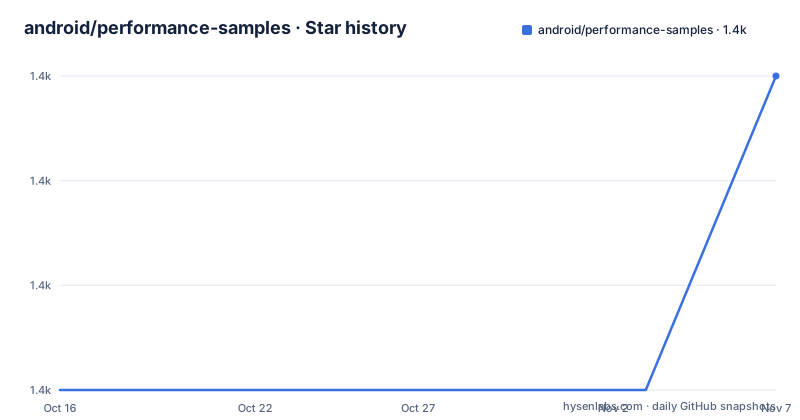
- android/performance-samples1,447 ★ · +3
| Repository | 2026-10-16 | 2026-11-07 |
|---|---|---|
| android/performance-samples | 1.4k | 1.4k |
3 Stars in the last 22 days, measured from the daily GitHub snapshot. Compare with other projects
Editorial analysis
What android/performance-samples covers
android/performance-samples is a collection of Kotlin samples for Android performance APIs and practices rather than a reusable performance library. Its primary audience is Android developers who already know which measurement they need and want a repository example showing how AndroidX performance components are wired into an application project. The scope covers several measurement layers that should not be treated as interchangeable.
At the application-process level, the Macrobenchmark sample addresses startup and runtime scenarios such as scrolling a `RecyclerView` or `LazyColumn` to measure jank. It also includes code for generating a baseline profile and a GitHub workflow for running Macrobenchmarks on Firebase Test Lab. That makes it relevant to teams interested in repeatable tests around complete user journeys, device-level execution, and performance policies in continuous integration.
The Microbenchmark sample has a narrower target. According to the repository description, it benchmarks code and UI from library modules. This distinction matters because a Microbenchmark is aimed at a controlled component-level question, while the Macrobenchmark sample covers application-level behavior. The JankStats sample provides a third pattern for detecting janky frames through runtime frame data.
The repository also contains `KeepAnnotationsSample`, plus scripts named `pull_benchmark_data.sh` and `pull_traces.sh`. The README does not explain those entries in detail, so their exact setup and role cannot be established. The repository is not archived, and its last push was on 2026-10-15. That is recent repository activity, but it is not equivalent to a documented release cadence because the repository has no GitHub releases.
Macrobenchmark startup, scrolling, and baseline profiles
The Macrobenchmark sample is the broadest of the documented examples. Its README says it tests application startup and runtime performance cases. Two named scrolling cases, `RecyclerView` and `LazyColumn`, provide concrete targets for measuring jank rather than presenting a generic benchmark skeleton.
The sample also contains a dedicated baseline-profile generator under `MacrobenchmarkSample/macrobenchmark/src/main/java/com/example/macrobenchmark/baselineprofile/`. This separates profile generation into an identifiable source directory and shows that baseline-profile work is treated as part of the Macrobenchmark workflow. The repository-level documentation does not describe how generated output is installed into the target application, so an adopter must follow the sample's own files and README for that integration detail.
Jetpack Compose appears in `FrameTimingBenchmark.kt`, where the repository documents an example of using Compose with Macrobenchmark. This extends the sample beyond view-based scrolling, although the README does not enumerate every measured operation in that file.
For CI execution, `.github/workflows/firebase_test_lab.yml` runs Macrobenchmarks on Firebase Test Lab. The dedicated `MacrobenchmarkSample/ftl/README.md` is the authoritative place for Firebase Test Lab configuration, but its contents are not included in the repository README. Consequently, this article cannot confirm service setup details, device selectors, test commands, result retention, or failure thresholds. The repository layout supports a CI use case, but the top-level README alone is not enough to reproduce it.
Microbenchmark and JankStats measurement boundaries
The Microbenchmark sample and JankStats sample answer different questions. Microbenchmark is for measuring code or UI contained in library modules. JankStats is for setting up detection of janky frames. Choosing between them starts with deciding whether the subject is a controlled component measurement or frame-by-frame runtime behavior.
That separation prevents a common category error. A fast library-level result does not, by itself, establish that a full application starts quickly or scrolls smoothly. Conversely, observing janky frames during an application run does not isolate which library function needs optimization. The repository exposes both approaches, but the top-level README does not prescribe a combined workflow or explain result interpretation.
The one operational warning in the Microbenchmark documentation is important: the device screen must be on before running benchmarks. This indicates that display state can affect the validity of the measured run. No further device preparation, thermal-control procedure, repetition policy, or statistical method is documented at the repository level, so those points cannot be inferred.
The JankStats sample is described only as setup and usage for detecting janky frames. It does not claim to be a complete dashboard, alert system, or production observability service. Based on the repository layout, it belongs in an application as an instrumentation component. The README does not specify retention, backend upload, aggregation, or alert delivery, so teams looking for those capabilities should not treat this sample as a monitoring platform.
Getting started with the Android performance samples
The repository-level README does not provide installation commands, a Gradle invocation, an Android Studio setup sequence, or a list of required tool versions. For that reason, there is no verified command to reproduce here. The documented starting point is the repository itself, with `MacrobenchmarkSample`, `MicrobenchmarkSample`, and `JankStatsSample` as the named modules.
A first useful inspection begins with one sample rather than all three. For a full application workflow, open `MacrobenchmarkSample` and read `MacrobenchmarkSample/ftl/README.md` if Firebase Test Lab execution is required. For code or UI measurements isolated to a library module, inspect `MicrobenchmarkSample`. For runtime frame detection, inspect `JankStatsSample`.
The README gives one concrete prerequisite for the Microbenchmark path: keep the target device's screen on before running a benchmark. It also identifies the Compose frame-timing file for a Compose-oriented Macrobenchmark example. Beyond those instructions, the README does not state what output, device selection, build status, or measured value a first run should display. Consult the sample-level build files and documentation before attempting setup, especially when matching Gradle plugins, Android SDK configuration, and instrumentation targets.
The repository links to Android Performance guidance at `https://d.android.com/performance` and `https://d.android.com/topic/performance/overview`. Those links are the documented places for broader API context. The sample repository should be used as an implementation reference, not treated as a substitute for the official documentation when configuring a current toolchain.
Firebase Test Lab automation and operational limits
The checked-in `.github/workflows/firebase_test_lab.yml` is the clearest CI signal in the repository. It indicates that Firebase Test Lab execution is represented as a GitHub workflow for the Macrobenchmark sample. This can fit teams that want performance measurements attached to repository automation, but the top-level README does not describe trigger events, authentication, permissions, service selection, result publishing, or retention.
Device execution also carries measurement constraints that are not resolved by the sample. The README names application startup and scrolling as scenarios and warns about screen state for Microbenchmark, yet it gives no documented thermal policy, device availability policy, power configuration, or variance threshold. Those omissions limit how confidently a new user can interpret a single result.
The absence of GitHub releases is another operational fact. There is no release history here from which to infer upgrade compatibility between sample revisions. The last push was on 2026-10-15, which confirms recent repository activity, but adopters still need to review changes at the module level because no release notes identify migration steps.
The repository includes a `CONTRIBUTING.md` file and `CODEOWNERS`, but the README does not explain the contribution workflow or ownership boundaries. It also includes `renovate.json`. The presence of these files is evidence of repository infrastructure, not proof that every sample remains aligned with every current Android release.
License, alternatives, and adoption boundaries
The repository is licensed under `Apache-2.0`. That permits use under the license's terms and obligations, but this review does not provide legal advice. Teams should retain the applicable license and notices when redistributing or incorporating sample code, and should inspect each sample for its own headers if they combine code from several modules.
A real alternative is to build performance checks directly on AndroidX Macrobenchmark and Benchmark APIs without adopting this repository. That approach can produce a smaller, application-specific test suite, but the developer must create the test structure, scenarios, Gradle configuration, baseline-profile integration, and CI workflow from scratch. android/performance-samples supplies concrete examples for those pieces, which is its principal value. It does not turn them into a supported general-purpose framework.
Another alternative is a production monitoring service or runtime telemetry system. Such a system would target continuous field observations rather than repeatable benchmark scenarios, although the README does not identify a specific product or document that category. The distinction matters because JankStats detection in this sample should not be presented as an end-to-end observability platform. No backend, dashboard, alerting, or retention behavior is documented.
The repository is therefore best treated as example code and implementation guidance. It is a weaker choice for teams that require one-click installation, pinned releases, documented support boundaries, or a single performance dashboard. The main upgrade cost lies in reviewing sample-level API and build configuration as Android tooling changes, not in upgrading a published package with documented migration notes.
Editorial conclusion
Android developers should consider this repository when they need concrete AndroidX benchmarking patterns, while teams seeking a complete performance monitoring platform, production telemetry service, or documented release process should look elsewhere. Before adoption, inspect the individual sample READMEs and build files to confirm that their configurations match the application, target devices, and CI environment, because the repository-level README does not document installation commands, dependency versions, or setup steps.
Frequently asked questions
Which Android performance libraries are demonstrated in android/performance-samples?
The README documents Macrobenchmark, Microbenchmark, JankStats, and baseline profile generation. It also identifies examples for application startup, scrolling jank, library code and UI measurement, and janky-frame detection.
Does android/performance-samples support running Macrobenchmarks on Firebase Test Lab?
Yes. The repository includes `.github/workflows/firebase_test_lab.yml`, and its README directs readers to `MacrobenchmarkSample/ftl/README.md` for more information.
What preparation is required before running a Microbenchmark on Android?
The Microbenchmark section specifically says to make sure the device's screen is on before running benchmarks. The README does not list additional preparation steps.
Official sources
Add this badge to your README
If you maintain this project, the badge below links readers to this analysis and shows its maintenance status from the daily GitHub snapshot. Paste the markdown into your README; add ?metric=license or ?metric=stars to the image URL for a different field.

[](https://hysenlabs.com/projects/android-performance-samples)Star history chart for your README
[](https://hysenlabs.com/projects/android-performance-samples)Was this useful?