Aniyomi: the Android manga reader and anime player that ships no content
An app for manga and anime
At a glance
- What is it?
- Aniyomi is an Apache-2.0 Android app for local reading and watching, built on Mihon, with an mpv-based player and extension repositories. It hosts zero content, so what you get depends entirely on the extensions you add.
- Who is it for?
- Adopt Aniyomi if you want a single Android app for local manga and video playback with tracker sync to MyAnimeList, AniList, Kitsu, MangaUpdates, Shikimori, Simkl or Bangumi, and you accept that extensions must come from repositories you add yourself. Do not adopt it if you need an iOS client, a desktop build, or a source of content: the README documents Android 8.0 or higher only, and states that the app hosts zero content.
- Can I use it commercially?
- Yes. Apache-2.0 is a permissive licence: you can use, modify and sell software built on it, as long as you keep its copyright and licence notices.
- Is it still maintained?
- No. The owners have archived the repository on GitHub, so it is read-only and no longer receives changes.
- What is it written in?
- Mainly Kotlin, according to GitHub's language statistics.
Answers come from the project's GitHub data, last synced on November 15, 2026, and from our analysis. They are not legal advice.
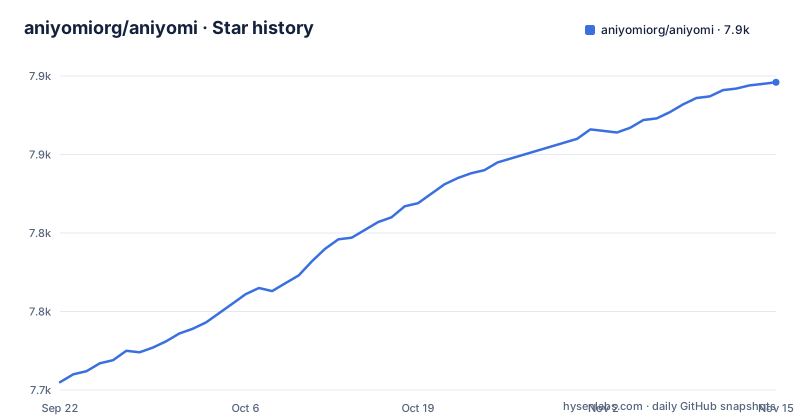
Star history
- aniyomiorg/aniyomi7,896 ★ · +191
| Repository | 2026-09-22 | 2026-11-15 |
|---|---|---|
| aniyomiorg/aniyomi | 7.7k | 7.9k |
191 Stars in the last 54 days, measured from the daily GitHub snapshot. Compare with other projects
Editorial analysis
What Aniyomi actually is, and who it is for
Aniyomi is an Android application for reading manga and watching anime, cartoons and series. The README describes it as a "Full-featured player and reader, based on ~~Tachiyomi~~ Mihon", and the repository carries the Apache-2.0 licence with copyright lines for Javier Tomás (2015), the Mihon Open Source Project (2024) and the Aniyomi Open Source Project (2024). That lineage matters more than the feature list: Aniyomi is a fork of a manga reader that grew a video player, not a streaming service with a reader bolted on.
The intended user is someone who already keeps files or sources locally and wants one Android app to open them, organise them into categories, and sync progress to a tracker. The README lists MyAnimeList, AniList, Kitsu, MangaUpdates, Shikimori, Simkl and Bangumi as supported trackers. It also lists a configurable reader with multiple viewers and reading directions, a configurable player built on mpv-android, light and dark themes, scheduled library updates for new chapters and episodes, and backups written locally or to a cloud service.
The disclaimer is the part to read twice: "The developer(s) of this application does not have any affiliation with the content providers available, and this application hosts zero content." Aniyomi is a client and a library manager. Everything you watch or read arrives through extensions you install and configure yourself.
How the extension and source model works
The repository layout shows the architecture plainly. Alongside app/, core/, data/, domain/ and presentation-core/, there are source-api/ and source-local/ modules, plus core-metadata/. The README does not describe these modules, but the names suggest a split: the app knows how to display a list of titles, chapters or episodes and how to hand a stream or an image to a player or reader, and an extension knows how to fetch that list from one particular site.
Because extensions are separate artefacts, the app ships without any of them. You add what the community calls an extension repository (a URL that serves an index of extensions), and from there install the ones you want. This is the same shape as Tachiyomi and Mihon, and it has two consequences worth stating. First, the app's own release cadence and an extension's release cadence are independent. Second, the project can keep its disclaimer honest: the repository contains no scrapers for named sites, only the API those scrapers implement.
The player is built on mpv-android, and the project maintains a separate aniyomi-mpv-lib repository, which the README links under its Repositories section. The reader is configurable with multiple viewers and reading directions. Both are presentation layers over whatever the active extension returns, which is why the feature list emphasises configurability rather than a fixed catalogue.
Installing Aniyomi on Android and adding a first extension
Aniyomi is distributed as an APK through GitHub releases, not through Google Play. The README's Download section links two release channels: a Stable build and a Preview (beta) build hosted in the aniyomi-preview repository. The README states the requirement directly: "Requires Android 8.0 or higher."
Start by checking your Android version in Settings, then install the APK from the release page you chose. Because it is a sideloaded APK, Android will ask you to allow installation from that source; the project does not document a Play Store route, so there is no store listing to fall back on.
Once the app is open, the first real task is adding an extension repository. The project's website at aniyomi.org carries the FAQ and changelogs that the README points to. The README does not publish a repository URL.
After adding the repository, open the Extensions screen, install one extension, then use Browse to confirm that it returns titles.
For manga specifically, the same flow applies: install a manga extension from a repository, then add titles to your library and organise them into categories. Backups are created from the app's settings and can be written locally or to a cloud service, which is the mechanism the README names for reading and watching offline.
Where Aniyomi is the wrong tool
The clearest limitation is platform. The README documents Android 8.0 or higher and nothing else. There is no iOS build in the repository, and no desktop build: the top-level entries are all Gradle modules for an Android application (app/, presentation-core/, presentation-widget/, macrobenchmark/). If you need to read on an iPhone or a laptop, Aniyomi is not the project for you, and the search interest in an iOS version is not matched by anything in the repository.
A second limitation is that the app is only as good as its extensions. Because Aniyomi hosts zero content and ships no sources, an empty extension list produces an empty app. The README does not document what happens when an extension stops working, and it does not document rollback, so if a new app release changes the source-api contract and an extension has not caught up, the failure mode is a source that errors rather than a graceful degradation. The practical mitigation is the Preview channel: keeping the beta build installed alongside a stable one lets you see whether a change breaks your sources before it reaches your main install. That is a workflow choice, not a documented feature.
Third, the tracker integrations are one-way conveniences, not a library. If your real requirement is a synced watch history across devices, Aniyomi's contribution is writing progress to MyAnimeList, AniList, Kitsu, MangaUpdates, Shikimori, Simkl or Bangumi. It is not itself a sync backend, and the README does not describe cross-device library sync beyond the backup file.
Aniyomi against Mihon, and why the fork exists
The README's own wording is the comparison: Aniyomi is "based on ~~Tachiyomi~~ Mihon". Mihon is the continuation of Tachiyomi after that project's shutdown, and it is a manga reader. Aniyomi takes the same foundation and adds video: the mpv-android based player, episode scheduling in the library, and the anime-side trackers. If you only read manga, Mihon is the narrower choice; if you want one app for both reading and watching, Aniyomi is the fork that made that choice for you.
The other axis is Cloudstream, a separate app with its own plugin system. That is worth being precise about: extensions are built against a specific host application's API. Aniyomi's contract lives in the source-api module of this repository. A Cloudstream plugin is built against Cloudstream's own plugin interface. The two are not interchangeable, and using an Aniyomi extension in Cloudstream is not a supported path. The README says nothing about Cloudstream compatibility, and the repository contains no Cloudstream adapter module.
So the honest framing is: Aniyomi versus Mihon is a scope decision about video, and Aniyomi versus Cloudstream is a different architecture entirely, one that is not documented as compatible.
Maintenance, releases and the Apache-2.0 licence
The repository is not archived, and the last push was on 2026-09-14. Two releases landed that day, v0.18.2.0 and v0.18.2.1, following v0.18.1.2 on 2025-10-28. That gap of roughly ten and a half months between v0.18.1.2 and v0.18.2.0 is the number to plan around if you depend on the app: this is not a project that ships weekly, and the version numbering suggests patch releases on top of a stable line rather than a rolling stream.
The upgrade cost is mostly in extensions, not in the app. The README points readers to the changelogs page at aniyomi.org and to the FAQ, and it asks that issues be checked against the changelog and existing issues before filing. There is a translation pipeline on Weblate, which the README badges, and the i18n/ and i18n-aniyomi/ directories in the repository layout correspond to that. If you run a modified build, the Apache-2.0 licence permits that, provided you keep the notices: the licence notice in the README carries three copyright lines, from Javier Tomás, the Mihon Open Source Project and the Aniyomi Open Source Project. Apache-2.0 also includes a patent grant and requires that modified files carry prominent notices of change. This is a description of the licence text, not legal advice; if you plan to redistribute a build, read the LICENSE file in the repository yourself.
One practical point about the release channels: the Preview build lives in a separate repository, aniyomi-preview, so its releases do not appear in the main repository's release list. If you are tracking versions, track both.
Editorial conclusion
Adopt Aniyomi if you want a single Android app for local manga and video playback with tracker sync to MyAnimeList, AniList, Kitsu, MangaUpdates, Shikimori, Simkl or Bangumi, and you accept that extensions must come from repositories you add yourself. Do not adopt it if you need an iOS client, a desktop build, or a source of content: the README documents Android 8.0 or higher only, and states that the app hosts zero content. Before committing, verify that the extension repository you intend to use is reachable from your device, and check the changelogs page at aniyomi.org for the changes between v0.18.1.2 and v0.18.2.1, since the README does not document rollback.
Frequently asked questions
Is Aniyomi still available?
Yes. The repository is not archived, the last push was on 2026-09-14, and v0.18.2.1 was released the same day. Builds are distributed as APKs through GitHub releases for both the Stable and Preview channels.
Does Aniyomi cost money?
The project is licensed under Apache-2.0 and the README describes no paid tier, subscription or purchase. The disclaimer states that the app hosts zero content, so there is no content licensing fee involved either.
Is Aniyomi legal to use?
The README does not make a legal claim about use. It states that the developers have no affiliation with the content providers available and that the application hosts zero content. What you read or watch depends on the extensions and sources you configure, and the project does not document the legality of any particular extension.
How do I install Aniyomi on Android?
Download the APK from the Stable or Preview release page linked in the README and install it; the README states it requires Android 8.0 or higher. There is no Play Store listing documented, so installation is a sideload.
How do I install Aniyomi extensions?
Extensions are not bundled with the app. You add an extension repository URL in the app, then install individual extensions from the Extensions screen. The README does not list any repository URLs, and the project's FAQ and changelogs live at aniyomi.org.
Can I use an Aniyomi extension in Cloudstream?
The README does not document Cloudstream compatibility, and the repository contains no module for it. Aniyomi extensions are built against the source-api contract in this repository, which is specific to this app.
Official sources
Add this badge to your README
If you maintain this project, the badge below links readers to this analysis and shows its maintenance status from the daily GitHub snapshot. Paste the markdown into your README; add ?metric=license or ?metric=stars to the image URL for a different field.

[](https://hysenlabs.com/projects/aniyomiorg-aniyomi)Star history chart for your README
[](https://hysenlabs.com/projects/aniyomiorg-aniyomi)Was this useful?