UxPlay: receiving AirPlay mirror and audio streams on Linux and Unix
AirPlay Unix mirroring server
At a glance
- What is it?
- UxPlay turns a Linux, macOS or Unix machine into a server that accepts AirPlay mirror and audio streams from iOS and macOS clients. Version 1.73 added mp4 recording, Bluetooth LE service discovery and HLS streaming restricted to the YouTube iOS app.
- Who is it for?
- UxPlay suits engineers who want to receive iOS or macOS AirPlay mirror or audio streams on a Linux, FreeBSD or Raspberry Pi machine and are prepared to configure GStreamer sinks for their hardware. Skip it if you need AirPlay2 multi-room audio (shairport-sync covers that case), or if you want to stream from the AirPlay icon in a browser rather than from the YouTube iOS app.
- Can I use it commercially?
- Yes, with conditions. GPL-3.0 is a copyleft licence: if you distribute software that includes it, you must release that software's source code under the same licence. Running it internally without distributing it does not trigger that obligation.
- Is it still maintained?
- Activity is slowing. The repository last received commits 6 months ago.
- What is it written in?
- Mainly C, according to GitHub's language statistics.
Answers come from the project's GitHub data, last synced on October 23, 2026, and from our analysis. They are not legal advice.
Star history
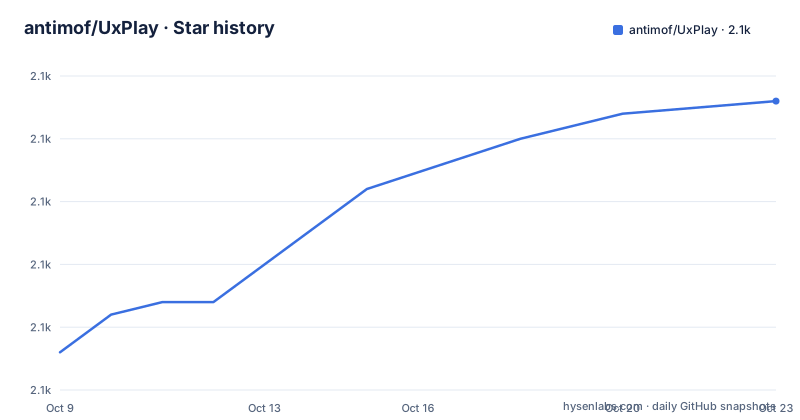
- antimof/UxPlay2,138 ★ · +20
| Repository | 2026-10-09 | 2026-10-23 |
|---|---|---|
| antimof/UxPlay | 2.1k | 2.1k |
20 Stars in the last 14 days, measured from the daily GitHub snapshot. Compare with other projects
Editorial analysis
GStreamer receives decrypted h264/h265 video and ALAC audio from the AirPlay client
UxPlay implements two AirPlay modes on the server side: AirPlay Mirror, which forwards a full device screen together with audio, and AirPlay Audio-only, which carries Apple Lossless ALAC audio from current iOS and iPadOS clients. Both modes terminate at GStreamer rather than a fixed display output. That design choice means the rendering layer is not hardwired into the binary.
In mirror mode, the incoming stream carries h264 or h265 video alongside audio. In audio-only mode, the stream carries ALAC. UxPlay handles the AirPlay protocol and decryption, then pipes the result into GStreamer plugins configured for the target hardware.
The client side of the connection is broad. macOS machines from 2011 onward, covering both Intel and Apple Silicon M1 and M2 models, can send streams to UxPlay. Older iOS hardware is also supported, including 32-bit devices such as iPad 2nd generation, iPod Touch 5th generation and iPhone 4S running iOS 9.3.5 or later. The Windows AirPlay emulator AirMyPC is also listed as a supported client. macOS machines can act as either the sending client or as the server running UxPlay, which allows one Mac to mirror its screen to another using the same tool.
Install from a package manager on Debian, Fedora, FreeBSD or OpenBSD
Most major Linux distributions and BSD systems carry UxPlay in their official repositories. On Debian-based systems:
sudo apt install uxplayOn Fedora 38 and later RPM-based systems:
sudo dnf install uxplayOn FreeBSD:
sudo pkg install uxplayOn OpenBSD:
doas pkg_add uxplayArch-based systems have UxPlay through the AUR. For other RPM-based distributions that have not yet packaged it, the repository provides a specfile named uxplay.spec in the source tree and in the release assets at FDH2/UxPlay.
Raspberry Pi builds are explicitly supported, covering four tested boards: Zero 2 W, 3 Model B+, 4 Model B and 5. Hardware video decoding through the Broadcom GPU is optional; the build can skip it for boards where that decoder is not available or useful. Building from source uses CMake, and the repository root holds CMakeLists.txt. Package versions across distributions are tracked via the Repology badge in the README.
GStreamer sink selection and the fully-configurable video pipeline
Because UxPlay uses GStreamer for output, the videosink and audiosink are selectable rather than fixed. A desktop machine with an Nvidia GPU uses a different sink than a Raspberry Pi that decodes video in the Broadcom GPU. Both are supported without rebuilding UxPlay.
The README describes the video streaming pipeline as fully-user-configurable. That means a user with unusual hardware or a non-standard display target can replace entire pipeline sections, not just swap the sink name at the end.
Version 1.73 added screensaver inhibition for Linux and BSD desktop environments that use D-Bus. The -scrsv option takes a numeric argument: 0 leaves inhibition off, 1 turns it on only during active video, and 2 keeps it on for the whole UxPlay session. Testing covered Gnome, KDE, Cinnamon, Mate and Xfce 4; the Wayland case is flagged as uncertain, and the dbus-monitor output is the way to confirm whether the inhibit signal is actually landing.
Audio-mode cover art from Apple Music can be rendered inside UxPlay by passing -ca with no filename. Passing -ca with a filename exports the cover art to a file instead, for display by an external viewer. Audio metadata output uses -md, and the initial client audio volume is set with -vol.
The -vrtp and -artp flags forward decrypted streams to OBS Studio and other receivers
Two options added in version 1.73 turn UxPlay into a protocol gateway rather than a renderer. The -vrtp flag takes a GStreamer pipeline string, decrypts the h264 or h265 video stream from the AirPlay client, and ships the result as RTP packets to whatever address the pipeline targets. Audio works the same way: -artp sends decoded audio as L16 RTP packets.
Both options can run at the same time. A single AirPlay client connection produces two concurrent RTP streams, one carrying video and one carrying audio, each consumed by whatever tool the user configures as the receiver. The README names OBS Studio as an example and provides sample GStreamer receiver pipeline strings in the Usage section.
This path is distinct from the -mp4 recording option. The -mp4 flag, also new in v1.73, records mirror-mode and audio-mode streams to an mp4 file directly. The README states that -mp4 recording works for mirror mode and audio mode but not for HLS streams. The -vrtp and -artp path bypasses UxPlay's renderer entirely and leaves recording, processing and display to the downstream application, which suits setups where OBS or a similar tool already manages output.
Service discovery on networks that block DNS-SD uses a Python script and Bluetooth LE advertisements
UxPlay normally announces itself to iOS and macOS clients through DNS-SD (Bonjour/Rendezvous). On networks where running a DNS-SD service is not permitted, version 1.73 added an alternative: a Python script, uxplay-beacon.py, that broadcasts Bluetooth LE advertisements while UxPlay is running.
The script requires Python 3.6 or later and runs independently of UxPlay itself. While running, it broadcasts a 46-byte legacy-type Bluetooth LE advertisement at regular intervals, carrying the server's IPv4 address and the TCP port number. Nearby iOS and macOS devices pick this up and know where to connect. Bluetooth 4.0 hardware is the minimum, and a low-cost USB adapter meets that threshold.
Platform support for the script is uneven across operating systems. Linux, Windows and FreeBSD use Python modules for Bluetooth LE support. macOS works only with the BleuIO USB dongle, which carries its own BLE stack on a Renesas SoC and appears to the operating system as a serial modem rather than a standard Bluetooth adapter. The same BleuIO path also works on the other supported platforms, making it a portable fallback when standard BLE libraries are not available.
The script was introduced in v1.73 and improved through v1.73.4 and v1.73.6. Setup instructions are in the README under the section heading for Bluetooth LE setup. Bluetooth LE does not carry the AirPlay stream; it only announces the server's address to nearby Apple devices.
HLS works only from the YouTube iOS app, and browser AirPlay is explicitly not supported
The -hls option, introduced in version 1.71 and extended in v1.73, adds HLS (HTTP Live Streaming) video support. The scope is narrow: m3u8 protocol from the YouTube iOS app only. Tapping the AirPlay icon inside a browser window does not currently work with UxPlay.
HLS rendering defaults to GStreamer playbin v3. When a particular video fails to load, -hls 2 switches to playbin v2 as a fallback. The documentation gives no other troubleshooting path if v2 also fails.
YouTube app HLS content sometimes offers AI-dubbed language tracks. The -lang option controls which one plays first: -lang fr:es:en means French is preferred, then Spanish, then English. When none of the preferred tracks is available, playback continues in whatever track the source provides. Setting $LANGUAGE has the same effect, but -lang takes precedence when both are present. Passing -lang alone, with no codes, disables dubbed audio entirely if $LANGUAGE is set.
AirPlay2 multi-room audio is not part of UxPlay at all. shairport-sync handles that use case, and the README points to that project explicitly. Password-based access control, as an alternative to on-screen PIN prompts, uses the -pw option.
Development moved to FDH2/UxPlay; the last push to the antimof repository was on 2026-04-04
The antimof/UxPlay repository is where the project originated. Active development now takes place at FDH2/UxPlay, which the README directs users to for issue reports and the latest versions. The last push to the antimof repository was on 2026-04-04; the highest version documented in the antimof README is v1.73.6, released in March 2026. GitHub releases do not appear in the antimof repository at all, so the specfile uxplay.spec and the binary assets are only at FDH2/UxPlay.
The project is licensed under GPL-3.0. The repository root includes a LICENSE file. For a build distributed as a modified binary, the GPL terms require the corresponding source to be made available. That includes any modifications to the GStreamer pipeline configuration or to the AirPlay protocol handling code.
Windows support is documented in the README as building with the MinGW-64 compiler in the MSYS2 environment. The feature list notes support for a server behind a firewall. Neither the Windows build process nor the firewall configuration is documented in the portion of the README given here, so those details require reading the full README at FDH2/UxPlay.
Editorial conclusion
UxPlay suits engineers who want to receive iOS or macOS AirPlay mirror or audio streams on a Linux, FreeBSD or Raspberry Pi machine and are prepared to configure GStreamer sinks for their hardware. Skip it if you need AirPlay2 multi-room audio (shairport-sync covers that case), or if you want to stream from the AirPlay icon in a browser rather than from the YouTube iOS app. Before deploying, verify that your distribution packages the GStreamer plugins the sink you plan to use depends on, and check whether your GPU needs a hardware decoder flag. Issues and current releases belong at FDH2/UxPlay, not the antimof repository.
Frequently asked questions
What is UxPlay?
UxPlay is an open source AirPlay mirror and audio server for Linux, macOS, FreeBSD and Windows. It accepts AirPlay streams from iOS and macOS clients and uses GStreamer plugins for video and audio output.
How do I install UxPlay on Linux?
On Debian-based systems use sudo apt install uxplay; on Fedora 38 and later use sudo dnf install uxplay. FreeBSD packages it as sudo pkg install uxplay. If your distribution does not carry it, the README points to build-from-source instructions using CMake.
Does UxPlay support AirPlay2?
No. The README states that AirPlay2 multi-room audio streaming is not supported, and names shairport-sync as the tool to use for that purpose.
Can UxPlay stream from the YouTube app?
Yes, using the -hls option. The README states that only streaming from the YouTube iOS app in m3u8 protocol is currently supported. Streaming via the AirPlay icon in a browser is not yet supported.
Does UxPlay run on Raspberry Pi?
Yes. The README lists four tested models: Raspberry Pi Zero 2 W, 3 Model B+, 4 Model B and 5, both with and without hardware video decoding by the Broadcom GPU.
Official sources
Add this badge to your README
If you maintain this project, the badge below links readers to this analysis and shows its maintenance status from the daily GitHub snapshot. Paste the markdown into your README; add ?metric=license or ?metric=stars to the image URL for a different field.

[](https://hysenlabs.com/projects/antimof-uxplay)Star history chart for your README
[](https://hysenlabs.com/projects/antimof-uxplay)Was this useful?