dsh-web-search-pro: A Persistent Multi-Engine Search Plugin for DeepSeek Harness
Enhanced, persistent web search plugin for DeepSeek Harness (multi-engine search, SQLite+LRU cache, platform backends, Playwright rendering)
At a glance
- What is it?
- This bundle plugin adds 11 search and browsing tools to DeepSeek Harness, with SQLite caching, platform backends, and Playwright rendering. It is a serious option for teams that need governed, reproducible web access from a model, but it carries real operational weight.
- Who is it for?
- Adopt dsh-web-search-pro if you run DeepSeek Harness and need model-accessible web search with caching, platform-specific backends, and strict automation controls. Skip it if you want a lightweight single-engine search or if you cannot manage the external dependencies (bili-cli, yt-dlp, agent-reach, mcporter, Playwright) and the two-plugin upgrade dance.
- Can I use it commercially?
- Yes. MIT is a permissive licence: you can use, modify and sell software built on it, as long as you keep its copyright and licence notices.
- Is it still maintained?
- Yes. The repository last received commits 15 days ago.
- What is it written in?
- Mainly TypeScript, according to GitHub's language statistics.
Answers come from the project's GitHub data, last synced on October 22, 2026, and from our analysis. They are not legal advice.
Star history
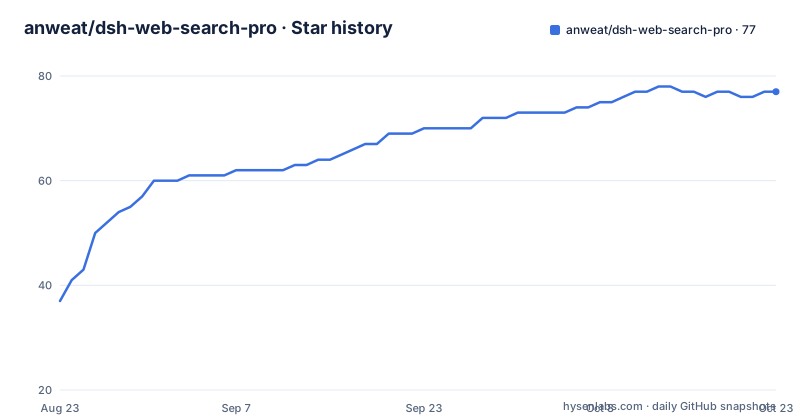
- anweat/dsh-web-search-pro77 ★ · +40
| Repository | 2026-08-23 | 2026-10-22 |
|---|---|---|
| anweat/dsh-web-search-pro | 37 | 77 |
40 Stars in the last 60 days, measured from the daily GitHub snapshot. Compare with other projects
Editorial analysis
What This Plugin Actually Does
dsh-web-search-pro is a bundle plugin for DeepSeek Harness (DSH). It packages 11 tools that a model can call directly, covering web search, platform search, content fetching, snapshots, history, cache management, rule persistence, and backend diagnostics. The README is explicit that it is an enhanced, persistent version of a basic web search plugin. The persistence part matters: search results are cached in both memory and SQLite, and history and extraction rules survive restarts. The intended user is someone running DSH who wants the model to search the web without leaving the harness, while keeping control over which backends are used and how much automation is allowed. The problem it solves is not just search; it is search with governance. Without this plugin, a DSH model would need external APIs or manual browsing. With it, the model can call web_search_pro, get fused results from multiple engines, and optionally trigger Playwright rendering for pages that need JavaScript.
The Mechanism: Engines, Caching, and Fallback Logic
The core tool is web_search_pro. It runs multiple search engines in sequence or in parallel, depending on the parallelEngines config key. The default engine order is ddg, bing, exa, seam, jina. Results are fused using Reciprocal Rank Fusion (RRF), which is a standard method for merging ranked lists from different sources. The cache is two-layered: an in-memory LRU cache and a SQLite persistent cache. The ttlSeconds config controls how long cached results are considered fresh. If you need a forced refresh, you pass fresh=true in the tool call. The README warns that if you specify a single engine, failures are returned as-is; only when no engine is specified does the plugin automatically fall back through the configured order. This is a deliberate design choice. It means the model must be told to omit the engine parameter to get resilience. The web_backend_status tool exists to check which backends are ready before searching, and the docs recommend running it first. There is also a web_deps tool that detects and installs external dependencies like bili-cli and yt-dlp.
Installation and Setup: Two Plugins, Not One
Installation is not a single command. The README shows: dsh plugin --profile web add @anweat/dsh-browser@^0.1.8 dsh-web-search-pro@^0.1.8. Both plugins must be direct dependencies of the profile. The README warns that DSH only activates bundle layers for direct dependencies, and that standard profiles may set autoInstallPeers to false. So you cannot rely on peer dependency auto-install. If you are using a local source checkout of the harness, version numbers may differ, and you need to align versions in pnpm-workspace.yaml. After installation, you must fully stop and restart the Web profile. A simple page refresh is not enough because the client.js file is only rescanned on restart. The upgrade path is equally strict: dsh-web-search-pro >= 0.1.8 requires @anweat/dsh-browser >= 0.1.8. If you upgrade only the search plugin, the old browser plugin will lack the web_snapshot screenshot=false option and the four-level approval policy for write operations. The README gives a specific post-upgrade checklist: check browser_status, then web_backend_status, then open the plugin configuration panels.
Configuration Layers: Panel, YAML, and Environment
Configuration is split into three layers, plus environment variables. The most daily-facing layer is the DSH visual panel under Settings -> Plugins -> Plugin Configuration -> Web Search Pro. The panel groups settings by search strategy, service credentials, runtime backends, and advanced rules. Changes are saved as a local draft first, then written to settings.yaml on save, with hot reload. Credentials for Exa, Jina, and GitHub are stored via DSH Credentials, and the panel only shows whether they are configured, not the actual keys. The second layer is the $DSH_HOME/settings.yaml file, which supports hot reload. An example shows keys like exaApiKeyEnv, jinaApiKeyEnv, engines, parallelEngines, ttlSeconds, searchMaxResults, and browserBindings. The third layer is cordis.yml config for deployment defaults. The README recommends using environment variable references like EXA_API_KEY rather than putting secrets in the config file. The allowProxyFakeIp setting is a specific switch for Clash/TUN fake-IP DNS environments, and it is off by default. The README warns that enabling it only trusts DNS resolution results from those proxy ranges; it does not allow literal fake-IP URLs.
Automation Modes: The Real Governance Story
The plugin does not give the model free rein. dsh-browser controls automationMode, which has four levels: read-only, standard (default), autonomous, and unrestricted. The README describes what each level allows. In standard mode, interactive operations, write recipes, external scripts, OpenCLI, and cache/rule changes require approval. Autonomous mode passes through page interactions and local cache/rule changes, but still requires approval for installs, external scripts, and generic OpenCLI. Unrestricted is explicitly for isolated test profiles only. Even in unrestricted mode, the plugin still enforces domain, parameter, size, and step limits, plus call buffering, backoff, and crawl budgets. This is a strong point. Many search plugins either allow everything or block everything. Here, you can tune the level per profile. The README also notes that Web Search Pro's own panel does not bypass dsh-browser's approval or resource policies. The two plugins work as a pair, and the automation mode is the boundary.
Platform Search and External Dependencies
web_platform_search covers 20 platforms, including GitHub, Bilibili, YouTube, V2EX, Xiaohongshu, Twitter, Reddit, Instagram, Facebook, and RSS. Some platforms require external CLI tools. Bilibili needs bili-cli, YouTube needs yt-dlp, and Reddit and others need OpenCLI, which is built into dsh-browser. The README gives install commands: uv tool install bili-cli, uv tool install yt-dlp, npm i -g mcporter for Exa MCP fallback. The web_deps tool can detect and install these. This is a significant operational cost. Each backend is an external process that must be present and healthy. The README warns that if a platform is a Chinese site with access restrictions, you may need an AuthProfile with stored cookies. The browserBindings config maps platforms to auth profiles and rule packs. For example, zhihu can be bound to authProfile china-community and rulePack zhihu-enhanced. This is not a zero-config plugin. You must plan for which platforms you actually need and install the corresponding tools.
Limitations and Failure Modes
The most obvious limitation is the dependency chain. If you do not install bili-cli, the Bilibili backend will not work. If Playwright is missing Chromium, rendering will fail until you run browser_install. The README also warns about SSRF protection. If you use Clash/TUN with fake-IP DNS, the native HTTP backend may see addresses like 198.18.0.0/15 or fdfe:dcba:9876::/96. The allowProxyFakeIp setting exists to handle this, but it is off by default. The README is clear that this switch only trusts DNS resolution results from those proxy ranges, and it still rejects literal fake-IP URLs, localhost, and other private addresses. Another failure mode is version mismatch. If you upgrade Web Search Pro without upgrading the browser plugin, you lose the four-level approval policy and the screenshot=false option. The README says the upgrade requires a full profile restart, and even then you must manually verify that both plugin cards are loaded. The plugin is also not a sandbox for external UserScripts. The README states that browser_userscript_run runs in the page's main world and is not a secure sandbox. So the automation mode is the only barrier, and unrestricted mode removes it entirely for test profiles.
Alternatives and Trade-offs
The natural alternative is to skip the plugin and use a single search API directly, either via a custom DSH tool or an external MCP server. The difference is in approach. A single API like Exa or Bing is simpler to configure, but you lose the fallback chain, the RRF fusion, and the platform-specific adapters. The README mentions that Exa can be used via a native API key or via an MCP connection through mcporter as a fallback. That is a lighter path if you only need semantic search. Another alternative is to use a generic browser automation tool like Playwright directly, without the DSH plugin layer. But then you lose the approval policy and the usage budget. The plugin's value is that it bundles these controls into the model's tool call surface. The trade-off is that you are locked into the two-plugin pair and the version alignment requirement. If you already run dsh-browser for other reasons, adding this plugin is natural. If you do not, you are adopting two plugins and their external dependencies at once.
Maintenance and Upgrade Cost
The README is unusually explicit about upgrade discipline. The last push was August 2026, and there were three releases in three days (v0.1.9, v0.1.10, v0.1.11). That is a fast release cadence, which means you should expect frequent updates. The upgrade instructions require upgrading both plugins together and doing a full restart. The README warns that the profile lock file may keep the old browser version if you only upgrade the search plugin. So the maintenance cost is real. You also need to monitor backend health. The web_backend_status tool is the diagnostic entry point, and the README recommends running it after every upgrade. The plugin is MIT licensed, which means you can fork it and modify it without license restrictions, but you must retain the copyright notice. There is no legal advice here, just the license identifier. The plugin depends on @deepseek-ai/* packages published to npm at ^0.1.0-rc.6, so if you are on an older harness checkout, you may need to align versions manually. That is a concrete maintenance task.
Editorial conclusion
Adopt dsh-web-search-pro if you run DeepSeek Harness and need model-accessible web search with caching, platform-specific backends, and strict automation controls. Skip it if you want a lightweight single-engine search or if you cannot manage the external dependencies (bili-cli, yt-dlp, agent-reach, mcporter, Playwright) and the two-plugin upgrade dance. Before deploying, verify the version alignment between dsh-web-search-pro and @anweat/dsh-browser, confirm your profile's autoInstallPeers setting, and run web_backend_status after a full restart to see which backends are ready. The plugin's value depends on that setup being correct.
Frequently asked questions
What does dsh-web-search-pro add on top of a plain Exa API key?
Multi-engine routing across ddg, bing, exa, seam and jina with RRF fusion, an in-memory and SQLite two-layer cache, persistent history and per-site extraction rules. The Exa path on its own gives you one engine and none of that state.
Why did my dsh-web-search-pro changes not take effect after I installed it?
The web profile has hot module reload turned off, so the profile must be stopped and started again rather than refreshed in the browser, or the plugin's client.js is never rescanned. Both plugins must also be direct profile dependencies, because the standard profile can set autoInstallPeers to false.
Which DeepSeek Harness versions does dsh-web-search-pro 0.1.15 support?
Only the dsh-v0.1.7-rc.2 baseline together with Browser 0.1.15. Earlier maintained versions up to 0.1.11 target the older dsh-v0.1.1-rc.2 baseline, and mixing the two is not supported.
What does allowProxyFakeIp in dsh-web-search-pro actually allow?
It trusts DNS resolution results for the two proxy ranges 198.18.0.0/15 and fdfe:dcba:9876::/96, which Clash and TUN fake-IP DNS produce. Literal fake-IP URLs, localhost and other private addresses are still refused by the SSRF protection, and the setting is off by default.
Are the UserScripts that dsh-web-search-pro can run sandboxed?
No. They run in the page main world and the documentation states this is not a security sandbox. @match is enforced, @grant must be none and @require is disabled, and approval for external scripts is skipped only under unrestricted.
Official sources
Add this badge to your README
If you maintain this project, the badge below links readers to this analysis and shows its maintenance status from the daily GitHub snapshot. Paste the markdown into your README; add ?metric=license or ?metric=stars to the image URL for a different field.

[](https://hysenlabs.com/projects/anweat-dsh-web-search-pro)Star history chart for your README
[](https://hysenlabs.com/projects/anweat-dsh-web-search-pro)