Nomi: an AGPL-3.0 desktop workbench where Claude Code or Codex drives AI video generation over MCP
Open-source AI video workbench. Bring any model or your local ComfyUI, and let Claude Code / Codex / Cursor direct it over MCP — storyboard, references, generation, editable first cut on a real timeline. Local-first: projects, prompts, and keys stay on your machine. No account, no telemetry.
At a glance
- What is it?
- Nomi is a local-first Electron app for AI video that exposes 25 MCP tools so an external coding agent can run storyboard, generation and timeline editing. The interesting part is the cost architecture; the friction is in unsigned installers and self-managed updates.
- Who is it for?
- Adopt Nomi if you already pay for Claude Code, Codex or Cursor and want that membership to act as the generation backend, or if you run a local ComfyUI and want a timeline around it. Skip it if you need a signed, auto-updating macOS build, a Linux or Windows arm64 installer, or a managed cloud pipeline with no local setup.
- Can I use it commercially?
- Yes, with strict conditions. AGPL-3.0 is a network copyleft licence: if people use a modified version over a network, for example as a hosted service, you must offer them its source code under the same licence.
- Is it still maintained?
- Yes. The repository received new commits within the last day.
- What is it written in?
- Mainly TypeScript, according to GitHub's language statistics.
Answers come from the project's GitHub data, last synced on November 15, 2026, and from our analysis. They are not legal advice.
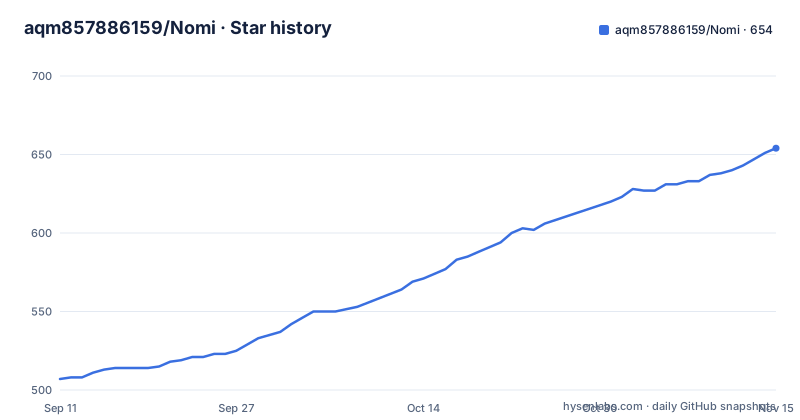
Star history
- aqm857886159/Nomi654 ★ · +147
| Repository | 2026-09-11 | 2026-11-15 |
|---|---|---|
| aqm857886159/Nomi | 507 | 654 |
147 Stars in the last 65 days, measured from the daily GitHub snapshot. Compare with other projects
Editorial analysis
The cost problem Nomi is actually built around
The README states the thesis plainly: the real spend in AI video is generation, not editing. Nomi's answer is to let one project pull from several generation sources at once, including relay wholesale prices, time-limited platform promotions, the free image credits bundled with an agent membership, free sources such as ModelScope, and a local ComfyUI instance. The intended workflow is a three-stage funnel the README calls draft, reference, finish: cheap or free models produce storyboard sketches, pose frames and reference videos that you regenerate freely, and only the approved frames get fed as references into an expensive model for the final take. That is a real cost lever and it is the reason the app exists. It is not an editing feature with a generation button attached. Note what the README does not provide: no per-model price table, no measured cost reduction. The claim is architectural, not benchmarked, and you should treat it that way until you price your own provider mix.
Where Nomi sits relative to your agent
The structural bet is that an open-source local app can be driven by an agent in a way a hosted platform cannot, because a hosted platform earns margin on the compute it sells. Nomi exposes 25 MCP tools, and the README says Codex, Claude Code or Cursor can use them to drive generation, orchestration and editing. The practical consequence is that the credits bundled with your coding-agent membership become a generation budget. This is the part of the project worth evaluating hardest. It depends on your agent client supporting MCP servers and on the tool surface staying stable across Nomi releases; the README gives the count of tools but not their names or schemas, so the integration document at docs/integrate-with-your-agent-en.md is the file to read before you plan anything around it.
Provider plumbing: two wired cores and a paste-a-URL escape hatch
Nomi ships APIMart and Kie.ai as what the README calls the two cores, with roughly ten further providers listed by name: ModelScope, Volcengine, Runway, fal, Replicate, MiniMax, ElevenLabs and others. The README also mentions a continuously growing integration-certification ledger, currently 66 certified entries, which is a curated compatibility list rather than a guarantee about any specific model. Anything OpenAI-compatible, Anthropic, Responses, or a relay endpoint can be added by pasting a URL and a key, and the README states no rebuild is required. That escape hatch matters more than the curated list, because it means a provider Nomi has never heard of is still reachable if it speaks one of those shapes. The reverse is also true: a provider with a bespoke API shape is not covered by that sentence.
ComfyUI as a first-class provider, and the preflight check
Local ComfyUI is treated as a provider like any other, but the integration goes further than a URL. The README states that Nomi converts the normal Save workflow format, so workflows downloaded from elsewhere import rather than fail on a format mismatch. Before running anything, it diffs the graph against ComfyUI's /object_info endpoint and reports which custom nodes and model files are missing. That preflight is the most concrete engineering detail in the README and the one most likely to save you an afternoon, because missing custom nodes are the usual reason a shared ComfyUI workflow dies on import. It also implies a constraint: your ComfyUI instance has to be reachable and its /object_info endpoint has to answer, or the check cannot run.
Install and first run: unsigned builds and manual updates
Releases cover macOS arm64, macOS x64 and Windows 10/11 x64. The README states that Linux, Windows arm64 and macOS universal installers are not currently published. On macOS the build is not Apple Developer ID signed or notarized, so the documented path is to drag Nomi.app to Applications, then right-click it in Finder and choose Open, and if that fails, go to System Settings, Privacy & Security, and click Open Anyway. Only if macOS reports the app as damaged should you run:
xattr -dr com.apple.quarantine "/Applications/Nomi.app"
The README explicitly says not to disable Gatekeeper globally. On Windows the installer has no Authenticode signature and the documented path is More info, then Run anyway in the SmartScreen prompt. Updates are not in place: the README states you download the matching DMG and replace the app manually. That is a recurring operational cost, not a one-time setup annoyance, and it is the single biggest reason a managed team deployment will feel rough.
The integration document is the real onboarding path
Nomi's second onboarding route is to hand docs/integrate-with-your-agent-en.md to your Codex or Claude Code and describe what you want connected. The README says the document covers four paths: custom or relay providers, local ComfyUI, MCP driven by an agent, and skill import, each with a stated success signal and a recommended combination aimed at lowering cost. This is an unusual choice and it deserves a direct judgement. It is honest about the fact that provider integration is the project's main pain point, and it turns that pain into a task your agent can execute. It is also a dependency: your onboarding quality now depends on the quality of that document and on your agent following it. If you would rather read a configuration reference and set keys yourself, the README points you at the curated provider list instead, which is the shorter path.
Licence, local data, and what stays on your machine
Nomi is AGPL-3.0-only. If you modify it and let users interact with it over a network, the AGPL's source-availability obligations are the thing to examine with your own counsel; this article does not give legal advice. The README states there is no account and no telemetry, and that footage, generated takes, workflows and provider setup live on your machine. It is careful about the boundary: when you call an external model API, only the inputs required to complete the task are sent to the provider you configured. That is the accurate framing, and it is worth repeating because local-first is often overstated. Generation still leaves your machine whenever you use a hosted provider. Only a fully local ComfyUI keeps the whole loop on disk. The README also mentions AGPL-compliant custom development and deployment available by contacting the maintainer, which tells you the project expects commercial forks to exist.
When Nomi is the wrong tool, and what to use instead
Nomi is the wrong choice if you want a signed macOS build that updates itself, if you are on Linux or Windows arm64, or if you have no interest in running a local ComfyUI or managing provider keys. For teams that want a hosted pipeline with no local install, a cloud video generation platform is the alternative, and the difference is not cosmetic: a hosted platform owns the compute and bills you for it, while Nomi assumes you bring generation capacity you already pay for elsewhere. That is precisely why the MCP-driven-agent angle is unavailable on a hosted platform, per the README's own reasoning. The trade is that you take on installation, updates and provider configuration yourself. If that trade is wrong for you, Nomi is not a lighter version of a hosted tool; it is a different arrangement of who owns the pipeline.
Editorial conclusion
Adopt Nomi if you already pay for Claude Code, Codex or Cursor and want that membership to act as the generation backend, or if you run a local ComfyUI and want a timeline around it. Skip it if you need a signed, auto-updating macOS build, a Linux or Windows arm64 installer, or a managed cloud pipeline with no local setup. Before committing, verify three things yourself: that your provider endpoint is one Nomi accepts (OpenAI-compatible, Anthropic, Responses, or a relay URL plus key), that your ComfyUI workflow imports and its custom nodes resolve against /object_info, and that you accept manually replacing the app from a DMG for every update, since the README states updates are not delivered in place.
Frequently asked questions
Which platforms does Nomi publish a download for?
Three: Nomi-mac-arm64.dmg for Apple Silicon Macs, Nomi-mac-intel.dmg for Intel Macs, and Nomi-windows-setup.exe for Windows 10 and 11 x64. Supported targets are macOS arm64 and x64 plus Windows x64. Linux, Windows arm64 and macOS universal installers are not currently published.
Why does macOS block Nomi on first launch?
The current macOS build is neither Apple Developer ID signed nor notarized. You right-click Nomi.app in Finder, choose Open and confirm, and if it is still blocked you use System Settings, then Privacy & Security, then Open Anyway. The README says to use only the direct downloads or links from the official site and repository.
How do I update Nomi once it is installed?
On macOS you download the matching DMG again and replace the app in Applications by hand. The README does not describe an in-app updater, and it also says not to disable Gatekeeper globally as a way around the signing status.
Does Nomi proxy or resell my model usage?
No. You always pay providers directly with your own key at their price, and every provider can be swapped for your own endpoint. The disclosure notes that the APIMart link carries a referral code, which is the one commercial detail in that chain.
What can Claude Code or Codex do with Nomi over MCP?
Nomi ships an MCP server with 24 MCP tools, so those agents can generate, arrange and edit, reusing the credits that come with your agent subscription. For adding a model, the Let AI connect it for me flow has the assistant look up the endpoint and parameters while you paste the key on Nomi's own page, then runs one real test.
Official sources
Add this badge to your README
If you maintain this project, the badge below links readers to this analysis and shows its maintenance status from the daily GitHub snapshot. Paste the markdown into your README; add ?metric=license or ?metric=stars to the image URL for a different field.

[](https://hysenlabs.com/projects/aqm857886159-nomi)Star history chart for your README
[](https://hysenlabs.com/projects/aqm857886159-nomi)Was this useful?