Atmosphère for the Nintendo Switch: What the Five Layers Actually Replace
Atmosphère is a work-in-progress customized firmware for the Nintendo Switch.
At a glance
- What is it?
- Atmosphère is a customized firmware for the Nintendo Switch built from five cooperating components. The README names each layer but leaves installation, upgrade and rollback paths to the community, and that gap is what this review examines.
- Who is it for?
- Atmosphère is for Switch owners who already understand the console's boot chain and are comfortable building or sourcing a payload outside any official channel; it is not for anyone expecting a supported, guided installer, because the README documents components and credits rather than setup steps.
- Can I use it commercially?
- Yes, with conditions. GPL-2.0 is a copyleft licence: if you distribute software that includes it, you must release that software's source code under the same licence. Running it internally without distributing it does not trigger that obligation.
- Is it still maintained?
- Yes. The repository received new commits within the last day.
- What is it written in?
- Mainly C++, according to GitHub's language statistics.
Answers come from the project's GitHub data, last synced on November 13, 2026, and from our analysis. They are not legal advice.
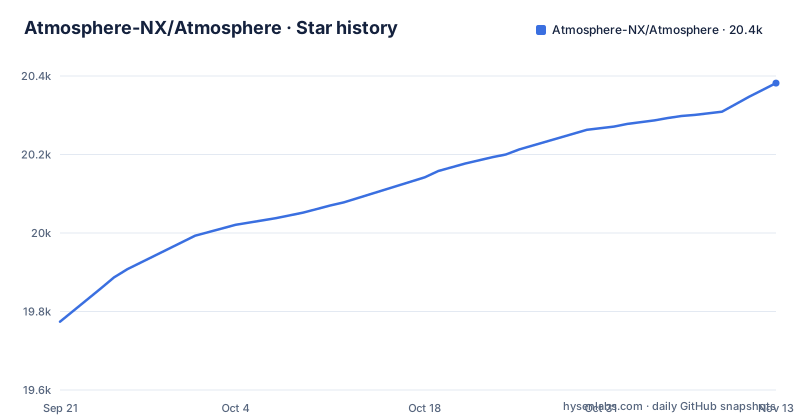
Star history
- Atmosphere-NX/Atmosphere20,382 ★ · +608
| Repository | 2026-09-21 | 2026-11-13 |
|---|---|---|
| Atmosphere-NX/Atmosphere | 19.8k | 20.4k |
608 Stars in the last 53 days, measured from the daily GitHub snapshot. Compare with other projects
Editorial analysis
The problem Atmosphère solves on a Switch
A retail Switch boots through a fixed chain: Package1loader hands control to a bootloader, which loads a TrustZone secure monitor, which in turn brings up the kernel and the FIRM sysmodules. Every stage validates the next. Atmosphère's stated purpose is to replace or modify each of those stages so the console runs code Nintendo did not sign. The README describes it as "a work-in-progress customized firmware for the Nintendo Switch", and the component list is organized by which part of that chain each piece takes over.
The audience follows from that. This is not an application you launch. It is firmware, and the people who use it are typically running homebrew, emuNAND setups, or system patches that the stock firmware would reject. If you only want to run a specific piece of homebrew and someone offers a bundled installer, you are still depending on Atmosphère underneath, whether or not you interact with it directly.
Fusée, Exosphère, Thermosphère: the boot and TrustZone layers
Fusée is the first-stage loader. According to the README it loads and validates stage 2, the custom TrustZone, plus package2, which contains the kernel and FIRM sysmodules, and patches them as needed. The README also states that Fusée replaces all functionality normally found in Package1loader and the NX Bootloader. That is the earliest point in the chain where Atmosphère intervenes, and it means the rest of the stack depends on Fusée getting its validation and patching right.
Exosphère is the customized TrustZone, running a customized Secure Monitor. Thermosphère provides EL2 emuNAND support, which the README describes as backing up and using virtualized or redirected NAND images. The practical consequence of Thermosphère is that the console can operate against a redirected NAND rather than the internal one, which is why emuNAND setups are discussed separately from running Atmosphère on the internal storage. These three layers are the ones where a mistake is least recoverable, because they execute before the operating system exists.
Stratosphère and Troposphère: sysmodules and Horizon OS patches
Stratosphère covers custom sysmodules. The README splits these into two kinds: Rosalina-style modules that extend the kernel or add features, and loader reimplementation modules that hook important system actions. Troposphère is described as application-level Horizon OS patches used to implement CFW features. The split matters because the two operate at different levels: a sysmodule is a running service, while a Troposphère patch changes behavior inside existing system applications.
The repository layout reflects this division literally. The top level contains exosphere/, fusee/, mesosphere/, stratosphere/, thermosphere/ and troposphere/ as separate directories, alongside libraries/, emummc/, utilities/, tests/, docs/ and config_templates/. Anyone reading the source to understand a behavior should expect to find it in the directory named after the layer, not in a single monolithic codebase. That structure is unusual for a firmware project and it is the clearest thing the repository communicates about its own design.
Building Atmosphère with the provided Dockerfile
The README does not walk through installation. What the repository does provide is a Dockerfile and a Makefile, so the documented path to a build is through the container rather than a hand-configured toolchain. The Dockerfile starts from devkitpro/devkita64:20260219, which pins the toolchain image to a specific tag. It also downloads Python 2.7.18 and verifies it against a SHA-256 value before extracting, then installs a python-lz4 wheel with its own checksum check. The checksum verification is a deliberate supply-chain step, and it is worth noticing that the build depends on Python 2, a version that has been end-of-life for years.
To build, clone the repository and run the container against it, then invoke the default make target:
makeThe Makefile defines all as an alias for nx_release, so a bare make produces the release build. Three configurations exist per target: release, debug and audit. The debug variant adds -DAMS_BUILD_FOR_DEBUGGING, and the audit variant adds -DAMS_BUILD_FOR_AUDITING along with the debugging flag. Cleaning works the same way, with clean-nx_release for the release configuration and clean-all to remove every configuration.
Where Atmosphère is the wrong choice
The first limitation is stated by the project itself: it is a work in progress. That is not a marketing hedge, it is a description of the boot chain it modifies. Components that run before the kernel have no error surface a normal user can act on, and a failed Fusée stage does not produce a friendly message.
The second is documentation scope. The README covers components, licensing and credits. It does not document installation, upgrade steps, or rollback. For a project that replaces a console's bootloader and secure monitor, the absence of a rollback procedure in the README is a real gap, and it means recovery guidance has to come from elsewhere. The release history shows releases at 1.11.2, 1.12.0 and 1.12.1, and the README does not describe how to move between them or what happens if a newer release targets a firmware the console is not on.
The third is audience. If you want a homebrew environment without reasoning about TrustZone, sysmodules or NAND redirection, this is the wrong layer to adopt directly. Atmosphère is infrastructure that other distributions build on top of, and treating it as an end-user product misreads what the component list is telling you.
How Atmosphère differs from a bootloader like hekate
The README's credits point to hekate twice: the original project by naehrwert and st4rk for its hwinit code base, and CTCaer's continued fork. That relationship is the useful comparison. Hekate is a bootloader, a piece of software that runs first and decides what to launch. Atmosphère is the thing being launched and the set of modifications applied once control is handed over. They occupy adjacent positions in the same chain rather than competing for the same slot.
A second comparison is emuMMC, credited to m4xw. Thermosphère in Atmosphère provides EL2 emuNAND support for redirected NAND images, while emuMMC is credited separately, and the repository itself carries an emummc/ directory at the top level.
Licence terms and what they mean for a fork
Atmosphère is licensed under GPLv2, and the README points to the LICENSE file for the full text. The licensing section also records an exemption: Nintendo is exempt from GPLv2 and may instead license any source code authored for the project under the Zero-Clause BSD license, at its option. That is an unusual clause and it is specific to this project, not a general pattern in GPLv2 firmware.
For anyone considering a fork or a redistribution, the practical point is that the exemption is written for one named party. It does not extend to other redistributors, and the README does not describe any other relicensing path. The GPLv2 obligations that apply to everyone else are the ones in the LICENSE file. This is a description of what the repository states, not legal advice; if you plan to redistribute Atmosphère or a derivative, have someone qualified read the LICENSE and the exemption text together.
Maintenance and the cost of tracking releases
The last push to the master branch was on 2026-10-16, and the most recent release is 1.12.1 from 2026-10-16. The README names SciresM, TuxSH, hexkyz and fincs as the current developers and maintainers. Nothing in the repository indicates it is archived.
The upgrade cost is where a firmware project differs from a library. There is no package manager step that swaps a version. A new release means rebuilding or replacing the payload and the files on the SD card, and the README does not describe a migration procedure between releases. The build environment adds its own cost: the Dockerfile pins devkitpro/devkita64:20260219 and installs Python 2.7.18 from source, so reproducing a build years from now depends on that image tag and that Python archive remaining available. The Dockerfile's checksum verification protects against a corrupted download, not against the archive disappearing.
Editorial conclusion
Atmosphère is for Switch owners who already understand the console's boot chain and are comfortable building or sourcing a payload outside any official channel; it is not for anyone expecting a supported, guided installer, because the README documents components and credits rather than setup steps. Before adopting it, verify three things: that your console's firmware is one the current release targets, that you can build the tree with the Dockerfile pinned to devkitpro/devkita64:20260219, and that you have a way back to stock if a layer misbehaves. The project's own licensing section is the clearest boundary it draws: GPLv2, with Nintendo exempted and permitted to relicense project-authored source under Zero-Clause BSD.
Frequently asked questions
How do you install Atmosphère on a Switch?
The README does not document an installation procedure; it describes the components, the licence and the credits. The repository does provide a Dockerfile and a Makefile, so the documented path to producing the firmware is building it from source rather than running an installer.
How do you use Atmosphère on a Switch?
Atmosphère is firmware rather than an application, so using it means booting the console through the chain its components replace. Fusée loads and validates stage 2 and package2, Exosphère runs the customized Secure Monitor, and Stratosphère and Troposphère provide sysmodules and Horizon OS patches once the system is up.
What does Atmosphère's component list mean?
Each component replaces a different part of the system. Fusée is the first-stage loader, Exosphère is the customized TrustZone, Thermosphère provides EL2 emuNAND support, Stratosphère covers custom sysmodules, and Troposphère applies application-level Horizon OS patches.
What licence is Atmosphère released under?
It is licensed under GPLv2, with the licence text in the LICENSE file. The README records one exemption: Nintendo is exempt from GPLv2 and may instead license source authored for the project under the Zero-Clause BSD license.
Can you build Atmosphère without the provided Dockerfile?
The repository's documented build path uses the Dockerfile, which starts from the pinned devkitpro/devkita64:20260219 image and installs Python 2.7.18 plus a python-lz4 wheel, both verified by SHA-256. The README does not describe an alternative toolchain setup.
Official sources
Add this badge to your README
If you maintain this project, the badge below links readers to this analysis and shows its maintenance status from the daily GitHub snapshot. Paste the markdown into your README; add ?metric=license or ?metric=stars to the image URL for a different field.

[](https://hysenlabs.com/projects/atmosphere-nx-atmosphere)Star history chart for your README
[](https://hysenlabs.com/projects/atmosphere-nx-atmosphere)Was this useful?