AudioKit: a Swift audio engine for iOS, macOS and tvOS
Audio synthesis, processing, & analysis platform for iOS, macOS and tvOS
At a glance
- What is it?
- AudioKit is an MIT-licensed Swift package for synthesis, processing and analysis on Apple platforms. It installs through Xcode package collections, and its API is documented on audiokit.io rather than in the README.
- Who is it for?
- Adopt AudioKit if you are building a native Swift app for iOS, macOS or tvOS and want synthesis, processing and analysis without writing your own audio graph and DSP layer. Do not adopt it if your target is Android, Windows, a VST plugin or a web build; the README names only iOS, macOS (including Catalyst) and tvOS.
- Can I use it commercially?
- Yes. MIT is a permissive licence: you can use, modify and sell software built on it, as long as you keep its copyright and licence notices.
- Is it still maintained?
- Yes. The repository last received commits 111 days ago.
- What is it written in?
- Mainly Swift, according to GitHub's language statistics.
Answers come from the project's GitHub data, last synced on November 13, 2026, and from our analysis. They are not legal advice.
Star history
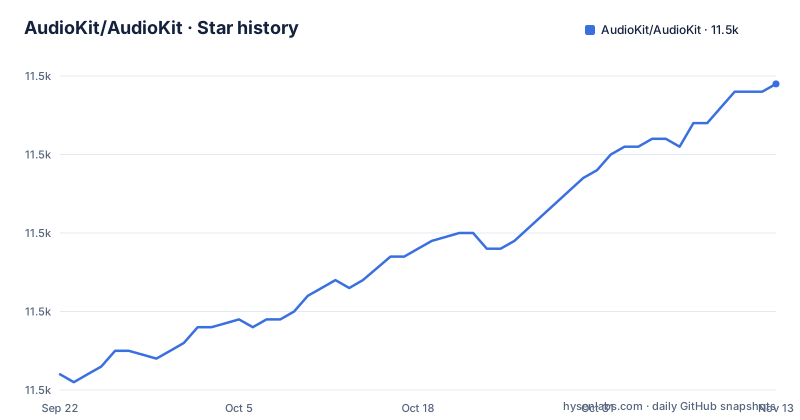
- AudioKit/AudioKit11,499 ★ · +37
| Repository | 2026-09-22 | 2026-11-13 |
|---|---|---|
| AudioKit/AudioKit | 11.5k | 11.5k |
37 Stars in the last 52 days, measured from the daily GitHub snapshot. Compare with other projects
Editorial analysis
What AudioKit is for, and who it is aimed at
AudioKit describes itself as "an audio synthesis, processing, and analysis platform for iOS, macOS (including Catalyst), and tvOS." That sentence is the whole scope. It is not a plugin format, not a cross-platform audio library, and not a DAW. It is a Swift package that gives an Apple-platform app a set of audio nodes you wire together.
The audience is Swift developers who need audio behaviour inside an app: a synth, an effect chain, a meter, a pitch or frequency readout. If your product ships as a Mac or iOS binary and you are already in Xcode, the package fits the build system you have. If your audio work happens in a plugin host or on a server, the platform list in the README excludes you, and no amount of Swift familiarity changes that.
One practical signal for adoption: the repository ships an AudioKit.playground directory at the top level alongside Sources and Tests. A playground is a low-commitment way to hear what a node does before you put it in an app target.
How the package is put together
The repository is a Swift Package. Package.swift sits at the root, and there is a second manifest named [email protected]. Two manifests means the package resolves differently depending on the Swift toolchain version in use; that is a normal SwiftPM pattern, but it is worth knowing before you debug a resolution failure, because the manifest Xcode picks is not always the one you opened.
Beyond that, the layout is conventional: Sources holds the library code, Tests holds the test targets, and .github holds the CI workflow that the README's build badge points at. The README does not describe the internal audio graph, the node protocols, or the rendering path. Anyone who wants to know how a signal moves through AudioKit has to read the source or the generated documentation, not the README.
That is a fair criticism of the front page. A project whose value is in its node graph tells you how to add the dependency and where to ask questions, and leaves the architecture to the docs site and the Cookbook. The README's own "Documentation" section says docs appear on audiokit.io and that you can generate them in Xcode by choosing "Build Documentation" from the Product menu. That second route is the more reliable one when you want to read the API for the exact version you pinned.
Installing AudioKit through Xcode package collections
The README documents one installation path, and it runs through Xcode rather than a command line. In Xcode, select File, then Add Package Dependencies. In the Collections sidebar, click the plus icon in the bottom left corner and choose Add Package Collection from the pop-up menu. That opens a dialog where you paste a URL.
https://swiftpackageindex.com/AudioKit/collection.jsonEnter that URL and click Load. According to the README, the collection then lets you add any of the AudioKit packages you need and read about what they do without leaving Xcode. That last part matters more than it sounds: the collection carries descriptions, so you can compare the packages before adding one to your target.
Once the dependency is resolved, the README points to a second step for learning the API. Pull down the Product menu and choose Build Documentation. Xcode then generates the documentation for the version you actually resolved. For a first real use, the README's own answer is the AudioKit Cookbook, which it describes as containing "many recipes for simple uses for AudioKit components." The Cookbook is a separate repository, and the README gives no worked example of its own, so the honest first step is: install the package, build the docs, then open the Cookbook and copy the recipe closest to what you want to build.
Where AudioKit is the wrong choice
The platform line is the first limit. iOS, macOS including Catalyst, and tvOS. Nothing in the README mentions Android, Windows, Linux, a web target, or a plugin format. If you need the same audio code on Android, AudioKit does not cover it.
There is a second limit that is less obvious. AudioKit is a library, not a host. It has no standalone app, no preset browser, no MIDI mapping UI, and no plugin wrapper in this repository. The README's installation section talks about adding packages to an Xcode project, which presupposes you have an app to add them to. If you want to make sound without writing a Swift app, this is the wrong layer.
The documentation gap is a third. The README does not document rollback, deprecation policy, or what changes between minor versions, and the release list shows three releases within two days in late March 2026 (5.7.0, 5.7.1, 5.7.2). Rapid patch releases after a minor version are normal, but the README gives no compatibility statement, so pinning an exact version in your manifest is the only guarantee the README supports.
AudioKit and AVFoundation are not the same layer
The comparison people actually search for is AudioKit against AVFoundation, and the difference is one of level. AVFoundation is Apple's own framework, ships with the OS, and covers capture, playback, file handling and the system audio session. AudioKit is a third-party Swift package that sits on top of the platform's audio stack and gives you synthesis, processing and analysis nodes: oscillators, effects, generators, and the analysis side named in the project description.
Choosing AVFoundation means no external dependency, no package resolution, and Apple's own documentation and support path. Choosing AudioKit means you get a higher-level vocabulary for building sound rather than only moving it. The trade is maintenance: AVFoundation is updated with the OS, while AudioKit is a package you track through SwiftPM and update on your own schedule, with the release cadence visible in the repository's tags.
Neither replaces the other. A realistic app uses AVFoundation for the session and file plumbing and AudioKit for the parts that generate or transform samples. The README does not claim otherwise, and it does not present AudioKit as a substitute for the system framework.
Licence, releases and the cost of staying current
AudioKit is MIT licensed, and the LICENSE file sits at the repository root. MIT is permissive: it allows use in closed-source products provided the copyright notice and permission notice are retained. That is a description of the licence text, not legal advice, and if your organisation has a policy on third-party dependencies you should have it read the file rather than this paragraph.
The upgrade cost is the part the README leaves open. There is no stated deprecation policy, no migration guide, and no compatibility matrix. What the repository does show is a short run of recent releases: 5.7.0 and 5.7.1 on 2026-03-29, then 5.7.2 on 2026-03-31. The last push to the default branch was on 2026-07-26, so the project is not dormant.
For a team, the practical cost is the Swift toolchain. The presence of [email protected] means the package tracks Swift versions explicitly. Upgrading Xcode can therefore change which manifest resolves, which is a build-time event, not an audio-time one, but it lands in the same pull request.
Getting help and judging whether the project fits
The README gives a specific order for support, and it is worth following because it filters noise. First, post your problem to StackOverflow with the #AudioKit hashtag. Second, only once you are sure the problem is not in your implementation but in AudioKit itself, open a GitHub issue. That ordering is a deliberate request from the maintainers, and it tells you something about the volume of questions that turn out to be application bugs.
The README also asks teams and companies using AudioKit to consider sponsoring the maintainer through GitHub Sponsors. That is a funding request, not a feature.
Before you commit, check three things. Does the Cookbook contain a recipe close to your use case? Does the audiokit.io documentation cover the node you need at the version you resolved? And does your target list stay inside iOS, macOS including Catalyst, and tvOS? If all three are yes, the package is a reasonable dependency. If any is no, the README gives you no fallback.
Editorial conclusion
Adopt AudioKit if you are building a native Swift app for iOS, macOS or tvOS and want synthesis, processing and analysis without writing your own audio graph and DSP layer. Do not adopt it if your target is Android, Windows, a VST plugin or a web build; the README names only iOS, macOS (including Catalyst) and tvOS. Before committing, open the AudioKit Cookbook and confirm the specific node you need exists there, then read the audiokit.io page for that node, because the README covers installation, documentation links, the Cookbook and support channels but not the API itself.
Frequently asked questions
How do I install AudioKit in an Xcode project?
Use File, then Add Package Dependencies. In the Collections sidebar, click the plus icon, choose Add Package Collection, and enter the URL https://swiftpackageindex.com/AudioKit/collection.json, then click Load and add the packages you need.
Where can I find AudioKit tutorials and examples?
The README points to the AudioKit Cookbook repository, which it describes as containing many recipes for simple uses for AudioKit components. You can also generate API documentation in Xcode by choosing Build Documentation from the Product menu.
Which platforms does AudioKit support?
The README states that AudioKit is an audio synthesis, processing and analysis platform for iOS, macOS (including Catalyst) and tvOS. No other platforms are listed.
How does AudioKit compare with AVFoundation?
AudioKit is a third-party Swift package for synthesis, processing and analysis, while AVFoundation is Apple's own framework for capture, playback and session handling. The README does not present AudioKit as a replacement for the system framework.
Official sources
Add this badge to your README
If you maintain this project, the badge below links readers to this analysis and shows its maintenance status from the daily GitHub snapshot. Paste the markdown into your README; add ?metric=license or ?metric=stars to the image URL for a different field.

[](https://hysenlabs.com/projects/audiokit-audiokit)Star history chart for your README
[](https://hysenlabs.com/projects/audiokit-audiokit)Was this useful?