Avalonia: a cross-platform .NET UI framework for XAML developers leaving Windows-only WPF
Develop Desktop, Embedded, Mobile and WebAssembly apps with C# and XAML. The future of .NET UI
At a glance
- What is it?
- Avalonia targets Windows, macOS, Linux, iOS, Android and WebAssembly from one C# and XAML codebase, with an MIT-licensed core and a separate commercial product for running existing WPF apps on macOS and Linux. The interesting question is where the MIT-licensed framework stops and the commercial Avalonia XPF begins.
- Who is it for?
- Adopt Avalonia if you are a XAML team that needs one codebase across Windows, macOS, Linux, iOS, Android and WebAssembly and you accept that the framework is not a 1:1 WPF copy. Do not adopt it if you need a commercial support contract around the core framework itself, or if your goal is to move an existing WPF application without touching code, since that path runs through Avalonia XPF, which the README describes as licensed per-app, per-platform.
- Can I use it commercially?
- Yes. MIT is a permissive licence: you can use, modify and sell software built on it, as long as you keep its copyright and licence notices.
- Is it still maintained?
- Yes. The repository last received commits 1 day ago.
- What is it written in?
- Mainly C#, according to GitHub's language statistics.
Answers come from the project's GitHub data, last synced on November 13, 2026, and from our analysis. They are not legal advice.
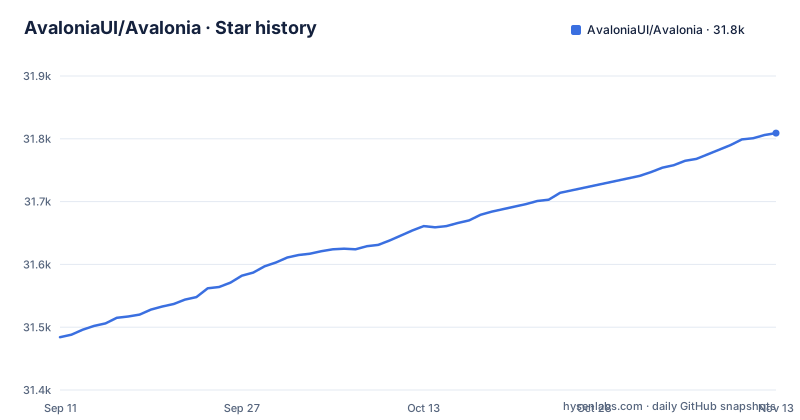
Star history
- AvaloniaUI/Avalonia31,809 ★ · +325
| Repository | 2026-09-11 | 2026-11-13 |
|---|---|---|
| AvaloniaUI/Avalonia | 31.5k | 31.8k |
325 Stars in the last 63 days, measured from the daily GitHub snapshot. Compare with other projects
Editorial analysis
The problem Avalonia addresses: one XAML codebase instead of one per platform
A .NET team that wants a desktop application on Windows, macOS and Linux has historically had a small set of options, and most of them force a choice between native look and a single codebase. Avalonia's answer is a UI framework written for .NET that renders its own controls across all of those targets, so the same XAML and the same view models compile and run on each. The README states support for Windows, macOS, Linux, iOS, Android and WebAssembly, which means the same project structure can also produce a mobile build and a browser build. The intended audience is stated plainly: XAML developers, specifically those coming from WPF. The README says it is "considered by many to be the spiritual successor to WPF" and notes that it is similar to WPF but not a 1:1 copy. That framing matters for scoping. This is not a framework for teams who want to write platform-specific UI per target, and it is not a web framework with a .NET backend. It is a rendering and layout stack with its own styling system, aimed at people who already think in XAML.
What the repository actually contains, and what the README leaves out
The repository is C# on the main branch, MIT licensed, with an active release cadence: 12.1.3 on 2026-09-22, 12.1.4 on 2026-10-09 and 12.1.5 on 2026-11-02. The README points to a documentation page listing the breaking changes between Avalonia 11 and Avalonia 12. The README does not describe the rendering backend, the layout engine, the threading model or the composition pipeline. It links to docs.avaloniaui.net for that. It also does not describe the package split beyond two example install commands, so a reader cannot tell from the README alone which NuGet packages are required for a mobile target versus a desktop one. If you are evaluating Avalonia from the repository front page, you will get the platform list, the licence, the editor tooling and the install commands, and you will need the documentation site for everything architectural.
How the framework is put together: packages, targets and tooling
The visible architecture is a layered set of NuGet packages rather than a single monolith. The README's manual install instructions are two commands in the Package Manager console: Install-Package Avalonia and Install-Package Avalonia.Desktop. That split is informative. The core package carries the framework, and Avalonia.Desktop is a separate package for desktop targets, which implies further per-target packages exist for mobile and WebAssembly even though the README does not list them. Styling is described as a flexible styling system.. Tooling sits alongside the framework rather than inside it: a VS Code extension providing XAML previewing, completion, diagnostics and navigation; a Visual Studio extension with project and control templates plus a live XAML previewer; and for JetBrains Rider, code completion, inspections and refactorings work out of the box while XAML previewing requires the community-maintained AvaloniaRider plugin. That last detail is the kind of thing that decides a team's editor choice, and it is stated explicitly in the README rather than buried.
Getting a project running: the commands the README gives
The README does not provide a dotnet new template invocation, so the shortest documented path to a working project is the editor extensions plus the package commands. In the Visual Studio Package Manager console, the two commands are Install-Package Avalonia and Install-Package Avalonia.Desktop. The README directs readers to the Get Started guide at docs.avaloniaui.net for the fuller walkthrough, and to a starter tutorial for newcomers. It also points at a separate samples repository, AvaloniaUI/Avalonia.Samples, for working code. For Rider users the setup is a two-step: code completion and inspections work without configuration, and XAML previewing requires adding the JetBrains plugin repository URL and installing the AvaloniaRider plugin. There is also a nightly build feed documented in the repository wiki, which the README says tracks the current state of master and which, in its words, "many of our users actually prefer". Treat that as a real option only if you can absorb churn, since the README itself notes those packages are less stable than the NuGet.org release.
The WPF migration path is a separate, commercial product
This is the part most likely to be misread. Avalonia is MIT licensed. Avalonia XPF is not. The README describes XPF as enabling WPF applications to run on macOS and Linux "with little to no code changes" and states it is a commercial product licensed per-app, per-platform. So there are two distinct migration stories. If you are rewriting or starting fresh, you use the MIT-licensed framework and accept that the XAML is similar to WPF but not identical. If you have a large existing WPF application and want it on macOS and Linux without a rewrite, the README's answer is XPF, and the pricing model is per application and per platform you ship to. That is a licensing decision, not a technical one, and it should be made before any code is written. The README does not publish XPF pricing, so that has to be obtained from the vendor.
Where Avalonia is the wrong choice, and what competes with it
The clearest limitation is stated by the project itself: Avalonia is similar to WPF but not a 1:1 copy. A team expecting to paste WPF XAML and have it compile will spend time on the differences, and the existence of a dedicated breaking-changes page between versions 11 and 12 suggests the framework's own APIs move between major releases. The second limitation is support. The README documents a security contact address, [email protected], and notes that Avalonia does not operate a bug bounty programme. There is no mention of commercial support tiers for the open source framework, only sponsorship, with Devolutions named as a sponsor. Teams that need an SLA around the core framework will not find one described here. The natural alternative is .NET MAUI, which is Microsoft's own cross-platform UI stack for .NET and ships inside the .NET release train. The difference in approach is that MAUI maps controls onto each platform's native widgets, while Avalonia draws its own controls and exposes a XAML dialect closer to WPF. The practical consequence: MAUI gives you platform-native control appearance and a Microsoft support channel, whereas Avalonia gives you pixel-consistent rendering across targets and a styling system that behaves the same everywhere. Which one is right depends on whether visual consistency across platforms or native look per platform matters more to your users.
Maintenance cost, version lines and licence implications
The recent releases listed are all on the 12.1.x line (12.1.3, 12.1.4 and 12.1.5), and the breaking-changes documentation between 11 and 12 tells you moving between major versions is not free. The README does not state a support window for the 11.x line, so if you are on 11.x you should confirm how long that line receives fixes before committing. On the licence side, the framework is MIT, which the README states directly and links to a licence file. MIT is permissive and carries no per-app or per-platform obligation. The commercial obligations attach to Avalonia XPF, not to Avalonia itself, and the README is explicit that XPF is licensed per-app, per-platform. This article is not legal advice; if you plan to ship XPF, read the actual licence terms rather than the README summary. For the open source framework, the licence is the least complicated part of the adoption decision.
Editorial conclusion
Adopt Avalonia if you are a XAML team that needs one codebase across Windows, macOS, Linux, iOS, Android and WebAssembly and you accept that the framework is not a 1:1 WPF copy. Do not adopt it if you need a commercial support contract around the core framework itself, or if your goal is to move an existing WPF application without touching code, since that path runs through Avalonia XPF, which the README describes as licensed per-app, per-platform. Verify first which major version you are starting on: the recent releases are on the 12.1.x line, and the documentation publishes a dedicated page of breaking changes between Avalonia 11 and Avalonia 12.
Frequently asked questions
Which is better, WPF or Avalonia?
The project positions Avalonia as the spiritual successor to WPF, and says it is similar to WPF but is not a one to one copy, with plenty of improvements. For a codebase that must stay WPF, Avalonia XPF is the alternative: it runs WPF applications on macOS and Linux with little to no code changes and is licensed per-app, per-platform.
How much does Avalonia cost?
Avalonia itself is licensed under the MIT licence, and development is supported by the sponsorship of Devolutions. The commercial product is Avalonia XPF, which is licensed per-app and per-platform. The Rider XAML preview depends on a separate community-maintained plugin.
What apps are built with Avalonia?
The project states that Avalonia is mature and production ready and is used by companies including Schneider Electric, Unity, JetBrains and GitHub. The repository's own samples are organised as control catalogues per platform, including Android, Browser, Desktop, MacCatalyst, iOS and tvOS, plus a ControlGallery.WinUI project.
How do I install Avalonia in Visual Studio 2022?
Install the Avalonia Visual Studio extension, which for Visual Studio 2022 and 2026 contains project and control templates, a live XAML previewer, code completion and full diagnostics. The framework packages themselves come from NuGet, and the README gives Install-Package Avalonia and Install-Package Avalonia.Desktop as the manual commands in the Package Manager console.
How do I use Avalonia in JetBrains Rider?
Code completion, inspections and refactorings are supported out of the box. XAML previewing is the exception and requires a third party, community-maintained extension: add the plugin repository at plugins.jetbrains.com/plugins/dev/14839 to your plugin repositories, then install the AvaloniaRider plugin from its own repository.
Official sources
Add this badge to your README
If you maintain this project, the badge below links readers to this analysis and shows its maintenance status from the daily GitHub snapshot. Paste the markdown into your README; add ?metric=license or ?metric=stars to the image URL for a different field.

[](https://hysenlabs.com/projects/avaloniaui-avalonia)Star history chart for your README
[](https://hysenlabs.com/projects/avaloniaui-avalonia)Was this useful?