Ambxst: a customizable Wayland shell for Hyprland and Niri
An Axtremely customizable shell.
At a glance
- What is it?
- Ambxst is a desktop shell for Hyprland and Niri, written as a QML front end over a Go backend that supervises Quickshell and an axctl daemon. It installs with one curl command and adds a launcher, clipboard, wallpaper and tmux manager without rewriting your compositor config, under an AGPL-3.0 licence.
- Who is it for?
- Adopt Ambxst if you already run Hyprland or Niri on Arch, Fedora or NixOS and want a bar, launcher, clipboard and notification layer without assembling it from separate pieces, and if you can live with the generated files being owned by the axctl daemon. Do not adopt it if you need a compositor, since Hyprland or Niri is a prerequisite, or if you are on another distribution, since only those three are listed as supported.
- Can I use it commercially?
- Yes, with strict conditions. AGPL-3.0 is a network copyleft licence: if people use a modified version over a network, for example as a hosted service, you must offer them its source code under the same licence.
- Is it still maintained?
- Yes. The repository received new commits within the last day.
- What is it written in?
- Mainly QML, according to GitHub's language statistics.
Answers come from the project's GitHub data, last synced on October 23, 2026, and from our analysis. They are not legal advice.
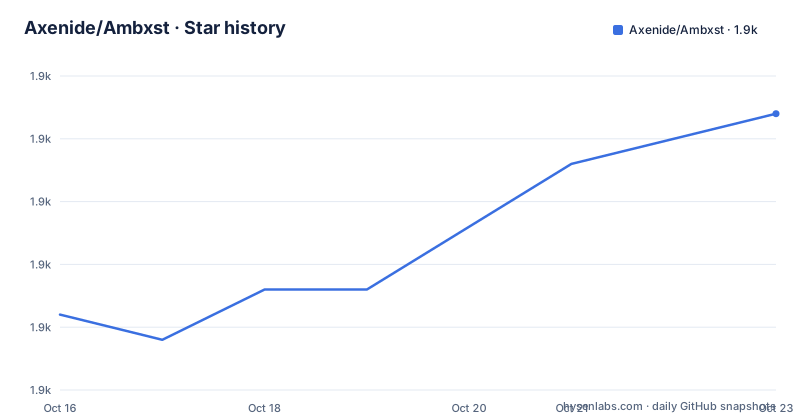
Star history
- Axenide/Ambxst1,866 ★ · +8
| Repository | 2026-10-16 | 2026-10-23 |
|---|---|---|
| Axenide/Ambxst | 1.9k | 1.9k |
8 Stars in the last 7 days, measured from the daily GitHub snapshot. Compare with other projects
Editorial analysis
A shell layer, not a compositor
Ambxst describes itself as an extremely customizable shell, and the important word in that sentence is shell. The documentation is explicit that the only prerequisite is having Hyprland or Niri installed, and the repository topics list hyprland, quickshell, wayland and desktop-environment. This is a bar and panel layer that sits on top of a compositor you already run, not a window manager in its own right.
The audience is therefore people who have already made that choice. Someone on Hyprland with a hand written config may want a launcher, a clipboard manager, a wallpaper daemon and a tmux session list without wiring four separate programs together and hoping they agree on themes and hotkeys. Ambxst bundles that layer and lets you restyle it.
The implementation is a split between a QML front end and a Go backend, with the repository containing shell.qml at the root, a backend/ directory, config/, modules/, scripts/, nix/ and a Makefile. The primary language in the repository listing is QML, which tells you the interface is declarative, and the Go side is where the system integration lives.
The homepage is axeni.de/ambxst, the licence is AGPL-3.0, and the supported distributions are Arch, Fedora and NixOS, base and derivative distributions of each.
The Go binary is the daemon that supervises everything
The Makefile makes the process model plain, and it is the piece of the design that explains how the rest works. The Go source lives in backend/, with the entry point at backend/cmd/ambxst, and the build target compiles it into a binary named ambxst at the repository root, which is gitignored. The comment on the run target states it plainly: the ambxst binary itself is the daemon, and it supervises Quickshell and axctl children.
So there are three processes in play. The Go binary is the parent. Quickshell is the shell engine that runs the QML interface. axctl is the control daemon that owns the generated configuration.
That last point explains the behaviour that trips people up. The generated files are rewritten by the axctl daemon on every theme, gaps or binds change, and the documentation warns not to edit them directly. For Niri, the file ~/.local/share/ambxst/niri.kdl is generated by Ambxst and regenerated automatically on every theme, gaps or binds change, so overrides belong in ~/.config/niri/config.kdl instead. The same logic applies under home-manager, where cosmetic tweaks do not require a home-manager switch, though structural changes such as new binds or a layout switch do.
For local development the Makefile offers build, vet, lint, run, dev, nix, install and clean. Lint is go vet plus a best effort QML lint, and nix builds the backend package through Nix for NixOS or Nix installs.
One curl command, then ambxst install
Installation is a single line, and it pulls down the installer together with the dependencies:
curl -fsSL get.axeni.de/ambxst | shAfter that the ambxst command is on your path. The compositor integration is a second step, and the two supported compositors are handled separately. For Hyprland, ambxst install hyprland adds Ambxst's configuration to the compositor by sourcing a config file that applies its settings, and it keeps using a legacy import for compatibility if you only have hyprland.conf rather than hyprland.lua.
For Niri, ambxst install niri appends an include block to ~/.config/niri/config.kdl that pulls in the generated niri.kdl from the Ambxst data directory. In both cases the block ends with an OVERRIDES marker, and the documentation is explicit that anything you want to change from Ambxst's settings goes under that marker.
Starting the shell for the first test is a matter of running the command in a terminal:
ambxstIf you want it to keep running without the terminal window open, the documented form is ambxst & disown. That is only necessary for the first run, because after the install step Ambxst starts automatically on login.
One NixOS-specific wrinkle is worth knowing about before you record anything. The screen recording utility gpu-screen-recorder can only use the portal backend until you add programs.gpu-screen-recorder.enable = true; to your configuration.nix or home-manager configuration, because the portal path is the only one available by default.
Your config stays yours, except for one import block
The most common objection to a shell like this is that it takes over the compositor configuration. Ambxst's answer is a one line integration plus an escape hatch.
The documentation states that apart from the Ambxst import block in hyprland.conf or hyprland.lua, or the include block in Niri's config.kdl, the project is designed to be non-intrusive and will not modify any of your existing configurations. Everything you want to change from the generated settings goes into the OVERRIDES section below the import, and the generated file is replaced whenever the theme, gaps or binds change.
That is a workable model with one condition attached: you have to accept that the part of the file Ambxst owns is regenerated. If you want a hand-tuned bar layout, that is what the OVERRIDES block is for, and structural changes still need a home-manager switch when you are on NixOS.
The home-manager case deserves its own explanation because the first run surprises people. home-manager-managed configs are read-only symlinks into /nix/store, so ambxst install detects them and prints a guide instead of writing through them. The documented workaround is to source the files Ambxst generates in ~/.local/share/ambxst from your declarative config, using hyprland.lua or hyprland.conf for Hyprland and niri.kdl for Niri, for example through an xdg.configFile entry or an activation script.
For NixOS there are two documented paths. With home-manager, the flake input is github:Axenide/Ambxst and the package is added to home.packages, then you run ambxst install hyprland or ambxst install niri as usual, which works as long as your compositor config is not itself home-manager-managed. Without home-manager, the NixOS module installs the package and the required fonts and enables the recommended services, with programs.ambxst.enable on by default.
What the shell layer actually contains
The feature list is long, and the grouping tells you what kind of project this is. The first group is the shell itself: customizable components and themes.
Then comes system integration, and this is where the bulk of the work sits. There is an app launcher, a clipboard manager, a quick notes feature, a wallpaper manager and an emoji picker. A tmux session manager is included, which is the least common item on the list and the one that tells you this is aimed at people who live in a terminal. A system monitor reports on the machine, media control handles playback, and a notification system is built in.
Hardware and desktop services round it out with a Wi-Fi manager, a Bluetooth manager and an audio mixer, and there is an explicit integration with EasyEffects. A screen capture feature completes the list, which connects back to the gpu-screen-recorder note on NixOS, since the screen recorder in question is what backs the capture path.
The repository also carries an examples/mods/ directory and a translations/ directory, and the configuration is described as customizable components plus themes, which suggests the panels and widgets are meant to be rearranged rather than merely recoloured. What the documentation does not say is how the components are described, whether they are QML files a user is expected to edit, or whether a stable public API exists for writing your own. The AGENTS.md file at the root and the docs/ directory are where a developer would look.
Maintenance pace, licence and the practical limits
The project is not archived, and the last push was on 2026-10-18, a few days after the 1.3.12 release on 2026-10-13. The version line has been moving steadily: 1.3.10 on 2026-10-03, 1.3.11 on 2026-10-08 and 1.3.12 on 2026-10-13. Releases this close together mean the shell is changing fast, and since the daemon rewrites generated files on theme, gaps and binds changes, a shell upgrade can alter your layout without you touching anything.
The licence is AGPL-3.0, and for a desktop shell that is a factor worth taking seriously. AGPL obligations attach to modified versions offered over a network, and the practical situation for a local desktop shell is that the obligations on distribution and modification are easier to trigger than for an ordinary library. This is not legal advice, and the licence text is the authority, but if you plan to fork and ship Ambxst to a team, read it rather than assuming MIT semantics from the neighbouring ecosystem.
The distribution support list is the other practical limit. Arch, Fedora and NixOS, base and derivative distributions. If you are on Debian or Ubuntu, the install script is the only documented path and the guarantees are thinner.
The project also asks for support, with a Ko-fi link and a Discord community, and the repository points at a stargazers page for Axenide/Ax-Shell, an earlier name that appears in the badges.
Editorial conclusion
Adopt Ambxst if you already run Hyprland or Niri on Arch, Fedora or NixOS and want a bar, launcher, clipboard and notification layer without assembling it from separate pieces, and if you can live with the generated files being owned by the axctl daemon. Do not adopt it if you need a compositor, since Hyprland or Niri is a prerequisite, or if you are on another distribution, since only those three are listed as supported. Before you start, decide whether your compositor config is home-manager managed, because ambxst install will refuse to write through read-only symlinks into the nix store and you will have to source the generated files from your declarative config instead, and remember that the files in ~/.local/share/ambxst are rewritten on every theme, gaps or binds change.
Frequently asked questions
What does Ambxst do, and does it replace my compositor?
It is a desktop shell layer for Hyprland and Niri with themes, an app launcher, a clipboard manager, a wallpaper manager, a tmux session manager, a system monitor, media control, notifications, Wi-Fi, Bluetooth, an audio mixer and a screen capture. The only prerequisite is having Hyprland or Niri installed, so it does not replace the compositor.
How do I install Ambxst on Hyprland?
Run curl -fsSL get.axeni.de/ambxst | sh to install Ambxst and its dependencies, then run ambxst install hyprland to add the import block to your compositor config, and start it with ambxst. After the install step it starts automatically on login.
Will Ambxst overwrite my Hyprland or Niri configuration?
The documentation says it will not modify your existing configurations beyond adding an import or include block. Anything you want to change from Ambxst's settings belongs under the OVERRIDES marker, and the generated files in ~/.local/share/ambxst are rewritten on every theme, gaps or binds change.
How do I use Ambxst with home-manager on NixOS?
home-manager-managed configs are read-only symlinks into /nix/store, so ambxst install detects them and prints a guide instead of writing through them. Source the generated hyprland.lua, hyprland.conf or niri.kdl from your declarative config, for example with an xdg.configFile entry or an activation script, and add the flake input github:Axenide/Ambxst with the package in home.packages.
Which Linux distributions does Ambxst support?
Arch, Fedora and NixOS are the listed supported distributions, base and derivative distributions of each. The install route is a curl script that installs Ambxst and its dependencies.
Official sources
Add this badge to your README
If you maintain this project, the badge below links readers to this analysis and shows its maintenance status from the daily GitHub snapshot. Paste the markdown into your README; add ?metric=license or ?metric=stars to the image URL for a different field.

[](https://hysenlabs.com/projects/axenide-ambxst)Star history chart for your README
[](https://hysenlabs.com/projects/axenide-ambxst)Was this useful?