Azure Developer CLI: A Template-Driven Path from Code to Azure, with AI Workflows as the New Focus
A developer CLI for working with Azure resources to build and deploy AI applications. Commands map to key workflow stages: code, build, deploy, and monitor.
At a glance
- What is it?
- The Azure Developer CLI (azd) wraps Azure deployment in an opinionated, template-first workflow. Recent releases point at a growing role for AI application scenarios, but the tool's value still depends on how much you accept its conventions.
- Who is it for?
- Adopt azd if you are deploying to Azure and want a CLI that enforces a consistent, template-based workflow for code, build, deploy, and monitor stages, especially for AI applications. Do not adopt it if you prefer to manage infrastructure with your own scripts or if you need to avoid telemetry collection without configuration.
- Can I use it commercially?
- Yes. MIT is a permissive licence: you can use, modify and sell software built on it, as long as you keep its copyright and licence notices.
- Is it still maintained?
- Yes. The repository last received commits 1 day ago.
- What is it written in?
- Mainly Go, according to GitHub's language statistics.
Answers come from the project's GitHub data, last synced on November 14, 2026, and from our analysis. They are not legal advice.
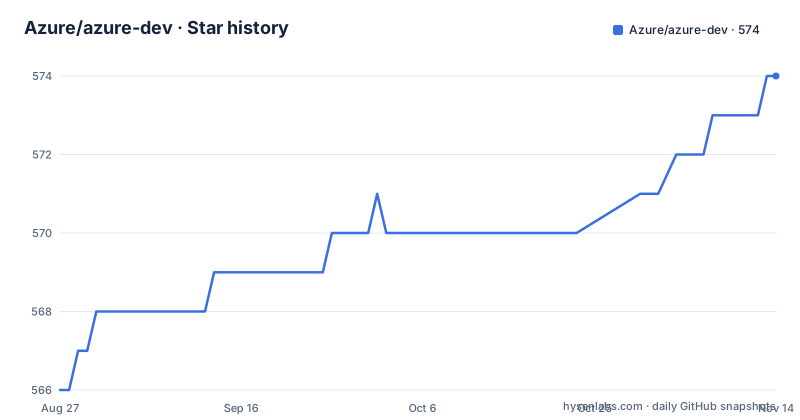
Star history
- Azure/azure-dev574 ★ · +8
| Repository | 2026-08-27 | 2026-11-14 |
|---|---|---|
| Azure/azure-dev | 566 | 574 |
8 Stars in the last 79 days, measured from the daily GitHub snapshot. Compare with other projects
Editorial analysis
What azd Actually Automates
The Azure Developer CLI, or azd, is a command-line tool that maps the software delivery lifecycle onto Azure. The README describes it as a developer-centric CLI to build, deploy, and operate Azure applications. The key word is operate. azd does not just push code. It orchestrates the steps that normally require separate tools: provisioning resources, building artifacts, deploying them, and monitoring the result. The project positions itself with opinionated templates that follow Azure development standards. That means you get a prescribed path, not a blank canvas. For engineers who know Azure well, azd removes the repetitive glue between local code and cloud resources. For newcomers, it offers a guided route through Azure constructs, which the README calls learning as you build.
The Command Model: Code, Build, Deploy, Monitor
The repository description states that azd commands map to key workflow stages: code, build, deploy, and monitor. That is a deliberately simple model. You do not write a dozen separate commands for each service. Instead, azd groups related actions under these stages. The README does not list the actual command names, but the stage mapping suggests a coherent mental model. For someone who has used Terraform or raw Azure CLI, this is a shift. You trade fine-grained control for a higher-level abstraction. The trade-off is acceptable if the templates cover your use case. If they do not, you may end up fighting the tool. The documentation, linked via aka.ms/azd, is the place to see the exact commands. The repo itself does not enumerate them in the README.
Installation and First Steps
Getting azd onto a machine is straightforward. On Windows, the recommended method is winget install microsoft.azd. Chocolatey and a PowerShell script are alternatives. macOS users run brew trust azure/azd and then brew install --cask azure/azd/azd. The trust step is notable: Homebrew requires it for third-party casks. Linux users use curl -fsSL https://aka.ms/install-azd.sh | bash. After installation, shell completion is available for bash, zsh, fish, and powershell, configured with azd completion <shell> --help. The README does not show how to start a project or authenticate. That detail is in the documentation. The installation instructions are clear and platform-specific, which is more than many CLI projects offer.
AI Workflows Are the Emerging Focus
The recent releases tell a story that the README only hints at. The main CLI version is 1.32.0, but there are separate extension releases: azd-ext-azure-ai-projects_1.0.0-beta.8 and azd-ext-azure-ai-agents_1.0.0-beta.13. These names indicate that azd is extending beyond generic deployment into AI-specific scenarios. Azure AI Projects and Azure AI Agents are the targets. The beta status of these extensions matters. They are not stable yet. If you are building an AI application, you can use azd today, but the AI-specific commands may change. The README itself does not mention AI extensions directly. It only says the CLI is for building and deploying Azure applications. The repository description, however, explicitly says the CLI is for AI applications. That gap between the README and the release tags suggests the AI story is still maturing.
Telemetry: Opt-Out, Not Opt-In
The README states that azd may collect usage data and send it to Microsoft. You can disable this with the environment variable AZURE_DEV_COLLECT_TELEMETRY=no. That is a clear, documented opt-out. For organizations with strict data policies, this is a consideration. The default is to collect, which may be a problem for some teams. The README links to the Microsoft Privacy Statement for details. This is not a hidden feature. It is in the main README. But the default-on approach is a common criticism of Microsoft developer tools. If you care about telemetry, set the environment variable in your CI pipeline or local shell profile before running azd. The tool will still work without sending data.
Licensing and Contribution Constraints
The project is licensed under the MIT license, which is permissive and widely understood. The README also notes that the repository may contain Microsoft trademarks or logos, and their use must follow Microsoft's guidelines. That is a separate consideration from the code license. For contribution, most changes require a Contributor License Agreement, and the project follows the Microsoft Open Source Code of Conduct. If you plan to submit templates, Microsoft employees and partners should follow the template standardization guidelines linked in the README. For an adopter, the MIT license means you can use azd in commercial products without concern. The trademark clause is a reminder that you cannot brand your own tools with Microsoft marks.
Where azd Fits and Where It Does Not
azd is not the only way to deploy to Azure. The alternative is the Azure CLI (az) combined with infrastructure-as-code tools like Bicep or Terraform. The difference is approach. With az, you write your own scripts and orchestrate steps yourself. With azd, you rely on templates and a fixed command structure. azd also competes with GitHub Actions, which can deploy to Azure but requires you to define the pipeline. azd can be used inside CI/CD, but it is designed for a local developer loop first. The README positions it as a developer-centric CLI. If you need to manage existing infrastructure, azd is likely the wrong tool. It works best for greenfield projects that fit its templates. If you have a custom deployment process, the abstraction may be too rigid.
Maintenance and Upgrade Path
The project is actively maintained. The last push and release dates are recent, and the version number 1.32.0 indicates a mature CLI. The README says to install or upgrade to the latest version, which implies a regular release cadence. The availability of uninstall scripts for each platform suggests the maintainers think about lifecycle management. For upgrades, the package managers (winget, choco, brew) handle updates. The Homebrew note about removing a non-Homebrew installation before upgrading is a specific gotcha. The extensions for AI projects are in beta, so expect breaking changes there. The core CLI, at 1.x, should be more stable. You should still read the release notes for each version before upgrading in production.
Editorial conclusion
Adopt azd if you are deploying to Azure and want a CLI that enforces a consistent, template-based workflow for code, build, deploy, and monitor stages, especially for AI applications. Do not adopt it if you prefer to manage infrastructure with your own scripts or if you need to avoid telemetry collection without configuration. Before committing, verify that the available templates match your stack, test the CLI in a non-production subscription, and check the documentation for any breaking changes in the current release.
Frequently asked questions
What is the Azure Developer CLI?
A developer command line tool for building, deploying and operating applications on Azure, written in Go and usually invoked by a three-letter name. Its main contribution is opinionated templates that encode Azure recommended practices, with the stated goal of getting a developer from a repository to running cloud resources in minutes while learning the platform's core constructs along the way.
How do I install it on macOS?
With two commands joined into one: the first trusts the vendor's Homebrew tap, the second installs the cask. The trust step is not optional, because Homebrew refuses to install casks from a third-party tap until you have. If you previously installed the binary by hand rather than through a package manager, remove that binary first.
Does the CLI send telemetry?
It may collect usage data and send it to the vendor, and you opt out by setting one environment variable. Because it is an environment variable rather than a configuration file or an install flag, it is easy to set in one context and lose in another, so on a shared runner or a managed machine it is worth setting it in the image.
How do I uninstall it?
It depends on both your platform and, on Windows, your version. Current versions go through your operating system's program removal flow or your package manager's uninstall command, and a signed uninstall script is provided for the older packaging. Check which version you have before following instructions for the other one.
Where do templates come from?
Templates live in a separate curated gallery rather than in this repository. Official templates published by the vendor and its partners follow a separate standardisation guide, which is how a template collection avoids filling up with definitions that break on upgrade.
Can I use it with an AI coding assistant?
The repository carries an agent instructions file for contributors and an internal tooling configuration for employees, but guidance for using the tool with an assistant lives in the documentation site and the template gallery rather than in the repository. If you are writing code against the tool rather than contributing to it, those two are where the practical detail is.
Official sources
Add this badge to your README
If you maintain this project, the badge below links readers to this analysis and shows its maintenance status from the daily GitHub snapshot. Paste the markdown into your README; add ?metric=license or ?metric=stars to the image URL for a different field.

[](https://hysenlabs.com/projects/azure-azure-dev)Star history chart for your README
[](https://hysenlabs.com/projects/azure-azure-dev)Was this useful?