babel-minify: a minifier that skips the transpile step
GitHub describes it as :scissors: An ES6+ aware minifier based on the Babel toolchain (beta). The repository metadata lists JavaScript as its primary language. The metadata lists the MIT license. This article stays within the project description and details documented in the GitHub repository README.
At a glance
- What is it?
- babel-minify turns a set of Babel plugins into an ES6-aware minifier, so modern syntax can be shortened without being transpiled first. The README still calls it beta and advises against production use, and the last push was on 2024-06-01.
- Who is it for?
- Adopt babel-minify only if your build already runs Babel and your browser matrix supports the syntax you write. Skip it for legacy browser targets, and for production bundles you cannot afford to debug.
- Can I use it commercially?
- Yes. MIT is a permissive licence: you can use, modify and sell software built on it, as long as you keep its copyright and licence notices.
- Is it still maintained?
- Probably not. The repository last received commits 29 months ago, on June 1, 2024.
- What is it written in?
- Mainly JavaScript, according to GitHub's language statistics.
Answers come from the project's GitHub data, last synced on November 15, 2026, and from our analysis. They are not legal advice.
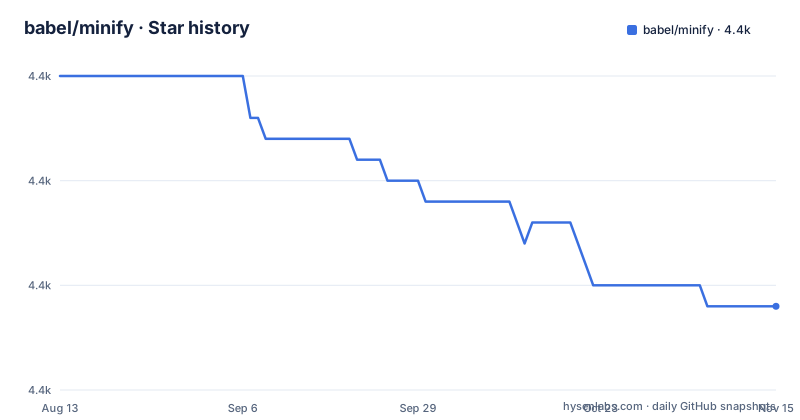
Star history
- babel/minify4,364 ★ · -11
| Repository | 2026-08-13 | 2026-11-15 |
|---|---|---|
| babel/minify | 4.4k | 4.4k |
-11 Stars in the last 94 days, measured from the daily GitHub snapshot. Compare with other projects
Editorial analysis
The point of the project is to delete the transpile step, not to minify harder
Most minifiers take ES5. You hand them output from a compiler, they shave identifiers, and whatever the compiler produced is what ships. babel-minify takes the opposite route. It is a collection of Babel plugins, so it reads modern syntax directly through the Babel parser and prints the same syntax back out, only shorter. The README puts it as a one line difference between two pipelines: ES2015+ code goes through Babel and then a minifier to become minified ES5, or it goes through babel-minify alone to become minified ES2015+.
That matters when the target browsers already run the syntax. The class constructor in the README example is the cleanest case. Written out, it keeps its own name. Minified, it becomes a one line class whose constructor assigns the argument straight to the property, and the trailing new call keeps the class alive because the original code creates an instance.
One monorepo, ten-plus plugins you can mix yourself
The repository is a lerna monorepo, the same shape as babel itself, with each transform living in its own package under packages. The preset is only a bundle of them. babel-plugin-minify-mangle-names handles identifier shortening, babel-plugin-minify-dead-code-elimination removes branches that cannot run, babel-plugin-minify-constant-folding folds constants, babel-plugin-minify-simplify rewrites expressions, and babel-plugin-minify-replace handles substitutions. Others cover flip-comparisons, guarded-expressions, infinity, type constructors and member expression literals.
Because they are ordinary Babel plugins, the granular path is open. You can take two of them without the preset. That is the more interesting fact in the plugin table for anyone who hit a bad rewrite: exclude the one transform that broke the build and keep the rest. Root package.json shows how the project itself is worked on, with jest for tests, eslint and prettier for lint, and gulp driving the build through gulp-babel.
Running it as the CLI on a directory
Install the CLI package into a project:
npm install babel-minify --save-devThe package puts a minify binary on the path. The usage line in the README takes a source directory and writes to a destination:
minify src -d libRead that as: point it at the directory holding your sources, and it emits minified files under lib. It sits alongside the Babel CLI conventions rather than replacing them, so a project that already compiles with Babel keeps its file layout and just changes which program does the last pass.
The floor for running anything here is stated in two lines: node of version 6 or newer, and babel at 6.20.0 or newer. Those numbers come from the requirements section of the README, and they are old enough that a modern Node release satisfies them without thought.
The preset path gates minification behind BABEL_ENV
If you would rather not add a separate build step, install the preset:
npm install babel-preset-minify --save-devThen add it to your .babelrc under the production environment only:
{
  "presets": ["es2015"],
  "env": {
    "production": {
      "presets": ["minify"]
    }
  }
}
The environment has to be set by hand for the block to take effect. The README gives the invocation:
BABEL_ENV=production npm run buildOne detail is easy to skim past and matters more than the install: options specific to an environment are merged into, and overwrite, the non-environment options. The production entry does not sit beside your dev config, it takes precedence over it. Forget the variable and your production build comes out readable, which is the failure mode you would spend an afternoon on rather than a minute.
The README tells you twice not to ship this to production
The experimental section calls the project 0.x and states plainly that it is not for production. The preset section repeats it in softer words, saying the preset should be used for the production environment rather than for production code, which is a narrower claim than it first looks like. Both statements sit in the same document, and the contradiction is worth naming: the same file that hands you a build instruction also tells you the artifact is not ready for the build you just configured.
There is a second limitation with no hedging at all. Minifying with this tool is only safe when the syntax you wrote is syntax your browsers run. The README's argument for the project depends entirely on targeting browsers that support newer ES features. Drop that precondition, for a legacy target that still needs transpilation, and babel-minify has removed the step that would have made it work.
Uglify and Closure approach minification from compiled input
The alternative is not another ES6-aware minifier but a different starting point. UglifyJS and Closure Compiler work on the code they are given, which in a Babel project is the compiled ES5 output. They are excellent at shortening compiled code and say nothing about parsing class syntax, because by the time they run the class is already a function and a helper call. The README makes the point structurally: the class example compiles through Babel into a constructor that calls _classCallCheck before assigning the property, and the minifier can only squeeze that already expanded form.
The devDependencies in the root package.json show the project measuring itself against uglify-js, terser, closure-compiler and google-closure-compiler-js side by side. That comparison is the honest framing. If you need to support browsers without class syntax, the ES5 path with a conventional minifier still wins, and babel-minify's advantage, keeping modern syntax intact, becomes a liability instead.
Release cadence stopped years before the last commit
The repository is not archived, and the last push was on 2024-06-01. The published packages tell a different story about pace. babel-minify 0.5.1 was released on 2019-08-15, while gulp-babel-minify 0.5.0 dates from 2018-09-24 and gulp-babel-minify 0.4.3 from 2018-05-14. Five years separate the newest package release from the newest commit, so the code is receiving commits without producing new package versions you would pick up with an install.
The licence is MIT, which is short enough to read in one sitting and carries no adoption friction. It is also the least interesting thing to check. The version numbers matter more, because a project pinned at 0.5.1 since 2019 means the code on master is not what most installs are running.
Editorial conclusion
Adopt babel-minify only if your build already runs Babel and your browser matrix supports the syntax you write. Skip it for legacy browser targets, and for production bundles you cannot afford to debug. Before wiring it into a build, run the CLI over an existing entry point and diff the output against your current minifier, because the project's own stated position is that it is still 0.x and not for production.
Frequently asked questions
What does babel-minify do?
It minifies ES6 and newer code using Babel plugins, so modern syntax can be shortened without being transpiled to ES5 first. The output keeps the syntax you wrote in.
How do I install babel-minify?
The README gives npm install babel-minify --save-dev for the CLI, and npm install babel-preset-minify --save-dev for the Babel preset. Requirements are node 6 or newer and babel 6.20.0 or newer.
How do I run the babel-minify CLI?
The documented usage is minify src -d lib, which reads a source directory and writes minified output to a destination directory.
How do I enable babel-minify only in production?
Add the minify preset under the production key in the env block of .babelrc, then set BABEL_ENV=production npm run build. Environment specific options are merged into and overwrite the non-environment options.
Is babel-minify safe for production builds?
The README describes it as experimental, at 0.x, and says not to use it in production. The last push was on 2024-06-01 and the newest package release, babel-minify 0.5.1, dates from 2019-08-15.
What is the difference between babel-minify and UglifyJS?
UglifyJS minifies compiled ES5 output, while babel-minify is a set of Babel plugins that parses and prints modern syntax directly. For legacy browser targets the compile-then-minify pipeline still applies.
Official sources
Add this badge to your README
If you maintain this project, the badge below links readers to this analysis and shows its maintenance status from the daily GitHub snapshot. Paste the markdown into your README; add ?metric=license or ?metric=stars to the image URL for a different field.

[](https://hysenlabs.com/projects/babel-minify)Star history chart for your README
[](https://hysenlabs.com/projects/babel-minify)Was this useful?