Databag puts one Go binary and a SQLite file behind a federated messenger
fast & lightweight self-hosted messenger
At a glance
- What is it?
- Databag is a self-hosted messenger where identity is a key pair rather than an account on a domain, topics replace contacts, and the server holds state in a SQLite volume you can back up by copying a file. Calls need your own TURN relay, and the last release predates its last commit by two years.
- Who is it for?
- Databag fits a household, a small team or a community that wants its own server, federates with other nodes, and is content to administer a domain, a certificate and a STUN/TURN relay itself. Do not adopt it for an organisation that needs compliance evidence, an audit trail or an availability commitment, because the release cadence is slow and the project publishes no such material.
- Can I use it commercially?
- Yes. Apache-2.0 is a permissive licence: you can use, modify and sell software built on it, as long as you keep its copyright and licence notices.
- Is it still maintained?
- Yes. The repository last received commits 147 days ago.
- What is it written in?
- Mainly TypeScript, according to GitHub's language statistics.
Answers come from the project's GitHub data, last synced on November 7, 2026, and from our analysis. They are not legal advice.
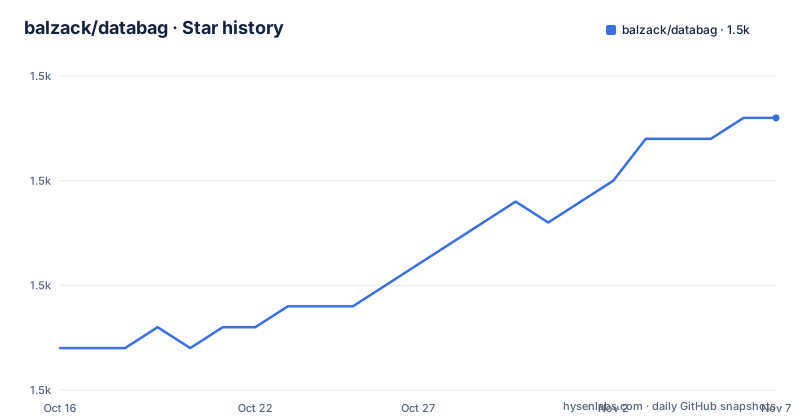
Star history
- balzack/databag1,513 ★ · +11
| Repository | 2026-10-16 | 2026-11-07 |
|---|---|---|
| balzack/databag | 1.5k | 1.5k |
11 Stars in the last 22 days, measured from the daily GitHub snapshot. Compare with other projects
Editorial analysis
Identity is a key pair, not a row in someone else's table
The architectural decision that shapes everything else is the identity model. Databag uses public-private key based identity, and the README is explicit that this is not bound to any blockchain or hosting domain.
That single choice produces the rest of the design. Because your identity is a key and not an account row, moving to a different node does not mean losing your account, and two nodes can recognise the same person without either operator being trusted. Accounts on different nodes can communicate, which the README lists as the federated property, alongside decentralised direct communication between app and server node.
Encryption follows from the same premise. Topics can be sealed, and a sealed topic is one the hosting admin cannot read. The README states the hosting admin cannot view topics if sealed, which is the guarantee a self-hoster can offer users who do not trust them.
Topics, not contacts, are the organising unit. Messages are organised by topic rather than by contact, and there is no limit on group thread members. That is a departure from the contact-list model most messengers use, and it suits small communities better than it suits a large address book: you join or follow a topic rather than adding people.
Unlimited accounts per node is listed as a feature, with the framing that you can host for your whole family. Combined with the lightweight claim, that points at the intended scale clearly: dozens to hundreds of people on hardware you own, not thousands on hardware you rent.
One port, one volume, one environment variable
The compose file is small enough to read in full, which tells you more about the deployment than any diagram would.
name: databag

services:
  app:
    build: .

    ports:
      - 127.0.0.1:7000:7000
    volumes:
      - database:/var/lib/databag
    environment:
      - ADMIN=password

volumes:
  database:
Three things stand out. The port mapping binds to `127.0.0.1`, so the container is not exposed to your network directly and a reverse proxy in front of it is the intended topology rather than an optional hardening step. The single named volume `database` holds everything under `/var/lib/databag`, which makes backup a file copy. And the one environment variable is `ADMIN`, the initial administrator password.
Portainer instructions in the README follow the same shape: publish port 7000 for both host and container, pass the admin password as the `ADMIN` variable, and map `/var/lib/databag` to a volume. The Nginx Proxy Manager example then asks you to point a hostname at the host, request an SSL certificate, and forward to port 7000.
The bundled nginx config explains why the compose file binds to loopback. It sets `proxy_http_version 1.1`, upgrades the `Upgrade` and `Connection` headers for WebSocket support, passes the host header through to `127.0.0.1:7000`, and sets `client_max_body_size 0` and `proxy_max_temp_file_size 0` so that uploads are streamed through rather than buffered to disk on the proxy. Those two zero values are a deliberate choice for a messenger carrying attachments and they are easy to miss.
For HTTPS without hand-editing, there is a certbot variant. You create a DNS entry pointing at the host, edit `net/container/docker-compose-swag.yml` with the domain, then launch it. Container images for arm64 and amd64 are published on Docker Hub, and a Raspberry Pi Zero v1.3 is named as the low end of the hardware range.
Calls are the one feature you cannot get from the node
Audio and video calling is listed alongside the other features, and the caveat appears in the same bullet: NAT traversal requires a separate relay server.
The mechanics are WebRTC, and the README explains that Databag relies on a STUN/TURN relay for NAT traversal. Testing was done with coturn and with Cloudflare's TURN service, and the expectation is that any conforming implementation works. In the admin configuration you enable WebRTC calls and set a WebRTC server URL as a `turn:` URI.
This is the part of the deployment that most self-hosters underestimate. The Databag node handles identity, messages and topic state; it does not relay media. A STUN server only discovers your public address and most symmetric NATs still fail, so a TURN relay with bandwidth is required for reliable calls, and that relay is a separate machine you secure, monitor and pay for.
The README offers two ways out. Set up your own coturn server, with a linked guide to installation instructions, or use Cloudflare's hosted TURN service. For testing there is a demo relay configuration in the admin modal, which is fine for a trial and not something to leave in place.
Other optional pieces are listed in the same section as separate requirements rather than bundled services. Mobile alerts for new contacts, messages and calls support UnifiedPush, FCM and APN, so push delivery may route through a third party depending on the platform. Multi-factor authentication integrates with TOTP apps, which is a client-side feature and adds no server burden.
If you run a Raspberry Pi Zero, note that a TURN relay alongside it is a separate deployment in most cases. The low-power claim covers the Databag node only.
A two-stage build with CGO enabled and ffmpeg in the image
The Dockerfile in the repository root shows the real shape of the artefact, and it is not a single compiled binary dropped into a scratch image.
There are two build stages. The first is `node:22-alpine`, which copies `app/client/web/package.json` and its `yarn.lock` first so dependency installation is cached independently of the source, installs with `yarn --frozen-lockfile`, copies the client sources, and builds them with `yarn run build`.
The second stage is `golang:alpine`, and this is where the interesting constraint sits. The build installs `build-base imagemagick sqlite ffmpeg curl` with apk before compiling, and the compile line is:
CGO_ENABLED=1 go build -o databag .CGO is explicitly enabled, which is why a C toolchain is needed. Combined with the sqlite and ffmpeg packages in the image, this tells you the server links against system libraries rather than using a pure Go database driver, and that media handling such as thumbnails is done with those tools. ImageMagick and ffmpeg in a running container are a real operational consideration for a self-hosted service: they are large, they process untrusted input, and they have a history of CVEs.
The build accepts `DATABAG_GOARCH` and `DATABAG_GOOS` build arguments and applies them when set, with a commented-out block in the compose file showing how to cross-build for `linux/arm64`. The compose file builds from the local `.` context rather than pulling an image, and the Dockerfile sets `DEV=0` and a default `ADMIN` value, which the compose file overrides.
The entrypoint is a shell script rather than the binary, `entrypoint.sh` in `net/server`, which is presumably where migrations and directory setup happen. The repository copies `./net/server` into the image and `./net/transform` into `/opt/databag/transform`, so image transformation runs as a separate step from the server.
For developers there is a Makefile with `dev-start`, `dev-stop`, per-component restart targets for `net-server`, `net-web` and `net-repeater`, plus `prod-docker-start` and a `prod-raw-build` target that runs `./build.sh` for a build without containers.
The maintenance reality is the biggest caveat
Set expectations before anything else: this is a project with active code and quiet releases.
The repository is not archived and the last push was on 2026-06-14, four months before today. The recent releases are v1.1.1021 on 2024-06-20, v1.1.1020 on 2024-06-12 and v1.1.1019 on 2024-05-26, and their tags carry descriptive names: ContactAcceptFix, CFTurn & Download, MFA Support. Note the naming convention: the tag is a release plus a patch number plus a short description of what changed, which is a useful convention for a project without a conventional changelog.
The gap between commits and releases is roughly two years. That is not necessarily neglect, since a self-hosted server people deploy once and keep running does not need frequent releases, but it does mean you should expect to run from an image built from the repository rather than from a published version, and that you will be reviewing unreleased commits yourself.
Licensing is Apache-2.0 with the LICENSE file at the repository root, which permits commercial and modified self-hosting with the notice retained.
What the project does not offer is any of the things an organisation asks for before deploying a messenger. There is no security advisory history, no published audit, no support contract and no migration or upgrade documentation beyond the compose examples. The README points to a design overview document, a design guidelines file in `.design/`, and a Figma file it invites you to duplicate. The Figma invitation is a good sign for the interface and tells you nothing about the protocol.
One deployment warning is stated in the README and should be respected: the public test server at databag.coredb.org is regularly wiped, so it is a demo rather than a service.
How Databag differs from Matrix and from a hosted messenger
The comparison worth making is with Matrix, since both are federated and both are self-hostable, and the differences are structural rather than incremental.
Matrix is a published specification with many independent server implementations, a large homeserver ecosystem and clients outside any single vendor's control. Interoperability is the point: any Matrix client can talk to any Matrix server. Databag has one server implementation and one family of clients, so federation works between Databag nodes and not between Databag and arbitrary Matrix homeservers. Choosing Databag is choosing a closed federated island with open federation inside it.
That trade is favourable when you want a small, understandable server and unfavourable when you need to interoperate with an existing Matrix deployment, reach users on other clients, or rely on the wider Matrix ecosystem for bridges to other protocols.
Against a hosted messenger such as a mainstream chat app, the differences are the ones the feature list advertises: your server, your keys, topics instead of contacts, and sealed topics the admin cannot read. What you give up is everything a commercial service provides around the protocol: account recovery when someone loses their key, spam and abuse controls, delivery guarantees, group size limits, a support team, and any assurance that your messages are not being scanned somewhere. End-to-end encryption here protects sealed topics from the host; it does not protect participants from each other.
The self-sovereign identity model deserves one more caution. Because identity is a key pair rather than a recoverable credential, a lost device is not a support ticket. The README lists a user icon that generates a new account link, which is account creation rather than key recovery, so decide your backup and key-storage policy before you onboard anyone.
Editorial conclusion
Databag fits a household, a small team or a community that wants its own server, federates with other nodes, and is content to administer a domain, a certificate and a STUN/TURN relay itself. Do not adopt it for an organisation that needs compliance evidence, an audit trail or an availability commitment, because the release cadence is slow and the project publishes no such material. Verify first that you can obtain a DNS name and a certificate for your node, since the README states that as a hard prerequisite and the whole federation model depends on it.
Frequently asked questions
How do I install Databag on my own server?
You need a DNS name pointing at your node with a certificate. The simplest route is the supplied compose file, launched from the net/container sub directory with `docker-compose -f compose.yaml -p databag up`, or the Portainer path using the `balzack/databag:latest` image on port 7000 with an ADMIN password and a volume mapped to `/var/lib/databag`.
Does Databag need a TURN server for calls?
Yes. Audio and video calling relies on a STUN/TURN relay for NAT traversal, which is separate from the Databag node. The README says testing was done with coturn and with Cloudflare's TURN service, and that any implementation should work, and it offers a demo relay configuration for testing only.
How does Databag's identity model work?
Identity is based on a public-private key pair and is not bound to any blockchain or hosting domain. That is what lets accounts on different nodes communicate, and it is why the project describes it as federated with direct communication between app and server node.
Can the Databag server administrator read my messages?
Not sealed topics. The README states the hosting admin cannot view topics if sealed, and end-to-end encryption is described as covering all messages and data within a space, with sealing as the mechanism that denies the host access.
What hardware does Databag need?
The README describes it as lightweight and states a server can run on a Raspberry Pi Zero v1.3. There is also documentation for installing without a container on a Raspberry Pi Zero, in AWS, and integrated into OpenWrt firmware, plus one-click installs for CapRover, CasaOS, Unraid, Runtipi, Kubero and Umbrel.
What license is Databag released under?
Apache-2.0, with the LICENSE file at the repository root. The project is primary-language TypeScript with a Go server, and the Dockerfile builds a Node web client and a CGO-enabled Go binary into one image.
Official sources
Add this badge to your README
If you maintain this project, the badge below links readers to this analysis and shows its maintenance status from the daily GitHub snapshot. Paste the markdown into your README; add ?metric=license or ?metric=stars to the image URL for a different field.

[](https://hysenlabs.com/projects/balzack-databag)Star history chart for your README
[](https://hysenlabs.com/projects/balzack-databag)Was this useful?