ONCE requires /up, port 80 and /storage, and that contract is the product
Easy self-hosting for Docker-based web apps
At a glance
- What is it?
- ONCE is an MIT licensed Go tool that installs and manages Docker web applications behind a TUI, written by Basecamp and shipping 37signals apps by default. What it really offers is a four point contract any container can meet, plus backups that pause the container when an app cannot produce a safe copy of its own data.
- Who is it for?
- ONCE fits a small server or a Raspberry Pi where you want a handful of web apps installed, updated and backed up without writing compose files, and it fits developers whose apps already honour the /up and /storage contract because 37signals apps ship it.
- Can I use it commercially?
- Yes. MIT is a permissive licence: you can use, modify and sell software built on it, as long as you keep its copyright and licence notices.
- Is it still maintained?
- Yes. The repository last received commits 9 days ago.
- What is it written in?
- Mainly Go, according to GitHub's language statistics.
Answers come from the project's GitHub data, last synced on October 23, 2026, and from our analysis. They are not legal advice.
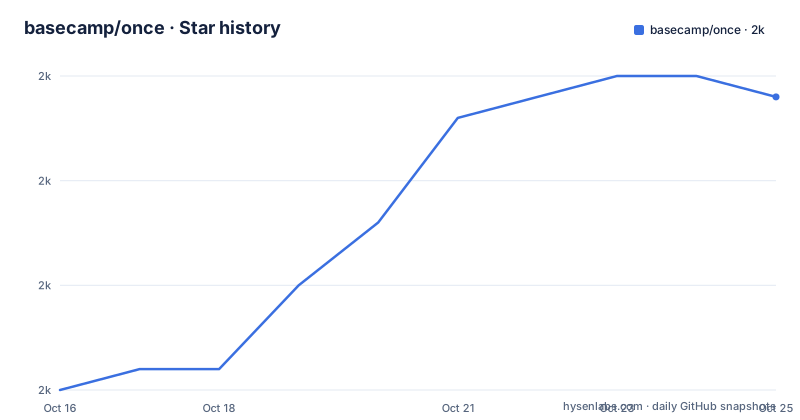
Star history
- basecamp/once1,985 ★ · +15
| Repository | 2026-10-16 | 2026-10-23 |
|---|---|---|
| basecamp/once | 2k | 2k |
15 Stars in the last 7 days, measured from the daily GitHub snapshot. Compare with other projects
Editorial analysis
The compatibility contract is four lines long
ONCE works with any web application that satisfies four conditions: it is packaged as a Docker container, it serves HTTP on port 80, it exposes a healthcheck endpoint at `/up` that returns success, and it keeps persistent data in `/storage`.
That is the basic compatibility contract, while hooks and environment variables can provide deeper integration. Anything that does not serve plain HTTP on port 80 is out, which means a service that wants 8080, a websocket-only service, or a database with no HTTP layer has no place here. The /up endpoint is the mechanism behind monitoring and probably behind the dashboard state, so an image without it will look broken or unknown.
The /storage mount is doubled for Rails compatibility. ONCE mounts a persistent volume at `/storage` and also mounts the same volume at `/rails/storage`, so a Rails app built with the default Dockerfile works without change. That is a small detail that tells you who this is for.
A set of 37signals apps is bundled in, and you can enter any image path instead, including your own fork of a built in app.
Backups pause your container unless you write the hook
The hook scripts are the most interesting mechanism in the project, and pre-backup is the one that reveals the design.
ONCE will not assume it is safe to copy files from a running application. Before a backup it calls `/hooks/pre-backup`. If that script exists and returns success, ONCE proceeds to copy files and leaves the application running. If it is missing or returns an error, ONCE pauses the application's container while the copy happens.
So backups are consistent either way, and the hook exists purely to avoid introducing latency into in flight requests during a backup. The README's suggested use is SQLite's online backup feature to take a safe consistent copy of the database, which is the correct pattern rather than copying a live database file.
`/hooks/post-restore` is the inverse, called after data is restored from a backup but before the application boots. That is where an app cleans up files generated during pre-backup, such as renaming them into place.
If you adopt ONCE for an app you did not write and that has no hooks, expect the container to stop for the duration of every backup. That is the correct behaviour, and it is still downtime you did not ask for.
Install paths: curl a script, or download the binary yourself
The bootstrap path is a single pipeline:
curl https://get.once.com | shIt downloads the platform binary, installs it along with its background service, and launches it. If Docker is missing on the machine it installs Docker too, on supported platforms.
For scripted installs there is one environment variable, `ONCE_INTERACTIVE=false`, which installs without launching:
curl https://get.once.com | ONCE_INTERACTIVE=false shThe manual path is three steps: install Docker yourself, put the `once` binary wherever you like, then register the background service with a privileged command:
sudo once background installThat sudo requirement has a consequence worth noting. If you need sudo for Docker commands because your user is not in the docker group, then you also need sudo for every `once` invocation, which is an awkward fit for an agent driving it from a script. Getting your user into the docker group is the smoother path.
The TUI is the config, and the CLI exists for agents
Interaction is a terminal UI with a dashboard for monitoring and operating applications, alongside CLI commands for the common operations. The README frames the CLI as being there for you or for your AI agent, which tells you the project expects scripted use.
Inside the dashboard the keys are short. With an application selected, `s` opens the settings menu and `a` opens the action menu for starting, stopping or removing an application. Settings cover the backup location, hostname, switching to your own fork's image, and configuring an email provider.
One flag is worth knowing before you deploy this anywhere you will be presenting from. The first run shows an animated logo and background, and if that is distracting or breaks in your environment you set `ONCE_REDUCED_MOTION=true`:
ONCE_REDUCED_MOTION=true onceNote what is absent. There is no declarative configuration file in the repository root that describes your apps, so the state of your installation lives where ONCE stores it, not in a file you review and commit.
DNS and TLS are yours, and Cloudflare proxying has a caveat
You choose a hostname for each application, and it must have a DNS record pointing at the machine. The README recommends a subdomain so several apps can share one domain, with Writebook at `books.example.com` as the example, and mentions a wildcard entry if you plan to install many apps on one machine.
The Cloudflare note is the concrete warning. Cloudflare enables the proxy option by default on DNS entries, so traffic passes through Cloudflare before reaching your server. ONCE works in that setup provided SSL is end to end, and the specific instruction is to set the Cloudflare SSL mode to Strict (full) when using the proxy option.
The README does not describe how ONCE itself terminates TLS when Cloudflare is not in the path, which is the gap to close before pointing a real domain at a new install.
A Go codebase built around moby and cobra
The implementation is Go, with a module path of github.com/basecamp/once and a Go 1.27.0 directive. The dependency list explains the shape of the tool: cobra for the command surface, bubbletea, bubbles and lipgloss for the TUI, the moby client and api packages plus containerd errdefs for container operations, go-containerregistry for image references, gopsutil for the system information it reports, and prometheus client model and common, plus axiomhq hyperloglog, which suggests something cardinality related is being tracked.
The Makefile builds with `CGO_ENABLED=0` and trims the path, which is what lets the same binary run on a Raspberry Pi and a laptop. Platforms built are linux and darwin across amd64 and arm64, and the dist target copies those binaries into dist/ with a checksums.txt. There is no Windows target.
Tests split into two tiers. Unit tests run over ./internal/..., while integration tests run against ./integration/ with 16 in parallel and a 30 minute timeout, which is the layer that would catch a change in the container contract. `make check` runs go vet and govulncheck, linting is golangci-lint, and workflow linting adds actionlint and zizmor.
Against Compose, CapRover and Coolify
Automatic updates are listed as a feature of ONCE, without further detail in the README. ONCE runs on Linux and macOS, which is unusual for a self hosting panel and convenient for a laptop, but there is no Windows support in the build matrix.
Editorial conclusion
ONCE fits a small server or a Raspberry Pi where you want a handful of web apps installed, updated and backed up without writing compose files, and it fits developers whose apps already honour the /up and /storage contract because 37signals apps ship it. It is the wrong tool for anything outside HTTP on port 80, for stateful services such as databases, and for teams that need declarative configuration in git, since settings live in the UI or the CLI rather than a reviewed file. Verify first by pointing a container at ONCE that does not implement /hooks/pre-backup, so you can see the container pause during a backup before you trust it with data that has no other copy.
Frequently asked questions
How do I install ONCE?
Run the install snippet, which downloads the platform binary, installs it with its background service and launches it, installing Docker too if the machine does not have it. Set ONCE_INTERACTIVE=false to install without launching, for example in a script.
What does an application need to be compatible with ONCE?
It must be packaged as a Docker container, serve HTTP on port 80, expose a healthcheck endpoint at /up that returns success, and keep persistent data in /storage. The same volume is also mounted at /rails/storage for Rails compatibility.
How does ONCE back up an application that has no hooks?
If /hooks/pre-backup is missing or fails, ONCE pauses the application container while it copies the files, so the backup stays consistent. Implementing the hook lets the app produce its own safe copy, for example with SQLite online backup, and avoid that pause.
Does ONCE work on Windows?
No. The README states ONCE runs on Linux and macOS, and the Makefile only builds for linux and darwin across amd64 and arm64.
Official sources
Add this badge to your README
If you maintain this project, the badge below links readers to this analysis and shows its maintenance status from the daily GitHub snapshot. Paste the markdown into your README; add ?metric=license or ?metric=stars to the image URL for a different field.

[](https://hysenlabs.com/projects/basecamp-once)Star history chart for your README
[](https://hysenlabs.com/projects/basecamp-once)Was this useful?