Wedecode restores wxapkg source trees: what the decompiler actually produces
A fully automated source code recovery tool for WeChat Mini Program wxapkg packages, for online code security auditing; supports Windows, macOS and Linux.
At a glance
- What is it?
- Wedecode is a TypeScript CLI and local web UI that unpacks and decompiles WeChat mini program and mini game wxapkg packages on Windows, macOS and Linux. It rebuilds JS, WXML, WXSS, WXS and JSON output, and it is GPL-3.0 licensed.
- Who is it for?
- Wedecode fits engineers doing authorized security review of mini program packages, or studying how wxapkg decompilation works, and anyone who needs WXML, WXSS, WXS and JSON restored rather than raw unpacked files. It is the wrong tool if you only have one subpackage, since the README states missing subpackages produce default templates in the output, or if you need a permissive licence, since the package is GPL-3.0-or-later.
- Can I use it commercially?
- Yes, with conditions. GPL-3.0 is a copyleft licence: if you distribute software that includes it, you must release that software's source code under the same licence. Running it internally without distributing it does not trigger that obligation.
- Is it still maintained?
- Yes. The repository last received commits 80 days ago.
- What is it written in?
- Mainly TypeScript, according to GitHub's language statistics.
Answers come from the project's GitHub data, last synced on November 15, 2026, and from our analysis. They are not legal advice.
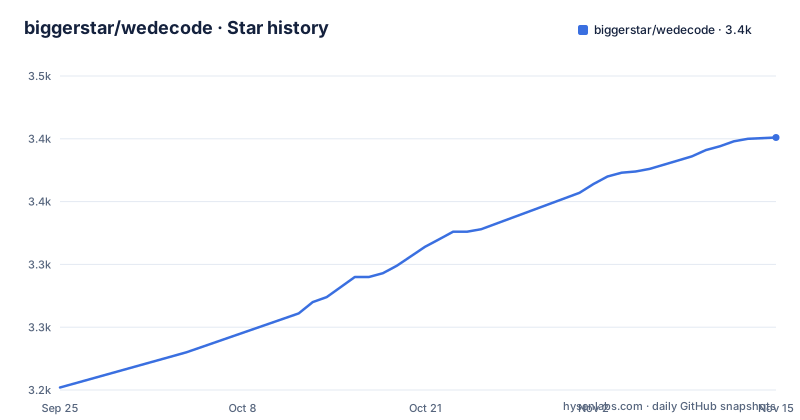
Star history
- biggerstar/wedecode3,401 ★ · +199
| Repository | 2026-09-25 | 2026-11-15 |
|---|---|---|
| biggerstar/wedecode | 3.2k | 3.4k |
199 Stars in the last 51 days, measured from the daily GitHub snapshot. Compare with other projects
Editorial analysis
The problem Wedecode solves: reading a wxapkg instead of guessing at it
A WeChat mini program ships to the client as a wxapkg package, not as the source tree the developer wrote. Anyone doing a security review of a published mini program, or trying to understand how a third-party mini program or game is built, starts from that binary container. Wedecode's stated purpose is to reverse that step: the repository description calls it a fully automated wxapkg source code restoration tool for online code security auditing. The README's own disclaimer narrows the intended use to online code security auditing for finding vulnerabilities quickly, and to studying decompilation principles.
The audience is therefore narrow and technical. You need a Node.js environment, and the README recommends v18 or newer. You need to be comfortable running a CLI, or willing to use the bundled browser UI. And you need a legitimate reason to look inside someone else's package, because the same README states that illegal use is prohibited and that consequences fall outside the author's responsibility. That is not boilerplate to skip past: a decompiler is a dual-use tool, and the licence and disclaimer are part of what you are adopting.
How Wedecode reassembles JS, WXML, WXSS and WXS
The README lists what comes out of a run: JS, WXML, WXSS, WXS and JSON files, plus other asset types such as media, wasm and workers, all beautified. That list is the real scope statement. A tool that only unpacked the archive would leave you with compiled bundles and no page templates; Wedecode's claim is that it restores the directory structure and the source form together.
Two mechanisms are documented. The first is subpackage and plugin handling. The README says subpackage code and plugin code are supported, and the FAQ explains why that matters: if you compile a package without its subpackages, files that depend on a missing subpackage come out as default templates, because the mini program runtime checks dependencies and the tool generates a stub so the rest still runs. The practical consequence is that you should compile every package belonging to one mini program together, in the same directory, or accept stub files in the output.
The second is the polyfill directory. During compilation Wedecode looks for a polyfill folder next to the package. If a module inside it has the same path and name as a module being written to the output, the custom JavaScript module is used and the original module is not compiled. The README's example shows a polyfill/@babel/array.js next to the wxapkg files, matched by an @babel/array.js path in the OUTPUT tree. That is a targeted escape hatch for modules the decompiler gets wrong, not a general plugin system.
The project also scans for mini program packages and can decrypt them automatically, and the README notes support for WeChat client versions from 20180111 onward. Older clients are outside the stated range.
Installing Wedecode and running a first decompile
Wedecode installs from npm as a global binary. The README gives separate commands for Windows and macOS, and the macOS one uses sudo. After this, the wedecode command is available in any terminal.
# window
npm i wedecode -g
# mac
sudo npm i wedecode -g
With no arguments, wedecode runs an interactive guided flow that scans for packages and asks what to do. If you prefer to skip the prompts, pass the package path directly. A single file, the current directory, or a named subdirectory are all accepted.
# 手动指定一个包
wedecode ./name.wxapkg
# 或者  编译当前命令行所在文件夹内的所有包
wedecode ./
# 或者: 将编译结果输出到指定目录 --out 为输出目录
wedecode ./  --out ./output_path
Without --out, output goes to an OUTPUT directory beside the package. The README documents --clear to wipe old output, --open-dir to open the result directory when compilation finishes, --px to parse CSS in px instead of the default rpx, and --unpack-only to unpack without decompiling. Arguments can be preset so the interactive prompt never appears.
wedecode --out output_path --clear --open-dirFor a browser interface instead of the terminal, run wedecode ui and open the local address it prints, which the README shows as http://localhost:3000. There is also a source-based path: clone the repository, run npm install, then npm run start or npm run ui. The README notes that if npm is slow you can switch to a mirror with npm config set registry https://registry.npmmirror.com.
The output you should expect is a directory tree mirroring the original project, with app.json at the top and pages, components and other folders beneath it, plus beautified source files.
Where Wedecode breaks down
The most concrete failure mode is documented by the project itself. Compile a package without its subpackages and the output contains default templates. This is not a bug report; it is the FAQ's explanation of expected behavior, and it means a partial package set produces a partially meaningless tree. If you only have one wxapkg file and the app.json references subpackages you do not possess, you will spend time reading stubs.
The polyfill mechanism is the second soft spot, though the README frames it as a feature. A directory that lets you override modules by path is useful precisely when the decompiler's output for those modules is not usable. The existence of the override implies that some modules come out wrong and need hand-written replacements, and the README does not enumerate which ones or why.
There is also no documented rollback, no dry-run mode, and no version pinning guidance. The package version in the repository's package.json is 0.0.0, which is the placeholder used during development, and the repository has no published releases. The last push to the repository was on 2026-08-27, so the code has moved recently, but you cannot read a changelog to find out what changed between two installs. Treat an upgrade as an unknown until you re-run it against a package whose output you have kept for comparison.
Finally, the licence. GPL-3.0-or-later is a copyleft licence, and the repository's package.json declares it. If you intend to embed Wedecode's code inside a proprietary internal tool, that is a question for your own legal review, not something this article can settle. Running the CLI to inspect a package is a different matter from redistributing a modified version.
Wedecode compared with unpack-only and general reverse engineering tools
The honest alternative is not another named decompiler but a different level of ambition. Wedecode's --unpack-only flag is that alternative, built in: it extracts the archive without decompiling. If your goal is to inventory assets, check for embedded strings, or diff two versions of a package, unpacking alone is faster and produces fewer artifacts you have to trust. The difference in approach is that decompilation reconstructs source form, and reconstruction is where the default-template and polyfill problems live. Unpack-only sidesteps both.
General-purpose reverse engineering tooling sits at the other end. Those tools make no attempt to know what a mini program is; they give you a debugger and a disassembler and leave the semantics to you. Wedecode's value is the domain knowledge it encodes: the subpackage dependency model, the app.json layout, the WXML and WXSS file types, and the rpx unit convention that --px exists to override. You are trading generality for a tool that already knows the shape of the thing you are looking at. If the package is not a WeChat mini program or mini game, that knowledge is worth nothing.
The README also points at a third option for people who do not want to install anything: the GitHub Codespaces route, where you open the repository in a codespace and run npm run ui, then open http://localhost:3000. The README warns this demands good network connectivity and that dependency installation takes a while.
Maintenance, upgrade cost and what the licence means in practice
The repository is not archived, and its last push was on 2026-08-27, roughly a month before this article. That is a recent change, but the material offers no release history, so there is no way to judge cadence from versions. The package.json version field reads 0.0.0, which is the development placeholder rather than a published number, and the repository has no published releases. Anyone planning to depend on Wedecode should watch the repository's commit activity rather than a changelog, because none is provided.
Upgrade cost is low in one sense: it is a global npm install with a CLI surface of six documented flags, and the install commands are two lines. It is higher in another: because no rollback or version-pinning guidance is documented, the safe practice is to keep the OUTPUT directory from a known-good run and diff the next one against it. That is a workflow you build, not something the tool gives you.
On licensing, the package declares GPL-3.0-or-later in package.json and the repository carries a LICENSE file. The practical implication for most readers is that using the CLI as a tool and redistributing a modified or embedded copy are different acts with different obligations. This article cannot tell you which applies to your situation, and the project's own disclaimer pushes legal responsibility onto the user. If Wedecode's decompilation logic is something you want to fold into a closed product, raise that with your legal team before writing code against it.
Editorial conclusion
Wedecode fits engineers doing authorized security review of mini program packages, or studying how wxapkg decompilation works, and anyone who needs WXML, WXSS, WXS and JSON restored rather than raw unpacked files. It is the wrong tool if you only have one subpackage, since the README states missing subpackages produce default templates in the output, or if you need a permissive licence, since the package is GPL-3.0-or-later. Before adopting it, verify your Node version is v18 or newer, confirm the packages you intend to compile sit in the same directory so subpackage resolution works, and read the polyfill directory convention if you need to substitute a module that the decompiler mis-handles.
Frequently asked questions
What is Wedecode and what does it do?
Wedecode is a WeChat wxapkg decompilation tool that restores mini program and mini game source trees, including JS, WXML, WXSS, WXS and JSON files, plus assets such as media, wasm and workers. It runs on Windows, macOS and Linux on Node.js v18 or newer, and ships both a CLI and a local web UI.
How do I install Wedecode?
Install it globally from npm with npm i wedecode -g on Windows, or sudo npm i wedecode -g on macOS. After that the wedecode command is available in any terminal, and you can run it with no arguments for a guided flow or pass a package path directly.
Why does Wedecode output default templates for some files?
The README's FAQ states this happens when subpackages are missing from the compilation. Compile all packages belonging to the same mini program together, and check app.json or app.config.json for the subpackage dependencies, because the tool generates default templates so the output still runs without them.
Does Wedecode work without installing anything locally?
Yes. The README describes running the visual version on GitHub through a codespace: use the Use this template button, open it in a codespace, wait for initialization, then run npm run ui in the terminal and open http://localhost:3000. The README notes this requires good network connectivity and that setup can take a while.
What licence does Wedecode use?
The repository's package.json declares GPL-3.0-or-later, and the repository contains a LICENSE file. Redistributing a modified version carries copyleft obligations, so check your own use case rather than assuming the tool can be embedded freely.
Official sources
Add this badge to your README
If you maintain this project, the badge below links readers to this analysis and shows its maintenance status from the daily GitHub snapshot. Paste the markdown into your README; add ?metric=license or ?metric=stars to the image URL for a different field.

[](https://hysenlabs.com/projects/biggerstar-wedecode)Star history chart for your README
[](https://hysenlabs.com/projects/biggerstar-wedecode)Was this useful?