bitfield/script: shell-style pipelines in Go, and the error handling they quietly move to the end
Making it easy to write shell-like scripts in Go
At a glance
- What is it?
- script is a Go library that lets you chain File, Match, CountLines, Exec and HTTP stages like a shell pipe. It shortens small admin programs, but its error model puts the burden on whoever reads the final result.
- Who is it for?
- Use it when you are writing a Go program that does what a shell script does and you want chained calls instead of hand-wired readers. Skip it if you need a tagged release to pin, or if you will not check the error at the end of every chain, because a failed stage just produces no output.
- Can I use it commercially?
- Yes. MIT is a permissive licence: you can use, modify and sell software built on it, as long as you keep its copyright and licence notices.
- Is it still maintained?
- Yes. The repository last received commits 46 days ago.
- What is it written in?
- Mainly Go, according to GitHub's language statistics.
Answers come from the project's GitHub data, last synced on November 22, 2026, and from our analysis. They are not legal advice.
Star history
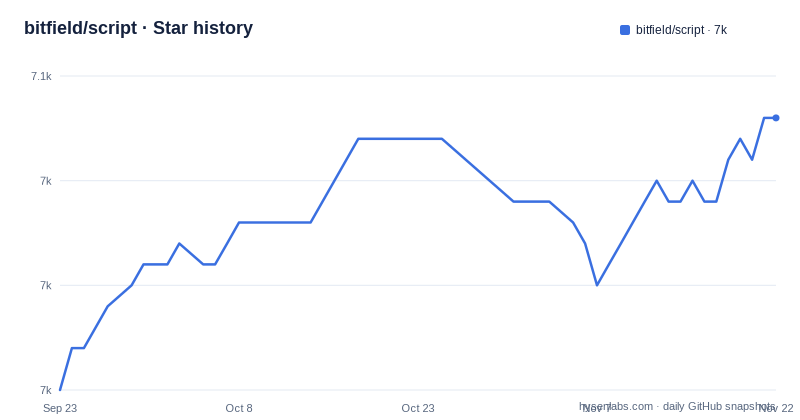
- bitfield/script7,048 ★ · +13
| Repository | 2026-09-23 | 2026-11-22 |
|---|---|---|
| bitfield/script | 7k | 7k |
13 Stars in the last 60 days, measured from the daily GitHub snapshot. Compare with other projects
Editorial analysis
A pipe that swallows the first error and hands it over at the sink
The central design choice in script is that a failed stage does not stop your program. When any pipe stage encounters an error, it produces no output to the stages after it, and the pipe remembers the error. You can retrieve it later by calling the Error method, or by using a sink method such as String, which returns an error value along with the result.
The consequence is easy to miss. If you write a chain and ignore the error from the final call, a missing file, a refused connection or a bad status code all look the same: nothing comes out. Your program carries on with an empty string or a count of zero. The only defence is the habit the project itself recommends for Stdout, which also returns an error plus the number of bytes written:
_, err := script.Do(req).Stdout()
if err != nil {
	log.Fatal(err)
}
That is one more line than a shell would need, and it is the price of the compact chains.
Sources and sinks decide what a chain can return
A script chain starts with a source and ends with a sink. Sources in the examples include File, Stdin, Args, Echo, Get and Do. Sinks include String, CountLines, Stdout and AppendFile. Reading a file into a string is one line:
contents, err := script.File("test.txt").String()Counting only the lines that match a string uses the same shape with a filter in the middle:
numErrors, err := script.File("test.txt").Match("Error").CountLines()Because the sink is the only place a typed value and an error come out together, you cannot inspect the data between two stages without ending the chain. If you want to look at an intermediate result, you either split the pipeline into two or write a custom stage with Filter. There is no way to peek at a stage and keep going other than Tee, which sends output to the terminal as well as onward, as in script.Echo("data").Tee().AppendFile("data.txt").
Turning a command-line program into a grep clone in one line
The Stdin and Args sources are what make small command-line tools short. To read standard input and print only matching lines, like grep, the example is:
script.Stdin().Match("Error").Stdout()To read every file named on the command line in sequence, concatenate them first:
script.Args().Concat().Match("Error").First(10).Stdout()First(10) keeps only the first ten matches. Swapping Stdout for AppendFile with a path such as /var/log/errors.txt writes those lines to a file instead. FilterLine takes any Go function over a line, so script.Stdin().Match("Error").FilterLine(strings.ToUpper).Stdout() upper-cases the matches.
The limit here is that these are line-oriented operations. Match, FilterLine and CountLines all work on lines of text, so anything that needs to treat a stream as structured records has to be written by hand as a Filter or handed to JQ.
HTTP responses outside 200 to 299 vanish instead of arriving
script can pull data from a URL with Get, send a body with Post, and perform a prebuilt request with Do. Its rule for status codes is blunt: response codes outside the range 200-299 are treated as errors. So a 404 does not give you a page body to examine. The pipe is in an error state, later stages are no-ops, and you see no output unless you read the error.
That is convenient when you only want good data and a problem when you want the body of an error response, for example a JSON message explaining a 400. The library gives you no stated way to keep the body of a rejected response in the pipe.
To change client behaviour, WithHTTPClient accepts your own client:
script.NewPipe().WithHTTPClient(&http.Client{
	Timeout: 10 * time.Second,
}).Get("https://example.com").Stdout()
For custom headers you build the request with http.NewRequest, call req.Header.Add("Authorization", "Bearer "+token), and pass it to Do.
ExecCommand streams output, which also means the process outlives your attention
External programs run through ExecCommand, for example script.ExecCommand("ping", "127.0.0.1").Stdout(). The command runs concurrently: it does not wait for the command to finish before returning any output. That is why the ping example prints each line as it is produced, and why it runs forever unless you stop it.
When the arguments are not known in advance, ExecForEach runs the command once per line of pipe data and substitutes the line with standard Go template syntax:
script.Args().ExecForEach("ping -c 1 {{.}}").Stdout()The command string is a template, and you can use a more elaborate template expression than {{.}} if you need one. The trade-off is that every line of input becomes part of a command line, so the program feeding Args or any other source is deciding what gets executed. Nothing in the examples sanitises that input, so if the lines come from a user you have to validate them before they reach ExecForEach.
Writing your own stage with Filter, and what concurrency changes
When no built-in operation fits, Filter takes a function with two parameters: a reader for the previous stages and a writer whose output goes to the next stage.
script.Echo("hello world").Filter(func (r io.Reader, w io.Writer) error {
	n, err := io.Copy(w, r)
	fmt.Fprintf(w, "\nfiltered %d bytes\n", n)
	return err
}).Stdout()
If your function returns an error, the pipe's error status is set, exactly as with Do, and the stages after it become no-ops. Filters run concurrently, so a pipeline can start producing output before its input has been fully read.
The consequence is that a custom filter is real concurrent code. It must read from r and write to w without assuming the whole input has arrived, and an error you return is only seen if the caller checks the sink. A filter that returns nil after a partial failure produces a silently truncated result.
JQ for JSON, backed by gojq, and nothing for other formats
Data from an HTTP request is often JSON, and script offers a JQ stage that takes a query string:
data, err := script.Do(req).JQ(".[0] | {message: .commit.message, name: .commit.committer.name}").String()The go.mod lists github.com/itchyny/gojq v0.12.13 as a requirement, so jq queries run inside your own binary rather than by shelling out to a jq executable. A target machine does not need jq installed.
The limit is that jq is the only structured-data tool in the examples. There is no equivalent shown for YAML, CSV or XML, so for those you fall back to Filter and your own parsing. The query is also a plain string, so a typo in it surfaces as a pipe error at the sink rather than as a compile error.
No releases, a high Go floor, and one source file to read
The repository has no GitHub releases, so there is no release page to pin against or read change notes from. Go modules can still fetch it by import path. The README opens its usage with the import line:
import "github.com/bitfield/script"The go.mod declares go 1.25.0 with toolchain go1.26.6. That is a high minimum, and a project stuck on an older Go version cannot adopt the current code unchanged. Direct requirements besides gojq are github.com/google/go-cmp v0.5.9, github.com/rogpeppe/go-internal v1.11.0 and mvdan.cc/sh/v3 v3.7.0.
The repository is not archived and the last push was on 2026-10-07. The library code sits in script.go at the root beside doc.go, with tests in script_test.go and platform-specific script_unix_test.go and script_windows_test.go, so reading the whole implementation is a short job. The project is MIT licensed and the default branch is master.
Editorial conclusion
Use it when you are writing a Go program that does what a shell script does and you want chained calls instead of hand-wired readers. Skip it if you need a tagged release to pin, or if you will not check the error at the end of every chain, because a failed stage just produces no output. Before adopting it, confirm that your toolchain meets the go.mod floor of Go 1.25.0.
Frequently asked questions
How do I use bitfield/script in a Go program?
Import github.com/bitfield/script, start a chain with a source such as script.File, script.Stdin or script.Args, add stages like Match or First, and end with a sink such as String, CountLines or Stdout. Check the error the sink returns.
How do I install bitfield/script?
It is a Go library, so you import it with import "github.com/bitfield/script". The repository has no GitHub releases, and go.mod declares go 1.25.0 with toolchain go1.26.6.
How do I download scripts with bitfield/script?
It does not ship ready-made scripts to download. It is a Go library for writing your own programs, and the code lives in script.go at the repository root under the MIT license.
Official sources
Add this badge to your README
If you maintain this project, the badge below links readers to this analysis and shows its maintenance status from the daily GitHub snapshot. Paste the markdown into your README; add ?metric=license or ?metric=stars to the image URL for a different field.

[](https://hysenlabs.com/projects/bitfield-script)Star history chart for your README
[](https://hysenlabs.com/projects/bitfield-script)Was this useful?