Null Motion: a finished ad over the rough drafts it grew from
Play a finished motion-graphics ad in sync with the rough drafts it grew from, and export the breakdown as MP4.
At a glance
- What is it?
- Null Motion is a small local web tool that plays a finished motion graphics advert on top of the plain rough drafts that preceded it, keeps them in sync frame by frame, and exports the whole breakdown as a single MP4. It runs on Node with no dependencies to install, and the export path uses WebCodecs in the browser.
- Who is it for?
- Null Motion fits a motion designer or student who wants to show how an advert was assembled, a creative team pitching a structure rather than a finished file, and anyone who wants a frame-accurate record of a timeline they already understand.
- Can I use it commercially?
- Yes. MIT is a permissive licence: you can use, modify and sell software built on it, as long as you keep its copyright and licence notices.
- Is it still maintained?
- Yes. The repository received new commits within the last day.
- What is it written in?
- Mainly HTML, according to GitHub's language statistics.
Answers come from the project's GitHub data, last synced on November 7, 2026, and from our analysis. They are not legal advice.
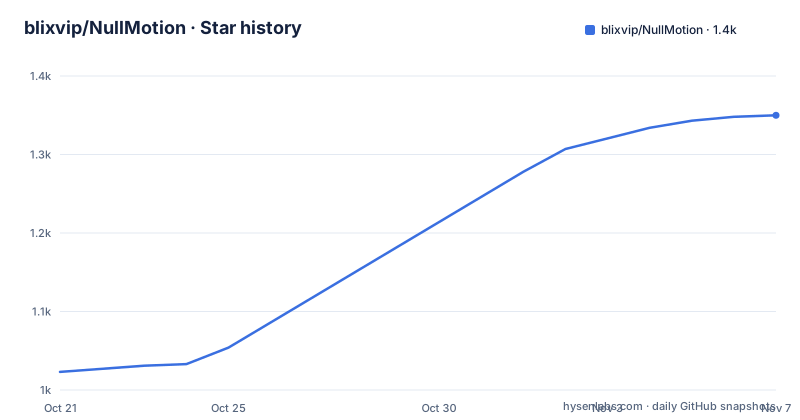
Star history
- blixvip/NullMotion1,350 ★ · +327
| Repository | 2026-10-21 | 2026-11-07 |
|---|---|---|
| blixvip/NullMotion | 1k | 1.4k |
327 Stars in the last 17 days, measured from the daily GitHub snapshot. Compare with other projects
Editorial analysis
A study tool for motion work, not another editor
The idea is narrow and clear. A motion graphics advert looks polished in its finished form, but it began as a rough plan of which idea belongs in which section and when each move lands. Null Motion shows that plan and the finished film at the same time, so the finished ad plays full width on top and the rough drafts run underneath, one per section. Each draft is deliberately plain: black and white, Arial type, flat shapes, a single simple move, built as a HyperFrames scene. The purpose is to make the idea visible before the polish, whether the reader is studying how a good advert was assembled, pitching a concept to a client, or simply understanding what moved when. It is a viewer and a study aid rather than a timeline editor, and the README is explicit that it is a separate thing from the hosted product of the same name.
The three references that ship with it
The repository includes three finished clips with their drafts already written, so the tool works on the first run with nothing to import. Infinite is a thirty second global payments advert with seven drafts. SaaS is a one minute two second launch sequence with eight drafts. Motion study 08 is three seconds long with three drafts, and it is the shortest one, which makes it the fastest way to see the whole idea in motion. The README is careful about provenance, stating that these clips come from other creators and are used as examples, and that they are not claims of commissioned work. That line matters for anyone who plans to point a client at one of the references, because the footage in the tool is not the tool maker's own advertising output, and the same note applies to the drafts, which are reconstructions of the sections rather than the original source files.
How sections and drafts are produced
The pipeline is a two stage script. The first stage, scripts/plan-sections.mjs, splits a reference into three to eight sections at real scene changes, using FFmpeg scene detection, and it keeps every cut in the film, so the boundary between two drafts lands on the moment the edit cuts rather than on an approximation. The second stage is the draft engine in public/drafts.mjs, a small HyperFrames implementation where each draft is a 640 by 360 HTML scene on a paused GSAP timeline. A section is described by one or two beats, and the beat vocabulary includes text, logo, phone, window, input, chat, cards, list, chart and cloud. Each beat is written to match the layout, the text and the timing of the real frame it stands in for, which is the whole reason the drafts read as the same advert in black and white rather than as a placeholder. The descriptions live in a drafts file per reference.
Playback driven by the film clock
The synchronisation is simpler than it sounds, and the reason it holds is that the film is the clock. The page drives every draft timeline from the clock of the playing film rather than from a shared timer, so a draft cannot drift away from the picture it is explaining. The section currently on screen follows the film frame for frame and is marked with an orange outline, while the other drafts keep looping their own part in the background, which gives the viewer the sense of a studio floor where every scene is running at once. A playhead runs across the drafts to tie the lower strip to the upper one. None of this is recorded or pre-rendered, so the same page works for any reference that has been imported.
How the MP4 export works
The export is the technically interesting part, and the README describes it in four steps. A hidden copy of the film plays at half speed in the background, so the machine has time to keep up. The requestVideoFrameCallback API captures every decoded frame as it appears, and the drafts are then drawn at that exact frame time rather than at the current wall clock. WebCodecs encodes the result at 24 Mbps, stamping each frame with its own timestamp, the audio is copied straight from the reference, and the mp4-muxer library writes the final MP4. The output is 1920 wide with the film audio, and because the process is not a screen recording in real time, no frames are dropped even though the source plays at half speed. The cost is the browser requirement, since WebCodecs and requestVideoFrameCallback mean the export path needs Chrome or Edge.
Running it, and bringing your own footage
The quick start is short because there is nothing to install. The repository is cloned and started, and the page is served on a local port:
git clone https://github.com/blixvip/NullMotion.git && cd NullMotion
npm start                # Node 22+, nothing to install
There is no npm install step, no API key and no account, and the server is a single Node file started through the start script, with a dev script that watches it. To use your own material instead of the shipped references, three extra tools are needed, Python 3 for the importer, and FFmpeg and ffprobe for the media work:
python scripts/import-motionclone.py --source /path/to/MotionClone
node scripts/plan-sections.mjs      # sections + scene cuts + contact sheets
The imported media is written to local directories that Git ignores, and it takes precedence over the shipped references. You then describe the beats of each section in the drafts file, and a section you have not described gets a placeholder draft until you write it. A build script rebuilds the shipped references from the local library.
What this repository is not
Several expectations have to be adjusted, and the README is clear about the main one. This is the free local launch film preview. Pause cuts, captions, and clips cut for YouTube, Twitch and Kick are features of Null Studio, a separate hosted product, and that code is not in this repository, so anyone expecting a browser based clipping tool will not find one here. The tool also has no dependency footprint to speak of, which means the only runtime requirement is Node 22 or newer, but that is a hard floor rather than a preference. The drafts are reconstructions, so for an imported film the quality of the lower strip depends entirely on how much time someone spends describing beats. And the reference material is other people's work, which the README states plainly, so it demonstrates the tool rather than vouching for the adverts.
Licence, releases and the shape of the project
The project is new and small. The releases are v1.0.0 on 2026-10-04, described as the version that went from rough drafts to a finished ad, and v1.0.1 on 2026-10-06, a faster first screen, with the last push on 2026-10-08. The package manifest names the package null, marks it private and sets the engine requirement to Node 22, and the scripts are the ones the README uses, including a test script that runs the Node test runner, a check script, a waveform build and the reference build. The tree also holds a third party notices file, which is the right place to look for the terms covering the bundled libraries such as GSAP and the muxer, and an agents file, a contributing guide and a tests directory. The repository has no licence file, and that is the one legal detail a team should settle before it copies code out of it.
Editorial conclusion
Null Motion fits a motion designer or student who wants to show how an advert was assembled, a creative team pitching a structure rather than a finished file, and anyone who wants a frame-accurate record of a timeline they already understand. It does not fit a team that needs the editing features of a hosted product, since pause cuts, captions and social clips belong to Null Studio and are not in this code, and it does not fit anyone who intends to redistribute the reference clips, which belong to other creators. Before depending on it, note that the repository carries no licence file, so the terms for reuse are unstated, and check that your browser is Chrome or Edge if the MP4 export matters to you.
Frequently asked questions
How do I run Null Motion locally?
Clone the repository and run npm start, which needs Node 22 or newer and installs nothing, then open http://127.0.0.1:4343 and pick a reference. There is no npm install step, no API key and no account.
Which browser do I need for the MP4 export?
Chrome or Edge, because the export relies on WebCodecs and requestVideoFrameCallback. Playback of the film and the drafts works in any modern browser.
How does the export produce a frame-accurate video?
A hidden copy of the film plays at half speed, requestVideoFrameCallback captures each decoded frame, the drafts are drawn at that frame exact time, WebCodecs encodes at 24 Mbps using the frame timestamp, the audio is copied from the reference and mp4-muxer writes the file.
Can I use my own reference videos instead of the shipped references?
Yes, with Python 3, FFmpeg and ffprobe. Run the importer script against your material and then the section planning script, describe the beats of each section in the drafts file, and the imported material takes precedence over the shipped references.
Is Null Motion the same product as Null Studio?
No. This repository is the free local launch film preview. Pause cuts, captions and social platform clips are features of the separate hosted Null Studio product and are not in this code.
Which licence applies to Null Motion?
The repository has no licence file, so the terms for reuse are not stated in the project. A third party notices file covers the bundled libraries, and the reference clips belong to other creators.
Official sources
Add this badge to your README
If you maintain this project, the badge below links readers to this analysis and shows its maintenance status from the daily GitHub snapshot. Paste the markdown into your README; add ?metric=license or ?metric=stars to the image URL for a different field.

[](https://hysenlabs.com/projects/blixvip-nullmotion)Star history chart for your README
[](https://hysenlabs.com/projects/blixvip-nullmotion)Was this useful?