PowerCalc turns a brightness value into a wattage, which is an estimate and not a measurement
Home Assistant Custom component to calculate estimated power consumption of lights and other appliances
At a glance
- What is it?
- PowerCalc is a Home Assistant custom component that creates virtual power sensors for devices that cannot report their own consumption, using device profiles and modelling inputs like brightness or fan speed. It is a default-integration HACS component, it requires Python 3.14.2 or later, and the accuracy claim rests entirely on the profile library.
- Who is it for?
- Adopt PowerCalc if you want whole-home energy visibility and would otherwise need a smart plug on every lamp, since cost sensors, utility meters and group sensors are built on top of the estimates for free. Do not adopt it as a billing or compliance instrument, because the component computes power from models rather than sampling it, so a wrong profile produces a confidently wrong number rather than an obviously wrong one.
- Can I use it commercially?
- Yes. MIT is a permissive licence: you can use, modify and sell software built on it, as long as you keep its copyright and licence notices.
- Is it still maintained?
- Yes. The repository received new commits within the last day.
- What is it written in?
- Mainly Python, according to GitHub's language statistics.
Answers come from the project's GitHub data, last synced on October 23, 2026, and from our analysis. They are not legal advice.
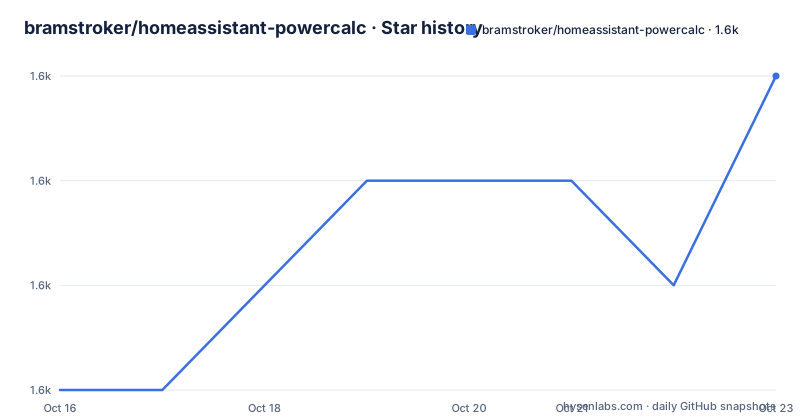
Star history
- bramstroker/homeassistant-powercalc1,615 ★ · +3
| Repository | 2026-10-16 | 2026-10-23 |
|---|---|---|
| bramstroker/homeassistant-powercalc | 1.6k | 1.6k |
3 Stars in the last 7 days, measured from the daily GitHub snapshot. Compare with other projects
Editorial analysis
It estimates, and the README says so four different ways
The README's framing is careful in a way most project READMEs are not. Instead of claiming to measure power, it says PowerCalc estimates energy consumption for devices that can't measure it themselves, and instead of measuring power directly, it accurately estimates consumption using smart models based on real measurements.
The claim of accuracy is not self-supporting, and the project knows it. That is why two of the README's links are about evidence rather than features: a Device Profile Library at https://library.powercalc.nl where you can look up a specific device, and a page inviting you to share measurements so the models improve. The accuracy of any individual sensor reduces to whether the profile for your device is right, which is a per-device question with a per-device answer.
The subject scope is what you would expect: lights, fans and media players. Nothing here applies to your electric vehicle charger or your heat pump, both of which measure their own consumption and would be better served by a real meter.
The README also states the payoff plainly in hardware terms: no smart plug required, and the stated motivation is not needing to buy smart plugs for every device. That is a cost argument as much as a technical one, and it is the reason most people arrive at this component.
Virtual sensors, and the four layers built on top of them
The mechanism is that PowerCalc creates virtual power sensors in Home Assistant. Nothing is measured; the sensor exists in software and carries a value derived from whatever inputs the device exposes.
The inputs are device-specific, and the README gives the mapping. Lights get power based on brightness, color and temperature. Fans get power based on speed. Other devices use configurable strategies or measured profiles.
That last category is where the design gets interesting. "Measured profile" means somebody ran a real measurement against that device and contributed the curve. "Configurable strategies" means you can define how power is derived yourself, for a device with no profile. Between those two you have coverage of most household appliances, but with different confidence levels, and nothing in the sensor tells you which one you got.
Four layers are built on the power sensors. Cost sensors track spending, which needs a tariff from your utility. Utility meters break usage down by day, week or month. Group sensors combine devices, rooms or the whole home into a single total. And on top of the estimates the README notes you get realistic energy data without physically measuring every device.
The group and utility meter layers are what make this more than a per-device curiosity: they are what lets you combine whole-home usage without wiring anything.
Python 3.14.2 is a hard gate, and it is unusual
The packaging metadata is where the practical constraints show, and the first one is a surprise for a Home Assistant component:
requires-python = ">=3.14.2,<4.0"
dependencies = ["homeassistant"]
Python 3.14.2 is a recent patch of a recent minor release, and it is stated as the floor rather than merely what the developer happens to run. Home Assistant versions ship their own Python floor, so whether you can install this component is decided by your Home Assistant release's embedded Python, not by your OS. That is the first thing to verify, before reading anything else about profiles.
Two other details in that file are worth noting. The project name in pyproject.toml is `PowerCalc` with a version of `0.1.0`, which is a placeholder-style value rather than a release number; the real releases are v1.25.5, v1.26.0 and a `dev` build, so the manifest version is not the version you install. And `homeassistant` is an unpinned dependency, so resolution is whatever the target Home Assistant environment provides.
The classifier list is short: intended audience of end users on desktop and developers, OS independent, and Python 3.14. That is a component written for the current generation of Home Assistant rather than a legacy one.
HACS distribution, a separate profile library, and Crowdin
Installation is documented through HACS and the Quick Start guide. The README carries a HACS-Default badge, which marks the component as one HACS offers in its default category, and links an install counter served from an external endpoint. There is a `hacs.json` at the repository root, the file HACS reads to know what this repository is and where to fetch it from.
The project is not packaged on PyPI. `custom_components/` at the top level is where the Home Assistant integration lives, which is the required directory name for anything loaded as a custom component, and Nothing in the README documents a manual copy procedure, so if you are not using HACS you are on your own.
The device profiles are a separate concern from the component, and they have their own website at https://library.powercalc.nl. That separation is architecturally significant: a profile is a curve for one device, and the library is where those profiles accumulate. Contributing a profile and contributing to the component are different activities, and the README lists both, pointing at CONTRIBUTING.md for the former and a share-measurements page for the latter.
The repository includes `crowdin.yml`, and the documentation is hosted at https://docs.powercalc.nl with a `docs/` directory in the repository. The Quick Start guide at https://docs.powercalc.nl/quick-start/ is the practical entry point, since the README carries no installation commands at all.
The test and lint setup is unusually heavy for a custom component
The tooling configuration suggests a project that treats correctness seriously, which is fair given the component makes numeric claims.
Pytest is configured with two test paths, `tests` and `utils/library/tests`, which confirms the profile library tooling is tested alongside the component. `asyncio_mode` is set to `auto`, the standard way to write async Home Assistant tests without decorating every test, and the fixture loop scope is pinned to `function`. There is a custom marker, `skip_remote_loader_mocking`, documented in-line as meaning do not mock the globally registered remote loader mock, which is the kind of marker you only need if you know exactly what breaks when it is mocked.
Two linters are configured for two audiences. Ruff handles import ordering with `custom_components` and `powercalc` declared as first-party and `homeassistant` as third-party. Mypy runs in strict mode with `python_version = "3.14"`, error codes shown, silent follow-imports, and warnings for incomplete stubs, unused configs and unreachable code. `local_partial_types` is enabled but commented as not covered by strict, which is a small sign the author has read the mypy documentation closely.
There is a third tool, `ty`, configured in a `[tool.ty]` block with an extra path for the release-draft scripts under `.github/scripts/release_draft` and an exclusion for test directories, with the inline comments explaining that tests are exercised by pytest rather than the type checker. Running two type checkers on a codebase of this size is unusual and is a reasonable signal about the project's standards.
Other infrastructure at the top level includes `.devcontainer/`, `AGENTS.md`, `.agents/`, `.claude/`, `renovate.json`, `uv.lock` and `SECURITY.md`. `uv.lock` alongside `renovate.json` means dependencies are both locked and automatically updated, which is how a custom component survives Home Assistant's fast release cadence.
Where it is the wrong tool
The honest limitation is the one in the first section, stated plainly. A smart plug measures. This component computes. If your meter reading and the PowerCalc sensor disagree, and the profile is wrong, the sensor is wrong in a direction that will not announce itself. For a household energy dashboard that is acceptable; for splitting an electricity bill between tenants, or for anything regulated, it is not.
Second, coverage is per device and per library. If your specific fixture is not in the library and nobody has contributed a profile, you are writing a strategy yourself from measurements you take. That work is real, and the README's share-measurements page exists precisely because it is rare.
Third, the Python floor. If your Home Assistant release runs on anything older than Python 3.14.2, this component will not install, and there is no older branch offered in the README as an alternative.
Fourth, scope. This is a custom component, which means it runs with the elevated trust Home Assistant gives custom integrations, outside the review that core integrations receive. That is worth weighing when you decide which non-core code runs in your home automation instance.
What it is genuinely good at is the boring middle of the market: a household with many lamps and measured appliances, where buying thirty smart plugs is not going to happen.
Editorial conclusion
Adopt PowerCalc if you want whole-home energy visibility and would otherwise need a smart plug on every lamp, since cost sensors, utility meters and group sensors are built on top of the estimates for free. Do not adopt it as a billing or compliance instrument, because the component computes power from models rather than sampling it, so a wrong profile produces a confidently wrong number rather than an obviously wrong one. Before enabling it on a device you care about, find that device's profile in the library at https://library.powercalc.nl and check its measurement source, and confirm your Home Assistant instance can run Python 3.14.2 or later, which is what `requires-python = ">=3.14.2,<4.0"` demands.
Frequently asked questions
How accurate are PowerCalc's power estimates?
They are estimates computed from device profiles and modelling inputs such as brightness, color, temperature or fan speed, not measurements. The README describes the models as based on real measurements, so accuracy depends on whether the profile for your specific device exists and is correct. The library is at https://library.powercalc.nl.
How do I install PowerCalc in Home Assistant?
The README carries a HACS-Default badge and links to the Quick Start guide at https://docs.powercalc.nl/quick-start/, with a `hacs.json` at the repository root. It is distributed through HACS as a custom component rather than from PyPI.
What Python version does PowerCalc require?
pyproject.toml sets `requires-python = ">=3.14.2,<4.0"` and the classifiers list Python 3.14. Since the component runs inside Home Assistant, whether it installs depends on the Python version embedded in your Home Assistant release.
What sensors does PowerCalc create?
Virtual power sensors based on device inputs such as brightness, color, temperature or fan speed. On top of those it creates cost sensors for spending, utility meters broken down by day, week or month, and group sensors combining devices, rooms or a whole home.
Can PowerCalc work for a device with no profile?
Yes, using configurable strategies rather than a measured profile, though the README presents measured profiles as the more accurate route. You can also measure the device yourself and share the measurements at the project's contribution page.
Official sources
Add this badge to your README
If you maintain this project, the badge below links readers to this analysis and shows its maintenance status from the daily GitHub snapshot. Paste the markdown into your README; add ?metric=license or ?metric=stars to the image URL for a different field.

[](https://hysenlabs.com/projects/bramstroker-homeassistant-powercalc)Star history chart for your README
[](https://hysenlabs.com/projects/bramstroker-homeassistant-powercalc)Was this useful?