winlibs_mingw: Windows GCC and MinGW-w64 distribution
winlibs standalone build of GCC compiler and MinGW-w64
At a glance
- What is it?
- winlibs_mingw combines GCC, MinGW-w64, and supporting build tools into downloadable Windows compiler distributions. It suits developers who want a Windows-native C and C++ toolchain but need to choose the architecture, threading model, and C runtime themselves.
- Who is it for?
- Adopt winlibs_mingw when you need a downloadable GCC and MinGW-w64 environment for Windows and can select the correct architecture, threading model, and runtime. Do not adopt it from the README alone if you need documented installation procedures, licensed terms, IDE integration instructions, or a known library set.
- Can I use it commercially?
- Not without permission. GitHub finds no licence file in the repository, and without a licence all rights are reserved by default: you may read the code but not reuse it. Check the README, or ask the authors, before using it.
- Is it still maintained?
- Yes. The repository last received commits 6 days ago.
- What is it written in?
- GitHub does not report a main language for this repository.
Answers come from the project's GitHub data, last synced on October 24, 2026, and from our analysis. They are not legal advice.
Star history
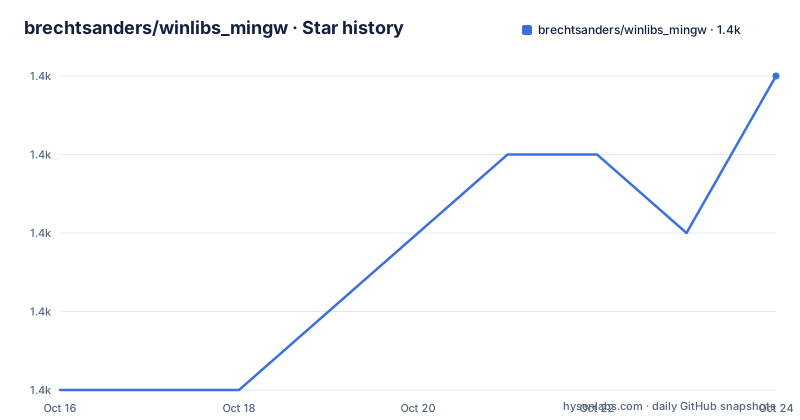
- brechtsanders/winlibs_mingw1,369 ★ · +4
| Repository | 2026-10-16 | 2026-10-24 |
|---|---|---|
| brechtsanders/winlibs_mingw | 1.4k | 1.4k |
4 Stars in the last 8 days, measured from the daily GitHub snapshot. Compare with other projects
Editorial analysis
What winlibs_mingw gives Windows C and C++ developers
winlibs_mingw packages GCC and MinGW-w64 into a standalone Windows development environment. GCC supplies the C and C++ compiler, while MinGW-w64 targets Windows on Intel 32-bit and Intel 64-bit platforms. The combined result is a compiler toolchain for producing Windows software without requiring the two components to be assembled separately.
The distribution is aimed at developers who already work with C or C++, particularly those building for Windows from command-line tools or compatible IDEs. It also states a broader goal of supporting use from the MSYS 2 shell and IDEs such as Code::Blocks. That goal should not be read as a detailed compatibility guarantee, because the README does not provide tested IDE configuration instructions.
Beyond the core compiler, the builds include GDB, GNU Binutils, GNU Make, Yasm, NASM, JWasm, CMake, ninja, ccache, and Doxygen. This makes the archive broader than a bare compiler download. It provides components commonly involved in compiling, assembling, debugging, generating documentation, and automating a C or C++ project. The exact command-line layout and whether every component is exposed through the same launcher are not documented in the README.
Architecture and runtime choices in the release packages
The repository publishes separate i686 and x86_64 downloads. The README defines i686 as an Intel 32-bit build that runs natively on 32-bit Windows and can also run on 64-bit Windows. The x86_64 build is the Intel 64-bit version that runs natively on Windows 64-bit. The README also states that the i686 download compiles for Windows 32-bit.
The release names expose another selection point: runtime and threading variants. Examples include `16.2.0posix-14.0.0-ucrt-r2`, which combines GCC 16.2.0 with POSIX threads and MinGW-w64 14.0.0 using UCRT, and `16.2.0posix-14.0.0-msvcrt-r2`, which uses the MSVCRT variant. Releases also exist as UCRT or MSVCRT `-r1` revisions. The README does not explain the compatibility implications of choosing one runtime over another, or why a consumer should prefer one revision over another.
That missing guidance matters. A compiler archive is not interchangeable with every existing Windows project. Runtime behavior, binary compatibility, library selection, and third-party dependencies can constrain the choice. The available names identify meaningful variants, but engineers still need to consult the documentation for the libraries and operating-system APIs used by their project before choosing.
Downloading and first use without undocumented assumptions
The project provides binary downloads for Windows and states that each build is compiled with itself. The repository README does not include installation steps, archive names, directory layout, executable paths, environment-variable setup, or a first compilation command. For that reason, this tutorial stops at the boundary of documented information rather than presenting an invented command.
Begin by choosing either the i686 or x86_64 download according to the target architecture. Then inspect the release label for its GCC version, MinGW-w64 version, threading model, runtime choice, and revision. The available 16.2.0 packages identify POSIX threads and either UCRT or MSVCRT. After downloading the matching Windows archive, consult the extraction or launcher documentation supplied by the release before attempting to invoke `gcc`, `g++`, `gdb`, or `make`. The README confirms the presence of GCC and the listed tools, but it does not say where their executables appear inside the archive.
A first real use would involve compiling a C or C++ source file for the selected Windows target and inspecting the resulting output. However, no exact executable path or compiler invocation is documented, so supplying a command such as `gcc main.c` would risk pointing the compiler at the wrong binary or environment. Engineers should treat the release contents as authoritative and avoid assuming that a system PATH has been configured by extracting the archive.
Self-hosted compiler builds and project automation tools
The README states that each build is built with itself. It further notes that optimizations introduced in newer GCC versions are also compiled into the compiler itself. This describes the build arrangement, but it does not provide build recipes, optimization flags, compiler settings, or evidence for performance comparisons. It should not be converted into a general claim that the resulting programs will always execute faster.
The bundled tool set has a more immediate architectural effect. GDB provides the GNU debugger. GNU Binutils supplies binary utilities, while GNU Make handles command execution through makefiles. Yasm, NASM, and JWasm cover assembler use cases. CMake and ninja support build-system generation and execution, ccache can retain compiler results for reuse, and Doxygen supports documentation generation. The README does not give their versions or describe default path initialization.
This grouping makes the distribution plausible for a self-contained Windows build environment. It also creates responsibility on the user. A project may expect a particular make implementation, generator, debugger integration, or assembler syntax. The inclusion of a tool confirms that the build was designed to include it, but it does not establish compatibility with every project configuration.
Where winlibs_mingw documentation falls short
The clearest limitation is missing operational documentation. The README does not provide installation instructions, extraction guidance, executable locations, PATH changes, compiler examples, runtime-selection advice, or troubleshooting steps. It also does not document rollback or migration between releases. An engineer cannot determine from this text alone how to move an existing project from one package to another.
The library story is also incomplete. The project states a goal of eventually providing libraries built with its compiler, including static and shared forms where possible, production-oriented binaries, stripped debugging information, and use from MSYS 2 or Code::Blocks. Those are stated goals, not a documented inventory of libraries. There is no list of available headers, import libraries, package managers, dependency versions, or deployment rules in the repository description.
Licensing is another unresolved adoption constraint. The repository description reports no license identifier. Although GCC and MinGW-w64 are identified as free and open source in the README, that statement does not establish the licensing status of every bundled tool, binary, library, or generated artifact. Users who need a redistributable package for internal distribution or commercial release must verify the applicable terms from the actual release files before packaging it.
winlibs_mingw compared with the project's LLVM builds
The repository also publishes LLVM releases containing Clang, LLD, and LLDB. According to the README, these LLVM builds are built with GCC and linked again against GCC's standard libraries. That gives them a different toolchain focus from the GCC-oriented winlibs_mingw packages, which combine the GCC compiler and MinGW-w64.
The practical distinction is the compiler and associated tooling: the GCC package centers on GCC, while the LLVM package centers on Clang, LLD, and LLDB. The repository description does not supply build commands, performance measurements, platform support tables, or compatibility results for either family. It therefore does not support a broad claim that one is faster or more reliable. Existing build scripts and standard-library requirements should determine which documented toolchain matches the project, although those requirements must be checked outside this README.
A standalone compiler package is also different from a full SDK installer or package manager. This project emphasizes downloadable Windows builds, but it does not document dependency resolution, system registration, or automated updates. Users who require those workflows would need additional evidence before treating the archive as a complete platform toolchain.
Maintenance signals and upgrade responsibility
The repository is not archived. Its last push was on 2026-09-29, and recent releases include GCC 16.2.0 with MinGW-w64 14.0.0 in UCRT and MSVCRT variants. These dates show recent release activity in the repository metadata. They do not establish a release schedule, long-term support policy, or backward-compatibility promise.
Upgrading may change the compiler, MinGW-w64 runtime, revision, and bundled tool versions together. The README does not document migration notes, ABI guarantees, rollback steps, or the procedure for comparing old and new binaries. Projects with native dependencies should therefore treat a release change as a controlled migration rather than an automatic replacement.
The repository layout contains only `README.md`, so build scripts and packaging definitions are not available for technical review. There is also no confirmed license metadata. Both gaps are relevant to upgrade planning: the visible documentation cannot establish how packages are produced, and it cannot settle licensing questions for a specific archive.
Editorial conclusion
Adopt winlibs_mingw when you need a downloadable GCC and MinGW-w64 environment for Windows and can select the correct architecture, threading model, and runtime. Do not adopt it from the README alone if you need documented installation procedures, licensed terms, IDE integration instructions, or a known library set. Before downloading, verify the archive architecture, runtime variant, package contents, and licensing for your intended use.
Frequently asked questions
What does brechtsanders/winlibs_mingw include?
It is a standalone Windows build of GCC and MinGW-w64. The builds also include GDB, GNU Binutils, GNU Make, Yasm, NASM, JWasm, CMake, ninja, ccache, and Doxygen.
Which Windows architecture should I download from winlibs_mingw?
The i686 download is the Intel 32-bit version and can run on 64-bit Windows, while x86_64 is the Intel 64-bit version for Windows 64-bit. Choose according to the runtime platform and target you need.
Does the winlibs_mingw README document installation and compiler commands?
No. It provides Windows binary downloads but does not document archive names, executable paths, PATH setup, installation steps, or a first compilation command.
Official sources
Add this badge to your README
If you maintain this project, the badge below links readers to this analysis and shows its maintenance status from the daily GitHub snapshot. Paste the markdown into your README; add ?metric=license or ?metric=stars to the image URL for a different field.

[](https://hysenlabs.com/projects/brechtsanders-winlibs-mingw)Star history chart for your README
[](https://hysenlabs.com/projects/brechtsanders-winlibs-mingw)Was this useful?