Bytenode: compiling Node.js source to V8 bytecode with .jsc files
A minimalist bytecode compiler for Node.js
At a glance
- What is it?
- Bytenode turns JavaScript files into V8 bytecode so the source is not shipped in plain form. It is a small CLI plus a programmatic API, and its real cost is a set of context-matching rules for Electron that are easy to get wrong.
- Who is it for?
- Adopt Bytenode when you ship a Node.js or Electron application to end users and want the source out of the delivered files, and accept that the protection is obfuscation-grade rather than cryptographic. Do not adopt it for server-side code you control, for libraries published to npm, or for any module that reads Function.prototype.toString, uses arrow functions under Electron, or needs a stack trace that names real source lines.
- Can I use it commercially?
- Yes. MIT is a permissive licence: you can use, modify and sell software built on it, as long as you keep its copyright and licence notices.
- Is it still maintained?
- Yes. The repository last received commits 21 days ago.
- What is it written in?
- Mainly JavaScript, according to GitHub's language statistics.
Answers come from the project's GitHub data, last synced on November 15, 2026, and from our analysis. They are not legal advice.
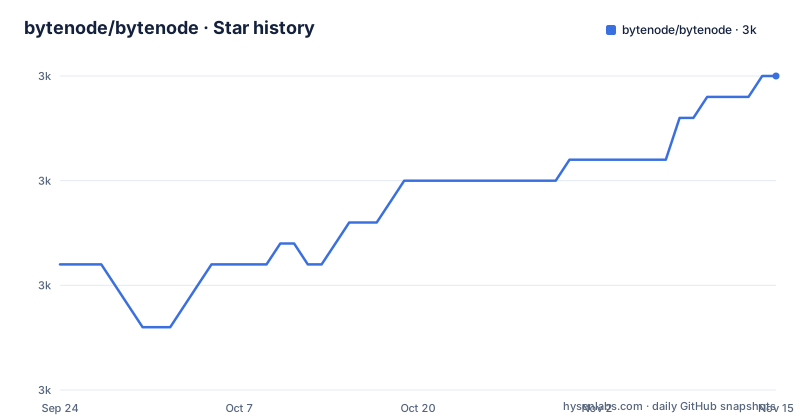
Star history
- bytenode/bytenode2,985 ★ · +9
| Repository | 2026-09-24 | 2026-11-15 |
|---|---|---|
| bytenode/bytenode | 3k | 3k |
9 Stars in the last 52 days, measured from the daily GitHub snapshot. Compare with other projects
Editorial analysis
What Bytenode actually protects, and who needs that
Bytenode compiles JavaScript into V8 bytecode. The README states it plainly: the tool "truly compiles your JavaScript code into V8 bytecode, so that you can protect your source code." The output is a .jsc file, and the README notes that Bytenode removes the source code from those files and puts dummy code in its place.
The audience is narrow and specific. It is developers who ship a Node.js program to a machine they do not control: a desktop application built on Electron or NW.js, a licensed on-premise server, a CLI tool distributed as a binary. In those settings the JavaScript is readable by anyone with a text editor, and the goal is to raise the cost of copying it. Bytenode does not encrypt anything and does not authenticate the bytecode. Anyone who has the .jsc can run it. The protection is that the original source is not sitting in the file, not that the file is locked.
If your code runs on infrastructure you own, this tool solves a problem you do not have. The README's own framing is source-code protection, and that is the only reason to accept the constraints that follow.
The compiler mechanism: CLI, .jsc files and loader files
The repository layout is small: lib/ holds the implementation, lib/cli.js is the bin entry declared in package.json, lib/index.js is the main module, and lib/index.d.ts provides types. There is a benchmark/ directory, a test/ directory running under mocha, and examples/ with four subdirectories: electron-hello-world, express-hello-world, no-module-flag and nwjs-hello-world.
The CLI compiles one file, several files, or a glob into .jsc siblings. It can also emit a loader file next to each result, with the loader filename controlled by a % replacer that stands in for the original name. The loader type is selectable as commonjs or module, and the README says the default is CommonJS. There is a --no-module flag for compiling without producing a CommonJS module, and its example directory exists precisely to show that path.
The API side exposes compileCode, which takes a JavaScript string and returns a Buffer of V8 bytecode. The README documents compileFile, compileElectronCode, compileElectronMainCode and compileElectronRendererCode as the file-level entry points. The Electron variants are not conveniences. They exist because bytecode is only valid in the V8 context whose snapshot produced it, a point the README makes at length.
Installing Bytenode and compiling a first file
The README gives two install paths: as a project dependency with --save, or globally with sudo. Version 1.7.0 is the current package.json version, and the package ships only the lib directory.
npm install --save bytenodeWith the package installed, the CLI compiles a file into a .jsc next to it. The README's example compiles express-server.js and then runs the result, which prints a listening message.
bytenode --compile express-server.js
bytenode express-server.jsc
Bytenode can also read from stdin. The README pipes a one-line script into the compiler with a dash as the input and redirects stdout to a file.
shopt -s globstar
echo 'console.log("Hello");' | bytenode --compile - > hello.jsc
The shopt line is from the README's note that compiling a whole project with ./**/*.js needs the bash globstar option enabled. Without it the shell expands nothing useful and the compiler receives the literal pattern. For a programmatic build, the README's API section shows requiring the module and calling compileCode, which takes the JavaScript source as a string and returns a Buffer you write to disk yourself.
Where Bytenode breaks: Function.prototype.toString and arrow functions
The README's known issues list is the most useful page of documentation in the repository, because it names the failure modes rather than hiding them. The first is that any code depending on Function.prototype.toString will break, since the source is replaced with a dummy. That is not a rare pattern. Frameworks that inspect function bodies, dependency injection containers that read parameter names, and template engines that compile functions from strings all touch it. The README points to issue #163 for a workaround rather than shipping one.
The second is arrow functions. The README states that async arrow functions, and arrow functions generally, cause crashes in Puppeteer and in Electron apps, and cause issues with the ndb debugger. The explanation offered is that V8 inspects them internally with Function.prototype.toString whenever there is a context change, including a call from another file or module. Issue #157 is cited for that. This is a real constraint on style: a codebase written in modern JavaScript is full of arrow functions, and rewriting them to function expressions to satisfy a packaging tool is a cost that belongs in the decision, not in a footnote.
The third is Node 10.x, where Bytenode does not work in debug mode (issue #29). That version is old, but it tells you the project's compatibility surface is tied to V8 internals that move.
Electron 42 and later: bytecode must be compiled in the process that loads it
This is where Bytenode stops being a one-command tool. The README documents that Electron 42 and later, with V8 14.8 and above, crash the main process with SIGTRAP when bytecode is compiled via ELECTRON_RUN_AS_NODE. The mechanism given is specific: V8's serialized bytecode header carries a read-only snapshot checksum at header offset 16, and the Electron main process boots V8 from Chromium's v8_context_snapshot, whose read-only heap differs from the Node default snapshot. A .jsc produced by compileElectronCode therefore carries a checksum that does not match, and from V8 14.8 the mismatch aborts instead of being rejected gracefully.
The fix is to compile in the same process type that will load the file, using compileElectronMainCode or compileFile with electronMain: true. Then Electron 43.5.1 adds a second split: preload scripts and renderer pages need electronRenderer: true, because the renderer has its own read-only snapshot that no longer matches the Node one. Bytecode compiled with electron: true or electronMain: true is rejected there with "Invalid or incompatible cached data (cachedDataRejected)", which in a page can surface as compiledWrapper.apply is not a function. The README's table lays out the mapping: main and worker_threads want electronMain, utilityProcess accepts electron or electronMain, and preload and renderer pages need electronRenderer only from 43.5.1 onward.
The consequence is that renderer bytecode is renderer-only. It is rejected in the main process and in worker threads, so each file must be compiled for the context that loads it. A build pipeline that compiled everything once now needs to know where every file runs, and a file loaded in two contexts needs two artifacts.
Alternatives: what a packager or a native addon does differently
The nearest alternative in practice is a bundler plus a minifier, and the difference is categorical. Minification renames identifiers and strips whitespace but the result is still JavaScript that a formatter and a reader can recover. Bytenode does not transform the source; it hands it to V8 and stores the serialized result, so there is no equivalent source to reformat. That is a stronger barrier, and it is why the .jsc file is not portable across V8 contexts while a minified bundle is.
A second alternative is to move the sensitive logic into a native addon, compiled C++ loaded through Node's addon interface. That gives you machine code rather than bytecode and removes the snapshot-matching problem entirely, because a native binary does not care which V8 snapshot is in play. The cost is a build toolchain per platform and a rewrite of the logic in another language. Bytenode's trade is the reverse: no rewrite, no per-platform compilation of source, but a bytecode format tied to the runtime that produced it.
The README also points to a Bytenode Webpack Plugin, which is the pragmatic middle path for projects already bundling. It does not change the underlying constraints, but it moves compilation into the build step where the context decisions can be made once.
Licence, maintenance and what an upgrade costs
Bytenode is MIT licensed, declared in package.json and present as a LICENSE file at the repository root. MIT permits commercial use and redistribution; it also means the project offers no warranty, which matters when the tool's failure mode is a hard SIGTRAP in a shipped desktop application. Nothing in the licence obliges you to publish your .jsc files, and nothing in it protects them either.
The last push to the default branch was on 2026-09-19, and the repository is not archived. The package version is 1.7.0, and the repository has no published releases, so version history has to be read from the repository rather than a release feed. The devDependencies pin electron at ^41.0.0 and mocha at ^11.1.0, while the README documents behaviour up to Electron 44.4.3 in its compatibility table. That gap is worth noticing: the documented support range is ahead of the version the test dependency targets.
Upgrade cost is the real ongoing expense. Each Electron major can move the read-only snapshot, and the README shows this happened at 42 and again at 43.5.1. A Node.js major can do the same. Upgrading the runtime therefore means recompiling every .jsc and re-verifying which context each file loads in. Budget for that as a recurring task tied to your Electron or Node upgrade cycle, not as a one-time build change.
Editorial conclusion
Adopt Bytenode when you ship a Node.js or Electron application to end users and want the source out of the delivered files, and accept that the protection is obfuscation-grade rather than cryptographic. Do not adopt it for server-side code you control, for libraries published to npm, or for any module that reads Function.prototype.toString, uses arrow functions under Electron, or needs a stack trace that names real source lines. Before committing, verify three things on your own build: that bytenode --compile output loads under your exact Node or Electron version, that Electron 43.5.1 and later preload scripts are compiled with electronRenderer: true, and that a decompiler cannot recover what you consider sensitive.
Frequently asked questions
What does Bytenode do to my JavaScript source?
It compiles the JavaScript into V8 bytecode and writes a .jsc file. The README states that Bytenode removes the source code from those files and puts dummy code in its place.
Can Bytenode compile a whole project at once?
Yes. The README shows bytenode --compile ./**/*.js and notes that you may need to enable the bash globstar option with shopt -s globstar for that pattern to expand.
Why does Bytenode bytecode fail in an Electron renderer?
The renderer has its own read-only snapshot, and from Electron 43.5.1 it no longer matches the Node snapshot. The README says to use compileElectronRendererCode or compileFile with electronRenderer: true, and that renderer bytecode is rejected in the main process and in worker threads.
Does Bytenode work with arrow functions?
The README lists arrow functions as a known issue. Async arrow functions and arrow functions generally cause crashes in Puppeteer and Electron apps because V8 inspects them internally with Function.prototype.toString when the context changes.
Which licence does Bytenode use?
MIT, declared in package.json and included as a LICENSE file at the repository root.
Official sources
Add this badge to your README
If you maintain this project, the badge below links readers to this analysis and shows its maintenance status from the daily GitHub snapshot. Paste the markdown into your README; add ?metric=license or ?metric=stars to the image URL for a different field.

[](https://hysenlabs.com/projects/bytenode-bytenode)Star history chart for your README
[](https://hysenlabs.com/projects/bytenode-bytenode)Was this useful?