GSYGithubAppKotlin is a GitHub client that exists to be read
Kotlin Android 超完整的开源项目,功能丰富,适合学习和日常使用。GSYGithubApp 系列的优势:我们目前已经拥有 Flutter、Weex、ReactNative、Kotlin View、Kotlin Jetpack Compose ,Compose MultiPlatform,Harmony ArkUI 七个版本,功能齐全,项目框架内技术涉及面广,完成度高,持续维护,配套文章,适合全面学习,对比参考。
At a glance
- What is it?
- GSYGithubAppKotlin is a native Android GitHub client built with Retrofit, RxJava2, Dagger2, DataBinding, LiveData and Navigation, and its author is explicit that its main purpose is to be a complete, readable Android sample. It has since been migrated from Realm to Room and from kapt to KSP2, and now offers a Personal Access Token login path.
- Who is it for?
- Adopt this project as a reference for how a large Android app is layered, or install it if you want a GitHub client on Android. Do not adopt it as production code for your own backend client, because a debug keystore, gsygithubapp-debug.jks, is committed and the login configuration expects your own GitHub App credentials in local.properties.
- Can I use it commercially?
- Yes. Apache-2.0 is a permissive licence: you can use, modify and sell software built on it, as long as you keep its copyright and licence notices.
- Is it still maintained?
- Yes. The repository last received commits 162 days ago.
- What is it written in?
- Mainly Kotlin, according to GitHub's language statistics.
Answers come from the project's GitHub data, last synced on November 7, 2026, and from our analysis. They are not legal advice.
Star history
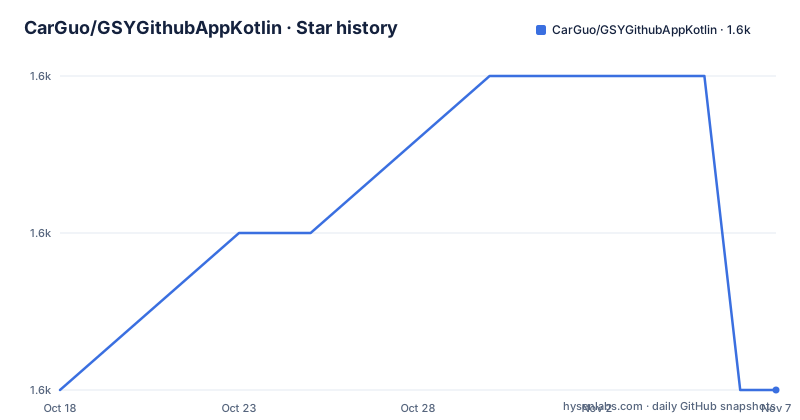
- CarGuo/GSYGithubAppKotlin1,596 ★ · +0
| Repository | 2026-10-18 | 2026-11-07 |
|---|---|---|
| CarGuo/GSYGithubAppKotlin | 1.6k | 1.6k |
0 Stars in the last 20 days, measured from the daily GitHub snapshot. Compare with other projects
Editorial analysis
Seven sibling apps with the same feature set
The repository description is written for a Chinese developer audience and makes the intent plain: this is a feature complete open source project suited to learning and daily use. What distinguishes it is the family around it.
The README links equivalents for Flutter, HarmonyOS ArkUI, Android Jetpack Compose, Compose Multiplatform, Weex and React Native, alongside this Kotlin View version, and the description counts seven in total. Each one is a separate repository with its own build, which makes the set a comparison exercise: you can see the same application in seven toolchains, and pick the one that matches the stack you are evaluating.
The stated advantage of the series is that the project touches a wide range of techniques at a high completion level, with accompanying articles. That is the real product here. The app itself is a GitHub client for daily account maintenance, and the archive is the lesson.
The stack is MVVM on Android Jetpack
The build line in the README names the libraries: Retrofit2 for the network layer, RxJava2 for asynchronous events, Dagger2 for dependency injection, DataBinding for the view layer, LiveData and ViewModel for data subscription, and Navigation for Jetpack navigation.
A few more sit alongside them in the third party table: aRouter for component routing, Glide for images, Room for the database, iconics for vector icons, markdownView with prism4j for rendering repository READMEs, materialDrawer, lottie for SVG animation and gson for JSON.
Two of those deserve a note because they are the parts of a GitHub client that are hardest to get right. Rendering a repository README inside an app is a markdown pipeline with syntax highlighting, and lazyRecyclerAdapter is a shared RecyclerView adapter binding that keeps list code out of the activities. If you are reading the project to learn list handling, that library is the piece to start with.
Building it needs local.properties with real GitHub credentials
The README highlights one requirement above the others: you must create a local.properties file in the project root and supply a GitHub client id and secret you have applied for.
ndk.dir="xxxxxxxx" CLIENT_ID = "xxxxxx" CLIENT_SECRET = "xxxxxx"
The ndk.dir line is there because the project uses CMake and NDK. To exercise that path you enable needCMakeTest in the Gradle configuration and set up a CMake environment, which the README links to a separate guide for.
The OAuth path also has a hard requirement created by GitHub's own change: the Authorization callback URL in your GitHub App registration must be gsygithubapp://authed. Get that wrong and the login simply never returns.
There is an alternative, and it is the easier one for trying the app. The login screen also offers a login by token path, where you paste a Personal Access Token generated on GitHub's settings page with repo, user and notifications scopes, and no client id or secret is needed at all.
The token login is stored in SharedPreferences and validated on entry
The token path is described in enough detail to be worth reading, because it shows how the author handled a credential that arrives by paste rather than through a redirect.
The login screen shows a dialog for pasting the token, with a suggested scope set of repo, user, notifications and gist. The field is masked by default with an eye icon on the right to reveal it, and a how to create a token link opens GitHub's settings page with the scopes preselected.
The flow then runs through LoginRepository.loginWithToken, writes into accessTokenStorage, and RetrofitFactory attaches the Authorization header for a GitHub GET /user call. If validation succeeds the app moves to MainActivity; if it fails, clearTokenStorage runs and the stored value is discarded. The README states the token is written only to local SharedPreferences on the device.
That is the weakest link in the whole design and the README does not claim otherwise: a pasted bearer token in plain SharedPreferences on a device is readable by anything with access to app storage. Fine for a sample app, not fine for a credential you would not paste into a web form.
Realm to Room and kapt to KSP2, one migration at a time
The architecture evolution section is the most useful thing in the README for anyone with a similar migration to do. The main line has completed three moves: Realm to Room for persistence, kapt to KSP2 for annotation processing, and AGP 8 to AGP 9.0.0-alpha14 for the build plugin, plus the new Personal Access Token entry point.
The repository ships a Mermaid diagram of that path, with commit references at each transition, and the diagram is a good summary of the shape of such a migration: change the persistence layer, change the annotation processor, change the build plugin, then verify the login path end to end, with the token verification against GET /user as the gate that proves the wiring works.
Migrating to an alpha build plugin is worth flagging on its own. AGP 9.0.0-alpha14 means the project compiles its samples against a pre-release of the Android toolchain, which is a reasonable choice for a sample but not something to copy into a production build configuration.
A deliberate warning against putting mirrors in settings.gradle
For developers in China, the README gives unusually specific advice, and the reasoning is the interesting part rather than the advice itself.
The repository's settings.gradle declares only standard Gradle repositories, which keeps GitHub Actions and overseas builds working. The README warns against adding the aliyun mirror to the project scripts, because Gradle 9 disables a repository outright when the mirror intermittently returns a 5xx error, which breaks the build in a way that is hard to diagnose from the symptom.
The recommended approach is a user level init script instead, so the mirror applies to your machine only and never to the repository:
allprojects {
    repositories {
        maven { url "https://maven.aliyun.com/repository/public" }
        maven { url "https://maven.aliyun.com/repository/google" }
        maven { url "https://maven.aliyun.com/repository/gradle-plugin" }
    }
}
Placed under ~/.gradle/init.d/, that keeps the project build reproducible for everyone else while still giving the local developer a fast download.
Licence, repository contents and what not to copy
The project is Apache 2.0, with the LICENSE file at the root and the README spelling out the main condition, preservation of copyright and licence notices.
The repository root tells you what kind of project this is: app/ for the application module, doc/ holding architecture diagrams including an Architecture, UIFramework, CoreAndroidComponents and DataLayerArchitecture set, gradle/ and the wrapper, gradlew and gradlew.bat, an AGENTS.md, a VERSION.md for release notes and a RECORD.md. Images are checked in at the root, which is normal for a README-heavy repository and not something to imitate.
Two things not to copy. First, gsygithubapp-debug.jks is committed, a debug keystore with a known password in most setups; generating your own is the rule, not the exception. Second, the data entities in this app were partly copied from ThirtyDegreesRay/OpenHub, an earlier Java, Retrofit, RxJava and MVP GitHub client credited at the bottom of the README, which is worth knowing if you plan to reuse any model class.
Maintenance is calm rather than active. The last push was on 2026-05-30, and releases v1.4.0, v1.4.1 and v1.4.2 all shipped on 2026-05-21, so expect the app to build against your current Android toolchain with some adjustment rather than a stream of new commits.
Editorial conclusion
Adopt this project as a reference for how a large Android app is layered, or install it if you want a GitHub client on Android. Do not adopt it as production code for your own backend client, because a debug keystore, gsygithubapp-debug.jks, is committed and the login configuration expects your own GitHub App credentials in local.properties. Verify first which of the seven sibling implementations you want, since Flutter, Weex, React Native, Jetpack Compose, Compose Multiplatform, HarmonyOS ArkUI and this Kotlin View version all exist with overlapping features.
Frequently asked questions
How do I build GSYGithubAppKotlin?
Create a local.properties file in the project root with ndk.dir, CLIENT_ID and CLIENT_SECRET for a GitHub App you registered, then build with the Gradle wrapper. If you need the CMake code path, enable needCMakeTest in the Gradle configuration and set up a CMake environment.
Do I need a GitHub client id and secret to use the app?
Not if you log in with a Personal Access Token. The login screen also offers a token entry where you paste a token with repo, user and notifications scopes, which is validated with a GitHub GET /user call before entering the app.
Which libraries does GSYGithubAppKotlin use?
Retrofit2 and OkHttp3 for the network layer, RxJava2 for async events, Dagger2 for dependency injection, DataBinding, LiveData and ViewModel, Navigation, Room for the database, Glide, gson, lottie and markdownView with prism4j for README rendering.
How does GSYGithubAppKotlin store the login token?
The Personal Access Token is written only to SharedPreferences on the device, through accessTokenStorage. If validation against GitHub fails, the stored value is cleared automatically.
Official sources
Add this badge to your README
If you maintain this project, the badge below links readers to this analysis and shows its maintenance status from the daily GitHub snapshot. Paste the markdown into your README; add ?metric=license or ?metric=stars to the image URL for a different field.

[](https://hysenlabs.com/projects/carguo-gsygithubappkotlin)Star history chart for your README
[](https://hysenlabs.com/projects/carguo-gsygithubappkotlin)Was this useful?