CarrierWave 3.1: File Uploads for Rails with a Cache/Store Split and a Breaking Format Change
GitHub describes it as Classier solution for file uploads for Rails, Sinatra and other Ruby web frameworks. The repository metadata lists Ruby as its primary language. This article stays within the project description and details documented in the GitHub repository README.
At a glance
- What is it?
- CarrierWave is a Ruby gem for attaching files to ORM models in Rails and other Rack apps. Version 3.x changes how converted file extensions behave, which matters for anyone upgrading from 2.x.
- Who is it for?
- Adopt CarrierWave 3.1 if you are building a Rails app that needs a straightforward, ORM-mounted uploader with filesystem or cloud storage, and you can tolerate the 3.0 extension change. Avoid it if you need built-in support for DataMapper, Mongoid, or Sequel, since those require separate gems.
- Can I use it commercially?
- Not without permission. GitHub finds no licence file in the repository, and without a licence all rights are reserved by default: you may read the code but not reuse it. Check the README, or ask the authors, before using it.
- Is it still maintained?
- Yes. The repository last received commits 11 days ago.
- What is it written in?
- Mainly Ruby, according to GitHub's language statistics.
Answers come from the project's GitHub data, last synced on October 23, 2026, and from our analysis. They are not legal advice.
Star history
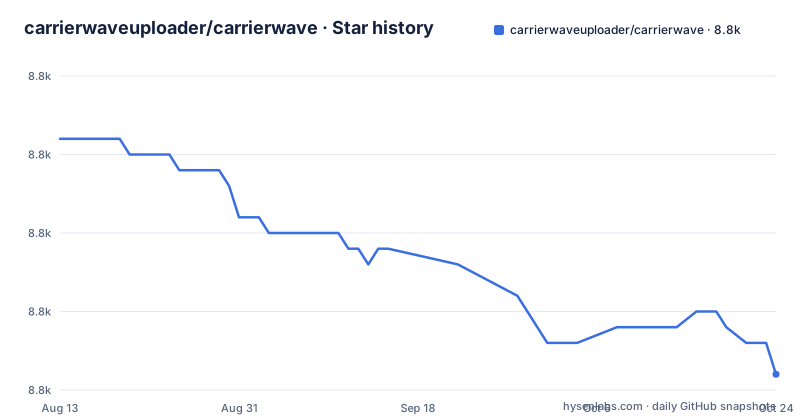
- carrierwaveuploader/carrierwave8,768 ★ · -13
| Repository | 2026-08-13 | 2026-10-23 |
|---|---|---|
| carrierwaveuploader/carrierwave | 8.8k | 8.8k |
-13 Stars in the last 71 days, measured from the daily GitHub snapshot. Compare with other projects
Editorial analysis
What CarrierWave Solves and Who It Is For
CarrierWave addresses the repetitive work of accepting an uploaded file, storing it somewhere permanent, and later retrieving it by an identifier. It is aimed at Ruby web applications built on Rack, with Rails as the primary target. The README shows a simple uploader class that inherits from `CarrierWave::Uploader::Base`, and you can mount that uploader on a model column so that assigning a file to an attribute automatically caches it on save. The gem is not a full file management system. It does not provide a browser UI, virus scanning, or resumable uploads. It is a library that gives you a consistent API for moving files from a temporary cache to a permanent store, with hooks for processing such as image conversion. The intended user is a Rails developer who wants to attach avatars, documents, or other files to records without hand-writing the storage and retrieval logic each time.
The Cache and Store Mechanism
CarrierWave separates file handling into two phases: a cache and a store. The cache is temporary storage used while a file is being assigned to a model but before the record is saved. The store is permanent storage, which can be a filesystem or a cloud service. The README demonstrates this with `uploader.store!(my_file)` for direct storage and `uploader.retrieve_from_store!('my_file.png')` for retrieval. In the typical ORM flow, assigning a file to a mounted attribute puts it in the cache, and saving the record moves it to the store. The separation is useful because it lets you validate and process a file before committing it to its final location. It also means the uploader can be used outside an ORM entirely, as shown by the direct `store!` example. The documentation notes that `u.avatar` never returns nil even when no file is attached; you must check `u.avatar.file.nil?` to test for presence. That is a small gotcha that can trip up new users.
Getting It Running: Installation and Basic Setup
Installation is a standard gem install: `gem install carrierwave` for standalone use, or add `gem 'carrierwave', '~> 3.0'` to a Rails Gemfile and restart the server. The README then walks through generating an uploader with `rails generate uploader Avatar`, which creates `app/uploaders/avatar_uploader.rb`. That file starts with `storage :file`, meaning filesystem storage. To use it with ActiveRecord, you add a string column to a model via a migration, for example `rails g migration add_avatar_to_users avatar:string`, then run `rails db:migrate`. In the model, you call `mount_uploader :avatar, AvatarUploader`. After that, assigning a file to `user.avatar` and calling `user.save!` stores it. You can then access `user.avatar.url` for the public URL and `user.avatar.current_path` for the filesystem path. The README also shows a note about requiring `carrierwave/orm/activerecord` if you load CarrierWave before your ORM. The commands are concrete and match what a Rails developer expects.
Multiple File Uploads and ORM Support Beyond ActiveRecord
CarrierWave supports multiple files per model attribute through `mount_uploaders` (with an s). The README explains that you need a column that can store an array, such as a JSON column in PostgreSQL or MySQL, or a serialized string in SQLite. For SQLite, you add `serialize :avatars, JSON` to the model. The form field must be set to `multiple: true`, and the controller must permit the attribute as an array, like `params.require(:user).permit(:email, :first_name, :last_name, {avatars: []})`. The README also shows how to preserve existing files when uploading new ones by including hidden fields with the existing identifiers. Reordering is possible by reordering those hidden fields. For ORMs other than ActiveRecord, CarrierWave has extracted support into separate gems: carrierwave-datamapper, carrierwave-mongoid, and carrierwave-sequel. That means the core gem only works with ActiveRecord out of the box. If you use Mongoid or Sequel, you must add another dependency, which is a real cost.
The 3.0 Extension Handling Change and Its Upgrade Impact
CarrierWave 3.0 introduced a change that affects anyone using `process convert: :format` to change a file's format. The README is explicit about the consequences. If the conversion is on the uploader itself, the file extension of the cached file changes. That means a cache file stored by CarrierWave 2.x cannot be retrieved by 3.x, and vice versa, which breaks blue-green deployments where both versions run on the same workload. If the conversion is inside a version, the extension of the stored file changes, and you must run `#recreate_versions!` to make it usable again. To preserve 2.x behavior, you can set `force_extension false` immediately after the `process convert: :format` call. This is a breaking change that requires planning. The README does not mention any automated migration path; it only gives the manual workaround. For a library that many applications depend on, this is a significant upgrade burden, and it is the kind of detail you want to know before bumping the version.
Limitations and When CarrierWave Is the Wrong Tool
CarrierWave is not a one-size-fits-all solution. The README lists several limitations indirectly. First, it does not provide built-in support for popular ORMs beyond ActiveRecord; you must pull in separate gems, and those may lag behind the core release. Second, the cache/store split means you have to understand two storage layers, and the extension change in 3.0 shows how fragile that split can be when versions disagree. Third, the multiple file feature relies on array columns or JSON serialization, which can be awkward on databases like SQLite. If you need direct streaming uploads to cloud storage without a local cache, or if you need complex processing pipelines with multiple format versions, you might find CarrierWave's model-centric approach limiting. For a simple use case like a single avatar image, CarrierWave is fine. For a high-volume file service with custom storage backends, you might be better off with a lower-level library like Shrine, which takes a different approach by separating the uploader from the model and giving you more control over the storage adapter. Shrine also handles versions and processing through plugins, rather than the built-in `version` and `process` macros that CarrierWave uses.
Maintenance and License Considerations
The repository shows recent activity with a release on 2025-04-13 (v3.1.2), and the project is not archived. The README links to a wiki and a Stack Overflow tag for help, and it directs bug reports to the issue tracker. That suggests an active maintenance cycle, but the README does not specify a license in the provided material. The license field is listed as unknown, which is a concern for production use. You should check the repository's LICENSE file or the gem's metadata before adopting it in a commercial project. The upgrade path from 2.x to 3.x is documented, but it requires manual steps for anyone using format conversion. The README also mentions that other ORM support is extracted into separate gems, which means you need to track their release cycles separately. The maintenance cost is moderate: the core gem is stable, but you must stay alert to changes like the 3.0 extension behavior. The fact that the README calls out a specific pull request (#2659) for the `force_extension` option shows that the maintainers are aware of the impact, but it also means you need to read release notes carefully.
Editorial conclusion
Adopt CarrierWave 3.1 if you are building a Rails app that needs a straightforward, ORM-mounted uploader with filesystem or cloud storage, and you can tolerate the 3.0 extension change. Avoid it if you need built-in support for DataMapper, Mongoid, or Sequel, since those require separate gems. Before upgrading from 2.x, check whether you use `process convert: :format`; if so, set `force_extension false` to preserve old behavior, and run `#recreate_versions!` for any versions that changed extension. Verify your cache file compatibility if you run a blue-green deployment across versions.
Frequently asked questions
carrierwave vs active storage
The readme makes no comparison with the framework's own file attachment feature and names no alternative. What it does document is its own shape: an uploader class you generate, a store for permanent files and a cache for temporary ones, pluggable storage backends including the filesystem and cloud storage, and mountable columns on models with one integration built in and three more shipped as separate gems.
activestorage vs carrierwave
Nothing in the repository addresses that comparison, so there is nothing here to quote. The readme does state a compatibility matrix for its own lines against framework and Ruby versions, and warns that the gemspec only declares a minimum, so a resolver can produce a combination that was never tested.
What is CarrierWave?
A gem for uploading files from Ruby applications, described as flexible and built for Rack-based applications such as Rails. You generate an uploader class, choose a storage backend, and mount it on a model column so that assigning a file caches it and saving the record stores it permanently.
How do I install CarrierWave in Rails?
Add a line to your Gemfile pinning the 3.x line and restart the server, or install the gem directly with the gem command. Then generate an uploader, which writes a class into your app's uploaders directory, and mount that uploader on a model column created by a migration.
Official sources
Add this badge to your README
If you maintain this project, the badge below links readers to this analysis and shows its maintenance status from the daily GitHub snapshot. Paste the markdown into your README; add ?metric=license or ?metric=stars to the image URL for a different field.

[](https://hysenlabs.com/projects/carrierwaveuploader-carrierwave)Star history chart for your README
[](https://hysenlabs.com/projects/carrierwaveuploader-carrierwave)Was this useful?