OctoBus: A Local gRPC Gateway That Turns Node.js Services into Agent-Ready Capsets
A secure local gateway for AI agents to reliably call approved enterprise APIs, tools, and services.
At a glance
- What is it?
- OctoBus is a single-binary local gateway that imports Node.js gRPC services, binds them into capsets, and exposes them to AI agents via gRPC, Connect RPC, and MCP. It solves the access-control problem for enterprise APIs, but its on-demand runtime mode and streaming limitations deserve scrutiny.
- Who is it for?
- Adopt OctoBus if you need a controlled, local gateway that lets AI agents call a curated set of gRPC methods without exposing your whole API surface. It suits teams already invested in Node.js services and gRPC, and who can accept the operational overhead of managing a daemon and its dependencies.
- Can I use it commercially?
- Yes, with conditions. GPL-3.0 is a copyleft licence: if you distribute software that includes it, you must release that software's source code under the same licence. Running it internally without distributing it does not trigger that obligation.
- Is it still maintained?
- Yes. The repository last received commits 10 days ago.
- What is it written in?
- Mainly JavaScript, according to GitHub's language statistics.
Answers come from the project's GitHub data, last synced on November 13, 2026, and from our analysis. They are not legal advice.
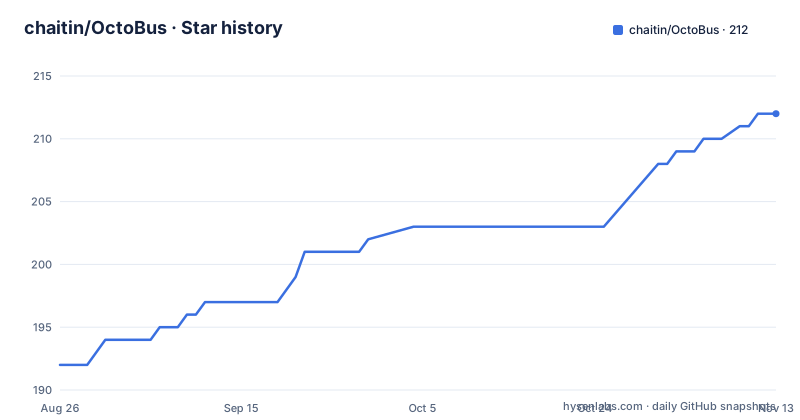
Star history
- chaitin/OctoBus212 ★ · +20
| Repository | 2026-08-26 | 2026-11-13 |
|---|---|---|
| chaitin/OctoBus | 192 | 212 |
20 Stars in the last 79 days, measured from the daily GitHub snapshot. Compare with other projects
Editorial analysis
What OctoBus Actually Does
OctoBus is a locally running single-binary gateway that manages pluggable Node.js service packages and exposes their gRPC capabilities to clients or agents by capset. The problem it solves is access control: an AI agent should not be able to call every method in every service. Instead, you define a capset, which is a deterministic set of capabilities composed of capset to service to instance to method bindings. The gateway then exposes only the selected methods. This is for teams that have enterprise APIs implemented as gRPC services in Node.js and want to give agents a controlled, auditable path to call them. It is not a general API gateway for REST or GraphQL; it is specifically about gRPC method exposure.
Architecture: One Port, Three Protocols, SQLite State
The architecture is a Go-built binary that runs a daemon and a CLI. The daemon listens on a single port, 127.0.0.1:9000 by default. The admin API, gRPC, Connect RPC, MCP, and reflection are all dispatched through that port. That is a deliberate trade-off: simplicity of deployment versus a single point of exposure. If you bind to 0.0.0.0:9000, you are responsible for network access control. The daemon uses SQLite to record services, instances, capsets, method bindings, descriptors, and runtime state. The CLI performs management operations through the admin API and does not write SQLite directly. This separation keeps the CLI from corrupting the database, but it also means the CLI is useless if the daemon is down. The daemon also manages Node.js subprocesses according to each service's runtime mode, which is a core part of the data flow.
Service, Instance, Capset: The Binding Model
The core model has four elements. A service is a service root inside an importable Node.js package, containing service.json, proto files, and a gRPC implementation. A single distribution package can expose multiple service roots through service-dir. An instance is one runtime instance of a service, with independent config and workdir. Long-running instances have logs and a local listen port. A capset is a deterministic set of capabilities for an agent or use case, composed of bindings. Each binding selects a specific gRPC method. Unary methods can be called through gRPC, Connect RPC, and MCP. Streaming methods only support gRPC calls for long-running services, and are not available through Connect RPC, MCP, or on-demand invocation paths. That is a real limitation: if your services rely on server streaming, you cannot expose them to MCP clients at all.
Two Runtime Modes: Long-Running vs On-Demand
Service packages use the long-running runtime mode by default. After an instance is created or started, OctoBus launches a resident Node.js gRPC subprocess. That subprocess stays alive and listens on a local port. The alternative is on-demand mode, declared in service.json as "runtime":{"mode":"on-demand"}. In that mode, instances are not prestarted and do not store a PID or listen address. For each incoming request, OctoBus starts one short-lived invoke subprocess. This is a significant trade-off. Long-running mode gives you lower per-call latency but consumes memory even when idle. On-demand mode saves resources but has higher latency per call and is unsuitable for streaming methods, which are not available in that path. The README does not give performance numbers, so you must measure your own workload. The choice is not just a config flag; it changes the entire invocation model.
Getting It Running: npm, Docker, or Build
There are three installation paths. The simplest is npm: npm install -g @chaitin-ai/octobus, then octobus serve. The npm package installs a small Node.js launcher and pulls the matching native Go binary through platform-specific optional dependencies like @chaitin-ai/octobus-linux-x64. You can also run npx @chaitin-ai/octobus serve. The Docker image includes the octobus binary and runtime dependencies, run with docker run --rm -p 9000:9000 -v octobus-data:/var/lib/octobus ghcr.io/chaitin/octobus:latest. The container listens on 0.0.0.0:9000 by default. Building from a checkout uses task build, then ./bin/octobus serve. Common options include --data-dir .octobus and --addr 127.0.0.1:9000, plus environment variables OCTOBUS_DATA_DIR and OCTOBUS_ADDR. The data directory stores the SQLite database, service artifacts, runtimes, instance config, and logs. The default data directory is .octobus under the current directory where the daemon command is started.
Dependencies and a Real Operational Cost
The daemon is a single binary, but normal service import and runtime flows require node, npm, protoc, and git to be available in PATH. That is a hidden operational cost. The npm package installs only the octobus binary, not these tools. If you run in a minimal container, you must install all four. The Docker image includes them, so that path is easier. The README also warns that go build or task build may fail with timeouts when downloading Go modules, and suggests configuring a Go module proxy, for example go env -w GOPROXY=https://goproxy.cn,direct. That is a specific, actionable workaround, but it indicates that the build process is network-sensitive. For a local gateway meant to be secure, having to download Go modules and npm packages at build time is a supply-chain consideration you must evaluate.
Workflow Example: Calculator and the Smoke Test
The README walks through a calculator example. After building and starting the daemon, you check connectivity with ./bin/octobus status. You can specify an address via a global option or environment variable, for example ./bin/octobus --addr 127.0.0.1:19001 status or OCTOBUS_ADDR=http://127.0.0.1:19001 ./bin/octobus service list. The https://host:port form is only for remote exposure with TLS provided by an outer proxy. To import the example service, you run ./bin/octobus service import calculator ./examples/calculator-js. The repository also provides a clean-checkout smoke script: task example:clean-checkout-smoke. That script cleans generated artifacts, rebuilds the binary and local SDK, installs calculator example dependencies, starts a temporary daemon, imports the service, creates an instance and capset, and calls Connect RPC to assert that the response is result: 42. This is a concrete way to verify your environment works before you build your own services.
Alternatives and the Trade-Off in Approach
The most direct alternative is to build your own thin proxy in front of your existing gRPC services, using a tool like grpc-gateway or a custom Connect RPC server. The difference is that those tools expose methods directly, without a capset model. You would have to implement your own authorization layer to filter methods per agent. OctoBus bakes that filtering into its core model. Another alternative is to use an API management platform like Kong or Envoy, which can route and authenticate HTTP requests but do not understand gRPC method-level capabilities natively. OctoBus's approach is to treat the capset as a first-class entity, stored in SQLite and managed via the CLI. That is a different philosophy: instead of configuring routes and policies, you define a set of bindings. The cost is that you must adopt OctoBus's service package format, which includes service.json and proto files, so it is not a drop-in replacement for an existing gRPC server.
Maintenance, License, and What to Verify
OctoBus is licensed under GPL-3.0. That has implications for distribution: if you link against it or distribute it, you may need to comply with copyleft terms. The project is at v0.1.0, with the last push on 2026-06-15. That is a very early stage. There is a CONTRIBUTING.md and a SECURITY.md in the repository, which suggests the maintainers care about process, but the API surface and configuration format may change without notice. The README does not describe an upgrade path or migration tooling. You should verify that your proto files compile with the protoc version you have, and that your Node.js services run under the long-running subprocess model before you rely on them. The on-demand mode is a different beast, and you should test it with your own services to see if the per-request subprocess startup is acceptable. The single-port design also means you must be careful about exposing the daemon remotely; the README explicitly says you are responsible for network access control.
Editorial conclusion
Adopt OctoBus if you need a controlled, local gateway that lets AI agents call a curated set of gRPC methods without exposing your whole API surface. It suits teams already invested in Node.js services and gRPC, and who can accept the operational overhead of managing a daemon and its dependencies. Do not use it if your services are not gRPC-based, if you need streaming methods over MCP or Connect RPC, or if you cannot guarantee that node, npm, protoc, and git are available in the runtime environment. Before adopting, verify that your proto files compile with the bundled protoc version, that your Node.js services run under the on-demand subprocess model if you choose that mode, and that your network exposure of the daemon is properly firewalled. The single-port design and capset model are concrete and testable, but the project is at v0.1.0, so expect breaking changes.
Frequently asked questions
What is OctoBus and what does the daemon do?
OctoBus is a locally running single-binary gateway for managing pluggable Node.js service packages. The Go-built octobus binary runs the daemon and CLI, exposes selected methods as gRPC plus unary methods as Connect RPC and MCP streamable HTTP, and records services, instances, capsets, bindings and runtime state in SQLite.
Can OctoBus expose streaming methods to an MCP client?
No. Unary methods can be called through gRPC, Connect RPC and MCP, but streaming methods support gRPC calls for long-running services only and are not available through Connect RPC, MCP or the on-demand invocation path.
What is a capset in OctoBus?
A capset is a deterministic set of capabilities for an agent or use case, composed of capset to service to instance to method bindings. The method binding is the gRPC method actually selected and exposed inside that capset.
Does OctoBus sandbox service runtimes by default?
No. By default a service runtime inherits the daemon's environment and can access anything the daemon user can. Pass --runtime-hardening=node, or set OCTOBUS_RUNTIME_HARDENING=node, to restrict each runtime, and that level requires Node.js 22.13 or newer.
Official sources
Add this badge to your README
If you maintain this project, the badge below links readers to this analysis and shows its maintenance status from the daily GitHub snapshot. Paste the markdown into your README; add ?metric=license or ?metric=stars to the image URL for a different field.

[](https://hysenlabs.com/projects/chaitin-octobus)Star history chart for your README
[](https://hysenlabs.com/projects/chaitin-octobus)Was this useful?