Bubble Tea: A Go TUI Framework That Brings The Elm Architecture to the Terminal
GitHub describes it as A powerful little TUI framework 🏗. The repository metadata lists Go as its primary language. The metadata lists the MIT license. This article stays within the project description and details documented in the GitHub repository README.
At a glance
- What is it?
- Bubble Tea is a Go framework for building terminal applications using the Elm Architecture. It offers a declarative view model, a high-performance cell-based renderer, and a mature ecosystem, but it demands a shift in how you structure your code.
- Who is it for?
- Adopt Bubble Tea if you are writing a terminal application in Go and want a declarative, state-driven UI with built-in rendering optimizations and a rich component library. It suits both simple and complex interfaces, from inline prompts to full-window apps.
- Can I use it commercially?
- Yes. MIT is a permissive licence: you can use, modify and sell software built on it, as long as you keep its copyright and licence notices.
- Is it still maintained?
- Yes. The repository last received commits 2 days ago.
- What is it written in?
- Mainly Go, according to GitHub's language statistics.
Answers come from the project's GitHub data, last synced on November 14, 2026, and from our analysis. They are not legal advice.
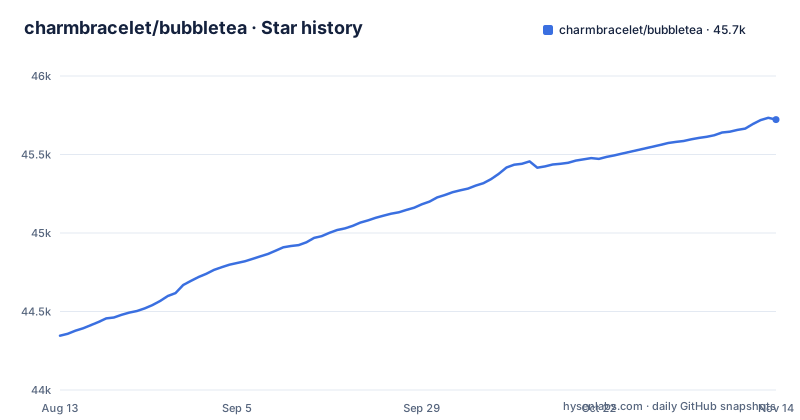
Star history
- charmbracelet/bubbletea45,722 ★ · +1,376
| Repository | 2026-08-13 | 2026-11-14 |
|---|---|---|
| charmbracelet/bubbletea | 44.3k | 45.7k |
1,376 Stars in the last 93 days, measured from the daily GitHub snapshot. Compare with other projects
Editorial analysis
What Bubble Tea Solves and Who It Is For
Bubble Tea addresses the messy problem of building terminal user interfaces in Go. Without a framework, you handle raw escape codes, redraw logic, and event loops yourself, which quickly becomes unmanageable for anything beyond a simple prompt. Bubble Tea replaces that with a structured, declarative model. It is designed for Go developers who want to build terminal apps that are either inline, full-window, or a mix of both. The README positions it as suitable for both simple and complex applications. The primary audience is a Go programmer who is comfortable with structs, methods, and type switches, and who is willing to adopt a functional architecture borrowed from Elm. If you are building a CLI tool that needs interactive menus, forms, or dashboards, this framework gives you a consistent way to manage state and rendering.
The Elm Architecture: Model, Update, View
At its core, Bubble Tea implements The Elm Architecture. The README explains that a program consists of a model that describes application state, plus three methods on that model. Init returns an initial command for the application to run. Update handles incoming events, which are called Msgs, and returns an updated model and possibly a new command. View renders the UI based on the current model. This is a unidirectional data flow: events come in, update changes state, view renders from state. The key insight is that you never manually redraw. The framework takes care of that. The README states that because the view describes the entire UI, you do not have to worry about redrawing logic. This is a fundamental shift from imperative terminal libraries where you draw to a screen buffer directly. For a Go developer, this means writing pure functions that transform state, which is testable and predictable.
Getting Started: Commands and a Shopping List
To start, you import the library as tea, using the module path charm.land/bubbletea/v2. The README tutorial builds a shopping list. You define a model struct with fields like choices, cursor, and selected. Then you implement Init, Update, and View. For example, Init returns nil to indicate no initial I/O. Update receives a tea.Msg, typically a tea.KeyPressMsg, and you use a type switch to handle it. The README shows handling keys like up, down, j, k, ctrl+c, and q. For quitting, you return tea.Quit as the command. View returns a tea.View. You build the content by iterating over your model's data. The README mentions that you may need to run go mod tidy to download bubbletea and its dependencies. The v2 upgrade guide is referenced for those coming from v1, indicating a significant API change.
Renderer and Input: High-Performance Features
Bubble Tea includes a high-performance cell-based renderer, which is a notable engineering claim. The README lists built-in color downsampling, declarative views, high-fidelity keyboard and mouse handling, and native clipboard support. These features are not trivial to implement in a terminal. The cell-based renderer likely means it tracks the visible cells and only updates what changed, which is efficient for complex UIs. Color downsampling is important because not all terminals support truecolor. The framework handles that automatically. Mouse handling and clipboard support are also included. The View method can optionally declare terminal features like alt screen mode, mouse tracking, and cursor position. That is a clean way to opt into advanced behavior without cluttering the rendering logic.
A Real Limitation: The Functional Constraint
The Elm Architecture is a double-edged sword. It forces you to structure your entire application around a single model and a single update function. That can become unwieldy as your app grows. The README acknowledges that Bubble Tea is suitable for complex applications, but its tutorial covers only a small shopping-list model. The provided example uses a simple struct with a slice and a map. In a large app, you would need to compose models and messages, which adds boilerplate. Also, the framework is Go-specific. If you are not writing Go, it is the wrong tool. The README points to the docs and the examples for advanced details.
Alternative: tview and the Imperative Approach
A common alternative to Bubble Tea is tview, a Go library for building terminal UIs with a more traditional widget-based approach. tview provides ready-made widgets like lists, forms, and text views, and you compose them in an imperative style. You create a list, set its title, add items, and then handle input through callbacks. This is closer to how you would build a desktop GUI. Bubble Tea, in contrast, is declarative: you describe the entire view from state each time. The difference is significant. With tview, you mutate widgets directly. With Bubble Tea, you return a new model and let the framework render. If you prefer a component hierarchy and do not want to write a custom View method for every screen, tview may be a better fit.
Maintenance, Upgrades, and License
The repository is under the MIT license, which is permissive and allows commercial use with attribution. The last push was on 2026-11-01, and the recent releases are v2.1.1, v2.1.0, and v2.0.10. That indicates active maintenance. The README points to an upgrade guide from v1 to v2, which suggests that upgrading is not trivial. You should read that guide before moving from v1. The project also has a companion library, Bubbles, which provides common UI components. That is an additional dependency to consider. The maintenance cost is moderate: you need to keep up with releases. The documentation is good, but you may need to rely on examples and the source code for advanced use cases. The license is clean, but you should verify that the dependencies of Bubble Tea themselves are compatible with your project's licensing requirements.
Editorial conclusion
Adopt Bubble Tea if you are writing a terminal application in Go and want a declarative, state-driven UI with built-in rendering optimizations and a rich component library. It suits both simple and complex interfaces, from inline prompts to full-window apps. Do not use it if you prefer imperative drawing or need to avoid a functional architecture. Before adopting, verify that your terminal's feature set (mouse, clipboard, alt screen) matches the library's assumptions, and review the v2 upgrade guide if you are coming from v1. The framework is actively maintained, with recent releases in 2026, so check the changelog for any breaking changes before upgrading.
Frequently asked questions
how to install bubble tea go
The v2 module is charm.land/bubbletea/v2, imported in the tutorial as tea "charm.land/bubbletea/v2", and go.mod requires Go 1.26.0. The tutorial notes you may also need to run go mod tidy to download bubbletea and its dependencies.
how to use bubble tea
A program is a model with three methods: Init returning an initial command, Update handling incoming messages, and View rendering the UI. The tutorial builds a shopping list where the model holds a choices slice, a cursor index and a selected set, and Update dispatches on tea.KeyPressMsg before switching on msg.String().
What exactly is bubble tea?
In this repository it is a Go framework for building terminal applications based on the Elm Architecture, suitable for inline, full-window or mixed layouts. The examples directory in the repository is a separate Go module listing what it can do, from canvas and cellbuffer to file-picker and markdown rendering.
Official sources
Add this badge to your README
If you maintain this project, the badge below links readers to this analysis and shows its maintenance status from the daily GitHub snapshot. Paste the markdown into your README; add ?metric=license or ?metric=stars to the image URL for a different field.

[](https://hysenlabs.com/projects/charmbracelet-bubbletea)Star history chart for your README
[](https://hysenlabs.com/projects/charmbracelet-bubbletea)Was this useful?