Aero Hand Open: an open-source tendon-driven robot hand for $314
https://shop.tetheria.ai/
At a glance
- What is it?
- Aero Hand Open is a 7 degree of freedom, tendon-driven robotic hand with five fingers and sixteen joints, weighing 389 grams, designed so a lab can print and assemble it from standard parts. The repository carries the CAD, the PCB design, the firmware, a Python SDK and ROS2 integration.
- Who is it for?
- Aero Hand Open suits a research lab that needs a dexterous hand for manipulation and reinforcement learning work, and that cannot justify a proprietary price or wants to modify the mechanism. It is the wrong choice for a group that needs a validated product with support and a warranty, since this is a research design you assemble and maintain yourself, and the wrong choice if you intend to redistribute a modified version without reading the custom licence in LICENSE.md first.
- Can I use it commercially?
- Check first. The repository uses a licence we do not classify automatically, so read its LICENSE file before any commercial use.
- Is it still maintained?
- Yes. The repository last received commits 53 days ago.
- What is it written in?
- Mainly Python, according to GitHub's language statistics.
Answers come from the project's GitHub data, last synced on November 7, 2026, and from our analysis. They are not legal advice.
Star history
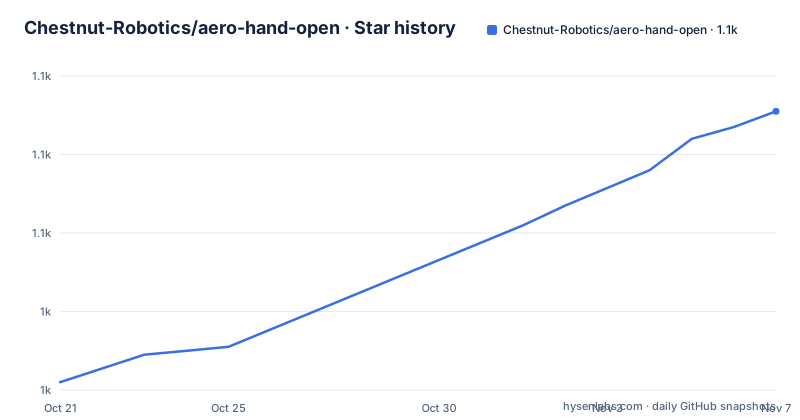
- Chestnut-Robotics/aero-hand-open1,091 ★ · +69
| Repository | 2026-10-21 | 2026-11-07 |
|---|---|---|
| Chestnut-Robotics/aero-hand-open | 1k | 1.1k |
69 Stars in the last 17 days, measured from the daily GitHub snapshot. Compare with other projects
Editorial analysis
What the hand is and who it is aimed at
Aero Hand Open is an open-source, tendon-driven robotic hand designed by Chestnut Robotics, formerly TetherIA, for dexterous manipulation research. The README states the aim plainly: rather than an expensive proprietary solution, the hand focuses on simplicity, reliability and accessibility by using standard 3D printing and off-the-shelf electronic components.
The specifications are concrete. Seven degrees of freedom across five fingers, sixteen joints in total, tendon actuation for each joint, a fully 3D-printed structure that is modular and easy to assemble, and a mass of 389 grams. The complete kit is listed at 314 US dollars.
That price point is the reason the project exists in this form. Research groups that need a dexterous hand for reinforcement learning experiments typically buy a proprietary one, and the cost changes what experiments are affordable. An open design that a lab can print, modify and repair moves the hand from a line item to a platform, which is also why the repository publishes the mechanical design rather than only the firmware.
The work is documented in a paper, Aero Hand Open: A Simulation-Ready Tendon-Driven Hand for Dexterous Manipulation Learning, on arXiv, with a project page, documentation and a shop linked from the README.
Prints, modules and the tendon routing
The CAD is published as STEP files and one-click print files under the hardware/CAD directory, with an Onshape document linked as well. The README gives the print settings used for every part: a Bambu X1C, a 0.4mm nozzle, 0.2mm layer height, tree supports enabled and the support on build plate only option selected.
It also recommends keeping the same orientation and settings. The print orientation is said to minimise supports and to optimise surface tolerances and smoothness for the parts that interface with each other, which is the kind of instruction that matters when a tendon pulley has to sit at a consistent height for the tendon to run without binding.
Mechanically the hand is tendon driven, so each joint is moved by a cable routed through the finger rather than by a motor at the joint itself. That is what keeps the mass down and the structure printable, and it is also why the assembly guide spends time on routing the tendons. The guide covers the whole build, from mounting the actuators to routing the tendons and connecting the electronics, and it organises the work around finger modules: each finger is assembled independently and attached to the palm afterwards, which makes maintenance and replacement of a single finger possible instead of requiring the whole hand to be taken apart.
The bill of materials, line by line
The bill of materials is a CSV file at hardware/Assembly/BOM.csv, and the README describes it as the complete list of components needed to build the hand, covering mechanical, electronic and printed parts such as motors, tendons, bearings, fasteners and 3D-printed components.
The point of publishing it as a spreadsheet with a fixed structure is that each item is listed with its part number, vendor, quantity and estimated cost. That last column is what makes the kit price meaningful, and it is also what lets you substitute. A researcher in a country with different distributors, or with access to a different fabrication route, can price the hand against their own suppliers rather than against a single quoted number.
The printed parts sit in the same list as the bought ones, which is worth noting: the file is a complete bill of materials, not a hardware shopping list with the prints assumed. For anyone planning a build, the practical order of work is to read the BOM and the print settings first.
The electronics: PCB design, firmware and ESP32
The electronics are open as well. The hardware/PCB directory carries all design files, including the Gerber files, the KiCad project, the bill of materials and the CPL, which is the pick and place file, so the board can be ordered from a fab and assembled from the published data. Further detail is in the PCB documentation.
The firmware has its own directory in the repository, and the hand is described as compatible with ESP32 and ROS2 systems with an independent Python SDK. That combination matters for the research use case. A lab that already runs ROS2 can drive the hand from the same stack as the rest of the robot, while a lab that wants a quick experiment can talk to the board over serial from Python without standing up a ROS graph.
The hardware setup documentation covers the rest of that path, and there is also a RELEASE_NOTES.md file in the repository root.
The Python SDK and the sequencing demo
The SDK lives in the sdk/ directory with its own README and a documentation page, and the examples folder is where the working code sits.
The example that the README highlights is the sequencing demo, which shows how different finger motions are combined into continuous, pre-defined sequences. The point of it is that a gesture such as a pinch, an open palm or a peace sign is not a single joint command but a timed coordination of several, and the demo automates that coordination so a user can reproduce the gesture without working out the timings by hand.
Once the SDK is installed and the serial port configured, the examples run directly with Python:
python run_sequence.pyThat is the whole loop for a first interaction: install the SDK, point it at the serial port, run a script. A video of the demo is linked in the README so you can see the expected result before connecting anything.
The SDK documentation is where the joint-level API is described, and for a research user that reference is more important than the demo, because the demo shows one sequence and the API is what you use to write your own.
ROS2, simulation and reinforcement learning
The hand integrates with ROS2 humble, and the repository carries a ros2/ folder with setup instructions and source code alongside the ROS2 documentation.
Simulation is the other half of the research proposition, and the paper title points at it directly with the phrase simulation-ready. The README states that high-fidelity simulation models are provided, and the repository has a sim_rl/ directory that the table of contents labels as reinforcement learning tools. That combination, an accurate model of the hand in simulation, is what lets a policy be trained without occupying a physical hand for every episode, which is the practical bottleneck in manipulation learning.
For the audience this matters, the relevant question is how closely the simulation matches the printed mechanism, since tendon-driven hands have compliance and friction that a rigid model does not reproduce. The repository gives you the models and the hardware so you can compare them, and measuring the gap yourself before trusting a policy trained in simulation is sensible.
Licence, sourcing and what to check first
Two practical points close this out.
The first is the licence. The repository is described by its metadata as carrying a custom licence that GitHub cannot classify, and the terms live in a LICENSE.md file in the repository root. The README has a licence section with a short summary for readers who do not want to open the file, which is a reasonable convention, but the file governs. Anyone planning to modify the design and redistribute it, or to build a product around it, should read that licence rather than assume the MIT terms that similar hardware projects often use.
The second is what you are actually buying. The complete kit is listed at 314 US dollars and there is a shop for it, while the mechanical design, PCB files, firmware and SDK are all in the repository. Those are two different paths, and they answer different questions. The kit answers whether you can have a hand this week. The repository answers whether you can change one.
If you are building rather than buying, check three things in order: that the BOM prices match what you will actually pay in your region, that the print settings produce parts that fit the tendon routing, and that the firmware and SDK versions in the repository match the board you assembled. The last point is the one people skip, and a board flashed with firmware from a different release is the reason a first run does nothing.
Editorial conclusion
Aero Hand Open suits a research lab that needs a dexterous hand for manipulation and reinforcement learning work, and that cannot justify a proprietary price or wants to modify the mechanism. It is the wrong choice for a group that needs a validated product with support and a warranty, since this is a research design you assemble and maintain yourself, and the wrong choice if you intend to redistribute a modified version without reading the custom licence in LICENSE.md first. Verify first that the parts and vendors in the bill of materials fit your schedule, that your printer can hold the published settings, and that the firmware you flash matches the SDK and ROS2 packages you plan to use.
Frequently asked questions
How many degrees of freedom does the Aero Hand Open have?
Seven degrees of freedom across five fingers, with sixteen joints in total. Each joint is driven by tendon actuation, and the whole hand weighs 389 grams.
What does it cost and what is included?
The complete kit is listed at 314 US dollars. The bill of materials at hardware/Assembly/BOM.csv lists every mechanical, electronic and printed part with part number, vendor, quantity and estimated cost, and a shop is linked from the README for buying the kit.
How do I run the example scripts?
Install the SDK, configure the serial port, and run an example directly with Python, for example python run_sequence.py. The sequencing demo combines finger motions into timed gestures such as a pinch, an open palm or a peace sign.
Can I print the parts myself and modify the design?
Yes. STEP files and one-click print files are published under the hardware/CAD directory, along with an Onshape document, and the README gives the print settings used for every part so that mating surfaces stay consistent. The licence is a custom one in LICENSE.md, so read it before redistributing a modified design.
Official sources
Add this badge to your README
If you maintain this project, the badge below links readers to this analysis and shows its maintenance status from the daily GitHub snapshot. Paste the markdown into your README; add ?metric=license or ?metric=stars to the image URL for a different field.

[](https://hysenlabs.com/projects/chestnut-robotics-aero-hand-open)Star history chart for your README
[](https://hysenlabs.com/projects/chestnut-robotics-aero-hand-open)Was this useful?