msdf-atlas-gen: turning a font into a texture your renderer can scale
MSDF font atlas generator
At a glance
- What is it?
- msdf-atlas-gen is a C++ utility that takes a TTF or OTF font, computes a signed distance field for a chosen subset of glyphs, packs them into an atlas bitmap and exports the result as an Artery Font file, an image, a CSV sheet or JSON. It exists for real-time rendering, and the choice of atlas type is where the real decisions live.
- Who is it for?
- msdf-atlas-gen fits a game or real-time renderer that needs one texture holding many glyphs and wants them to stay sharp at sizes the art was not drawn for, and it is a poor fit for a UI that renders text at a single fixed size where a plain bitmap atlas would be simpler.
- Can I use it commercially?
- Yes. MIT is a permissive licence: you can use, modify and sell software built on it, as long as you keep its copyright and licence notices.
- Is it still maintained?
- Yes. The repository last received commits 175 days ago.
- What is it written in?
- Mainly C++, according to GitHub's language statistics.
Answers come from the project's GitHub data, last synced on November 6, 2026, and from our analysis. They are not legal advice.
Star history
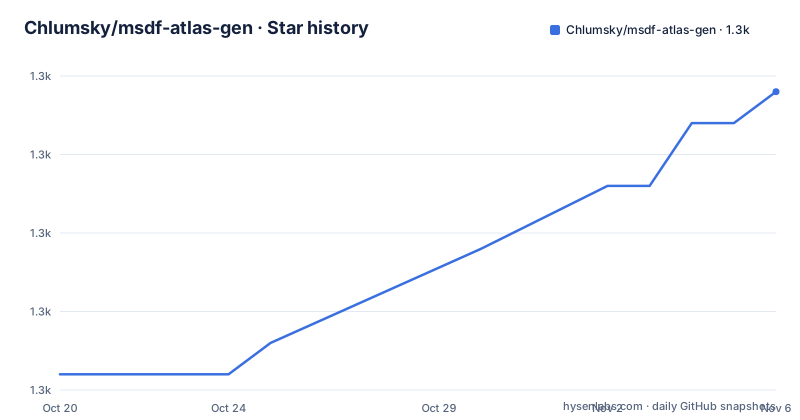
- Chlumsky/msdf-atlas-gen1,347 ★ · +9
| Repository | 2026-10-20 | 2026-11-06 |
|---|---|---|
| Chlumsky/msdf-atlas-gen | 1.3k | 1.3k |
9 Stars in the last 17 days, measured from the daily GitHub snapshot. Compare with other projects
Editorial analysis
A font atlas is a texture, and the texture is the expensive part
The problem this tool solves comes from how real-time rendering draws text. A font atlas is typically stored in texture memory and used to draw text in real-time rendering contexts such as video games. You take the glyphs you need, render each one into a texture, pack them into a single bitmap, and at draw time the renderer samples the right rectangle and the right glyph.
The difficulty is that the same texture has to work at the sizes the game actually uses. A traditional bitmap font atlas is drawn at one size, and it either blurs when scaled up or looks wrong. The alternative is to store a distance field instead of a picture of the letter.
msdf-atlas-gen is a utility for generating compact font atlases using MSDFgen. It loads a subset of glyphs from a TTF or OTF font file, generates a distance field for each of them, and tightly packs them into an atlas bitmap. The word compact in that sentence is doing real work: a distance field stores a number per texel rather than a colour, and the shader reconstructs an edge from it, so one atlas covers a range of scales.
The audience is therefore engine developers and tools engineers, not designers. The output is a texture plus the metadata needed to find each glyph in it, and the tool can be used either as a library or as a standalone console program, with library usage examples at the bottom of the README.
Six atlas types, and the difference is in the channels
The generator can produce six kinds of atlas, and the README tabulates them by what each one can do. The type is chosen with the -type argument, and the default is msdf.
A hard mask is a non-anti-aliased binary image with a single one-bit channel. A soft mask is an anti-aliased image with one channel. Neither scales, since there is no distance information in them, and both are what a plain bitmap font atlas gives you.
Two of the distance field types share one channel and add anti-aliasing and scalability. sdf is a true signed distance field. psdf is a signed perpendicular distance field, which is the variant that supports hard effects, meaning effects that use perpendicular distance, such as mitered outlines or thickness adjustment. sdf is the one that supports soft effects, meaning effects that use true distance, such as glows, rounded outlines or simplified shadows.
Then there are the two multi-channel types. msdf uses three channels and is the default, and it is the one that preserves corner sharpness when upscaled. mtsdf uses four channels and is a combination of MSDF and a true SDF in the alpha channel, so it keeps the sharp corners and adds the true distance information.
So the choice is not cosmetic. If your text needs a glow, sdf carries the information. If it needs a mitered outline whose corners survive scaling, msdf is the minimum. If you want both, mtsdf costs an extra channel of memory for every texel in the atlas.
Packing is bin-packing unless you ask for a uniform grid
The layout strategy matters as much as the distance field type, because an atlas that wastes texture memory is an atlas that has to be smaller in glyph count.
By default, glyphs in the atlas have different dimensions and are bin-packed in an irregular fashion to maximise the use of space. That is the right default for a game, where you want as many glyphs as possible inside a single texture.
The -uniformgrid switch changes the arrangement: all glyphs get identical dimensions and are laid out in a grid. Several options then become available, and the README lists them. The number of columns comes from -uniformcols, the size of each cell from -uniformcell, a constraint on the cell dimensions from -uniformcellconstraint with the values none, pots, potr, square, square2 and square4, and the placement of the glyph origin from -uniformorigin with the values off, on, horizontal and vertical.
Those same constraint names appear in the atlas dimension options, which is a sign that they are a shared vocabulary rather than two separate features. The dimension constraints are -pots for a power-of-two square, -potr for a power-of-two square or rectangle, typically a 2:1 aspect ratio, -square for any square, -square2 for a square with an even side length, and -square4, the default, for a square whose side length is divisible by four. Fixed dimensions can be set outright with -dimensions and a width and a height.
The uniform grid is the case where a renderer benefits, because a fixed cell size means the shader can compute the glyph rectangle arithmetically instead of reading it from metadata. That trade, less packing efficiency for a simpler shader, is the same choice every atlas tool makes.
The output is either a self-describing font file or a loose image and metadata
The export targets are where this tool differs from a plain texture baker, and the README lists four of them. The finished atlas and/or its layout metadata can be exported as an Artery Font file, a plain image file, a CSV sheet or a structured JSON file.
The Artery Font route is the interesting one. It bundles the bitmap and the description of what is in it into a single file, so the runtime loads one asset and gets both the texture and the per-glyph metadata. The plain image route leaves you to manage the layout yourself, which is what you want if your engine already has a font format and you only need the texture.
The CSV and JSON routes are the practical middle ground. A CSV sheet is a spreadsheet of the layout, which is easy to inspect and easy to diff, and the structured JSON file is the version your engine can parse. Neither carries the bitmap with it, so the image and the metadata have to stay in step.
The image format is chosen with -format, and the list is long because different consumers want different things. There is png for a compressed PNG image, bmp for an uncompressed BMP, tiff for an uncompressed floating-point TIFF, rgba for an uncompressed RGBA file, fl32 for an uncompressed floating-point FL32 file, text for a sequence of pixel values in plain text, textfloat for the same with floating-point values, bin for raw bytes, and binfloat for raw 32-bit floating-point values in little endian, with binfloatbe for big endian.
If the format is not specified, it may be deduced from the extension of the -imageout argument or other clues. And there is one caveat that will bite someone eventually: all colour values must be interpreted as if they were linear, not sRGB, like the alpha channel, even if the image format implies otherwise. A distance field stored through an sRGB-aware pipeline gets distorted, and the letters will look subtly wrong in a way that is hard to attribute.
Building it means vcpkg, submodules and a CMake preset
The project can be used either as a library or as a standalone console program, and the quickest route to the latter is a Windows binary from the Releases section.
To build from source, the README points at the included CMake script, CMakeLists.txt. In its default configuration it requires vcpkg as the provider for third-party library dependencies, and if you set the environment variable VCPKG_ROOT to the vcpkg directory, the CMake configuration will take care of fetching all required packages from vcpkg. The repository also carries vcpkg.json, which is the manifest that describes those dependencies, and CMakePresets.json, so a configured build is reproducible rather than a set of hand-typed cache variables.
The tree shows what is vendored and what is referenced. The root contains .gitmodules along with the artery-font-format and msdfgen directories, which are the two submodules the tool depends on: msdfgen is the distance field generator doing the actual work, and artery-font-format is the format the font file export follows.
The command line surface is wide, and the README groups the arguments by what they affect. The five that cover most runs are:
-font <fontfile.ttf/otf>
-allglyphs
-type <type>
-format <format>
-uniformgrid
The input side covers the font file with -font, which is required, and the alternative -varfont, which takes a variable font with its axis settings in a query string such as ?var0=value0&var1=value1. The character set comes from -charset, or the glyph set from -glyphset, or both can be given inline with -chars and -glyphs, and -allglyphs takes every glyph in the file. -fontscale applies a scaling transformation to the glyphs, which the README says is mainly for generating multiple sizes in a single atlas, -fontname stores a name for the font in certain output files as metadata, and -and separates multiple inputs to be combined into a single atlas. If no character set or glyph set is provided, and -allglyphs is not used, the ASCII charset is used.
Version 1.4, MIT, and a dependency story that has moved twice
The licence is MIT, recorded in LICENSE.txt at the root of the repository, which makes the tool straightforward to embed in a commercial game engine or to use as a build step in a proprietary pipeline.
The release history is sparse and worth reading carefully. Version 1.2.2 was published on 2021-09-06, version 1.3 on 2024-06-01, and version 1.4 on 2026-03-05. The last push to the repository was on 2026-05-16. So the project is not abandoned, and the newest release is recent, but the gaps between tags are years long rather than weeks.
The change log is linked from the README for what is new in each version, and the repository keeps a CHANGELOG.md at the root. The pattern in the tree suggests the reason for the slow cadence: the tool's behaviour is tied to MSDFgen, and MSDFgen is a submodule, so improvements in the distance field generation arrive as updates to that dependency and a rebuild, not as a stream of releases from this repository.
The practical upgrade cost is therefore a dependency refresh rather than an API change, and the API is stable enough that the argument list in the README is a reasonable specification to write against. The trade-off is that when a new MSDFgen release lands, you get it by updating a submodule and rebuilding, not by bumping a version number of this tool.
Editorial conclusion
msdf-atlas-gen fits a game or real-time renderer that needs one texture holding many glyphs and wants them to stay sharp at sizes the art was not drawn for, and it is a poor fit for a UI that renders text at a single fixed size where a plain bitmap atlas would be simpler. Before you build it, check that vcpkg is available and that VCPKG_ROOT points at it, since the default CMake configuration pulls its third-party dependencies from there, and decide early whether you want the Artery Font format, which carries the layout metadata, or a loose image plus your own JSON, because that choice determines what your runtime has to parse.
Frequently asked questions
What does msdf-atlas-gen do and who needs it?
It generates compact font atlases using MSDFgen, loading a subset of glyphs from a TTF or OTF font, generating a distance field for each and tightly packing them into an atlas bitmap. It is aimed at real-time rendering, such as games, where a font atlas is stored in texture memory and used to draw text.
Which atlas types can msdf-atlas-gen produce?
Six: hardmask, softmask, sdf, psdf, msdf and mtsdf, selected with the -type argument, with msdf as the default. msdf and mtsdf preserve corner sharpness when upscaled, sdf supports soft effects such as glows and rounded outlines, and psdf supports hard effects such as mitered outlines and thickness adjustment.
How do I build msdf-atlas-gen from source?
Use the included CMake script, CMakeLists.txt. In its default configuration it requires vcpkg as the provider for third-party dependencies, and setting the environment variable VCPKG_ROOT to the vcpkg directory makes the CMake configuration fetch the required packages. The repository also ships vcpkg.json and CMakePresets.json.
What output formats are available for the atlas?
The image format is chosen with -format and can be png, bmp, tiff, rgba, fl32, text, textfloat, bin or binfloat, with binfloatbe for big endian. The atlas and its layout metadata can also be exported as an Artery Font file, a CSV sheet or a structured JSON file. The README warns that all colour values must be interpreted as linear, not sRGB.
How do I choose which glyphs go into the atlas?
With -charset for a character set file, -glyphset for glyph indices, -chars or -glyphs to give the set inline, or -allglyphs to take every glyph in the font. If no character set or glyph set is given and -allglyphs is not used, the ASCII charset is used.
Official sources
Add this badge to your README
If you maintain this project, the badge below links readers to this analysis and shows its maintenance status from the daily GitHub snapshot. Paste the markdown into your README; add ?metric=license or ?metric=stars to the image URL for a different field.

[](https://hysenlabs.com/projects/chlumsky-msdf-atlas-gen)Star history chart for your README
[](https://hysenlabs.com/projects/chlumsky-msdf-atlas-gen)Was this useful?