Coding-iOS: A Full-Featured Client for the Coding Platform, Built for Study and Modification
GitHub describes it as Source code for the CODING iOS client. The repository metadata lists Objective-C as its primary language. The metadata lists the MIT license. This article stays within the project description and details documented in the GitHub repository README.
At a glance
- What is it?
- Coding-iOS is the open source Objective-C client for the Coding.net development platform. It shows how a complex, multi-section app can be structured, but its age and dependencies mean it is a study aid, not a production template.
- Who is it for?
- Adopt Coding-iOS if you want to study a real, working iOS client that integrates with the Coding.net API and demonstrates how to handle dynamic tabs, HTML content, and push notifications in Objective-C. Do not use it if you need a modern, Swift-based, actively maintained codebase, or if you are building for a platform other than Coding.net.
- Can I use it commercially?
- Yes. MIT is a permissive licence: you can use, modify and sell software built on it, as long as you keep its copyright and licence notices.
- Is it still maintained?
- Probably not. The repository last received commits 90 months ago, on May 23, 2019.
- What is it written in?
- Mainly Objective-C, according to GitHub's language statistics.
Answers come from the project's GitHub data, last synced on October 22, 2026, and from our analysis. They are not legal advice.
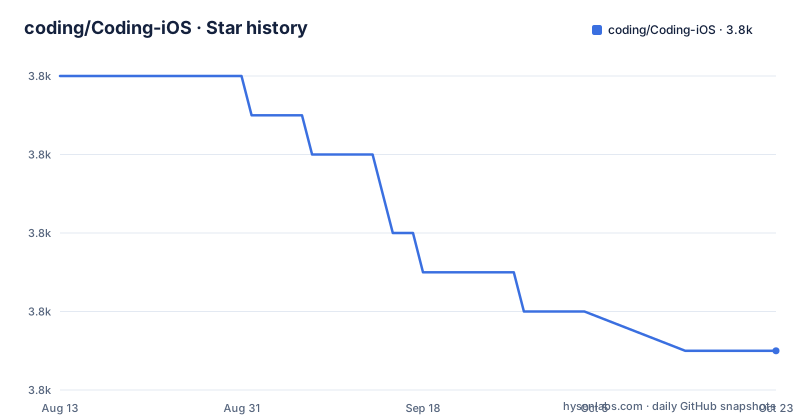
Star history
- coding/Coding-iOS3,779 ★ · -7
| Repository | 2026-08-13 | 2026-10-22 |
|---|---|---|
| coding/Coding-iOS | 3.8k | 3.8k |
-7 Stars in the last 70 days, measured from the daily GitHub snapshot. Compare with other projects
Editorial analysis
What This Project Actually Solves
Coding-iOS is the official iOS client for Coding.net, a development platform that combines project management, task tracking, documentation, code hosting, and a social feed called '冒泡' (bubbles). The repository provides the complete source code for that client, written in Objective-C. It solves a specific problem for developers who want to see how a large, real-world iOS app is organized, especially one that talks to a RESTful API with JSON. It is not a library or a framework. It is a full application you can read, build, and potentially extend. The intended audience is developers who use Coding.net and want to understand or modify the client, or who want a reference for building a similar app. The README is written in Chinese, which suggests the primary audience is Chinese-speaking developers, but the code itself is language-agnostic in terms of learning.
Architecture: A Classic MVC Layout with a Heavy View Layer
The project follows a standard Model-View-Controller structure. The Models directory contains data classes, Views holds all custom views, and Controllers maps to each page in the app. Within Views, there are subdirectories for collection view cells (CCell) and table view cells (Cell). The README notes that the ProjectViewController, which shows a single project's content, is 'quite bloated' and has been split into separate view classes. Each data list gets its own XListView, and if there are tabs, a separate XsView wraps a segment control and an iCarousel for swipeable content. These views are stored in a dictionary called projectContentDict, and the controller shows or hides them based on the selected category in the top navigation bar. This approach is a pragmatic way to manage complexity, but it also means the view layer is tightly coupled to the controller's logic. The app's navigation flow starts in AppDelegate, where the appearance is set, then it decides between LoginViewController and RootTabViewController based on login state. RootTabViewController inherits from RDVTabBarController and loads five root controllers: Project, MyTask, Tweet, Message, and Me. This is a clear, if conventional, pattern.
Networking and Data Handling: AFNetworking and HTML Parsing
All API requests are centralized in Coding_NetAPIManager. The network layer uses AFNetworking, and data is exchanged as JSON, consistent with the Coding.net API. This centralization is a good practice because it gives you a single place to see every endpoint the app calls. The README also reveals a subtlety: content in bubbles, private messages, and discussions is returned as HTML, not plain text. The app uses a class called HtmlMediaItem to parse this HTML. It first parses the HTML with hpple, then stores media elements and their positions so that the view can render them appropriately. This is a common issue when dealing with rich text from a web service, and the solution is instructive. Another data handling point is emoji. The Coding.net server does not accept most emoji characters, and the app initially could not handle them. The developer found NSStringEmojize, which maps emoji names to codes, and it worked for most cases but not all. This limitation is worth noting because it shows that even a dedicated solution can be incomplete, and you may need to handle edge cases yourself.
Getting It Running: Bootstrap, CocoaPods, and a Critical Submodule Warning
The README gives clear build instructions. You need Xcode 8.0 (8A218a) and both CocoaPods and Carthage installed. After cloning the repository, you must run the bootstrap script at the root. This script downloads dependencies and can take a while. The README strongly warns that you must clone the repository with git, not download a zip file, because the project uses submodules. This is a critical point: if you download a zip, the submodules will be missing, and the project will not build. The bootstrap script presumably runs pod install and carthage bootstrap, but the README does not specify the exact commands. Based on the dependencies listed, you will need both CocoaPods for libraries like AFNetworking and SDWebImage, and Carthage for others. The project also uses ReactiveCocoa, which is a heavy dependency. The build process is not trivial, and the Xcode version is old, so you may need to adjust for newer Xcode versions. The README does not mention any Swift compatibility, so this is a pure Objective-C project.
Push Notifications: A Double SDK Mess
The README describes a complicated push notification setup. The app originally used UMeng push, then switched to Tencent Xinge. To support old app versions, the server keeps both push systems active. To prevent the new version from receiving duplicate notifications, the code retains the UMeng SDK solely to unbind the push token from the UMeng Alias. This is a pragmatic but ugly solution. It means the app includes two push SDKs, increasing binary size and potential for conflicts. For a developer studying this project, this is a clear example of a real-world technical debt. The README does not explain how to configure push for your own build, so you would need to set up your own UMeng and Xinge accounts and modify the code accordingly. This is a significant hurdle if you want to run the app for your own Coding.net account, because push notifications may not work without those credentials.
Dependencies and Their Implications
The project relies on a long list of third-party libraries. The README lists them with brief descriptions: SDWebImage for image loading, TTTAttributedLabel for rich text labels, RegexKitLite for regular expressions, hpple for HTML parsing, MBProgressHUD for HUDs, ODRefreshControl for pull-to-refresh, TPKeyboardAvoiding for keyboard handling, JDStatusBarNotification for status bar notifications, BlocksKit for block-based delegate replacements, and ReactiveCocoa for reactive programming. This is a typical set for an iOS app of that era. However, some of these libraries are outdated. For example, ODRefreshControl is an old pull-to-refresh control, and ReactiveCocoa's Objective-C API has changed significantly in newer versions. The README does not specify which versions are used, but given the Xcode 8 requirement, the versions are likely from 2016 or earlier. This means you may face compatibility issues with modern iOS SDKs. For learning, this is fine. For production, you would need to update or replace many of these dependencies.
Limitations and When It Is the Wrong Tool
The most obvious limitation is age. The README specifies Xcode 8.0, which was released in 2016. The project is written entirely in Objective-C, with no Swift support. If you are building a new iOS app, this is the wrong starting point. The architecture, while clear, is not modular in a modern sense. The ProjectViewController is described as 'bloated', and the split into views is a workaround, not a clean design. The push notification setup is a mess, and the emoji handling is incomplete. The project is also tied to the Coding.net API. If you are not using Coding.net, you would need to replace the entire network layer. The README does not mention any unit tests or UI tests, so testing is absent. For a production app, that is a serious gap. However, for learning how to structure a complex iOS app, or for studying how to integrate with a specific REST API, it is a useful resource. The lack of recent releases and the unknown last push date suggest the project is not actively maintained, so do not expect fixes or updates.
Alternatives and Comparisons
A direct alternative is to use the Coding.net web API directly and build your own client from scratch, using a modern stack like Swift and URLSession. That gives you full control and avoids the legacy dependencies. The difference is that Coding-iOS shows you a complete implementation with all the edge cases, but it is tied to the old API and libraries. Another alternative is to look at other open source iOS clients for development platforms, such as GitLab's iOS client or GitHub's unofficial clients. Those projects are often more recent and may use Swift, but they are not directly comparable because they target different platforms. The key difference with Coding-iOS is that it is the official client, so it demonstrates the exact patterns the Coding.net team used. If you want to understand the Coding.net API, this is the most direct reference. If you want a modern app, you are better off starting fresh.
Maintenance and License
The project is licensed under the MIT license, as stated in the README. This means you can use, modify, and distribute the code with attribution, but you should read the LICENSE file for exact terms. The maintenance cost is high. The project uses submodules and two dependency managers, which makes setup fragile. The README warns that the bootstrap process can take a long time. There are no recent releases, and the last push date is unknown, so the project is likely unmaintained. If you fork it, you will need to update the dependencies, fix any API changes on Coding.net, and adapt to new iOS versions. The code is not written for Swift, so integrating with modern Swift code would require bridging headers. The lack of tests means any changes you make could break functionality without warning. For a learning project, the maintenance cost is acceptable. For a production app, it is prohibitive.
Editorial conclusion
Adopt Coding-iOS if you want to study a real, working iOS client that integrates with the Coding.net API and demonstrates how to handle dynamic tabs, HTML content, and push notifications in Objective-C. Do not use it if you need a modern, Swift-based, actively maintained codebase, or if you are building for a platform other than Coding.net. Before adoption, verify that the API endpoints in Coding_NetAPIManager still match the current Coding.net API, and check whether the two push SDKs (UMeng and Xinge) still function with your target server. The project is a valuable historical artifact, but its value lies in reading and adapting its patterns, not in running it as-is.
Frequently asked questions
What is the Coding-iOS repository?
It is the Objective-C source for the iOS client of the Coding project management service, released under the MIT licence. The code is organised into Models, Views and Controllers directories, all network requests go through a single API manager built on a networking library using JSON, and the logged-in app is a five-tab root controller extending a third-party tab bar library with navigation pushed from those five roots.
What does Coding-iOS require in order to build?
The documented build environment is Xcode 8.0. It also needs CocoaPods and the framework manager for Carthage installed, and before the first build you must run the bootstrap script in the repository root, which downloads dependencies and takes a while. Because submodules are used, the repository must be cloned with git rather than downloaded as a zip archive.
How does Coding-iOS handle push notifications?
It began on one Chinese push service and moved to another, but the server keeps both systems running so that older installed versions still receive messages. To stop the current build getting duplicate deliveries, the previous service's SDK is deliberately retained in the code, where it is used to unbind the push token from the old service's alias identifier.
How does Coding-iOS display chat and comment content?
The API returns chat bubble content, private messages and discussion comments as HTML rather than as plain text, so the client parses it on the device. A dedicated class runs the HTML through an open-source parser and then records the media elements it finds together with the positions they occupy, so the display layer can decide what to show when rendering.
Official sources
Add this badge to your README
If you maintain this project, the badge below links readers to this analysis and shows its maintenance status from the daily GitHub snapshot. Paste the markdown into your README; add ?metric=license or ?metric=stars to the image URL for a different field.

[](https://hysenlabs.com/projects/coding-coding-ios)Star history chart for your README
[](https://hysenlabs.com/projects/coding-coding-ios)