RGFW is one C header that creates a window and gets out of the way
A lightweight single-header cross-platform library for general windowing
At a glance
- What is it?
- RGFW is a single-header C99 windowing framework covering X11, Wayland, Cocoa, WinAPI and Emscripten, with graphics context helpers for OpenGL, Vulkan, DirectX, Metal and WebGPU that you opt into by defining macros. It deliberately renders nothing itself, and the licence is Zlib rather than LGPL or MIT.
- Who is it for?
- Adopt RGFW when you want to create a window and deliver input events in C99 with no external dependencies and a header you can read, and when Zlib licensing fits what you ship. Do not adopt it when you want a scene graph, a renderer, or a windowing layer that hides its event model from you, because RGFW supplies none of those by design.
- Can I use it commercially?
- Yes. Zlib is a permissive licence: you can use, modify and sell software built on it, as long as you keep its copyright and licence notices.
- Is it still maintained?
- Yes. The repository last received commits 1 day ago.
- What is it written in?
- Mainly C, according to GitHub's language statistics.
Answers come from the project's GitHub data, last synced on October 23, 2026, and from our analysis. They are not legal advice.
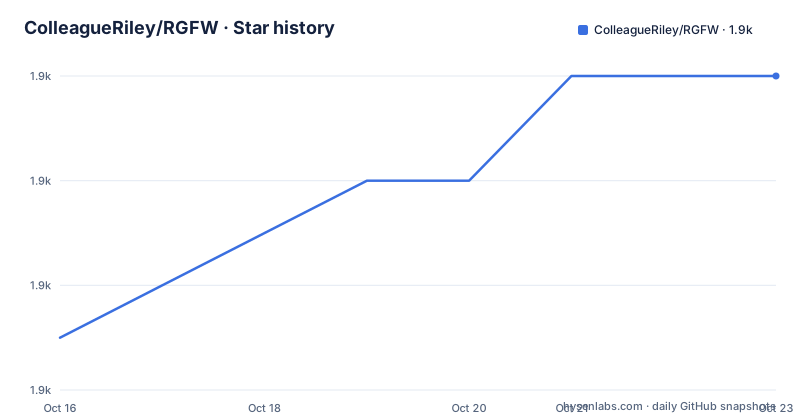
Star history
- ColleagueRiley/RGFW1,912 ★ · +5
| Repository | 2026-10-16 | 2026-10-23 |
|---|---|---|
| ColleagueRiley/RGFW | 1.9k | 1.9k |
5 Stars in the last 7 days, measured from the daily GitHub snapshot. Compare with other projects
Editorial analysis
RGFW.h holds the implementation, and you define it once
The framework is a single header called RGFW.h. The usage pattern is the one familiar from stb-style libraries: define the implementation macro before including it, and the library compiles itself exactly once into your binary.
#define RGFW_IMPLEMENTATION
#include "RGFW.h"
Beyond the window itself, the API is small enough to read in one sitting. `RGFW_init("example", 0)` starts things up and, per the comment in the README example, is where you load OpenGL, Vulkan or EGL entry points with `RGFW_initOpenGL`, `RGFW_initEGL` or `RGFW_initVulkan`. `RGFW_createWindow` takes a title, x, y, width, height and a flag list, and returns an `RGFW_window*`. The example passes `RGFW_windowCenter | RGFW_windowNoResize`.
Teardown is `RGFW_window_close(win)` and `RGFW_deinit()`. There is no object graph to manage and no allocation strategy to override unless you use the `examples/custom_alloc/` example.
The language position is specific. The README says RGFW is written in C99 in mind but supports C++, Objective-C/C++ and zig-cc compilation, and that it has a C89 compatible API. That is not cosmetic: the Makefile has an `ifdef (RGFW_C89)` block that switches the compile flags to `-std=c89 -Wno-declaration-after-statement -Wall -Wextra -Wpedantic`, so C89 conformance is a build target rather than an aspiration.
The compiler list is gcc, clang, zig-cc, msvc through cl.exe and emcc for Emscripten.
Three ways to consume events, which is the design decision
RGFW describes itself as multi-paradigm, with an event system offering multiple ways of handling events: callbacks, a queue, and state lookups. That trio is the library's most opinionated feature, and picking the wrong one shapes your main loop.
The queue style is the traditional one. `RGFW_window_checkEvent(win, &event)` returns whether an event was available, and you read `event.type`, then the union member such as `event.key.value` or `event.button.value`.
The callback style registers a handler by event type with `RGFW_setEventCallback(RGFW_keyPressed, keyfunc)`. The function receives `const RGFW_event*` and reads `event->common.win` to reach the window the event belongs to, which is what the example does to close on Escape:
void keyfunc(const RGFW_event* event) {
    if (event->key.value == RGFW_keyEscape) {
        RGFW_window_setShouldClose(event->common.win, 1);
    }
}
The third style does not consume events at all. State lookups are predicates such as `RGFW_isMousePressed(RGFW_mouseRight)`, and input position comes from `RGFW_window_getMouse(win, &mouseX, &mouseY)`. `RGFW_pollEvents()` exists for the case where you only want callbacks or state checking and not the queue.
Which to choose is a real fork in the road. Callbacks suit a game or a tool with a global input mapping. The queue suits an editor where events are context-sensitive and must be routed. State lookups suit an input-driven app where you poll current truth each frame and old events do not matter.
The repository reflects all three: `examples/callbacks/` and `examples/event_queue/` are separate example directories, and the README example uses the queue for one branch and the state check for another in the same loop.
Graphics context helpers are opt-in defines, not linked libraries
RGFW will not draw anything for you. The README states this directly: it does not handle any rendering other than creating the graphics context, and it is not an OpenGL focused library, since RGFW can be used with any graphics API.
What it offers is context creation plus blitting. Helper functions are included in the framework for OpenGL in its Native, EGL and GLES forms, Vulkan, DirectX, Metal and WebGPU. You enable each one by defining a macro before the include:
#define RGFW_OPENGL
#define RGFW_VULKAN
#define RGFW_DIRECTX
#define RGFW_WEBGPU
Nothing is pulled in unless you ask, which is the mechanism behind the claim of no external dependencies. RGFW depends only on system API libraries: Winapi, X11, Cocoa and their equivalents.
For software rendering there is the `RGFW_surface` object and `RGFW_window_blitSurface`, which blits raw data straight onto the window. The `examples/surface/surface/` example is the software rendering path, alongside `examples/gl11/`, `examples/gl33/`, `examples/gles2/`, `examples/egl/`, `examples/dx11/`, `examples/metal/`, `examples/gears/` and a `examples/microui_demo/` that embeds a third-party immediate mode GUI.
The last one is a useful sign of scope. RGFW is small enough that embedding a UI toolkit on top of it is a normal thing to do, which is also how you would get text rendering and layout, since RGFW itself provides none of that.
Platform coverage, and the Wayland asterisk
The README lists X11 on UNIX, Wayland on Linux marked experimental, Cocoa on macOS, Emscripten for WASM, and WinAPI, described as tested on Windows XP, 10, 11 and ReactOS with limited Windows 9x support.
That testing spread is unusual enough to state plainly rather than summarise. A modern windowing library claiming XP and ReactOS support tells you it has kept the WinAPI path conservative. The trade is that the Makefile defines `-D _WIN32_WINNT=0x0501` for Windows builds when the compiler is not zig cc, which is a Windows XP-era target macro.
Wayland is the weak point and the README marks it experimental. The build system reflects the uncertainty: `WAYLAND=1` compiles for Wayland, `WAYLAND_X11=1` compiles for Wayland and X11 so the examples fall back to X11 when no Wayland display is found, and `WAYLAND_ONLY=1` in the Makefile implies the former without X11 at all. The README notes these define `RGFW_WAYLAND` in the implementation, or `RGFW_WAYLAND` together with `RGFW_X11`. There is a `wayland/` directory and a `wayland.mk` in the repository root.
The practical reading: on Linux you get X11 today with a Wayland path you should test on your own compositor, and the examples are built to degrade rather than fail. A library where the experimental backend can fall back to the stable one at compile time is a reasonable design, but it means you choose your compromise at build configuration rather than at runtime.
Building the examples needs no build system expertise. The Makefile detects Darwin, Linux, NetBSD and Windows, and takes flags including `NO_VULKAN=1`, `NO_GLES=1`, `NO_OSMESA=1` and `NO_EGL=1` to skip examples you cannot build.
Compiling the minimal example by hand
Because there is no dependency to fetch, the smallest program builds with one command per platform. The README gives the three:
linux : gcc main.c -lX11 -lGL -lm -lXrandr
windows : gcc main.c -lopengl32 -lgdi32
macos : gcc main.c -framework Cocoa
The Linux line is the interesting one. X11 and GL are the obvious parts; `-lXrandr` is there for monitor and screen geometry, which is the same family of calls a windowing layer needs for positioning across multiple displays. The macOS line uses only Cocoa, and the Makefile's macOS branch is richer, adding CoreVideo, OpenGL and IOKit for full context support.
The Makefile covers more ground than those three lines. On Linux it links `-lXrandr -lX11 -ldl -lpthread -lm`, and when `WAYLAND_ONLY=1` is set it drops the X11 libraries entirely. On Windows it uses `-static -lgdi32` as the base, with DirectX libraries under a `DX11_LIBS` variable that expands to `-lgdi32 -ldxgi -ld3d11 -luuid -ld3dcompiler`, and Vulkan under `VULKAN_SDK` include and lib paths. Output extensions change per platform: `.exe` and `.dll` on Windows, `.dylib` on macOS, `.so` on Linux.
There is also a `premake5.lua` at the root for Premake-based generation, a `wasm/` directory for the Emscripten target, an `index.html` and a hosted build of the examples you can run in a browser at colleagueriley.github.io/RGFW, and separate GitHub Actions workflows for Linux, Windows and macOS.
The README is explicit that documentation is largely in-header, with the generated Doxygen reference at colleagueriley.github.io/RGFW/docs and a Doxyfile in the repository.
Zlib licensing, and what the library will not grow into
RGFW uses the Zlib/libPNG licence, which the README paraphrases as: use it freely, do not claim you wrote it, mark altered versions as such and keep the licence in the header. The full text in the repository is the standard three-clause form, including the condition that the notice may not be removed or altered from any source distribution.
For a windowing layer this is close to the permissive end. There is no requirement to publish anything, no reciprocal obligation on your own code, and the only practical duties are attribution honesty and keeping the notice intact. If you vendor the header into a proprietary product, the acknowledgement in documentation is appreciated but not required.
The scope boundaries are equally worth stating. There is no scene graph, no asset pipeline, no text rendering, no input remapping layer and no window management policy. RGFW creates windows, contexts and delivers events. Everything above that line is yours or a third party.
That makes it a different kind of dependency from GLFW, SDL or raylib. Compared with those named frameworks, RGFW is a header intended to be read and modified. The `examples/custom-backend/` directory points the other way too, suggesting that swapping or extending the backend is an intended activity rather than an accident.
Maintenance is current: the repository is not archived and the last push was on 2026-10-15. The recent tags are 1.8.1 on 2025-11-25, 1.8.0-pre on 2025-10-21 and v1.7.0 on 2025-05-06. Note the pre-release in the 1.8.0 tag name, and note that the numbering moved from v1.7.0 to 1.70 in one step, which is worth a glance at the CHANGELOG file in the repository root before you rely on version semantics.
Editorial conclusion
Adopt RGFW when you want to create a window and deliver input events in C99 with no external dependencies and a header you can read, and when Zlib licensing fits what you ship. Do not adopt it when you want a scene graph, a renderer, or a windowing layer that hides its event model from you, because RGFW supplies none of those by design. Verify first that your platform's backend is covered at the maturity you need, since Wayland is marked experimental while X11, Cocoa and WinAPI are not, and read the API in RGFW.h before sizing your event loop around it.
Frequently asked questions
How do I create a window with RGFW?
Define RGFW_IMPLEMENTATION, include RGFW.h, call RGFW_init, then RGFW_createWindow with a title, position, width, height and flags such as RGFW_windowCenter | RGFW_windowNoResize. Close with RGFW_window_close and RGFW_deinit.
Which graphics APIs does RGFW support?
Helper functions are included for OpenGL in Native, EGL and GLES forms, Vulkan, DirectX, Metal and WebGPU, plus an RGFW_surface object for blitting raw data with RGFW_window_blitSurface. Request OpenGL, Vulkan, DirectX and WebGPU helpers by defining RGFW_OPENGL, RGFW_VULKAN, RGFW_DIRECTX or RGFW_WEBGPU. RGFW itself does not render.
Is Wayland support stable in RGFW?
The README marks Wayland as experimental. Building with WAYLAND=1 targets Wayland, and WAYLAND_X11=1 also builds X11 so the examples fall back to X11 when no Wayland display is found.
How do I handle input events in RGFW?
Three styles are supported. Use RGFW_window_checkEvent to read events from the queue into an RGFW_event struct, RGFW_setEventCallback to register a handler such as RGFW_keyPressed, or state lookups like RGFW_isMousePressed for polling current input state.
What license does RGFW use?
The Zlib/libPNG licence. The README states you can use it freely as long as you do not claim you wrote it, mark altered versions as such, and keep the license included with the header.
Can I compile the RGFW examples without a build system?
Yes. The README gives a single command per platform, such as `gcc main.c -lX11 -lGL -lm -lXrandr` on Linux. A Makefile is also included, taking flags like WAYLAND=1, NO_VULKAN=1, NO_GLES=1 and NO_OSMESA=1, and a premake5.lua is available.
Official sources
Add this badge to your README
If you maintain this project, the badge below links readers to this analysis and shows its maintenance status from the daily GitHub snapshot. Paste the markdown into your README; add ?metric=license or ?metric=stars to the image URL for a different field.

[](https://hysenlabs.com/projects/colleagueriley-rgfw)Star history chart for your README
[](https://hysenlabs.com/projects/colleagueriley-rgfw)Was this useful?