Composer: dependency management for PHP, and how to install it
Dependency Manager for PHP
At a glance
- What is it?
- Composer is the dependency manager for PHP projects, with a 2.11 line for current PHP and a 2.2 LTS line for older runtimes. Here is how the resolver, the lock file and the platform requirements fit together, and where the tool stops being a good fit.
- Who is it for?
- Adopt Composer for any PHP project that pulls in third-party code, and pick the 2.2 LTS line if you are still on PHP 5.3.2 through 8.1, since the installer and self-update are documented to select the matching release automatically. Do not adopt it expecting it to manage system libraries or non-PHP runtimes; the binary list in the README (unzip or 7z, git, and the optional VCS clients) is the extent of what it shells out to.
- Can I use it commercially?
- Yes. MIT is a permissive licence: you can use, modify and sell software built on it, as long as you keep its copyright and licence notices.
- Is it still maintained?
- Yes. The repository received new commits within the last day.
- What is it written in?
- Mainly PHP, according to GitHub's language statistics.
Answers come from the project's GitHub data, last synced on November 15, 2026, and from our analysis. They are not legal advice.
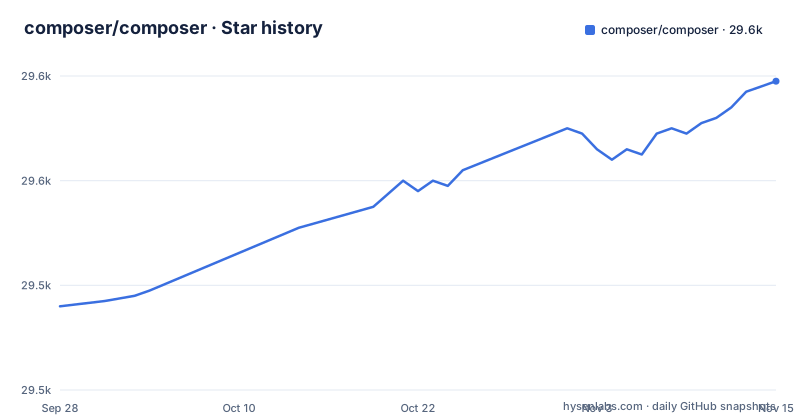
Star history
- composer/composer29,579 ★ · +43
| Repository | 2026-09-28 | 2026-11-15 |
|---|---|---|
| composer/composer | 29.5k | 29.6k |
43 Stars in the last 48 days, measured from the daily GitHub snapshot. Compare with other projects
Editorial analysis
What Composer solves for PHP projects
PHP had a package distribution problem long before it had a package manager. Code was copied between projects, vendored into a directory, or pulled in through PEAR, and nothing recorded which version of which library a project actually needed. Composer's stated job is narrow: it helps you declare, manage, and install dependencies of PHP projects. The declaration lives in composer.json, the resolved result lives in composer.lock, and the installed code lands in vendor/.
The audience is anyone shipping PHP: a Laravel application pulling in framework packages, a library that needs a test runner and a static analyser, a legacy codebase that has to stay on an old interpreter. Public packages are found on Packagist.org, and the README points at Private Packagist for private package hosting. Composer itself does not host packages. It is the client; Packagist is the index.
The interesting consequence is that Composer is a build-time tool, not a runtime one. Nothing about the installed application depends on Composer being present in production, provided vendor/ is deployed. That distinction matters when you decide where in your pipeline it belongs.
How the resolver, composer.json and composer.lock fit together
The dependency graph is solved once and then frozen. composer.json holds your constraints, which are version ranges rather than exact versions. Composer reads those constraints, walks the transitive requirements of every candidate package, and picks a set of versions that satisfies all of them at once. The result of that solve is written to composer.lock.
The README credits the solver's origin: this project's Solver started out as a PHP port of openSUSE's Libzypp satsolver. That is a satisfiability solver, and it explains a behaviour that surprises people. When two packages require incompatible versions of a shared dependency, Composer does not guess or pick the newer one. It reports the conflict and names the packages involved. A constraint set with no solution produces an error, not a best-effort install.
composer.lock is the part that matters operationally. It records the exact resolved versions, so a second machine running the install command gets the same tree rather than re-solving and possibly landing somewhere else. If the lock file is absent from version control, every environment solves independently and drift becomes possible. The repository layout keeps composer.lock at the top level.
The other input to the solve is the platform. Composer checks the PHP version and the loaded extensions against each package's requirements, so a package declaring ext-zip fails on a machine without that extension rather than at runtime. That check is what makes the binary dependency list in the README meaningful: unzip (or 7z/7zz), gzip, tar, unrar, xz, git, hg, fossil, p4 and svn are external programs Composer may invoke to fetch and extract archives. The README is explicit that most users need only two of them, unzip and git, and that if ext-zip is available only git is needed, though it calls that configuration not recommended.
Installing Composer and running a first install
The README does not inline download commands. It directs you to the official instructions at getcomposer.org/download, and the usage documentation at getcomposer.org/doc. Follow those pages for the installer, since the exact bootstrap command is versioned there and not in the repository README.
What the README does state is the runtime requirement. The latest Composer needs PHP 7.2.5 or above. The 2.2 LTS line supports PHP versions 5.3.2 through 8.1, and the installer or the self-update command is documented to select the appropriate Composer version for your PHP automatically. So on an old interpreter you do not choose the LTS line by hand; the tooling picks it.
Once Composer is on the machine, the first real use is declaring a dependency and installing it. The README points to Packagist for finding public packages. The README itself names only the self-update command:
composer self-updateAfter require finishes you should see the package under vendor/, a new entry in the require section of composer.json, and a composer.lock file at the project root if there was not one already. Subsequent machines run install, which reads the lock file rather than re-solving.
The distinction between install and update is the single most common source of confusion. require changes the dependency set and rewrites the lock file. install reproduces the locked set exactly. Deployments should run install, not update, because update re-solves and can move versions. The README names self-update as the command that also handles the PHP-version-appropriate selection when you need to keep Composer itself current.
Where Composer is the wrong tool
Composer manages PHP packages. It does not manage system packages, and it does not manage the PHP interpreter itself. If a library needs a C extension compiled against a specific PHP build, Composer can check that the extension is loaded and refuse to proceed, but it cannot install it for you. That work belongs to your base image, your package manager, or your provisioning tool.
There is a second boundary that catches people on shared hosting and locked-down production environments. Composer fetches archives and may invoke git, and it writes into vendor/. If the deployment target has no outbound network access and no unzip or 7z binary, the install step fails there. The usual answer is to run the install in a build stage and ship the resulting vendor/ directory, which is a deployment decision rather than a Composer feature.
The third case is a project with no third-party dependencies at all. A small library that only uses the standard library gains a composer.json, a lock file and a vendor directory it does not need. Composer's own repository is a counterexample in the other direction: it is a PHP project that uses Composer to build itself, which is why composer.json and composer.lock sit at its top level.
Finally, the version constraints are not a security mechanism. A constraint like ^2.0 accepts any 2.x release, including one published after you last reviewed the code. The lock file pins what you have; it does not vet what arrives when someone runs update.
Composer against PEAR and against language-native package managers
The historical alternative in PHP was PEAR, which installed packages into a shared, system-wide location rather than per project. That difference is the whole argument. PEAR made two applications on the same server fight over one version of a library. Composer puts vendor/ inside each project, so two applications can depend on different versions of the same package without conflict.
The closer comparison today is with package managers in other languages, such as npm for JavaScript or Bundler for Ruby. They share the model: a manifest with version ranges, a lock file with exact versions, and a per-project install directory. The differences are in the details. Composer's platform check is stricter than most, because PHP extensions and the interpreter version are first-class constraints that can make a solve fail. And Composer's solver, descended from a satsolver, reports unsatisfiable constraint sets as errors rather than resolving them loosely, which is more predictable but less forgiving when you are trying to force an install through.
If you are coming from PEAR, the mental shift is that dependencies are project-local and version-pinned in a file you commit. If you are coming from npm, the shift is smaller, though you should expect the platform checks to reject installs that npm-style tooling would happily complete.
Maintenance, release lines and the MIT licence
The repository is not archived, and the last push was on 2026-11-02. The recent release list shows two lines being maintained in parallel: 2.11.0 and 2.2.31, both published on 2026-10-29, with 2.11.1 following on 2026-10-30. The 2.2 line is the LTS branch, which is why it still receives releases despite the 2.11 line being current.
That dual-line structure is the upgrade cost in practice. If your PHP is 7.2.5 or above, you are on the 2.11 line and upgrades are ordinary minor releases. If you are pinned to PHP 5.3.2 through 8.1, you are on 2.2 LTS, and moving to 2.11 means moving PHP first. The README describes the installer and self-update as selecting the right line automatically, so the upgrade path is gated by your interpreter, not by a manual Composer choice.
The repository also carries UPGRADE-2.0.md at the top level, which is the document to read when a major-version jump changes behaviour. The licence is MIT, which permits use, modification and redistribution provided the copyright notice and permission notice are retained; the LICENSE file holds the exact text. That is a permissive licence with no copyleft obligation on your own code, but it says nothing about the licences of the packages you install, and Composer does not audit those for you.
Editorial conclusion
Adopt Composer for any PHP project that pulls in third-party code, and pick the 2.2 LTS line if you are still on PHP 5.3.2 through 8.1, since the installer and self-update are documented to select the matching release automatically. Do not adopt it expecting it to manage system libraries or non-PHP runtimes; the binary list in the README (unzip or 7z, git, and the optional VCS clients) is the extent of what it shells out to. Before you commit, verify three things: which Composer version your PHP actually receives, whether ext-zip is present on the target machines, and whether composer.lock is committed to the repository, because that file is what makes installs reproducible across environments.
Frequently asked questions
What is Composer?
Composer is a dependency manager for PHP. It helps you declare, manage, and install the dependencies of a PHP project, resolving packages published on Packagist.org and recording the result in a lock file.
How do I install Composer?
The README directs you to the official instructions at getcomposer.org/download rather than giving an inline command. The latest version requires PHP 7.2.5 or above, while the 2.2 LTS line supports PHP 5.3.2 through 8.1.
How do I use Composer in PHP?
You declare dependencies in composer.json, find public packages on Packagist.org, and install them into a project-local vendor directory. The lock file records the exact resolved versions so other machines reproduce the same tree.
How do I use Composer on Windows?
The README does not document platform-specific steps; it points to the official download page and the documentation at getcomposer.org/doc for installation and usage. The binary dependencies it lists, such as unzip or 7z and git, apply regardless of platform.
How do I install Composer on Windows?
The README gives no Windows-specific procedure and sends you to the official instructions at getcomposer.org/download. The runtime requirement is the same: PHP 7.2.5 or above for the latest release, or PHP 5.3.2 through 8.1 for the 2.2 LTS line.
Official sources
Add this badge to your README
If you maintain this project, the badge below links readers to this analysis and shows its maintenance status from the daily GitHub snapshot. Paste the markdown into your README; add ?metric=license or ?metric=stars to the image URL for a different field.

[](https://hysenlabs.com/projects/composer-composer)Star history chart for your README
[](https://hysenlabs.com/projects/composer-composer)Was this useful?