Cryogen: a static site generator where the templates are Clojure projects
A simple static site generator written in Clojure
At a glance
- What is it?
- Cryogen builds a blog from Markdown or AsciiDoc into plain HTML using Selmer layouts and a config.edn map, and it can be driven by Leiningen, clj-new or deps-new. The catch is that its published releases stopped in 2021.
- Who is it for?
- Cryogen fits a Clojure developer who wants a blog or small documentation site with a build step they can shape, and who is comfortable editing a project.clj and a config.edn map. It is a poor fit if you need a generator with an active release stream, since the newest published release is 0.6.6 from 2021-10-15 even though the repository itself was pushed to on 2026-06-01.
- Can I use it commercially?
- Yes, with conditions. EPL-1.0 is a weak copyleft licence: you can use it inside commercial and closed-source software, but if you distribute changes to its own files, you must publish those changes under the same licence.
- Is it still maintained?
- Yes. The repository last received commits 2 days ago.
- What is it written in?
- Mainly HTML, according to GitHub's language statistics.
Answers come from the project's GitHub data, last synced on November 7, 2026, and from our analysis. They are not legal advice.
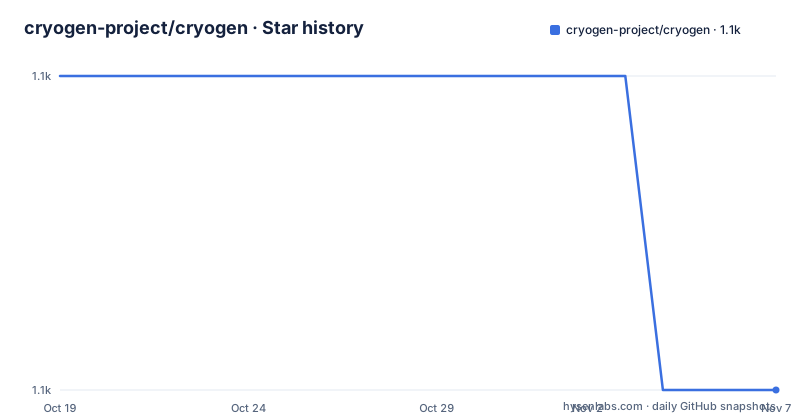
Star history
- cryogen-project/cryogen1,132 ★ · -1
| Repository | 2026-10-19 | 2026-11-07 |
|---|---|---|
| cryogen-project/cryogen | 1.1k | 1.1k |
-1 Stars in the last 19 days, measured from the daily GitHub snapshot. Compare with other projects
Editorial analysis
What Cryogen produces and who it is aimed at
Cryogen is a static site generator written in Clojure, and it is built for people who already live in the Clojure ecosystem. The output is plain static files: a blog or a small documentation site, generated from content files and HTML templates, then copied to a web server.
The feature list is a reasonable snapshot of what a small blog-oriented generator does. Blog posts and pages with Markdown by default or AsciiDoc, tags, table of contents generation, plain HTML page templates, code syntax highlighting, Disqus support, sitemap generation, RSS feed generation, Sass or SCSS compilation, and Klipse integration. Klipse is the unusual one, a component that turns code blocks in the content into live interactive examples rather than static snippets.
The distinguishing choice is the template layer. Cryogen uses Selmer, and layouts are plain HTML files with Selmer tags, not a Clojure data structure rendered through a template engine. The base layout lives at themes/{theme}/html/base.html and provides the general page structure, and each page layout extends it and fills the content block:
{% extends "/html/base.html" %}
{% block content %}
<div id="posts-by-tag">
    <h2>Posts tagged {{name}}</h2>
    <ul>
    {% for post in posts %}
        <li>
            <a href="{{post.uri}}">{{post.title}}</a>
        </li>
    {% endfor %}
    </ul>
</div>
{% endblock %}
That is HTML with template tags in it, which means a designer can read a layout without knowing Clojure at all, and the site is a set of files rather than a program.
The project documentation notes that the README only covers a subset of the features, with the full documentation on the cryogen site, and the site is at cryogenweb.org.
Three ways to create a site, and the two build tools behind them
Cryogen can be driven by three different Clojure toolchains, and the choice is made at project creation time.
With Leiningen, which needs version 2.5.0 or above installed, the project is created from the Cryogen leiningen template:
lein new cryogen my-blogWith clj-new installed as a tool, the commands are longer because the tool itself has to be installed first:
clojure -Ttools install com.github.seancorfield/clj-new '{:git/tag "v1.2.362"}' :as clj-new
clojure -Tclj-new create :template cryogen :name myname/myblog :force true
cd myname/myblog/
With deps-new as a tool, the template is fetched from a git tag with a pinned sha:
clojure -Ttools install io.github.seancorfield/deps-new '{:git/tag "v0.4.0"}' :as new
clojure -Sdeps '{:deps {io.github.cryogen-project/cryogen {:git/tag "0.6.6" :git/sha "fcb2833"}}}' -Tnew create :template org.cryogenweb/new :name myname/myblog
cd myname/myblog/
The artifact cryogen/lein-template contains both a leiningen template and a deps-new template, which is why one artifact serves two of the three paths.
The runtime mirrors the creation tool. The dev server starts with lein serve, or clojure -X:serve under tools-deps, and both have fast variants, lein serve:fast and clojure -X:serve:fast, which perform fast but partial compilation of only the changed page or post. The full server watches the content and themes folders and recompiles automatically. Generating the site without a server is lein run or clojure -M:build.
Having both paths is genuinely useful, since a project created with Leiningen carries a project.clj and one created with deps-new carries a deps.edn, and the repository itself contains both files at the top level.
Everything is configured from one EDN map
The site configuration lives in a single file, content/config.edn, and it is a plain Clojure map. The default template ships with every key populated:
{:site-title                   "My Awesome Blog"
 :author                       "Bob Bobbert"
 :description                  "This blog is awesome"
 :site-url                     "http://blogawesome.com/"
 :post-root                    "posts"
 :page-root                    "pages"
 :post-root-uri                "posts-output"
 :page-root-uri                "pages-output"
 :tag-root-uri                 "tags-output"
 :author-root-uri              "authors-output"
 :public-dest                  "public"
 :blog-prefix                  "/blog"
 :rss-name                     "feed.xml"
 :rss-filters                  ["cryogen"]
 :recent-posts                 3
 :post-date-format             "yyyy-MM-dd"
 :archive-group-format         "yyyy MMMM"
 :sass-src                     []
 :sass-path                    "sass"
 :theme                        "blue"
 :resources                    ["img"]
 :keep-files                   [".git"]
 :disqus?                      false
 :disqus-shortname             ""
 :ignored-files                [#"\.#.*" #".*\.swp$"]
 :previews?                    false
 :posts-per-page               5
 :blocks-per-preview           2
 :clean-urls                   :trailing-slash
 :collapse-subdirs?            false
 :hide-future-posts?           true
 :klipse                       {}
 :description-include-elements #{:p :h1 :h2 :h3 :h4 :h5 :h6}
 :debug?                       false}
Several of these keys carry decisions rather than mere values.:clean-urls is set to:trailing-slash, so URL style is a choice rather than a fixed behaviour.:hide-future-posts? is true, which matters if you write dated posts ahead of time.:ignored-files takes regex patterns, and the defaults skip editor swap files and dot-prefixed files.:keep-files lists paths that survive a clean build, and the default keeps.git so the generated public folder does not lose the repository metadata.
The keys are documented on the configuration page of the project site rather than in the README, and the README points there for the details of each one.
Markdown, AsciiDoc, and a theme that carries a condition
Content format is a swap rather than a plugin system. Cryogen ships with Markdown support as default, and the documentation explains how to switch: open the project.clj in the created blog and change the line in :dependencies that says cryogen-flexmark to cryogen-asciidoc, ensuring the right version. The compiler then stops looking for files ending in .md in content/md and looks for files ending in .asc in content/asc instead.
That is a coarse switch. It replaces the parser and the source directory, and the extension changes with it, so any content you already wrote does not carry across.
Themes are selected with the :theme key in config.edn, and the template comes with three themes in the themes folder. There is a licensing condition attached to one of them: the Nucleus theme is obtained from downloadwebsitetemplates.co.uk and requires you to keep the footer, unless you make a donation on their website. That is a real constraint for a project that is otherwise permissive, and it is the kind of detail worth finding before you pick a theme rather than after you have deployed.
Code syntax highlighting is handled by Highlight.js, and adding more languages means replacing themes/{theme}/js/highlight.pack.js with a customised package. The initHighlightingOnLoad call sits in themes/{theme}/html/base.html:
<script>hljs.initHighlightingOnLoad();</script>Because it lives in base.html, changing the highlight set or the way it initialises is a theme-level edit rather than a per-page one, which is the right place for it.
Deployment is a copy to a static folder
Deployment is deliberately dull, which is the point of a static site generator. The generated content is found under the public folder, and you copy that to a static folder for a server such as Nginx or Apache. The project includes a sample Nginx configuration, intended to be placed at /etc/nginx/sites-available/default, which listens on port 80 for both IPv4 and IPv6.
There is no build step in the deployment path, no server-side runtime, no database. The output of a build is a directory of files, and a misconfigured deploy is a missing file rather than a stack trace.
The Sass and SCSS compilation is part of the build rather than a separate step, driven by the:sass-path and:sass-src keys in config.edn, with:sass-src defaulting to an empty vector, which means no Sass sources are compiled out of the box. Static resources are picked up through the:resources key, which defaults to img, and the:page-root,:post-root-uri and:blog-prefix keys control where posts, pages, tags and author pages land relative to the public folder.
For a blog that is all the machinery you need: content in, HTML out, plus a posts-per-page setting of 5 for pagination and a recent-posts count of 3 for the front page.
The release history stopped in 2021, the repository did not
Here is the fact that should shape your adoption decision. The published releases are 0.6.6 from 2021-10-15, 0.6.5 from 2021-10-14 and 0.6.4 from 2021-10-14, and the release messages are informative in themselves: 0.6.6 added support for the deps-new template, 0.6.5 bumped cryogen-core, and 0.6.4 changed fast compilation to the *:fast variant.
The repository itself has not been abandoned. It is not archived, and the last push was on 2026-06-01. The top level carries a CHANGELOG.md, a CONTRIBUTING.md, a LICENSE, a deps.edn, a project.clj, a resources directory and a src directory, and the primary language is listed as HTML because the templates are the bulk of the content.
So the picture is a project that is worked on but not released. A bug fix or a dependency bump on master reaches nobody until a tag is cut, and the deps-new template command in the documentation pins an exact git tag and sha, 0.6.6 with sha fcb2833, which is what a user gets unless they change it.
The licence is EPL-1.0, which is a weak copyleft licence, so using the generator and its output in a commercial project is a question about the tool rather than about your site.
The practical guidance is to treat the master branch as the thing you actually install, pin it deliberately, and expect to read the source when a dependency breaks rather than to expect a release note telling you what changed.
Editorial conclusion
Cryogen fits a Clojure developer who wants a blog or small documentation site with a build step they can shape, and who is comfortable editing a project.clj and a config.edn map. It is a poor fit if you need a generator with an active release stream, since the newest published release is 0.6.6 from 2021-10-15 even though the repository itself was pushed to on 2026-06-01. Before adopting, read the configuration documentation for the config.edn keys, check the licensing conditions attached to the Nucleus theme, and test the site with the tool you will actually use, since the leiningen and tools-deps paths are separate invocations.
Frequently asked questions
How do I create a new site with Cryogen?
You can use leiningen with lein new cryogen my-blog, clj-new with clojure -Tclj-new create :template cryogen :name myname/myblog, or deps-new with the cryogen template from a pinned git tag. The artifact cryogen/lein-template contains both a leiningen template and a deps-new template.
How do I run the Cryogen development server?
From the project directory, use lein serve with Leiningen or clojure -X:serve with tools-deps. The server watches the content and themes folders and recompiles automatically, and the fast variants, lein serve:fast and clojure -X:serve:fast, do a fast but partial compilation of only the changed page or post.
Where is the Cryogen site configuration stored?
In content/config.edn, as a plain Clojure map. Keys include :site-title, :site-url, :post-root, :page-root, :blog-prefix, :theme, :sass-path, :posts-per-page, :clean-urls and :hide-future-posts?, and each one is documented on the configuration page of the project site.
Which templating engine does Cryogen use?
Cryogen uses Selmer, with layouts stored as HTML files in the themes/{theme}/html folder. The base.html layout provides the general site structure, and each page layout extends it and fills the content block, with the layout name matching the :layout key in the page metadata.
Is Cryogen still being released?
The most recent published release is 0.6.6 from 2021-10-15, and the repository is not archived with the last push on 2026-06-01. The project is licensed under EPL-1.0, and the deps-new template command pins a specific git tag and sha, so you install from a tag rather than from the branch tip.
Official sources
Add this badge to your README
If you maintain this project, the badge below links readers to this analysis and shows its maintenance status from the daily GitHub snapshot. Paste the markdown into your README; add ?metric=license or ?metric=stars to the image URL for a different field.

[](https://hysenlabs.com/projects/cryogen-project-cryogen)Star history chart for your README
[](https://hysenlabs.com/projects/cryogen-project-cryogen)Was this useful?