Videdown is a Vue shell that runs yt-dlp and ffmpeg as child processes
Videdown 是一款现代化的开源视频下载工具,让你可以从抖音 小红书 B站 YT Instagram等网站下载无水印高清视频
At a glance
- What is it?
- Videdown is an Electron desktop app whose real work is done by yt-dlp and ffmpeg; the project's own value is the queue, the progress display and the cookie import flow. The build config is Windows-first, with an NSIS installer for x64 and both binaries shipped outside the asar archive.
- Who is it for?
- Videdown suits a Windows user who wants a queue, format selection and cookie based access instead of a command line, and who is comfortable that yt-dlp and ffmpeg are the components doing the work. Server, headless and Linux packaging are not documented, since the electron-builder configuration declares only a Windows NSIS target for x64.
- Can I use it commercially?
- Yes. MIT is a permissive licence: you can use, modify and sell software built on it, as long as you keep its copyright and licence notices.
- Is it still maintained?
- Yes. The repository last received commits 62 days ago.
- What is it written in?
- Mainly TypeScript, according to GitHub's language statistics.
Answers come from the project's GitHub data, last synced on October 23, 2026, and from our analysis. They are not legal advice.
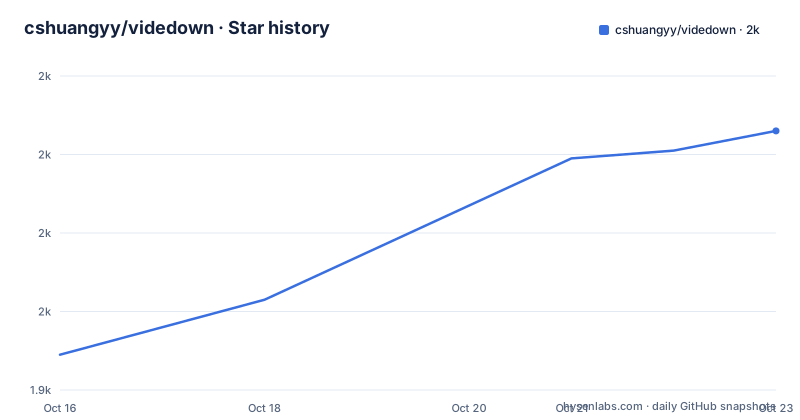
Star history
- cshuangyy/videdown2,006 ★ · +57
| Repository | 2026-10-16 | 2026-10-23 |
|---|---|---|
| cshuangyy/videdown | 1.9k | 2k |
57 Stars in the last 7 days, measured from the daily GitHub snapshot. Compare with other projects
Editorial analysis
The download logic is not in this repository
Start from what Videdown is not. It contains no extraction code, no site specific parsers, and no list of supported services of its own. The README attributes site coverage to the yt-dlp engine and points at yt-dlp's supportedsites.md for the full list, naming 1000+ platforms.
What the project contributes is a desktop front end. The stack is Electron for the shell, Vue 3 with TypeScript for the renderer, Tailwind CSS for styling, yt-dlp as the download engine and ffmpeg for audio and video processing. Vite and Vite plugin Electron handle the build, and electron-builder produces the installer.
The source layout follows the Electron split. The electron/ directory holds main.ts, the main process entry point, and preload.ts, the preload script. src/ holds the renderer: components/, assets/ and App.vue as the root component. public/ holds shared assets, and package.json and pnpm-workspace.yaml sit at the root. The renderer never talks to the network for downloads itself; the main process is what spawns the tools.
The feature set the README claims is queue shaped: pause, resume and retry on one click, a download queue, live progress with speed and estimated time remaining, a choice of video quality and format including audio only, and import of browser cookies for content that requires a login.
Two binaries shipped outside the asar archive
The build configuration in package.json says more about the runtime shape than the README does. Electron 30.0.1 is pinned exactly as a devDependency rather than floated. The app id is com.videdown.app and the product name is Videdown. The entry point is dist-electron/main.js, and the packaged files are dist/**/* and dist-electron/**/* inside an asar archive.
Two things are deliberately outside that archive. asarUnpack lists the yt-dlp.exe and ffmpeg.exe patterns with a double star prefix, and extraResources copies ./yt-dlp.exe and ./ffmpeg.exe to the top level of the installed app. A child process cannot be executed from inside a packed asar file, so unpacking is a functional requirement rather than a packaging preference, and it is why the repository build expects both executables to exist at the project root before you run pnpm build.
Only four Electron locale packs are shipped: zh-CN.pak, zh-TW.pak, en-US.pak and en-GB.pak. That is a deliberate size choice and also a statement about who the app is aimed at.
The Windows target is a single entry, NSIS with arch x64, using ./ldstore.ico as the icon. No macOS or Linux target appears in the configuration, which is the single hardest constraint on who can use this project.
The runtime dependencies list includes electron-updater for self updates and puppeteer-core, which is there for the browser side of the cookie flow rather than for downloading.
Getting the two engines in place before pnpm install
The README is explicit that yt-dlp and ffmpeg must both be present for the project to run. On Windows, the documented route downloads the yt-dlp release binary and a Windows ffmpeg build, then extracts ffmpeg.exe to the project root and deletes both the archive and the extracted directory.
Invoke-WebRequest -Uri "https://github.com/yt-dlp/yt-dlp/releases/latest/download/yt-dlp.exe" -OutFile "yt-dlp.exe"
Invoke-WebRequest -Uri "https://github.com/BtbN/FFmpeg-Builds/releases/download/latest/ffmpeg-master-latest-win64-gpl.zip" -OutFile "ffmpeg.zip"
Expand-Archive -Path "ffmpeg.zip" -DestinationPath "."
Copy-Item -Path "ffmpeg-master-latest-win64-gpl/bin/ffmpeg.exe" -Destination "ffmpeg.exe"
The final two lines of the README script remove ffmpeg.zip and the extracted directory, which keeps the tree matching what extraResources expects.
On macOS and Linux the README points at package managers instead.
brew install yt-dlp ffmpeg
sudo apt install yt-dlp ffmpeg
sudo pacman -S yt-dlp ffmpeg
Then the normal JavaScript setup applies.
git clone https://github.com/cshuangyy/videdown.git
cd videdown
pnpm install
For day to day work, pnpm dev starts Vite in development mode. For a production build, pnpm build runs vue-tsc and vite build and then electron-builder, so a type error fails the build before any packaging happens. The release artifact is a Windows installer named Videdown Setup x.x.x.exe.
Cookies come in through a Chrome extension, not a login form
The YouTube workflow in the README is the clearest description of how authentication is handled, and it is a workaround rather than a feature: install the Chrome extension Get cookies.txt, export cookies from the page while logged in, then import that file in the app's settings.
That means the app never sees a password. It reads a cookie file the browser already produced, which is the standard approach for sites that gate downloads behind a session, and it also means the export step sits outside the project.
The README does not document where the imported cookie file is stored, whether it is encrypted, or whether it is deleted on quit. For a file that grants access to a logged in account, that gap is the thing to check before importing anything you care about.
The general flow, for a link that needs no login, is copy the URL, paste it into the input box, click the parse button, choose a quality and format, then click download. Formats come from what the engine offers for that URL, and audio only is a selectable option.
What the project is against, and what the README leaves open
The honest comparison here is not another GUI, it is using yt-dlp directly. The engine is the same, the format list is the same, and the supported site list is the same document. What you give up by skipping Videdown is the queue with pause, resume and retry, the progress and remaining time display, the format picker, and the cookie import path. What you give up by using Videdown is scripting, which matters if you download in batches or on a schedule.
The README leaves several things unstated. There is no description of how parallel downloads are limited, no statement of whether concurrent yt-dlp invocations are serialised, and no mention of retry backoff or what a failed item does to the rest of the queue. There is also no headless or command line mode in the scripts section, so server and scheduled use are not documented.
On cadence, the README says the project is under active development and invites issue reports. The last push was on 2026-08-22, and v1.2.7 was tagged the same day, after v1.2.1 on 2026-06-02 and v1.2.0 on 2026-06-01. The version in package.json matches the tag, and the licence is MIT.
Editorial conclusion
Videdown suits a Windows user who wants a queue, format selection and cookie based access instead of a command line, and who is comfortable that yt-dlp and ffmpeg are the components doing the work. Server, headless and Linux packaging are not documented, since the electron-builder configuration declares only a Windows NSIS target for x64. Before installing, check whether the Windows installer named Videdown Setup x.x.x.exe on the releases page bundles yt-dlp.exe and ffmpeg.exe, since the build expects both to sit next to the project root as extraResources, and note that the last push was on 2026-08-22.
Frequently asked questions
What does Videdown need installed before it will run?
Both yt-dlp and ffmpeg. The README states the project requires them to work, and the build configuration copies yt-dlp.exe and ffmpeg.exe into the packaged app as extra resources while unpacking them from the asar archive.
Which platforms does Videdown ship installers for?
The electron-builder configuration in package.json declares a Windows target only, using the NSIS installer for x64 with ./ldstore.ico as the icon. No macOS or Linux build target is listed there, even though the README documents package manager commands for yt-dlp and ffmpeg on those systems.
How do I download a video that needs a login on Videdown?
Install the Chrome extension Get cookies.txt, export cookies from the site page while logged in, then import that cookies file in the app's settings. The README does not say where the imported file is stored or whether it is removed on quit.
Can Videdown run on a schedule or on a headless server?
Not from what the project documents. The scripts section defines only dev, build and preview, the production build produces a desktop installer through electron-builder, and no command line or headless entry point is described.
Official sources
Add this badge to your README
If you maintain this project, the badge below links readers to this analysis and shows its maintenance status from the daily GitHub snapshot. Paste the markdown into your README; add ?metric=license or ?metric=stars to the image URL for a different field.

[](https://hysenlabs.com/projects/cshuangyy-videdown)Star history chart for your README
[](https://hysenlabs.com/projects/cshuangyy-videdown)Was this useful?