finmarketpy: a Python backtesting library for FX and macro strategies
Python library for backtesting trading strategies & analyzing financial markets (formerly pythalesians)
At a glance
- What is it?
- finmarketpy is a Python library for backtesting trading strategies and analyzing market data, built around findatapy for data loading and chartpy for plotting. It suits quant researchers who want prebuilt backtest templates, seasonality studies and event studies, and it expects you to supply API keys before anything runs.
- Who is it for?
- Adopt finmarketpy if you already work with findatapy and chartpy and want prebuilt backtest templates for FX or macro strategies, seasonality studies and event studies without writing the return plumbing yourself. Skip it if you need a stable, fully documented API on a fixed release cadence, or if you trade instruments whose data vendors are not wired into findatapy, because the library's data layer decides what you can realistically backtest.
- Can I use it commercially?
- Yes. Apache-2.0 is a permissive licence: you can use, modify and sell software built on it, as long as you keep its copyright and licence notices.
- Is it still maintained?
- Activity is slowing. The repository last received commits 7 months ago.
- What is it written in?
- Mainly Python, according to GitHub's language statistics.
Answers come from the project's GitHub data, last synced on November 22, 2026, and from our analysis. They are not legal advice.
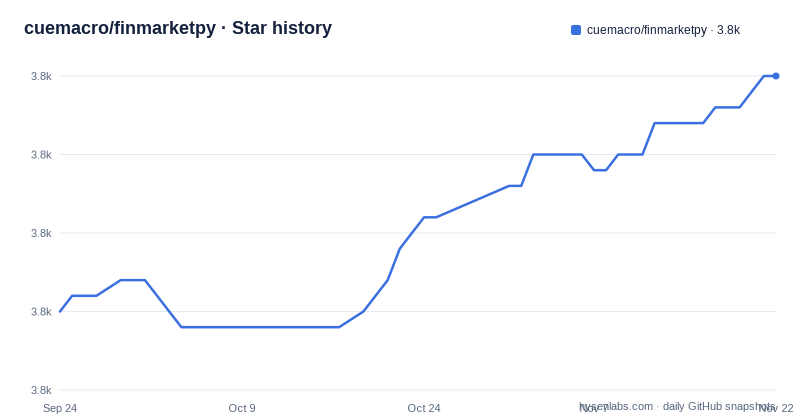
Star history
- cuemacro/finmarketpy3,830 ★ · +15
| Repository | 2026-09-24 | 2026-11-22 |
|---|---|---|
| cuemacro/finmarketpy | 3.8k | 3.8k |
15 Stars in the last 59 days, measured from the daily GitHub snapshot. Compare with other projects
Editorial analysis
What finmarketpy is for, and who it is not for
finmarketpy addresses a narrow but real problem: getting from a market data series to a tested strategy without writing the same return and seasonality plumbing on every project. The README describes it as a Python library that enables you to analyze market data and backtest trading strategies through a simple API, with prebuilt templates for defining a backtest. It is the successor to PyThalesians, and the README states the two have been merged so the author can maintain one set of libraries.
The intended user is a quant researcher or analyst working in Python who already thinks in pandas DataFrames and wants strategy templates rather than a full trading platform. The examples lean toward FX and macro: the gallery shows an FX trend following strategy, gold and FX volatility seasonality, and an event study around US nonfarm payrolls for USDJPY. If your work looks like that, the library's shape fits. If you are building an execution system, a portfolio accounting engine or a low-latency pipeline, this is not that, and the README never claims it is.
How finmarketpy is put together: three libraries, one data path
The architecture is deliberately split. finmarketpy depends on two sibling libraries: findatapy for loading market data and chartpy for charts. The README states that using findatapy you can download market data from Bloomberg, Quandl, Yahoo and similar sources, and that with chartpy you can switch between matplotlib, plotly and bokeh by changing a single keyword. That split is the main design decision, and it has consequences.
Data flows from a vendor through findatapy into a pandas DataFrame, then into a finmarketpy backtest object, and the results go out through chartpy for display. Because the data layer is external, the set of instruments you can backtest is bounded by what findatapy can fetch. The README does not enumerate the full vendor list, so treat that as something to check in findatapy's own documentation before you plan a project around a specific market.
Configuration is split the same way. The README instructs you to edit marketconstants.py in finmarketpy, or create a marketcred.py file to override the settings. chartpy needs chartconstants.py edited to add a Plotly API key, and findatapy needs dataconstants.py edited to add the Quandl API key. Credentials therefore live in three places across three repositories, which is more setup than a single-package library but keeps the credential files out of the code you write.
Installing finmarketpy and running the FX trend example
The README points to INSTALL.md for detailed setup, including how to build the whole Python environment, and to a separate notebook from the author's Python for finance course. It also recommends installing from the repository rather than from PyPI, on the grounds that the newest version is on GitHub. The pyproject.toml declares requires-python as >=3.9, while the README's requirements section names Python 3.10, so check both before you pick an interpreter.
Install the two sibling libraries first, then finmarketpy. The README gives this order explicitly.
pip install git+https://github.com/cuemacro/chartpy.git
pip install git+https://github.com/cuemacro/findatapy.git
pip install git+https://github.com/cuemacro/finmarketpy.git
If you prefer PyPI, the README notes that `pip install chartpy` and `pip install findatapy` also work, with the caveat that those may be slightly older than the GitHub versions.
FinancePy is optional and only needed for option pricing. The README recommends installing it separately from PyPI, without dependencies, because its strict version pins on libraries such as llvmlite can clash with the rest of your environment. It also says to pin a specific version, since the API changes often.
pip install numba numpy scipy llvmlite ipython pandas prettytable
pip install financepy==0.370 --no-deps
Before the first backtest, edit marketconstants.py or create marketcred.py to override it, and add your Quandl key to findatapy's dataconstants.py. The README says you may instead be prompted for the API key on first run. After that, the entry point to copy is finmarketpy_examples/tradingmodelfxtrend_example.py, which the README cites as the source of the FX trend cumulative return chart in the gallery. Expect to see a cumulative return series, a series showing how the strategy's exposure changes over time, and individual trade returns, since the gallery shows all three. There are also Binder links for backtest_example.ipynb and market_data_example.ipynb if you want to try the notebooks in a browser first, though the README warns a Binder instance can take a few minutes to start.
Where finmarketpy gets in your way
The README is unusually candid about one limitation: the library is under continual development, the API is heavily documented, and the project is looking to add more general documentation. Read that as a warning about the documentation surface, not the code comments. If you need a written guide for a specific backtest class, you may not find one, and you will be reading source and examples instead.
The release history reinforces the point. v0.11.15 fixed Pandas deprecation warnings, v0.11.16 removed print messages, and v0.11.19 changed NumPy and Pandas versions. Those are maintenance releases, not feature releases, and pyproject.toml pins numpy<2 with pandas>=1.5.3. The last push to the repository was on 2026-04-16, so the project is not abandoned, but the published releases are sparse and the README itself tells you to install from Git rather than wait for one.
The credential sprawl is a second cost. Three configuration files across three repositories, plus an optional FinancePy install with dependency conflicts the README explicitly warns about, is a real setup burden for a library whose value proposition is convenience. And because the data layer is findatapy, a vendor that findatapy does not support is effectively an instrument you cannot backtest without writing your own loader.
finmarketpy compared with vectorbt and pysystemtrade
The closest comparisons in the Python backtesting space take different architectural positions. vectorbt, which appears in the related searches for this project, is built around vectorized NumPy operations and is oriented toward fast parameter sweeps across many strategy variants. finmarketpy goes the other way: it is written in an object oriented style, as the README states, with reusable backtest templates and a readable API, which trades raw sweep speed for code you can follow and extend.
pysystemtrade sits at the other end of the scope spectrum. It is a full systematic trading framework with its own data layer, position sizing and production concerns, whereas finmarketpy stays a research library and delegates data to findatapy and charts to chartpy. If you want the whole stack in one project, pysystemtrade is the more complete answer; if you want to backtest an idea against data you already trust and plot it, finmarketpy's smaller surface is the advantage.
Neither comparison is settled by the README, which does not benchmark finmarketpy against anything. The honest framing is that finmarketpy's differentiator is the analysis tooling around the backtest: seasonality studies, event studies around data events, and a built-in volatility targeting calculator for risk weighting. Those are the features to evaluate, because the plain backtest loop is the part every library in this space has.
Licence, maintenance and what an upgrade costs you
finmarketpy uses the Apache 2.0 licence, and the README states this plainly. For most teams that is a permissive licence with a patent grant, and the repository ships a LICENCE file at the top level that you should read alongside your own legal review rather than relying on a summary here. The dependency chain matters more than the licence in practice: findatapy, chartpy and FinancePy each carry their own terms, and FinancePy is installed with --no-deps specifically to avoid version conflicts, which means you own the resolution of those conflicts yourself.
Upgrade cost is dominated by the pandas and NumPy pins. The most recent release changed NumPy and Pandas versions, and an earlier one fixed Pandas deprecation warnings, so the project tracks upstream breakage but does not move fast. If your environment is already on NumPy 2, the declared numpy<2 constraint is a blocker you will have to resolve before installing. The Makefile shows a ruff configuration with line-length 120 and target-version py39, plus pre-commit and deptry in the dev dependency group, so contributing back is a normal Python workflow rather than a bespoke one.
Editorial conclusion
Adopt finmarketpy if you already work with findatapy and chartpy and want prebuilt backtest templates for FX or macro strategies, seasonality studies and event studies without writing the return plumbing yourself. Skip it if you need a stable, fully documented API on a fixed release cadence, or if you trade instruments whose data vendors are not wired into findatapy, because the library's data layer decides what you can realistically backtest. Before committing, install it from GitHub rather than PyPI, set up marketconstants.py or a marketcred.py override, and run the FX trend example end to end to confirm your data keys resolve.
Frequently asked questions
Can finmarketpy backtest a trading strategy?
Yes. The README describes finmarketpy as a library that backtests trading strategies using a simple API with prebuilt templates, and the gallery shows cumulative returns, exposure over time and individual trade returns for an FX trend following example.
What is the best backtesting tool for stocks?
finmarketpy is not positioned specifically for stocks. Its examples and gallery focus on FX and macro, including an FX trend following strategy, gold and FX volatility seasonality, and a USDJPY event study around US nonfarm payrolls.
Can Python be used for stock trading with finmarketpy?
finmarketpy is a Python library, and its README says it can analyze market data and backtest strategies, with findatapy handling downloads from sources including Bloomberg, Quandl and Yahoo. The README does not document a stock-specific workflow, so check findatapy's vendor coverage for the equities data you need.
Official sources
Add this badge to your README
If you maintain this project, the badge below links readers to this analysis and shows its maintenance status from the daily GitHub snapshot. Paste the markdown into your README; add ?metric=license or ?metric=stars to the image URL for a different field.

[](https://hysenlabs.com/projects/cuemacro-finmarketpy)Star history chart for your README
[](https://hysenlabs.com/projects/cuemacro-finmarketpy)Was this useful?