notepad-- (ndd): a lightweight cross platform text editor built for UOS and plain text work
A text editor supporting Windows/Linux/Mac, aiming to be a text editor made by and for Chinese people, from China.
At a glance
- What is it?
- A C++ text editor that runs the same small window on Windows, Linux and macOS, with a Lua plugin system, aggressive large file handling and a release history that spends three versions on opening multi gigabyte logs quickly.
- Who is it for?
- notepad-- is at its best in the two situations it was clearly built around: opening enormous log or dump files without waiting, and running the same editor on a UOS or Linux desktop where the Windows-only lightweight editors do not exist. The Lua plugin hook in v3.9.0 and the portable Windows zip make it easy to try without committing.
- Can I use it commercially?
- Yes, with conditions. GPL-3.0 is a copyleft licence: if you distribute software that includes it, you must release that software's source code under the same licence. Running it internally without distributing it does not trigger that obligation.
- Is it still maintained?
- Yes. The repository last received commits 12 days ago.
- What is it written in?
- Mainly C++, according to GitHub's language statistics.
Answers come from the project's GitHub data, last synced on October 22, 2026, and from our analysis. They are not legal advice.
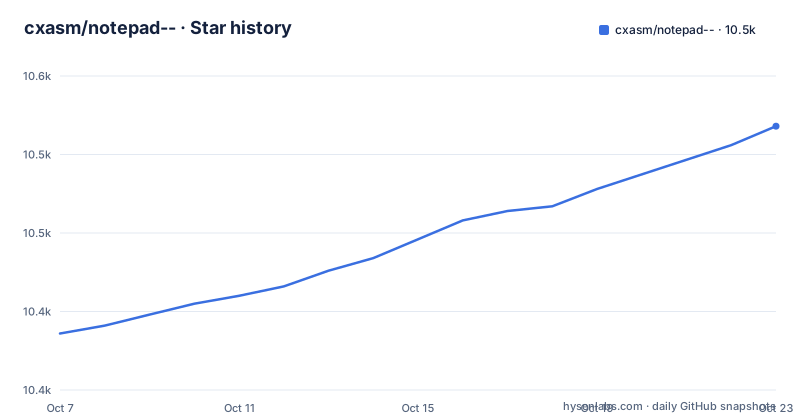
Star history
- cxasm/notepad--10,506 ★ · +120
| Repository | 2026-10-07 | 2026-10-22 |
|---|---|---|
| cxasm/notepad-- | 10.4k | 10.5k |
120 Stars in the last 15 days, measured from the daily GitHub snapshot. Compare with other projects
Editorial analysis
What notepad-- is actually trying to be
notepad--, usually shortened to ndd, is a small plain text editor written in C++ that runs on Windows, Linux and macOS. The repository description states the goal plainly: a lightweight text editor whose development effort targets domestic Chinese desktop operating systems, specifically UOS, alongside macOS and the various Linux distributions. It is licensed GPL-3.0, sits at roughly 10,329 stars and 395 forks, carries 269 open issues, and was last pushed on 2026-09-18.
The differentiator claimed against other editors in the same category is not a long feature list. It is that the same binary shape exists on three operating systems. Most editors of this size and speed are Windows only, so on a UOS or RedHat desktop the choices are usually a heavyweight IDE or a terminal. The README carries screenshots of ndd running on UOS, on Windows, on macOS, and of a related build on RedHat, which is the point being made: this is the plain text box you already know, present on the platform you actually sit in front of.
It is worth being clear about what ndd is not. It is not trying to be VS Code or Sublime Text. There is no language server, no project tree, no extension marketplace of that scale. The plugin system added in v3.9.0 is a Lua scripting surface rather than a full extension platform, which keeps the footprint small and also keeps the ceiling low. Readers coming from Notepad++ should expect a much smaller tool with a much narrower brief.
Where the Chinese README stops and the release notes begin
The README is Chinese first, with an English version kept alongside it as README_EN.md. It is short, around 1,700 characters, and it does three things: states the cross platform goal, points at the Gitee repository as the primary home for users in China, and embeds screenshots. It also contains a long public statement responding to what the author describes as anonymous defamatory posts by a competing product, alongside an assertion that ndd stays out of political argument. That is repository context worth acknowledging and then setting aside, because the software itself is the interesting part.
The practical problem with a short README is that it points at a version that has moved on. The latest download link in the README text still names Gitee release v3.5, while the newest published release on the repository side is notepad-v3.9.0 from 2026-09-18. Anyone following the README literally gets an old build. The release list is the more reliable source of what exists.
The repository also serves as the support desk. With 269 open issues, questions about encoding, crash reports and platform install problems land here rather than in a discussion forum, and the maintainer links to those issues directly from release notes. One example is worth naming: the macOS disk image instructions in every recent release point at a Gitee issue titled about macOS Sonoma 14.1.1 reporting the install as damaged, which tells you the known workaround for that macOS version lives in the issue tracker rather than in documentation.
Why the GitHub mirror can lag behind the real release
The GitHub repository is a mirror. The README states that this repository and the Gitee repository at gitee.com/cxasm/notepad-- are the same software, that users inside China should go to Gitee, and that the GitHub copy is synced from Gitee on a periodic basis. The stated reason for the delay is mundane and honest: the author is frequently unable to reach GitHub from inside China, so the sync does not happen immediately.
This has real consequences for anyone evaluating the project from outside China. Version numbers, release notes and even the download link in the README can all be a release or two behind what the maintainer actually shipped. The material collected here shows three releases: notepad-v3.8.2 published on 2026-08-05, notepad-v3.8.3 on 2026-08-20, and notepad-v3.9.0 on 2026-09-18, all with the same Windows installer, Windows portable zip and macOS disk image naming pattern.
There is a second distribution channel that partly compensates. Recent releases carry a SourceForge button pointing at a source archive for the same tag, and systems that did not get a fresh build that round are pointed at shared archive links on Weiyun, Baidu Netdisk and 123pan. So a mirror lag on GitHub does not mean a build is unavailable, it means you have to check a second place. For a project whose whole premise is working outside the Western release infrastructure, that is an unusual amount of channel juggling, and it is the single most practical thing to keep in mind when tracking versions.
Large file handling is the thread running through three releases
Read the changelogs of v3.8.2, v3.8.3 and v3.9.0 together and a clear priority emerges: opening very large files fast, and editing them without exhausting memory. The v3.8.2 notes describe background loading in the fast large text mode so the window opens immediately, memory for large files swappable to disk, full text replace across a large file, a more complete undo in that mode, search results centred when navigating between them, and tidier handling of temporary swap files. The same release fixes a reported stall when opening a SQL syntax file, a crash after deleting a file, and lag on long lines.
v3.8.3 pushes further and is the most interesting of the three. It claims that four to six gigabyte files open instantly with full replace supported, that folder searching was sped up, and that the fast large file mode was reworked using an intermediate cache so the swap file approach is more efficient. Editing in that mode uses the swap file rather than holding everything in memory. It also caps how much of a very long line the find bar will display at 1,200 characters, which is a small detail that reveals a lot about who the tool is aimed at.
v3.9.0 is smaller but adds the most significant thing: a Lua plugin system, so ndd plugins can be written in Lua. It also improves encoding detection, makes the line number column width adjust automatically during a find, and continues the crash fixes that the previous two releases were also doing. Together these describe a tool aimed squarely at log files, dumps and machine generated output, which is a more specific and more defensible niche than being a general editor.
Reading the source tree and finding the real documentation
The repository is small and its layout says what you need. These are the build related files in the tree:
CMakeLists.txt
cmake/
src/
win.bat
win.mk
THIRDPARTY.md
A CMakeLists.txt plus a cmake/ directory is the portable build, and win.bat and win.mk are the Windows specific entry points that predate it or bypass it. THIRDPARTY.md tracks the bundled third party components. A pngshow/ directory and a handful of numbered .png files at the repository root are screenshots and image material rather than program logic, and a changelog.txt sits alongside them.
The documentation situation is unusual and worth knowing before you plan an extension. The user manual in the repository is ndd-v3.7.0-manual.pdf, so it describes a version two minor releases behind the current 3.9.0. Plugin programming instructions live in a .docx file with a Chinese filename, and build instructions in a second .docx. Both are real, but neither is greppable, neither is in the README, and neither is reachable from the GitHub interface without downloading and opening an office document.
That matters for anyone planning to use the Lua hook introduced in v3.9.0. The release note tells you plugins are written in Lua, and the repository confirms a guide exists, but the actual API surface, the lifecycle callbacks available and what a plugin may register are documented only in that Word file. There is no example plugin in the repository either. So the honest position is that the extension mechanism is announced and documented somewhere, but the README alone does not tell you enough to write one.
What the download assets say about platform support
Each recent release ships exactly three files: an installer named Notepad--v3.9.0-plugin-Installer.exe, a portable archive named Notepad--v3.9.0-win10-portable.zip, and a disk image named Notepad--v3.9.0-mac_arm64_12.3.dmg. The naming tells you more about platform coverage than the README does.
The two Windows builds are deliberately different. The installer is described as the plugin version for Windows 10, and it associates the right click context menu and related registry entries. The portable zip is the green, install free build: extract and run, with no context menu registration and no registry writes. That pair is a sensible accommodation for locked down corporate machines where touching the registry is a problem.
The macOS disk image is narrower than the name suggests. It is explicitly for macOS 12.x and later on arm64 M1 and M2 chips, so Intel Macs get nothing from this release channel. Combined with the absence of any Linux binary in the release assets, despite Linux and UOS being headline targets, the picture is that Windows and Apple Silicon are the packaged platforms and Linux users are expected to build from source or to use a shared archive build from one of the linked netdisk collections. For a project whose central claim is cross platform reach, that is the gap to keep an eye on.
Editorial conclusion
notepad-- is at its best in the two situations it was clearly built around: opening enormous log or dump files without waiting, and running the same editor on a UOS or Linux desktop where the Windows-only lightweight editors do not exist. The Lua plugin hook in v3.9.0 and the portable Windows zip make it easy to try without committing. What the repository does not settle is how deep the plugin API goes, since the programming guide is a .docx rather than anything searchable, and how well the cross platform claim holds on Intel Macs, which get no disk image. Read the changelog, pick the portable build, and only move to the installer if you want the right click context menu entry.
Frequently asked questions
What is Notepad-- and which operating systems does it support?
Notepad-- (ndd) is a lightweight plain text editor written in C++ that runs on Windows, Linux and macOS. Its stated focus is domestic Chinese desktop systems, particularly UOS, alongside macOS and various Linux distributions.
How do I install Notepad-- on Windows without changing the registry?
Use the portable archive rather than the installer. The release notes describe the win10 portable zip as a green build you extract and run, which does not associate the right click context menu and does not write registry entries.
Is there an official Notepad-- package for Linux or UOS?
Not in the release assets. Recent releases ship a Windows installer, a Windows portable zip and a macOS arm64 disk image, and point Linux and other systems at shared archive links on netdisk services instead.
What did Notepad-- v3.9.0 add?
v3.9.0 introduced a Lua plugin system so plugins can be written in Lua. It also improved encoding detection, made the line number column width adjust automatically during a find, and continued fixing crash issues.
Official sources
Add this badge to your README
If you maintain this project, the badge below links readers to this analysis and shows its maintenance status from the daily GitHub snapshot. Paste the markdown into your README; add ?metric=license or ?metric=stars to the image URL for a different field.

[](https://hysenlabs.com/projects/cxasm-notepad)Star history chart for your README
[](https://hysenlabs.com/projects/cxasm-notepad)