Cypress 16: What the Browser-Native Test Runner Actually Changes for Your CI Pipeline
GitHub describes it as Fast, easy and reliable testing for anything that runs in a browser.. The repository metadata lists TypeScript as its primary language. The metadata lists the MIT license. This article stays within the project description and details documented in the GitHub repository README.
At a glance
- What is it?
- Cypress is a TypeScript-based, MIT-licensed test runner for anything that runs in a browser. This article examines its installation, execution model, and the trade-offs you face when adopting it for end-to-end testing.
- Who is it for?
- Adopt Cypress if your team writes end-to-end tests for a browser-based application and wants a single tool that runs in the same browser your users use. Avoid it if you need to test non-browser environments or if your team is already invested in a different assertion and command model.
- Can I use it commercially?
- Yes. MIT is a permissive licence: you can use, modify and sell software built on it, as long as you keep its copyright and licence notices.
- Is it still maintained?
- Yes. The repository received new commits within the last day.
- What is it written in?
- Mainly TypeScript, according to GitHub's language statistics.
Answers come from the project's GitHub data, last synced on November 15, 2026, and from our analysis. They are not legal advice.
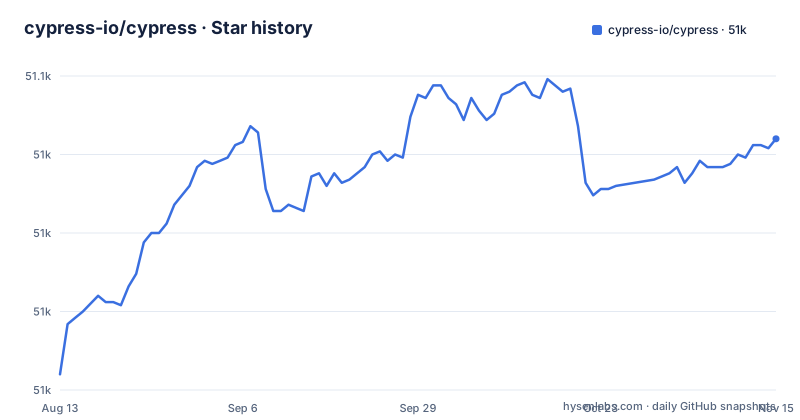
Star history
- cypress-io/cypress51,030 ★ · +75
| Repository | 2026-08-13 | 2026-11-15 |
|---|---|---|
| cypress-io/cypress | 51k | 51k |
75 Stars in the last 94 days, measured from the daily GitHub snapshot. Compare with other projects
Editorial analysis
The Problem: End-to-End Testing That Runs Where Your Users Do
Cypress targets a specific pain point: testing anything that runs in a browser. Traditional end-to-end tools often drive the browser through a remote protocol, which adds a layer of indirection and can produce tests that behave differently from real user sessions. Cypress instead runs directly in the browser alongside your application. The README's tagline, "Fast, easy and reliable testing for anything that runs in a browser," reflects that focus. The intended audience is front-end developers and QA engineers who need to verify user flows, not just unit-level behavior. If your product is a web app, Cypress is built for you. If your product is an API or a CLI, this is the wrong tool.
How It Works: In-Browser Execution and the Cypress Cloud
The README does not provide a detailed architecture diagram, but the project's identity is clear: Cypress executes test code in the same browser context as the application under test. This is a fundamental difference from tools that proxy commands through a driver. The repository mentions Cypress Cloud, which is a service for recording test runs and showing status badges. The README shows how to configure a badge for your project's README to display test status or test count from Cypress Cloud. That implies a data flow: your tests run locally or in CI, results are sent to the cloud, and the badge reflects those results. The cloud integration is optional but appears to be the primary way to get visibility into test history. The repository itself is a monorepo with a `develop` branch, and the contributing guidelines suggest a structured organization for linting and testing, which matters if you plan to modify the tool itself.
Getting It Running: Package Managers and the Binary Download
Installation is straightforward. The README lists three package managers: `npm install cypress --save-dev`, `yarn add cypress --dev`, and `pnpm add cypress --save-dev`. All three install the same npm package. What the README does not say, but what is well known from the project's history, is that the npm package triggers a postinstall step that downloads the Cypress binary. That binary is large, often hundreds of megabytes, and it can fail in restricted network environments. The README points to the official install guide at `https://on.cypress.io/install` for details, but the README itself does not cover proxy configuration or offline installation. If you are in a CI environment, you should expect the first install to take time. The command itself is simple, but the underlying download is a real operational consideration.
A Genuine Limitation: The Browser-Only Boundary
Cypress is explicitly for "anything that runs in a browser." That is a strength, but it is also a hard boundary. You cannot use Cypress to test a Node.js script, a database migration, or a native mobile app. The README does not claim otherwise, but teams sometimes try to stretch a browser test runner into a general-purpose testing tool. That is a mistake. Another limitation is the reliance on Cypress Cloud for centralized reporting. The README shows badges from Cypress Cloud, which means if you want that visibility, you need to create an account and send your test results to a third-party service. For teams with strict data policies, that could be a blocker. The README does not mention a self-hosted option, so the cloud dependency is a real trade-off.
The Alternative: Playwright and the Protocol-Based Approach
The main alternative to Cypress is Playwright. Where Cypress runs in the browser, Playwright drives the browser via a protocol, typically the Chrome DevTools Protocol. That difference has practical consequences. Playwright can control multiple browser contexts in parallel, which makes it faster for large test suites. Cypress, by contrast, runs each test in a single browser context, and while it supports parallelization through Cypress Cloud, the model is different. Playwright also supports testing across WebKit, Firefox, and Chromium with a unified API, while Cypress historically has had varying support for browsers. The README for Cypress does not mention Playwright, but any engineer evaluating a browser test runner will hit this comparison. If you need cross-browser coverage with a protocol-based approach, Playwright is the direct competitor. Cypress's advantage is its simpler mental model: you write tests that run in the same environment as your app.
Maintenance and Upgrade Cost: Frequent Releases and the Develop Branch
The repository shows a `develop` default branch and recent releases at a steady cadence: v16.2.1 (2026-10-28), v16.2.0 (2026-10-14), and v16.1.1 (2026-09-29), all within a few weeks of each other. That indicates an actively maintained project, but it also means you should expect frequent version bumps. Each upgrade may bring changes to the command API or the binary, so you need a plan for updating. The README points to a changelog at `https://on.cypress.io/changelog`, which is the first place to check before upgrading. The contribution guidelines mention linting and testing, which suggests the codebase is held to a standard, but that does not reduce your upgrade burden. The license is MIT, which is permissive and imposes few restrictions on commercial use, but it does not come with any warranty, so you are responsible for verifying that each new version works with your application.
What the README Does Not Tell You: The Missing Details
The README is thin on specifics. It does not explain how to write a test, what the command API looks like, or how the test runner interacts with the application's network requests. It does not mention fixtures, stubbing, or time travel debugging, which are features Cypress is known for. The README is limited to installation, badges, and a tagline, plus links. An engineer evaluating Cypress should go to the official documentation at `https://on.cypress.io` to learn the actual syntax. The README also does not mention any performance benchmarks or comparisons to other tools, so any claim about speed or reliability must be verified independently. This is a case where the marketing copy is broad, and the technical details live elsewhere.
Editorial conclusion
Adopt Cypress if your team writes end-to-end tests for a browser-based application and wants a single tool that runs in the same browser your users use. Avoid it if you need to test non-browser environments or if your team is already invested in a different assertion and command model. Before committing, verify that your CI infrastructure can handle the browser binaries Cypress downloads, and check the changelog for the specific version you plan to use, as the project releases frequently and the README does not detail the execution internals.
Frequently asked questions
how to install cypress
Install for Mac, Linux, or Windows with the package manager you already use: npm install cypress --save-dev, yarn add cypress --dev, or pnpm add cypress --save-dev. The page then points to the getting started guide on on.cypress.io, and the install pulls a prebuilt binary rather than compiling one.
how to install cypress using npm
The npm form is npm install cypress --save-dev, with --save-dev recording it as a development dependency. Yarn and pnpm have their own equivalent lines on the same page, so the flag differs only by which tool reads it.
how to install cypress on windows
The README states that Cypress installs for Mac, Linux, or Windows and gives no Windows specific step beyond the package manager command. Any Windows only detail has to come from the getting started documentation linked from the install section.
how to install cypress studio
The README does not mention Studio at all. It covers the install commands, a documentation and changelog and roadmap link, contributing, the MIT license, and badges, so the interactive runner is covered by the linked documentation rather than the project page.
how to install cypress in vs code
There is no editor extension documented here. A .vscode/ directory exists in the tree, but it holds this repository's own settings for developing Cypress, and the README covers only the package manager install.
Official sources
Add this badge to your README
If you maintain this project, the badge below links readers to this analysis and shows its maintenance status from the daily GitHub snapshot. Paste the markdown into your README; add ?metric=license or ?metric=stars to the image URL for a different field.

[](https://hysenlabs.com/projects/cypress-io-cypress)Star history chart for your README
[](https://hysenlabs.com/projects/cypress-io-cypress)Was this useful?