D2: a text-to-diagram language with a pluggable layout engine
D2 is a modern diagram scripting language that turns text to diagrams.
At a glance
- What is it?
- D2 compiles .d2 source files into SVG, PNG, GIF, PDF or PPTX through a Go CLI or as a library. Its layout engine is swappable, which is the main design decision to weigh before adopting it.
- Who is it for?
- Adopt D2 if your diagrams live in a repository next to the code they describe and you want them regenerated from a diffable .d2 file. Do not adopt it if you need a hand-placed canvas, because the layout is computed by the engine, not by you.
- Can I use it commercially?
- Yes, with conditions. MPL-2.0 is a weak copyleft licence: you can use it inside commercial and closed-source software, but if you distribute changes to its own files, you must publish those changes under the same licence.
- Is it still maintained?
- Yes. The repository last received commits 33 days ago.
- What is it written in?
- Mainly Go, according to GitHub's language statistics.
Answers come from the project's GitHub data, last synced on November 13, 2026, and from our analysis. They are not legal advice.
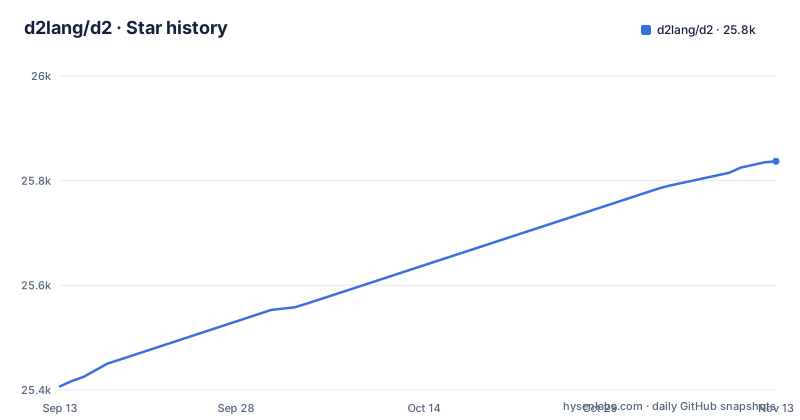
Star history
- d2lang/d225,837 ★ · +430
| Repository | 2026-09-13 | 2026-11-13 |
|---|---|---|
| d2lang/d2 | 25.4k | 25.8k |
430 Stars in the last 61 days, measured from the daily GitHub snapshot. Compare with other projects
Editorial analysis
The problem D2 solves: diagrams that drift from the code
Diagram files produced by a drawing tool are binary or XML blobs. Nobody reviews them in a pull request, and nobody notices when they stop matching the system. D2 takes the opposite position: the diagram is a text file with a .d2 extension, and the picture is an artifact you regenerate. The README's framing is "a modern diagram scripting language that turns text to diagrams", and the quickstart is three lines long: write x -> y -> z into in.d2, run the CLI, get out.svg.
The intended user is a developer documenting software architecture, which is why one of the bundled layout engines is described as designed specifically for software architecture diagrams. The language tooling section makes the same case from the maintenance side: the parser reports multiple errors from a broken program, there is an autoformatter, and syntax highlighting exists. Those are features you need when a diagram has a hundred nodes, not when it has five. If your diagrams are marketing illustrations, this is not the tool.
What a .d2 file actually contains
D2 mixes a container syntax with attribute blocks. The README example opens with a vars block holding d2-config, where layout-engine and theme-id are set, then declares a network container with nested containers inside it (cell tower, online portal, data processor). Nodes are bare identifiers, so writing transmitter on its own line creates a node. Shapes are attributes: shape: stored_data, shape: cylinder, shape: hexagon, shape: person. Repeating a visual element is style.multiple: true.
Edges are written with an arrow and an optional label after a colon, as in satellites -> transmitter: send. The same edge can appear more than once in the example, which is how the source expresses parallel connections. Node dimensions are settable too: the user node carries width: 130.
Two syntax details are worth noticing because they shape how you organize a file. Container paths are addressable with dots, so an edge can be declared from cell tower.transmitter to data processor.storage without re-declaring either node. And the vars block at the top is where global configuration lives, which means a diagram's layout engine can be pinned in the source rather than passed on the command line. That is convenient for reproducibility and awkward when the same file is rendered in two different pipelines.
Layout engines: Dagro by default, elk-go and TALA opt-in
The plugin system is the part of D2 that most affects output quality. Three layout engines are listed. Dagro is the default and bundled: a native Go port of the Dagre directed graph layout engine producing layered, hierarchical layouts, based on Graphviz's DOT algorithm. elk-go is also bundled and is a native Go port of the ELK engine, described as suited to node-link diagrams with an inherent direction and ports. TALA is bundled but opt-in, and the README calls it a native layout and edge-routing engine designed specifically for software architecture diagrams.
The selection mechanism is explicit: --layout=tala on the command line, the D2_LAYOUT=tala environment variable, or layout-engine: tala under vars.d2-config in the source. Three ways to set the same thing is one more than most projects need, and the README's layout section does not state the precedence between them. If you pin the engine in the file and also pass --layout, verify which wins before you rely on it in CI.
Because the engines are ports rather than wrappers, D2 does not shell out to Graphviz or a Java ELK process for these three. The README also says D2 handles specialized layouts such as sequence diagrams and grids, and that Go applications can use the layout packages directly or provide layout and routing functions through d2lib.
Getting it running, and the install script caveat
The documented install path is a shell script: curl -fsSL https://d2lang.com/install.sh | sh -s --. The README notes you can add --dry-run to see the commands without executing them, and --uninstall to remove the installation. If Go is already on the machine, go install github.com/d2lang/d2@latest works but the README states you will not get the manpage; installing a source release does include manpages, with details in docs/INSTALL.md.
The project's own advice is worth repeating plainly: it recommends using your OS package manager directly instead for improved security, while stating the install script is by no means insecure and that its functioning is described in detail in the installation documentation. Piping a remote script into a shell is a decision your environment has to make, and D2 does not hide that.
Once installed, the working loop is d2 --watch in.d2 out.svg. The README says a browser window opens with out.svg and live-reloads when in.d2 changes. That flag is the reason to use the CLI rather than the playground for real work: you edit text on one side and watch the rendered diagram update. There is also a playground at play.d2lang.com, and the README example links to a playground URL with the script encoded in the query string, which is a practical way to share a diagram without shipping a file.
Export formats, themes and fonts
Exports are SVG, PNG, GIF, PDF and PPTX. That list matters more than it looks. SVG is the default in the quickstart and is the right target for documentation sites and READMEs. PPTX is the odd one out and is the format that decides the tool for anyone who has to hand a diagram to a slide deck; a text-to-diagram tool that only emitted SVG would push that work back to a screenshot. PNG and GIF cover raster needs, and PDF covers print.
Styling is split between themes and fonts. The README says D2 includes a variety of official themes, browsable in the d2themes directory, and that you can make or contribute your own. The example sets theme-id: 300 with a comment identifying it as a terminal theme, so themes are selected by numeric id. Fonts default to Source Sans Pro, and changing them is documented under d2renderers/d2fonts. Both directories are in the repository, which means theme and font definitions are source files you can read and edit rather than opaque settings.
The honest limitation here is that the README does not enumerate the theme ids or show what each one looks like. You browse the d2themes directory or the playground to find one. That is a documentation gap, not a design flaw, but it costs time on first setup.
D2 as a Go library, and what that changes
The CLI is not the only interface. The README states that D2 can be used to produce diagrams from Go programs, with examples under docs/examples/lib. This is the difference between a documentation tool and a build dependency: a Go service that generates architecture diagrams from its own service registry can call the library instead of writing .d2 files to disk and shelling out.
The documented library route is for Go programs. There is also an npm package, @d2lang/d2, referenced in the badge row, and a d2js/ directory in the repository.
Where D2 is the wrong tool
The layout is computed. You do not place boxes. That is the whole value proposition and also the constraint: if you need a diagram with a specific visual arrangement, one that a human would nudge into place, you will fight the engine. The three bundled engines give you three families of automatic layout, not manual control. For a poster, a one-off architecture illustration with deliberate negative space, or anything where the composition is the point, a canvas tool is faster.
Finally, the project is pre-1.0. The release history shows v0.9.0, v0.8.2 and v0.7.1, with v0.9.0 dated 2026-09-07. The gap between v0.7.1 in August 2025 and v0.8.2 in August 2026 is a year, so the cadence is not fast. Treat the syntax as stable enough for internal documentation and check the changelog before assuming an upgrade is trivial.
How this differs from Mermaid and Graphviz
Mermaid is the closest comparison in intent: text in, diagram out, rendered in Markdown and wikis. The difference is the engine layer. Mermaid's rendering is tied to its own layout implementation, while D2 exposes layout as a plugin boundary with three bundled engines and a documented selection mechanism (--layout, D2_LAYOUT, layout-engine). If Dagro's layered output does not suit a particular diagram, you can switch to elk-go or TALA without changing the source file's structure. The README also points to text-to-diagram.com for comparisons.
Graphviz is the older reference point, and D2's default engine is explicitly a Go port of the Dagre layout engine, which the README ties back to Graphviz's DOT algorithm. So the lineage is direct: if you already think in DOT, Dagro's output will look familiar. The difference is the language around it. DOT has no autoformatter story in the same way, and D2's parser is described as reporting multiple errors from a broken program, which shortens the edit-render loop. Graphviz remains the safer choice if you need a layout algorithm D2 does not bundle.
Licence and maintenance cost
D2 is MPL-2.0. That is file-level copyleft: modifications to files covered by the licence stay under it, while larger works that combine D2 with other code can be distributed under other terms. Using the CLI to render .d2 files into images is not the same activity as modifying D2's source files, and the two have different obligations. This is a summary of the licence family, not legal advice; read LICENSE.txt and get your own counsel if you plan to fork the renderer or ship a modified binary.
Maintenance cost splits into two parts. The .d2 files themselves are small text and diff cleanly, which is the cheap part. Themes and fonts are source directories you can edit, so custom styling is a file change rather than a plugin build, though it does mean tracking upstream changes to d2themes and d2renderers/d2fonts on upgrade.
For a team that stays on the bundled engines and the CLI, the upgrade path is a binary swap plus a check of the changelog for syntax changes. The release cadence suggests that check is not urgent but should not be skipped.
Editorial conclusion
Adopt D2 if your diagrams live in a repository next to the code they describe and you want them regenerated from a diffable .d2 file. Do not adopt it if you need a hand-placed canvas, because the layout is computed by the engine, not by you. Before committing, verify three things: which layout engine your diagram type actually needs (Dagro, elk-go or TALA, selected with --layout or a layout-engine key under vars.d2-config), whether the export format you need is in the supported list (SVG, PNG, GIF, PDF, PPTX), and whether MPL-2.0 file-level copyleft is acceptable for how you plan to redistribute the binary or modified source files.
Frequently asked questions
What is D2 format?
D2 is a text diagram format with its own language rather than a variant of an existing one. A file declares containers, gives nodes shapes, sets styles, and connects nodes with an arrow operator that can carry a label, with a variables block for configuration such as the layout engine and theme. The repository also provides a cheat sheet as a PDF and a hosted playground, and a parser that reports several errors from a broken file at once plus an autoformatter.
What is D2 software?
A command line tool and Go library that compiles text diagram files into SVG, PNG, GIF, PDF and a presentation format. It runs as a runnable executable, it can be imported from Go programs, and it can watch a source file and reload the rendered output in a browser as you edit. Layout is done by three bundled engines rather than a browser library.
What are the key differences between D2 and Mermaid?
The repository does not compare the two; it links to a comparison site, text-to-diagram.com, and describes D2's own shape instead: three bundled native layout engines selectable by flag, environment variable or source setting, five export formats, a parser that reports multiple errors, an autoformatter, and a rendering path with no browser in it. Those are the properties to compare the two tools on.
Can GitHub render D2?
The README links to a hosted playground and a cheat sheet PDF, and the repository has a .pre-commit-hooks.yaml file. Extensions for VSCode and Vim are listed in the README's Related section rather than shipped from this repository.
Official sources
Add this badge to your README
If you maintain this project, the badge below links readers to this analysis and shows its maintenance status from the daily GitHub snapshot. Paste the markdown into your README; add ?metric=license or ?metric=stars to the image URL for a different field.

[](https://hysenlabs.com/projects/d2lang-d2)Star history chart for your README
[](https://hysenlabs.com/projects/d2lang-d2)Was this useful?