TLP UI: A GTK Front End for TLP Power Configuration
A GTK user interface for TLP written in Python
At a glance
- What is it?
- TLP UI is a Python and GTK application for viewing and changing TLP configuration files. It targets Linux users who want a graphical way to manage TLP 1.3 through 1.10 settings, including drop-in and user configuration changes.
- Who is it for?
- TLP UI is suitable for Linux users who already use TLP and want a graphical editor with visibility into default, user, and drop-in settings. It is not a replacement for TLP itself, and users should first verify that their required TLP version is supported, Python 3.10 or greater is available, and the GTK environment can run PyGObject.
- Can I use it commercially?
- Yes, with conditions. GPL-2.0 is a copyleft licence: if you distribute software that includes it, you must release that software's source code under the same licence. Running it internally without distributing it does not trigger that obligation.
- Is it still maintained?
- Activity is slowing. The repository last received commits 6 months ago.
- What is it written in?
- Mainly Python, according to GitHub's language statistics.
Answers come from the project's GitHub data, last synced on November 6, 2026, and from our analysis. They are not legal advice.
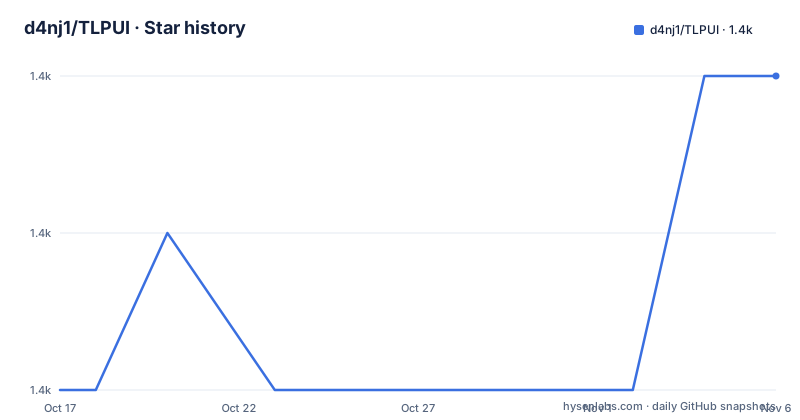
Star history
- d4nj1/TLPUI1,360 ★ · +2
| Repository | 2026-10-17 | 2026-11-06 |
|---|---|---|
| d4nj1/TLPUI | 1.4k | 1.4k |
2 Stars in the last 20 days, measured from the daily GitHub snapshot. Compare with other projects
Editorial analysis
What TLP UI Changes for Linux Power Settings
TLP UI addresses a specific configuration problem: TLP is configured through text files, while many Linux users work more comfortably with graphical controls. The project provides a GTK user interface around TLP configuration instead of requiring users to edit `/etc/tlp.conf` and related files manually. Its stated aim is to protect users from invalid settings and to provide a basic overview of valid configuration values.
The intended user is a Linux desktop user who has TLP installed and needs to inspect or adjust power-management behavior. The application does not replace the TLP daemon or claim to provide a separate power-management policy. It acts as a front end for the existing configuration files. This distinction matters because a graphical control only helps if the underlying TLP version and files are available on the system.
The README lists support for TLP versions 1.3 through 1.10. Older versions are assigned to TLP UI 1.6.1, rather than being covered by the current stated support range. TLP UI itself requires Python 3.10 or greater. The repository also includes an AppImage directory, documentation, tests, a desktop file, translation tooling, and packaging metadata, but the README does not document a complete release or upgrade workflow.
The Configuration Flow Behind the GTK Interface
Based on the repository layout, TLP UI is organized as a Python package named `tlpui`, with its executable entry point defined in `pyproject.toml`. The package depends on `pygobject`, PyYAML, and Python 3.10 or greater. PyGObject supplies the GTK integration, while the package's own modules are responsible for presenting and saving TLP-related configuration.
The documented data flow begins with reading TLP configuration files and displaying their values. The interface also distinguishes configuration changes involving defaults, unsaved edits, drop-in configuration, and user configuration. That distinction is more useful than presenting one undifferentiated settings screen because TLP configuration can come from more than one source. The interface can show which values have changed before the user commits them.
Saving is another explicit part of the design. The README states that changes can be saved with user permissions or with sudo permissions, including for `/etc/tlp.conf`. The exact permission prompt and privilege-escalation implementation are not described in the README, so the precise behavior cannot be confirmed. The application also supports loading `tlp-stat` output in simple and complete modes. The README does not say whether every TLP statistic is editable or whether saving requires a separate validation step.
Installation Paths and the First TLP UI Launch
The README points users to separate installation instructions for PyPI, Poetry, Python 3, and Arch Linux. It also links to a Flathub entry for `com.github.d4nj1.tlpui`. Those are the documented places to obtain installation instructions. The linked installation guides are not reproduced in the README.
The repository does define the installed console entry point as `tlpui`, mapped to `tlpui.__main__:main`. That is the exact launch command exposed by the package metadata. A user following the PyPI, Poetry, or Python 3 installation guide can use that entry point after installation if the guide places it on `PATH`:
tlpuiThe application should open its GTK interface for configuring the installed TLP setup. The README does not document a headless mode, command-line options, or a diagnostic switch, so there is no verified alternative command to provide. If launching the entry point fails, the README does not explain whether the failure came from GTK, PyGObject, TLP permissions, or an incompatible TLP installation.
Supported TLP Versions and Configuration Boundaries
Version compatibility is a practical boundary for adoption. The current README states support for TLP versions 1.3 through 1.10 and directs users of older TLP versions to TLP UI 1.6.1. An installation using an older TLP release should not assume compatibility with the current package metadata or current application behavior.
The project also distinguishes between reading configuration and changing it. It can read and display configuration, show information about changes, and save changes with user or sudo permissions. The README does not promise support for every TLP option across every supported TLP version. It calls the settings overview a basic overview of valid configuration values rather than a complete schema browser. Users should therefore expect the interface to help with supported settings while retaining TLP's own files as the source of configuration.
The UI can load `tlp-stat` in simple and complete modes. That is useful for inspecting the current system state, but it does not mean TLP UI can perform the power-management actions itself. TLP UI writes changes to the existing TLP configuration files.
Permissions, Privileges, and Configuration Risk
The sudo option is the feature that deserves the most attention. TLP UI can save changes to `/etc/tlp.conf` with sudo permissions, which means the application can modify a system-level configuration file. The README does not document a confirmation screen, dry-run mode, backup process, transaction log, or recovery procedure. Those omissions should be treated as unknowns rather than assumed safety features.
The user-permission path is distinct from the sudo path. That distinction likely matters for files that belong to the user, but the README does not enumerate the exact files or explain how ownership is checked. It also does not state whether the interface validates all edited values before writing, despite the stated goal of protecting users from bad configuration.
For a system where an accidental power setting could affect battery behavior, suspend, or device operation, users should inspect the changed values and the destination file before confirming a privileged save. TLP UI is best treated as an editor for an existing TLP installation, not as an isolated sandbox.
Packaging, Maintenance Signals, and Upgrade Cost
The repository is not archived, and its last push was on 2026-04-21. GitHub releases are not listed for the repository, so there is no release history available for judging upgrade cadence. The README includes current status and a roadmap, including Weblate translations, a mobile UI, and an implementation for the package build pipeline. Those entries indicate planned or unfinished work, but they do not provide dates or completed implementations.
The repository includes `poetry.lock`, `pyproject.toml`, `tox.ini`, tests, and an AppImage directory. This gives the project several apparent development and packaging paths, but the README does not document the operational cost of upgrading from one TLP UI version to another. It also does not state whether configuration files from older releases migrate automatically. The documented boundary is version support: older TLP versions are associated with TLP UI 1.6.1.
The repository lists `GPL-2.0`, while the package metadata declares `GPL-2.0-or-later`. Users distributing modified or packaged versions need to account with the repository's GPL licensing terms. This is a licensing observation, not legal advice.
TLP UI Compared with Direct TLP File Editing
Direct TLP configuration is the clear alternative. A user can edit `/etc/tlp.conf` and related configuration files with a text editor, without installing a GTK application or granting the application sudo access. That approach exposes the file format directly and avoids an additional interface, but it also places responsibility for valid keys and values on the user.
TLP UI takes a different approach by presenting configuration through GTK controls and separating information about defaults, unsaved changes, drop-in configuration, and user configuration. Its stated protective goal is to make invalid settings less likely. The trade-off is dependence on a desktop UI, GTK, PyGObject, and a compatible Python environment. Direct editing has fewer application dependencies, while TLP UI may be more accessible to users who do not want to work with the file syntax.
Neither approach removes the need to understand TLP itself. TLP UI does not document a complete set of settings guarantees, automatic migration, or a rollback mechanism. Users who require command-line automation or a server configuration workflow may find direct file editing or another TLP-compatible administration method more appropriate.
The TLPUI Scope of a GTK Power Editor
TLP UI is a focused choice for desktop Linux users who want to manage an existing TLP installation through GTK rather than edit configuration files by hand. Its documented features include reading configuration, displaying change information, saving with user or sudo permissions, and loading `tlp-stat` in simple and complete modes.
It is less suitable for users who need documented headless operation, complete TLP option coverage, release-to-release migration guidance, or an explicit rollback process. Before adopting it, verify that the installed TLP version falls within 1.3 through 1.10, that Python 3.10 or greater and PyGObject are available in the target GTK environment, and that the application can access the intended user and system configuration files. The concrete adoption boundary is an existing Linux desktop with TLP and a willingness to manage the GPL-2.0-or-later application.
Editorial conclusion
TLP UI is suitable for Linux users who already use TLP and want a graphical editor with visibility into default, user, and drop-in settings. It is not a replacement for TLP itself, and users should first verify that their required TLP version is supported, Python 3.10 or greater is available, and the GTK environment can run PyGObject. Adopting it also requires accepting the GPL-2.0-or-later licensing terms and understanding that privileged writes can affect system power configuration.
Frequently asked questions
What is TLP UI?
TLP UI is a Python GTK user interface for reading and changing TLP configuration files. The README says it provides a graphical way to view valid configuration values and save changes with user or sudo permissions.
Which TLP versions does TLP UI support?
The README states that TLP UI supports TLP versions 1.3 through 1.10. For older TLP versions, it directs users to TLP UI 1.6.1.
How do I install and launch TLP UI?
The README links to installation guides for PyPI, Poetry, Python 3, and Arch Linux, and also links to a Flathub entry. The package metadata defines the launch entry point as `tlpui`.
Official sources
Add this badge to your README
If you maintain this project, the badge below links readers to this analysis and shows its maintenance status from the daily GitHub snapshot. Paste the markdown into your README; add ?metric=license or ?metric=stars to the image URL for a different field.

[](https://hysenlabs.com/projects/d4nj1-tlpui)Star history chart for your README
[](https://hysenlabs.com/projects/d4nj1-tlpui)Was this useful?